
Vibe Menu
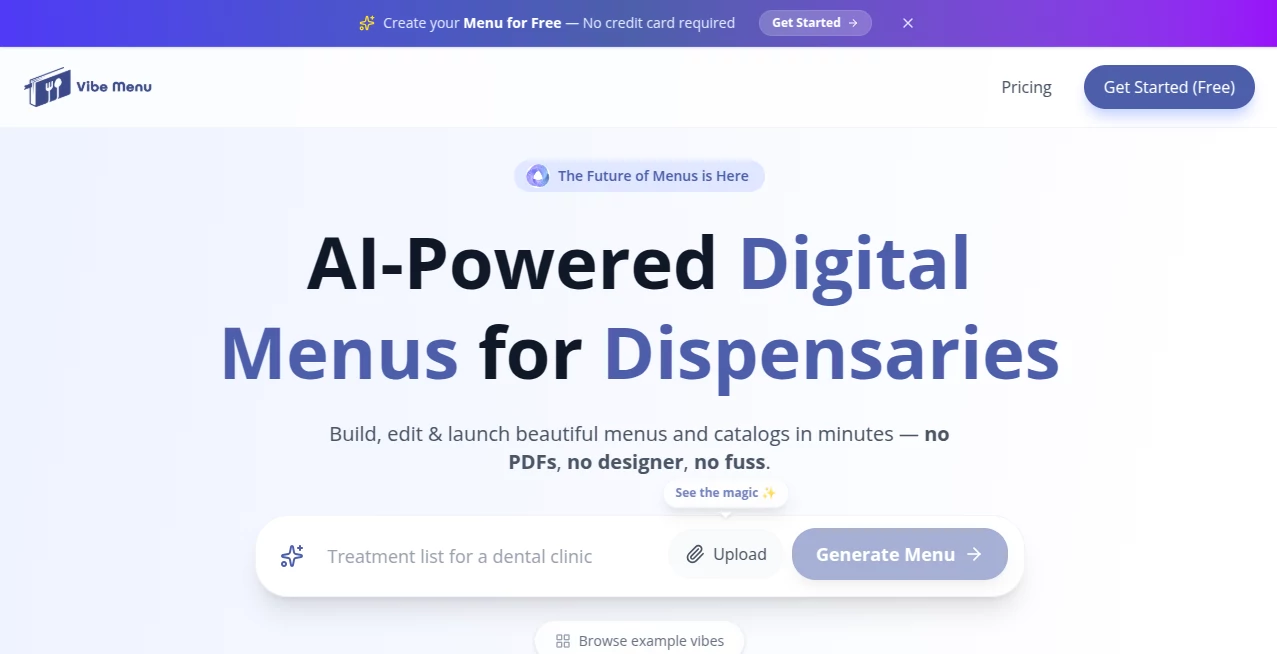
What is Vibe Menu?
Creating a professional digital menu used to be a time-consuming process involving designers, PDFs, endless revisions, and constant updates. Today, businesses need a faster and more flexible solution that keeps pace with changing products, services, and customer expectations.
This platform introduces a modern approach to menu and catalog creation through artificial intelligence. Whether managing a restaurant, café, hotel, salon, retail store, or service-based business, users can transform simple descriptions or existing files into attractive, mobile-friendly digital menus within minutes.
What makes this solution particularly appealing is its ability to simplify complex tasks. Instead of wrestling with design software or paying for frequent menu updates, business owners can focus on serving customers while the system handles structure, design, translations, and publishing.
Key Features
User Interface
The interface is refreshingly simple and designed for users without technical experience. Creating a menu feels more like having a conversation than working with software. Users can upload existing content, describe their offerings, and watch the system organize everything automatically.
The editor is clean, responsive, and easy to navigate. Updates can be made quickly, allowing businesses to adjust prices, add new items, or remove unavailable products without unnecessary steps.
Accuracy & Performance
The AI engine does an impressive job of generating clear and engaging descriptions for products, dishes, treatments, and services. It organizes information logically and creates professional layouts that are optimized for mobile viewing.
Performance remains fast even when handling large menus or catalogs. Changes appear almost instantly, making it practical for businesses that update offerings frequently throughout the day.
Capabilities
- AI-generated menu and catalog creation
- Automatic description writing
- QR code menu publishing
- Multi-language menu translation
- Mobile-friendly digital experiences
- Instant menu updates
- Custom themes and visual styling
- Interactive product and service presentation
- Support for restaurants, retail stores, hotels, salons, and more
- Analytics and customer engagement insights
Security & Privacy
Businesses often need confidence that their content and operational data remain secure. The platform operates through cloud-based infrastructure and allows users to manage and update content efficiently without exposing sensitive business information to customers.
Since menus are delivered digitally through QR codes and web-based interfaces, customers can access information without downloading additional applications, creating a convenient and streamlined experience.
Use Cases
- Restaurants creating modern QR-code dining menus
- Cafés showcasing drinks, pastries, and seasonal specials
- Hotels presenting room service and guest offerings
- Salons displaying treatments and pricing
- Retail stores building digital product catalogs
- Gyms promoting memberships and services
- Medical clinics sharing service information digitally
- Businesses serving international customers through multilingual menus
Pros and Cons
Pros
- Very fast menu creation process
- No design expertise required
- Easy real-time updates
- Excellent mobile experience
- Supports multiple industries
- Automatic translation capabilities
- QR code integration included
- Reduces printing costs significantly
Cons
- Requires internet access for menu viewing
- Advanced customization may be limited for highly specialized branding needs
- Businesses transitioning from traditional systems may need a short adjustment period
Pricing Plans
The platform offers a free entry point, making it accessible for small businesses and startups. Users can begin creating digital menus without upfront commitments, while additional premium plans provide expanded functionality for growing operations.
The availability of a free option allows businesses to test the platform before deciding whether advanced features are necessary for their workflow.
How to Use Vibe Menu
Getting started is straightforward and typically takes only a few minutes.
- Create an account
- Upload an existing menu or describe products and services
- Allow the AI system to generate the structure and content
- Customize the appearance and branding
- Review and edit descriptions if needed
- Generate a QR code
- Publish and share with customers
- Update content anytime from the dashboard
The process is designed to eliminate technical barriers, making digital menu creation accessible to virtually any business owner.
Comparison with Similar Tools
Many menu-building solutions rely heavily on templates and manual editing. While those platforms can be effective, they often require more time, design effort, and technical knowledge.
This solution takes a different approach by placing artificial intelligence at the center of the experience. Instead of forcing users to build everything manually, it generates descriptions, structures menus automatically, suggests designs, and streamlines updates.
Compared to traditional PDF-based menus, the advantages are even more noticeable. Customers receive a responsive mobile experience, businesses gain flexibility, and updates become nearly instantaneous.
Conclusion
Digital menus have evolved from a convenience into a necessity for many businesses. This platform delivers a practical, intelligent, and highly accessible way to create professional menus and catalogs without the usual complexity.
Its combination of AI-powered content generation, QR code publishing, instant updates, multilingual support, and mobile-first design makes it an excellent choice for organizations seeking a modern customer experience. Businesses that want to replace static PDFs with something more engaging will find significant value in this solution.
Frequently Asked Questions (FAQ)
Can I create a menu without design experience?
Yes. The platform is specifically designed for users with no design or technical background.
Can I update my menu after publishing?
Yes. Prices, descriptions, images, and menu items can be modified at any time.
Does it support multiple languages?
Yes. Automatic translation features help businesses serve international audiences more effectively.
Is it only for restaurants?
No. It can also be used by hotels, salons, retail stores, clinics, fitness centers, and many other industries.
Do customers need to install an app?
No. Customers simply scan a QR code and access the menu directly from their mobile browser.
AI Content Generator , AI E-commerce Assistant , AI Customer Service Assistant , AI Productivity Tools .
These classifications represent its core capabilities and areas of application. For related tools, explore the linked categories above.

Vibe Menu Alternatives Product

Presenti AI

Classroom Sc…

AI Product P…

VisualGPT

LyricStudio

Alai

Embedful

Chrome Sidek…

Syncity AI