


















Wan 3.0 AI
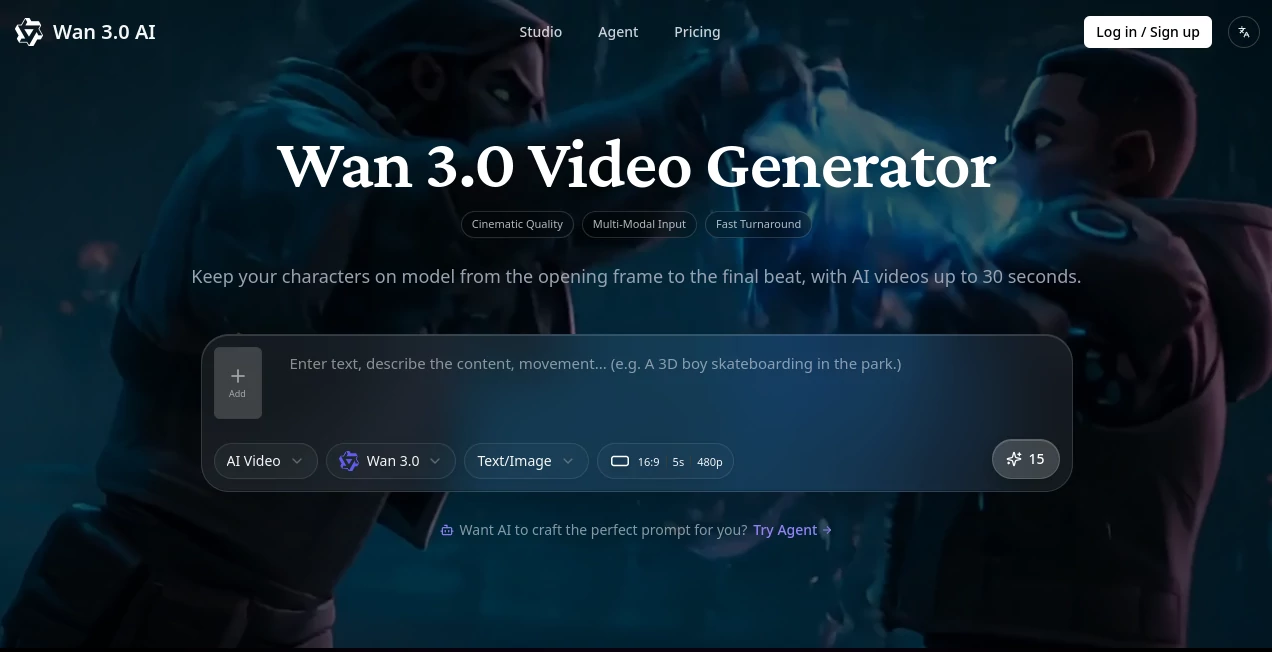
What is Wan 3.0 AI?
Wan 3.0 AI is a powerful video generation platform built around the Wan 3.0 model family, giving creators a practical way to turn text, images, audio, and existing video into polished visual content. The platform focuses on longer, more controlled generations, with clips reaching up to 30 seconds and output available at up to 1080p.
What makes the experience particularly interesting is the level of control available before and during generation. Creators can provide reference images, define first and last frames, use audio as part of the generation process, or make changes to an existing clip through natural-language instructions. For someone producing social content, advertisements, product videos, or cinematic experiments, that combination can remove a considerable amount of manual work.
The platform also includes an AI creative Agent that lets users describe what they want conversationally instead of adjusting every parameter themselves. This makes the workflow approachable for beginners while still leaving useful controls available for more experienced creators.
Key Features
- Text-to-video generation from detailed written prompts
- Image-to-video generation using visual references
- First-and-last-frame control for planned transitions
- Support for up to nine reference images in supported workflows
- Native audio conditioning during video generation
- Audio-driven lip synchronization and character movement
- Instruction-based editing for existing video clips
- Video generation up to 30 seconds
- Output resolutions up to 1080p
- 16:9, 9:16, and 1:1 aspect ratios
- Watermark-free MP4 exports
- Conversational creative Agent for video generation
- Additional AI image-generation models available on paid plans
User Interface
The interface is designed around a straightforward creative workflow rather than a complicated production console. Users can begin with a prompt or reference material, select an appropriate generation mode, and refine the result based on the intended scene. The newer conversational Agent is especially useful when the desired result is easier to explain in ordinary language than through a long list of technical settings.
For creators who regularly experiment with different concepts, templates and scene examples can also help shorten the distance between an initial idea and a usable first draft.
Accuracy & Performance
Video generation quality depends heavily on the prompt, reference material, selected model mode, and complexity of the requested scene. The platform's full-sequence processing approach is designed to maintain smoother motion and reduce common frame-to-frame inconsistencies, particularly in elements such as people, clothing, water, and fast movement.
First-and-last-frame control is another practical advantage. Instead of simply asking for an unspecified transition, creators can define where a clip should begin and where it should finish, giving the generation a clearer visual destination.
Capabilities
The system covers several common production scenarios. A marketer can turn a product image into a short promotional sequence, while a social creator can generate vertical clips for short-form platforms. Reference-to-video workflows can combine multiple images with an audio track, and existing footage can be modified with natural-language instructions such as changing an outfit, visual style, or color treatment.
Audio is also treated as part of the generation process rather than something that necessarily needs to be added afterward. With a publicly accessible MP3 or WAV source, the system can use the audio as a condition for character movement and lip synchronization.
Security & Privacy
The published privacy policy states that the service collects account information, prompts, uploaded reference images, audio files, generated media, usage information, and device information. Payment card details are processed by Stripe rather than stored as complete card numbers on the service's own servers.
The policy also states that data may be shared with infrastructure, analytics, email, authentication, payment, and AI inference providers when necessary to operate the service. It describes encryption in transit and at rest together with access controls, while also noting that no electronic storage or transmission method can be guaranteed to be completely secure.
Use Cases
- Marketing campaigns: Create short product demonstrations, promotional scenes, and campaign concepts from text or product imagery.
- Social media: Produce vertical 9:16 clips for TikTok, Reels, and similar short-form formats.
- YouTube content: Generate widescreen visual sequences that can become part of longer videos.
- Digital characters: Combine reference images and audio to maintain a more consistent character appearance and voice.
- Product visualization: Turn static product photography into animated presentations and reveal sequences.
- Creative development: Test cinematic concepts before investing time and money in traditional production.
- Video editing: Apply natural-language changes to existing clips without rebuilding an entire scene manually.
Pros and Cons
Pros
- Supports several video creation workflows in one platform.
- Up to 1080p output is suitable for many online publishing workflows.
- First-and-last-frame controls provide more direction over transitions.
- Native audio conditioning can simplify lip-sync and character-driven scenes.
- Support for multiple reference images is useful for maintaining visual context.
- Watermark-free MP4 export is available.
- New users can receive free credits to test the generation experience.
Cons
- Higher-quality and heavier workflows consume more credits.
- Complex scenes can still require several generations and prompt refinement.
- Some advanced capabilities are restricted to paid plans.
- Results can vary depending on the quality and consistency of supplied references.
Pricing Plans
The platform uses a credit-based subscription model with monthly and yearly options. A Starter plan is listed at $20 per month, with a lower effective monthly price when paid annually. It includes monthly credits, MP4 downloads, templates, permanent access to generated videos, community access, and support for the available video modes.
The Pro plan is positioned for regular video creators and is listed at $59.92 monthly at the displayed standard price, with a launch price of $29.95 per month shown on the current pricing page. It provides substantially more credits, faster generation queues, higher-resolution outputs, advanced features, and full Pro access.
The Scale plan targets heavier production workloads and is listed at $299 monthly, with a displayed promotional price of $149.50 per month. It includes a significantly larger monthly credit allocation, the fastest queue, a dedicated account manager, and access to the platform's advanced features.
New users can also receive free credits for trying supported generation modes, while one-time credit top-ups are stated to remain available without expiration.
How to Use the Tool
- Create an account and open the video creation workspace.
- Choose whether the project begins with a text prompt, image references, audio, or an existing video.
- Describe the scene clearly, including the subject, movement, environment, camera style, and desired visual direction.
- Use reference images or first-and-last-frame controls when maintaining a specific character, product, or transition matters.
- Add an appropriate audio source when the scene requires synchronized speech, movement, or ambient sound.
- Generate the clip and review the result.
- Refine the prompt or references when the first version does not match the intended scene.
- Download the finished result as an MP4 file when it is ready for publication or further editing.
Comparison with Similar Tools
There are now many capable AI video generators, but they do not all approach creation in the same way. Some concentrate primarily on text-to-video generation, while others are built around cinematic prompting, avatar production, or video editing.
This platform stands out for combining text-to-video, image references, first-and-last-frame control, audio conditioning, and instruction-based editing within the same environment. The ability to work with multiple reference images is particularly useful for projects where maintaining visual identity matters more than simply producing a one-off clip.
For creators who want a broader creative workspace rather than a single-purpose generator, the inclusion of additional image models and conversational generation tools can also make the platform more versatile for end-to-end concept development.
Conclusion
For creators looking beyond simple text-to-video experiments, this platform offers a more complete production workflow. Its combination of reference-driven generation, first-and-last-frame control, native audio conditioning, natural-language editing, and 1080p output gives users considerably more room to shape the final result.
It is particularly well suited to marketers, social media creators, product teams, and independent filmmakers who need to produce visual concepts quickly without giving up control over important elements of the scene. The free credits also make it easier to test the workflow before committing to a subscription.
Frequently Asked Questions (FAQ)
Can I try the platform for free?
Yes. New accounts receive free credits that can be used to explore supported text-to-video, image-to-video, and audio-driven generation workflows.
What is the maximum video length?
Supported video generations can reach up to 30 seconds, depending on the selected workflow and available credits.
Can I use images as references?
Yes. Supported workflows accept reference images, including first-and-last-frame inputs and configurations using up to nine reference images.
Does it support audio and lip synchronization?
Yes. Audio can be supplied as a publicly accessible MP3 or WAV URL, allowing the generation process to condition character movement and lip synchronization around the provided track.
Can I edit an existing video?
Yes. The instruction-based editing workflow allows users to describe changes to an existing clip, including visual style adjustments, clothing changes, and cinematic color treatments.
What video formats and resolutions are available?
Exports are provided as MP4 files, with output available at up to 1080p and support for 16:9, 9:16, and 1:1 aspect ratios.
Do purchased credits expire?
One-time top-up credits are stated to remain in the account without expiration, allowing them to be used when needed.
Is there a refund policy?
The current pricing information states that new subscription plans include a 7-day money-back guarantee. Renewal-related concerns should be raised with support within the stated support window.
AI Video to Video , AI Image to Video , AI Video Generator , AI Text to Video .
These classifications represent its core capabilities and areas of application. For related tools, explore the linked categories above.

Wan 3.0 AI Alternatives Product
Seedance 2 A…

Wan 2.7

ltx 2.3

LTX 2.3

Happy Horse

Kling 5.0

Seedance 2.0
SkyReels-V4

Seedance 2.0
