


















whatZCRM
What is whatZCRM?
Let’s be real for a second. If your team handles customer support or sales through WhatsApp, you already know the struggle. Messages get lost. Follow-ups slip through the cracks. Different agents reply to the same person without knowing the history. It’s messy, and honestly, it costs you deals and frustrates your customers.
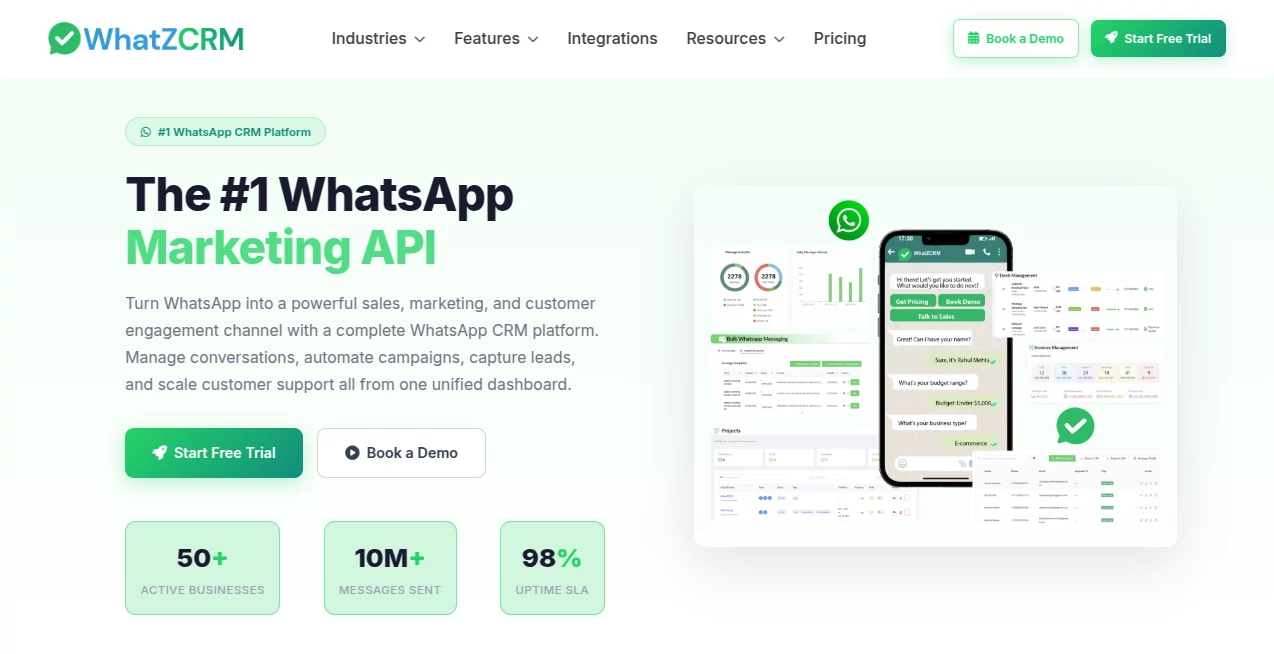
That’s exactly where this platform steps in to save the day. Think of it as the ultimate command center for your WhatsApp communication. It transforms that chaotic single-phone-number setup into a professional, multi-agent, highly organized system. Suddenly, every conversation has context, every lead gets tracked, and nothing falls through the cracks. I’ve seen small businesses double their response speed just within the first week of using it.
Key Features
What makes this tool stand out from the endless list of “simple chatbots”? It’s built like a true operating system for customer conversations, not just a broadcast tool. It covers everything from the first "hello" to the final invoice.
User Interface
You don’t need to be a tech wizard to navigate this dashboard. The interface is clean, uncluttered, and feels familiar to anyone who has used a standard CRM or email client. The shared inbox is the heart of it all. It looks like a typical messaging app but with superpowers: you see customer details, past interaction notes, and assigned tags right next to the chat. Switching between different departments or WhatsApp numbers happens with a single click, which is a lifesaver if you manage multiple brands or teams.
Accuracy & Performance
Speed matters more than ever in business messaging. The system runs on the official Meta WhatsApp Business API, so you won't face those random bans or connectivity issues that come with unofficial solutions. Messages arrive instantly, and the sync between agents is almost real-time. There’s a smart routing engine that automatically assigns incoming chats to the right agent based on keywords or previous conversation history. It feels responsive, stable, and built to handle hundreds of conversations at once without slowing down.
Capabilities
This is where the platform really shines. It’s not just about chatting; it's about closing deals and managing operations inside the chat window. You can create visual automation flows without writing a single line of code. Imagine this: a lead asks for a price list, the bot sends it automatically, asks for their email, and then creates a follow-up task for your sales agent. Beyond that, you have built-in tools for proposal generation and even invoicing. Customers can approve a quote and pay without leaving WhatsApp. That’s a game changer for freelancers and small agencies.
Security & Privacy
Since you're handling customer data and potentially payment info, security is non-negotiable. Because it uses the official API, it complies with standard global data protection regulations. Data transfers are encrypted, and you have granular control over who sees what inside your team. You can set specific permissions for agents, team leaders, and admins. It gives business owners peace of mind knowing that customer conversations aren't stored on someone's personal phone but in a secure, centralized cloud environment.
Use Cases
I’ve seen this tool work wonders across different industries, but a few specific groups seem to get the most value out of it.
- E-commerce Stores: Automate abandoned cart recovery, send order updates, and provide instant support to boost sales and reduce customer anxiety about shipping.
- Coaching Institutes & Educational Consultants: Manage thousands of student inquiries, share course brochures automatically, schedule demo classes, and send payment reminders without hiring a huge support team.
- Real Estate Agents: Handle property inquiries efficiently, send photo galleries or video tours directly in chat, and set up automated follow-ups for potential buyers to ensure no hot lead gets cold.
- Local Service Providers (Salons, Restaurants, Gyms): Simplify appointment booking, send automated confirmations, and run promo campaigns to bring customers back in the door.
Pros and Cons
No tool is perfect for everyone, so here is an honest look at the strengths and the friction points based on what actual users are saying.
Pros:
- Extremely high open rates (near 98% on WhatsApp) compared to email marketing.
- All-in-one system: chat, deal pipeline, and invoicing in one place.
- Multi-agent support with a shared inbox prevents double replies.
- Visual flow builder makes automation accessible to non-coders.
Cons:
- It relies entirely on the WhatsApp API, which means you can't message numbers that haven't texted you first after 24 hours (standard API limitation, not the tool's fault).
- Some users mention a learning curve with the more advanced automation features initially.
- Support response times can vary depending on your time zone, though they do offer local language assistance now.
Pricing Plans
Unlike traditional CRMs that charge you per user and often end up costing a fortune, this platform keeps things surprisingly transparent. The pricing usually starts around $49 per month for the core plan. That generally includes multiple agent seats and access to the main features like the shared inbox, chatbot builder, and analytics. For larger operations needing dedicated account management or higher API limits, there are custom enterprise plans available. The best part? There’s no long-term contract locking you in for most plans, so you can scale down if needed.
How to Use the Platform
Getting started is smoother than you might think. First, you sign up and connect your WhatsApp Business number via the official API. This requires a Facebook Business Manager account, but the setup wizard guides you step by step. Once connected, invite your team members. They just need an email invite to log in to the dashboard. Next, set up a few automated replies for common questions like "What are your hours?" or "Where is my order?". Finally, start importing your contacts or just wait for messages to flow into your new organized inbox. Most teams are fully operational within an afternoon.
Comparison with Similar Tools
You might be looking at other options like folk or Zoho CRM. The main difference here is the "WhatsApp-first" architecture. Standard CRMs treat WhatsApp as an add-on channel, often leading to clunky integrations and missing features. This platform was born from WhatsApp. Every feature—from the keyboard shortcuts to the way media is handled—feels native. While tools like folk are great for general contact management, they can't match the depth of WhatsApp automation you get here. Compared to a generic chatbot builder, this one offers the full sales cycle management including proposals and payments, which is rare to find bundled together at this price point.
Conclusion
If WhatsApp is where your customers live, this is where your business needs to be. It removes the friction of manual messaging and replaces it with a professional, scalable system. It respects your team's time by automating the boring stuff and empowers your sales team to focus on actually selling. Whether you are a startup trying to look bigger than you are or an established business drowning in chat volume, this platform offers a tidy solution. It turns your buzzing pocket notification nightmare into a well-oiled revenue machine.
Frequently Asked Questions (FAQ)
Do I need to install anything on my phone?
No. This is a cloud-based web dashboard. Your personal WhatsApp remains separate, though agents can use it on mobile browsers too.
Can multiple people use the same number?
Absolutely. That’s the main selling point. Multiple agents can log in and reply to chats from the same business number simultaneously.
Is there a free trial?
Availability changes, but usually, providers offer a demo or a limited free trial to test the waters before committing to a subscription.
Will my customers know they are talking to a bot?
You control that. You can set up the bot to sound very human, or you can label it. The system easily transfers to a human agent whenever the bot gets stuck.
What happens if I stop my subscription?
Your access to the dashboard stops, but your WhatsApp number remains active (just without the multi-agent tools). You won’t lose your conversation history if you decide to resubscribe later.
AI Chatbot , AI Sales Assistant , AI CRM Assistant , AI Customer Service Assistant .
These classifications represent its core capabilities and areas of application. For related tools, explore the linked categories above.

whatZCRM Alternatives Product
Overchat AI

BetterAntisp…

ChatGPT

KKV AI

Vapi

Chatzy AI

gpt-plus.ai

TranAI

Klyra AI
