
wikis.ai
What is wikis.ai?
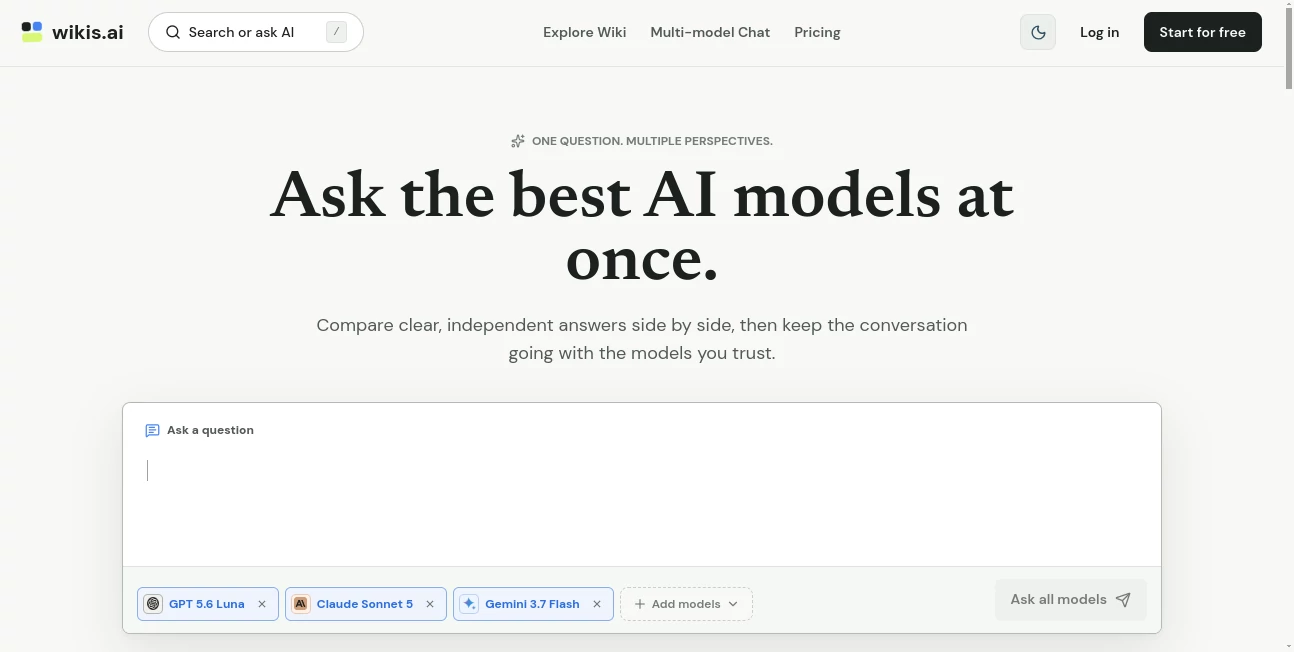
Wikis.ai brings a practical idea to AI research: instead of asking one model a question and accepting a single response, users can compare answers from several leading AI models in the same workspace. This makes it easier to notice differences in reasoning, identify useful details, and decide which response is most helpful for the task at hand.
The platform combines a multi-model chat experience with an AI Wiki containing structured guides on subjects such as artificial intelligence, models, platforms, business, productivity, coding, education, and more. A user can start with an existing guide, compare the answers behind it, and then continue the discussion directly in chat.
This approach is particularly useful for research and learning. When different models agree, that agreement can provide a useful starting point. When they disagree, the difference itself becomes something worth investigating.
Key Features
- Multi-model conversations that place independent AI responses side by side.
- Support for comparing up to eight model conversations on paid plans.
- AI Wiki guides covering a broad range of practical AI and technology questions.
- Web search for questions where current information matters.
- Searchable conversation history for returning to previous research.
- Shareable conversation previews that make it easier to send useful discussions to others.
- Export options for conversations in Markdown or PNG format.
- Follow-up conversations directly from AI Wiki guides.
- Access to models from providers including OpenAI, Anthropic, Google, and others shown in the model selector.
User Interface
The interface is designed around comparison rather than endless tab switching. A question can be sent to selected models and the resulting answers appear in a stable side-by-side layout. This makes differences in wording, reasoning, and conclusions easier to scan.
The experience also connects research and conversation. A user reading a wiki guide can move into a follow-up discussion without starting from scratch, which is a small but useful touch when researching a subject that requires several questions.
Accuracy & Performance
One of the strongest ideas behind the platform is that an AI answer should not automatically be treated as the final word. Comparing independent responses can expose agreement as well as disagreement. For example, if three models reach the same basic conclusion but explain it differently, the user gets a broader view of the subject rather than relying on a single generated response.
The platform itself also emphasizes verification. Agreement between models can increase confidence, but it does not guarantee that an answer is correct. For important research, users should still check original sources and confirm claims independently, particularly when dealing with current, technical, financial, legal, or otherwise sensitive information.
Capabilities
The service is useful for much more than casual questions. It can support research, brainstorming, learning, writing, comparing ideas, exploring AI concepts, and following up on information discovered in a wiki article.
The AI Wiki is especially interesting for people who regularly research unfamiliar subjects. Guides cover topics such as AI fundamentals, language models, AI platforms, coding, business and productivity, marketing, education, search, and other areas of the technology landscape.
For users who already have a preferred model, the comparison workflow can also be useful. Rather than choosing one model before seeing the answers, users can put several perspectives next to each other and continue with the response that best fits their needs.
Security & Privacy
The service collects account and subscription information as well as conversation data, including prompts, selected models, follow-up questions, uploaded files, and model responses. It also processes limited technical information required to operate and secure the service.
Because prompts and relevant conversation context may be sent to selected third-party AI providers, users should avoid entering passwords, confidential business information, regulated data, or personal information they are not authorized to share. This is an important consideration for anyone using a multi-model AI service for professional research.
Use Cases
Research: Ask the same research question to several models and compare their approaches before deciding what information deserves further investigation.
Learning: Students and independent learners can use different explanations to understand difficult concepts from multiple angles. If one explanation feels too technical, another model may present the same idea more clearly.
Writing and brainstorming: Writers can compare alternative ideas, outlines, explanations, or approaches instead of repeatedly asking a single model for another version.
AI research: The AI Wiki is useful for quickly exploring concepts such as LLMs, tokens, AGI, AI models, and the companies and platforms shaping the industry.
Decision support: When evaluating an idea or technical question, comparing several responses can reveal assumptions that might otherwise be missed.
Current information: Web search can help with questions where recent information is important, although important claims should still be checked against authoritative sources.
Pros and Cons
- Pros: Compare multiple AI models in one workspace.
- Pros: Makes differences between AI responses easy to see.
- Pros: Useful AI Wiki provides structured starting points for research.
- Pros: Follow-up conversations can continue from existing guides.
- Pros: Paid plans include conversation history, sharing, exports, and web search.
- Pros: A free plan is available without requiring a payment card.
- Cons: Comparing several models can consume multiple prompts at once.
- Cons: Model agreement does not guarantee factual accuracy.
- Cons: Users working with confidential information need to consider third-party model processing.
Pricing Plans
The platform offers a free option as well as paid subscriptions designed for heavier model usage.
- Free: $0 per month, including 60 Basic model prompts, 6 Advanced model prompts, and access to the public AI Wiki. No payment card is required.
- Pro: $19 per month when billed monthly, or $14.99 per month when billed annually. The plan includes 10,000 Basic model prompts and 1,500 Advanced model prompts, along with multi-model comparison, searchable history, sharing, Markdown and PNG exports, and web search.
- Unlimited: $39 per month when billed monthly, or $24.99 per month when billed annually. It provides unlimited Basic and Advanced model prompts plus the same major model-chat features available on Pro.
The paid plans do not require users to maintain separate subscriptions with individual AI providers for the models included in the service. Plans can also be changed or canceled, with access continuing through the current billing period.
How to Use Wikis.ai
Start by opening the multi-model chat and entering a question or task. Select the models you want to compare, then review their responses side by side. Instead of immediately choosing the first convincing answer, look for areas where the responses agree and where they take different approaches.
For research topics, the AI Wiki can be a useful starting point. Open a relevant guide, review the structured information, and then continue with a follow-up question when you want to explore a specific point in more detail.
If you use the service regularly, searchable conversation history makes it easier to return to previous research. Paid users can also export useful conversations or share them with others.
A simple workflow works particularly well: ask a focused question, compare the responses, investigate disagreements, ask a follow-up, and verify important claims before using the final information.
Comparison with Similar Tools
Traditional AI chat services generally center the experience around one model at a time. That can be convenient, especially when a user already knows which model they prefer, but it can also make comparison cumbersome.
This platform takes a different approach by making model comparison part of the core workflow. Instead of opening separate browser tabs and manually copying the same prompt into different services, users can place several responses together and inspect them in one interface.
It also goes beyond simple model comparison by combining chat with a structured AI Wiki. This gives users both a starting point for learning and a place to continue asking questions. For people who frequently research AI topics or want more than one perspective before reaching a conclusion, that combination is a practical advantage.
Conclusion
Wikis.ai is a strong choice for users who do not want their AI workflow to depend on a single answer. Its main strength is the ability to compare responses from multiple leading models while keeping the conversation in one focused workspace.
The AI Wiki adds another useful layer by turning common AI and technology questions into structured starting points for research. Instead of treating an article or generated answer as the destination, users can use it as the beginning of a deeper conversation.
For casual users, the free plan provides an easy way to experience the concept. For researchers, writers, developers, students, and frequent AI users, the paid plans offer considerably more room for regular multi-model work. The most valuable habit, however, remains the same: use multiple perspectives to improve your understanding, then verify important information before relying on it.
Frequently Asked Questions (FAQ)
What is Wikis.ai used for?
It is designed for comparing responses from multiple AI models, researching topics through an AI Wiki, continuing conversations with selected models, and exploring questions from different perspectives.
Can I compare multiple AI models at the same time?
Yes. Paid plans allow users to compare up to eight model conversations at once. The responses are displayed together so differences can be reviewed more easily.
Is there a free plan?
Yes. The free plan costs $0 per month and includes 60 Basic model prompts, 6 Advanced model prompts, and public AI Wiki access.
Does the service support web search?
Yes. Web search is included with the paid model-chat plans and is intended for questions where current information is useful.
Do I need separate ChatGPT, Claude, or Gemini subscriptions?
No. The paid plans include the listed models available within the platform, so separate subscriptions with those providers are not required for the included models.
Can I continue a conversation after reading a wiki guide?
Yes. A wiki guide can serve as the starting point for a follow-up conversation, allowing users to bring the existing context into chat and explore the subject further.
Can conversations be exported?
Yes. Pro and Unlimited users can export conversations as Markdown or PNG files.
Is information from multiple AI models always accurate?
No. Multiple models agreeing on an answer can be useful, but agreement is not proof of correctness. Important claims should still be checked against reliable original sources.
How many prompts does comparing models use?
Each model response consumes one prompt from the applicable allowance. For example, sending one question to four model panels uses four prompts.
Who can benefit most from this type of AI workspace?
Researchers, students, writers, developers, professionals, and curious AI users can all benefit from comparing different model perspectives rather than relying on a single generated response.
AI Knowledge Management , AI Research Tool , Large Language Models (LLMs) , AI Knowledge Base .
These classifications represent its core capabilities and areas of application. For related tools, explore the linked categories above.

wikis.ai Alternatives Product

StatMate

Grok

Geoleaper

Google Skills

AI Complianc…

Harvey

RepoClip

AISEOMate

MiniValuator