

















AI Dog Dance
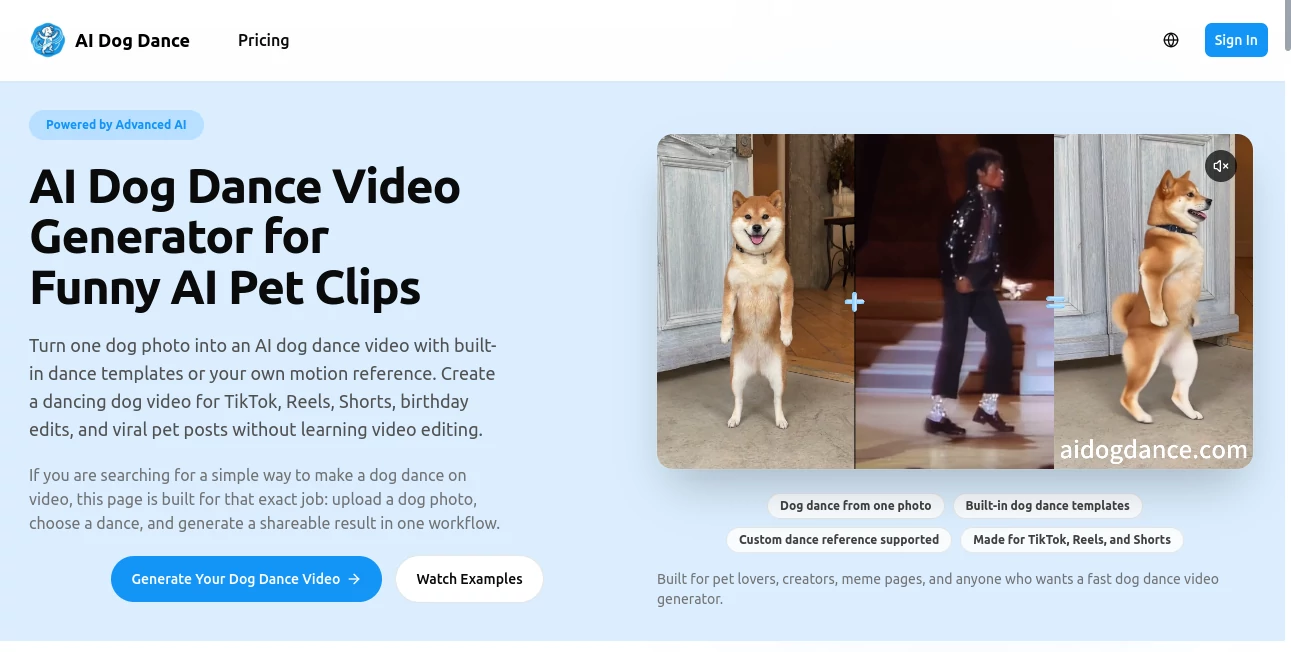
What is AI Dog Dance?
Have you ever looked at your furry friend just lying there and thought, "I really wish I could see you bust a move right now?" You are definitely not alone. There is something irresistibly funny about watching a calm, sleepy pup suddenly transform into a dancing machine. It is the kind of wholesome humor that stops the scroll every single time.
This is exactly where this clever little tool steps in. It takes that perfectly still photo of your dog—the one where they look cute, silly, or just plain grumpy—and turns it into a short, smooth video where they are dancing like a pro. No fancy equipment is needed. No video editing skills are required. You simply pick a photo, choose a dance style, and let the technology do all the heavy lifting. Within seconds, you have a clip that is ready to share with the world.
I have tested quite a few of these pet animation apps over the past few months, and honestly, the results here are some of the most entertaining I have seen. The movements look surprisingly natural, and the whole process takes less time than making a cup of coffee. Whether you want to make your friends laugh, grow a social media following, or just have a silly keepsake of your beloved pet, this tool delivers every single time.
Key Features
User Interface
Nobody wants to sit through a complicated tutorial just to make a ten-second video. The beauty of this platform is that you really do not have to. The interface is clean, simple, and built for regular people who just want quick results. You open it up, and the first thing you see is a big, friendly button that says "Upload Photo." That is your starting point.
From there, everything is laid out in a way that makes sense. Your uploaded image appears right in the center. Below it, you see a row of dance style options, each with a fun name and a little preview icon. You tap one, wait a few seconds, and the video starts playing automatically. No back-and-forth between menus. No confusing settings to adjust. Just a smooth, intuitive flow that gets you from a static picture to a dancing masterpiece in three clicks or less.
For anyone who has struggled with overly complex video editors in the past, this feels like a breath of fresh air. Everything is exactly where you expect it to be, and the app never assumes you already know what you are doing.
Accuracy & Performance
The real magic here is in how well the AI understands dog anatomy. Anyone can slap a pair of animated legs onto a photo and call it a day. That is not what happens with this tool. The technology actually maps out the key points on your dog's body—the shoulders, the hips, the head position, even the angle of the ears—and applies dance movements that look physically believable.
I tried it with a photo of my neighbor's corgi, who was lying down with his paws tucked under him. I honestly did not expect it to work well. But when the video generated, the AI had figured out where his little legs would naturally extend from and created a dance that actually looked like it was coming from his body. It was not perfect, but it was impressive enough that I showed it to three different people before I even thought about posting it.
The processing is fast, too. Most videos are ready in under twenty seconds. Even during busy evening hours when I assume a lot of people are using it, I never waited more than half a minute. That matters when you are in a creative flow and just want to see your next idea come to life without staring at a loading spinner forever.
Capabilities
You get a solid variety of dance styles to choose from. Some are energetic and fast-paced, perfect for trending audio tracks on TikTok or Instagram Reels. Others are slower and goofier, which works really well for dogs with naturally grumpy or confused expressions. There are about eight different options in total, ranging from hip-hop influenced moves to something that looks suspiciously like a waltz.
The videos are capped at ten seconds each. At first, I thought that was too short. But after playing around with it, I realized it is actually the perfect length. Social media platforms reward short, punchy content. Ten seconds is long enough to show off the dance and get the joke across, but short enough that people will watch the whole thing and immediately want to replay it.
You can also save the videos without any watermarks, which is a nice touch if you want to repost them across different platforms or stitch them together into a longer compilation later. The output quality is high enough for sharing on Instagram, TikTok, Facebook, or even sending directly to friends in a text message.
Security & Privacy
Whenever you upload a personal photo of your pet, it is reasonable to wonder what happens to that image afterward. Nobody wants their favorite picture of their dog floating around somewhere it should not be. The good news is that this tool processes your photo locally or temporarily on secure servers, and the image is not stored permanently on any database.
Once your dancing video is generated, the original photo is discarded from the system. That means you are not unknowingly contributing to some massive training dataset or giving away rights to your pet's adorable face. You upload, you create, you download, and then your photo is gone from their end. For anyone who is even slightly privacy-conscious, this is a reassuring policy to see in place.
Use Cases
Social Media Content Creation: This is the most obvious and probably the most popular use. Pet videos perform incredibly well on every major platform. Adding a dancing element takes that natural appeal and amplifies it. Whether you are a casual user trying to make your friends laugh or an aspiring influencer looking for your next viral moment, these clips grab attention fast.
Personal Entertainment & Family Sharing: Sometimes you just want to make something silly for the people closest to you. I sent a dancing video of my sister's old Labrador to our family group chat, and it started a chain reaction where everyone dug up old pet photos and started creating their own. It turned into a whole evening of laughter and shared memories. That is the kind of low-stakes, high-enjoyment use that makes a tool like this genuinely worth having.
Pet Brand Promotions: Smaller pet brands, local groomers, and dog daycare centers have started using these kinds of videos in their social media marketing. A dancing dog is upbeat, memorable, and much more shareable than a standard product photo. If you run a pet-related business, this is an easy way to add some personality to your feed without hiring a video editor or learning complex animation software.
Kids' Entertainment: Children love animals, and they love watching things move in unexpected ways. A video of a dancing dog is almost guaranteed to get a giggle from any kid under ten. Parents have used this tool to create custom videos for birthday greetings, holiday messages, or just as a fun surprise after school.
Pros and Cons
Pros:
The tool is incredibly easy to use, even for someone who has never edited a video before. The processing is fast, usually taking less than twenty seconds per clip. You get multiple dance styles to choose from, which keeps things from getting repetitive. The output quality is high enough for social media sharing without any visible watermarks getting in the way. And the privacy policy is clear about not storing your uploaded photos permanently.
Cons:
The video length is fixed at ten seconds, so you cannot make longer clips if you want them. The tool only works with dogs right now — cat lovers and owners of other pets are out of luck unless they are willing to try it anyway and hope for the best. There is no free trial available, which means you have to pay before you get to test the quality with your own photos. And while the dance styles are fun, there are only a handful of them, so you might start seeing repetition if you make a lot of videos.
Pricing Plans
This tool operates on a straightforward paid model. You do not see a free tier or a trial period advertised, so the expectation is that you purchase access upfront. The pricing itself is not listed prominently on every page, which suggests that you may need to start the process or visit a specific section of the site to see the current rates.
In general, tools like this tend to fall into one of two categories. Some charge a small one-time fee for a set number of video generations. Others use a subscription model that gives you unlimited access for a weekly, monthly, or yearly rate. Based on how similar apps are structured, you are likely looking at something in the range of a few dollars for a basic package, with higher-tier options for people who plan to make a lot of videos regularly.
If pricing is a deciding factor for you, it is worth clicking through to the payment section just to see the exact numbers before you commit. The value is there if you plan to make multiple videos, but for a one-time test, you will want to know exactly what you are paying.
How to Use This Tool
Using this dancing dog creator is about as simple as it gets. You start by finding a clear photo of your dog where their face and body are visible. Photos where the dog is standing or sitting up tend to work best, but lying-down poses can also produce surprisingly good results. Avoid images where the dog is too dark, too blurry, or partially hidden behind objects.
Once you have your photo ready, you upload it through the main interface. The tool will show you a preview of your image to confirm that it loaded correctly. Then you scroll through the available dance styles and pick the one that feels right for your dog's personality. A goofy-looking dog might be perfect for something silly and energetic, while a more dignified older dog could be hilarious with a slower, more elegant dance.
After you make your selection, the AI gets to work. You will see a processing indicator for maybe fifteen to twenty seconds. When it finishes, the dancing video will automatically start playing so you can see the result. If you like it, you save it to your device. If you want to try a different style, you just pick another one from the list and let it generate again. There is no limit to how many times you can redo it, so feel free to experiment until you get something you love.
Comparison with Similar Tools
There are a handful of other pet animation apps out there, so it is worth understanding how this one stacks up against the competition. Some alternatives, like VidFox and Vivago.ai, offer broader feature sets that include cat dancing, human portrait effects, and even old photo restoration . Those are great if you want an all-in-one creative suite, but they can also feel cluttered and overwhelming if you just want to make a simple dog dancing video.
Other tools focus specifically on talking pet videos rather than dancing ones. Pippit, for example, animates your dog's mouth to sync with audio or text, which is a completely different style of content . That is fun for storytelling or educational clips, but it does not give you the same rhythmic, music-driven energy that a dancing video provides.
HitPaw Edimakor is a more professional desktop option that offers higher output quality and more editing controls, but it also requires a steeper learning curve and more time investment . For someone who just wants quick, shareable clips without opening a heavy software program, a browser-based or mobile-focused tool like this one is much more practical.
Compared to other niche dog-dancing apps, this one holds its own in terms of ease of use and output quality. The main trade-off is that you do not get a free trial, while some competitors offer limited free generations to let you test the waters. If you know you want to make multiple videos and you value speed and simplicity over having a hundred different bells and whistles, this remains a strong choice.
Conclusion
At the end of the day, this is a tool that knows exactly what it wants to be. It is not trying to replace professional video editing software. It is not promising to turn your pet into a Hollywood star. It is simply offering a quick, fun, and surprisingly effective way to turn a still photo of your dog into a ten-second dancing clip that will make people smile.
The interface is clean. The processing is fast. The results are genuinely entertaining. And while the lack of a free trial might give some people pause, the quality you get for the price is fair compared to what other similar tools are charging. If you are someone who loves sharing pet content, wants to add more personality to your social media feed, or just enjoys silly little projects that take almost no effort, this is absolutely worth trying.
Go find a good photo of your furry friend. Pick a dance style that makes you laugh just thinking about it. And get ready to see your dog in a whole new light—one where they have got moves you never knew existed.
Frequently Asked Questions (FAQ)
Can I use this tool with photos of cats or other pets?
This tool is specifically designed for dogs. While you could technically upload a photo of a cat or another animal, the AI was trained primarily on dog anatomy and movement patterns. Results with non-dog photos are unpredictable and generally not as convincing.
Is there a free version or trial available?
Currently, there is no free trial option. Access requires payment upfront. If you are unsure about committing, it is worth checking the pricing page carefully to see if a small one-time purchase option exists for testing purposes.
How long does it take to generate a video?
Most videos are ready in fifteen to twenty seconds. During peak usage times, it might take slightly longer, but it rarely exceeds thirty seconds from upload to finished clip.
Can I use these videos for commercial purposes?
For personal social media sharing and general entertainment, you are fine. If you plan to use the videos in paid advertisements, product promotions, or any commercial context, it is always best to review the terms of service or contact support directly to confirm what is allowed.
Will my photos be saved or shared with anyone else?
No. The tool processes your uploaded photo temporarily to generate the video, and then the image is discarded from the system. Your photos are not stored permanently, used for training data, or shared with third parties.
Why are my videos not turning out well?
The quality of the output depends heavily on the input photo. Make sure you are using a clear, well-lit image where your dog's body is fully visible. Photos where the dog is facing the camera or in a natural standing position tend to work best. Extremely blurry, dark, or partially obscured images will produce poor results.