

















What is AI Fruit Video?
AI Fruit Video is a focused creative platform for turning short story ideas into entertaining videos starring expressive fruit characters. Instead of starting with a complicated editing timeline, creators can describe a scene, choose characters and a setting, and generate a complete short clip.
The concept is particularly well suited to the kind of fast, visual storytelling that performs naturally on TikTok, Instagram Reels, and YouTube Shorts. A jealous strawberry, a nervous mango, a dramatic breakup, or a completely absurd newsroom scene can become a short vertical video without requiring traditional video-editing skills.
What makes the experience appealing is its narrow focus. The workflow is built around fruit stories rather than trying to be an all-purpose video editor. That gives creators a straightforward way to experiment with one idea at a time and quickly see how it looks on screen.
Key Features
- AI-generated videos built around expressive fruit characters
- Text-based story and scene generation
- Ready-made fruit character references
- Prepared scene references for different environments
- Support for uploading custom character and scene references
- Vertical 9:16 video creation for short-form platforms
- MP4 downloads for generated clips
- Story ideas covering comedy, romance, drama, news-style scenes, and more
- Multiple video models with different quality, duration, and credit requirements
- Optional native audio support on compatible models
User Interface
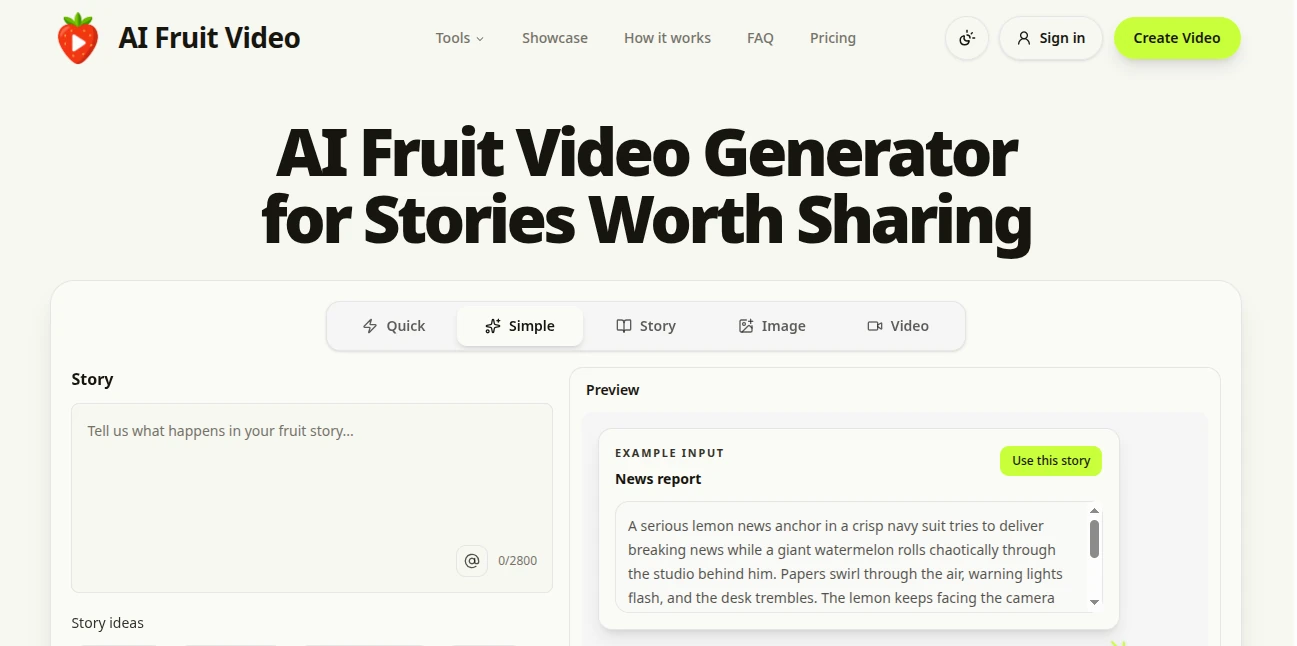
The interface keeps the main creative task front and center. Users can enter a story, select a model, choose video settings, add optional reference images, and start generation from the same workflow.
There are also ready-made story starters for situations such as jealousy drama, motivational speeches, fruit roasts, breakup stories, and singing performances. This is useful when the creator has an idea for a character but does not yet have a complete prompt.
The reference system is another practical touch. The platform provides prepared fruit character identity sheets and several scene references, while also allowing creators to upload their own JPEG, PNG, or WebP images. Uploaded references can be up to 10 MB each.
Accuracy & Performance
Performance depends on the selected video model, but the workflow is designed around short, focused generations rather than long-form productions. The standard generator can create a five-second vertical clip at 480p using Seedance 2.0 Mini, with the displayed generation cost set at 10 credits for that configuration.
More advanced options are available as well. MiniMax H3 supports clips from 5 to 15 seconds, 24 FPS playback, native stereo audio, and an output path reaching up to 2K through regeneration. H3 Max offers 5–15 second clips at 24 FPS with 480p or 768p output and is positioned around fast iteration and detailed prompt adherence.
In practical use, the strongest results come from describing one clear moment rather than attempting to squeeze an entire story into a single generation. A simple conflict, visible reaction, short line of dialogue, and defined camera direction give the model much less ambiguity to resolve.
Capabilities
The platform goes beyond simply making a fruit talk. Creators can build recognizable casts and place them in environments such as apartments, cafés, offices, beaches, and city squares. Multiple characters can be used in a scene, while custom reference images provide additional control over the visual identity.
The story workshop is particularly useful for creators who want to develop an ongoing series. A rough idea can be expanded into a story, followed by a character guide and a sequence of clip-ready prompts. This approach makes it easier to turn individual short videos into connected episodes.
For creators experimenting with more advanced models, the available controls can include image, video, frame, and audio references depending on the model. Some models can also produce native audio, allowing dialogue, ambience, sound effects, or music to be part of the generated result.
Security & Privacy
The service provides privacy and acceptable-use policies covering how the platform should be used. Its acceptable-use rules prohibit activities such as illegal content, pornography, credible threats, hateful abuse, non-consensual intimate imagery, deceptive impersonation, fraud, and other harmful applications.
Creators should also pay attention to the rights associated with material they upload. The platform states that users remain responsible for having the necessary rights to uploaded content and for reviewing generated results before publishing them.
Use Cases
The most obvious use case is short-form social content. A creator can build a recurring cast of fruit characters and publish individual scenes as TikTok videos, Instagram Reels, or YouTube Shorts.
Comedy creators can use exaggerated fruit personalities for awkward conversations, absurd situations, parody-style scenes, or unexpected punchlines. Storytellers can instead build romantic plots, betrayals, arguments, and cliffhangers around a consistent cast.
There is also potential for promotional content. A fruit character can deliver a playful announcement, appear in a product-style scene, or act as the host of a short branded concept. Because the output is downloadable as MP4, the resulting clips can be incorporated into broader social media workflows.
For example, imagine a small creator building a series around an ambitious apple entrepreneur and a sarcastic lemon. Rather than producing one long video, they could generate a short meeting scene, follow it with a conflict, and then end the third clip with a reveal. Each generation becomes a small piece of a larger story.
Pros and Cons
Pros:
- Highly focused on entertaining fruit-character videos
- Simple story-to-video workflow
- Useful ready-made characters and scenes
- Custom reference image support
- Strong fit for vertical short-form content
- Multiple generation models are available
- Some models support native audio
- MP4 downloads make the results easy to reuse
- Commercial and personal use are permitted under the stated terms
Cons:
- Individual generations are designed around short clips rather than complete long videos
- Character consistency can still vary between generations
- Higher-quality models consume more credits
- Advanced output settings depend on the selected model and account state
- Creators wanting a full finished episode may still need to combine multiple clips
Pricing Plans
The platform uses a credit-based generation system rather than presenting every video generation as a single fixed-cost operation. The exact credit requirement depends on the selected model and settings.
For example, the displayed Seedance 2.0 Mini configuration uses 10 credits for a five-second 480p vertical clip. MiniMax H3 is shown at 38 credits for a five-second 2K vertical generation, while MiniMax H3 Max is shown at 20 credits for a five-second 768p generation.
There is also an opportunity to start before committing to paid generation. The service states that visitors may receive a free generation when the offer is available, while new accounts can receive Gift Credits. Free visitor generations may be watermarked and use the lower-resolution Seedance configuration.
How to Use the Generator
- Start with one clear fruit story or scene rather than an entire screenplay.
- Describe the characters, their actions, the setting, and the main emotional moment.
- Choose prepared character references or upload your own images when greater visual control is needed.
- Select a scene reference or provide your own environment reference.
- Choose the video model and available duration, aspect ratio, and resolution.
- Generate the clip and preview the result.
- If the scene needs improvement, refine the story prompt and generate another version.
- Download the finished MP4 when the result matches the intended scene.
Comparison with Similar Tools
General-purpose AI video platforms often ask creators to move through several stages before seeing a finished result: developing characters, preparing a storyboard, selecting scenes, generating individual assets, and editing everything together.
This platform takes a different approach. It concentrates on one short story beat and tries to move directly from the idea to a shareable clip. That makes it especially attractive to creators who care more about speed and a distinctive visual format than about building a traditional production pipeline.
The choice between its available models also gives creators some flexibility. A lightweight model can be useful for quick experiments, while options such as MiniMax H3 are better suited to creators who want richer reference control, native stereo audio, or higher-resolution output. H3 Max is aimed more at fast iteration and following detailed shot instructions.
It is therefore less useful to think of the platform as a replacement for every professional video editor. Its strength is much more specific: taking a compact fruit-centered story idea and turning it into a short, visually distinctive clip with relatively little friction.
Conclusion
AI Fruit Video stands out by committing to a very specific creative format and making that format easy to explore. The combination of anthropomorphic fruit characters, story prompts, reference images, prepared environments, and short-form video generation gives creators a playful alternative to conventional AI video workflows.
The strongest results are likely to come from creators who think in scenes rather than full movies. Give a character a clear goal, introduce one problem, let the reaction carry the moment, and finish with a punchline or unanswered question. That simple structure fits the short-video format remarkably well.
For anyone looking to experiment with talking fruit, comedic micro-stories, recurring characters, relationship drama, or unusual social content, this is a particularly focused tool worth trying.
Frequently Asked Questions (FAQ)
What can I create with this tool?
You can create short videos featuring expressive fruit characters in stories involving comedy, romance, drama, conversations, announcements, performances, and other short-form scenarios.
Can I upload my own character references?
Yes. You can use prepared character references or upload your own JPEG, PNG, or WebP images. The stated upload limit is 10 MB per reference image.
Can I create vertical videos for social media?
Yes. The generator supports a 9:16 vertical format, making it a natural fit for TikTok, Instagram Reels, and YouTube Shorts.
Does it generate audio?
Audio availability depends on the selected model. Some supported models provide native audio, while others produce video without audio. The model selector indicates whether native audio is supported.
Can I use the generated videos commercially?
The service states that personal and commercial use are allowed under its terms. Users remain responsible for the rights associated with uploaded materials and should review every generated result before publishing.
Are the videos free to generate?
A free visitor generation may be available depending on the current offer and browser. The site also mentions Gift Credits for new accounts. Paid generation uses credits, with the required amount depending on the selected model and settings.
Can I make a longer story?
Yes. The workflow is designed around individual clips, so a longer story can be divided into separate story beats. The resulting MP4 clips can then be combined into a longer video using a video-merging workflow.
Will the same fruit character look identical in every video?
Reference images can improve consistency, but AI generation naturally introduces variation. Reusing the same references and keeping character descriptions consistent can improve continuity, although identical results are not guaranteed.
What makes this different from a general AI video generator?
Its main advantage is specialization. Instead of trying to serve every possible video-production scenario, the workflow is designed specifically around short stories featuring expressive fruit characters, making the creative process faster and more focused for this particular style.