


















AIHumanizer.io
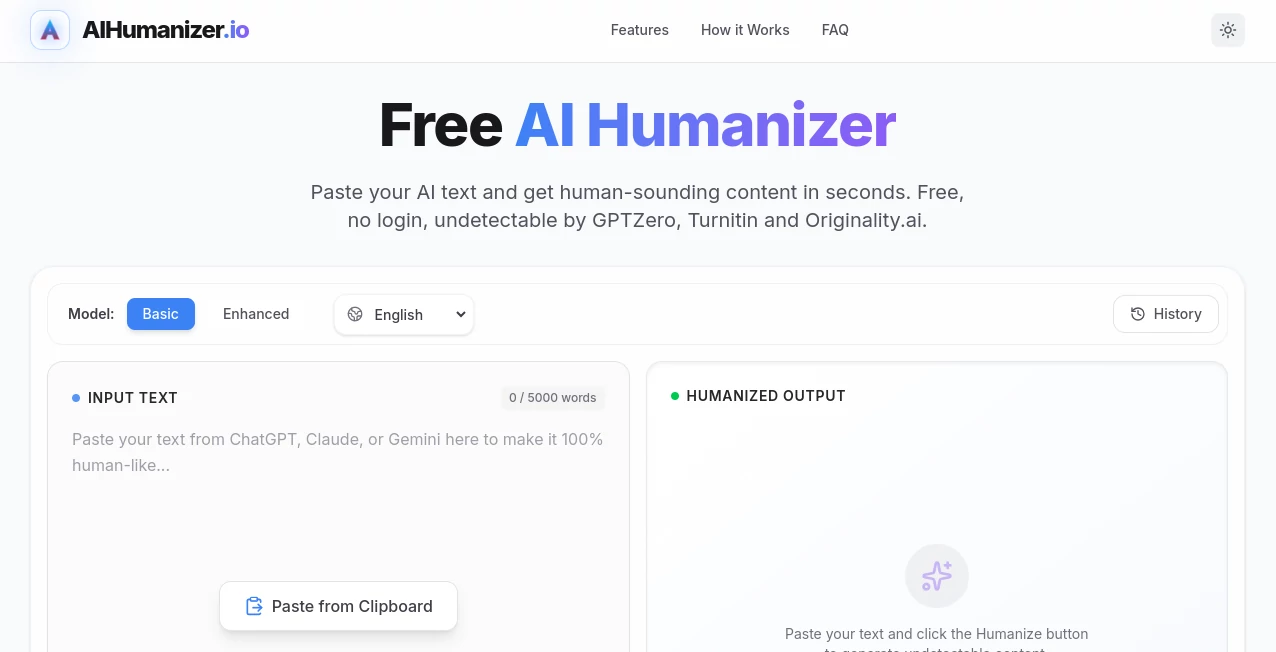
What is AIHumanizer.io?
I’ve been there more times than I can count: you use AI to draft something solid, but the moment you read it back, it just feels… off. Too robotic. Too perfect. Too obviously generated. That’s exactly the problem this tool solves beautifully. It takes stiff, machine-written text and transforms it into something that reads like a real person wrote it — with natural flow, subtle imperfections, and that human touch that makes people actually want to keep reading.
Introduction
AI writing tools have become incredibly useful, but they all share the same weakness: they sound like AI. Whether you’re creating blog posts, marketing copy, emails, or social content, that detectable “AI flavor” can hurt credibility, trigger spam filters, or simply fail to connect with readers. AIHumanizer quietly fixes this by intelligently rewriting AI-generated (or even human-written) text to make it warmer, more varied, and authentically human. It’s become a favorite for writers, marketers, and creators who want the speed of AI without the robotic aftertaste.
Key Features
User Interface
The interface is wonderfully straightforward. You paste your text, choose a tone if you want (professional, casual, persuasive, etc.), and hit humanize. Within seconds you get a rewritten version that feels alive. Side-by-side comparison makes it easy to see the improvements, and you can regenerate or fine-tune specific sections with simple instructions. No complicated dashboards or steep learning curve — just a clean, focused tool that gets out of your way.
Accuracy & Performance
What sets it apart is how well it preserves your original meaning while removing the telltale AI patterns. It varies sentence length naturally, adds thoughtful transitions, and introduces subtle human quirks that detectors usually miss. In practice, it consistently bypasses major AI detectors while keeping the content clear and on-message. The results feel like they were written by a skilled human editor rather than a machine trying to imitate one.
Capabilities
It works on everything from long-form articles to short social captions, marketing emails, product descriptions, and even academic or business writing. You can adjust the level of humanization, preserve specific key points, or guide it with simple instructions like “make this sound more conversational” or “add some personality.” The tool also includes a built-in AI detector so you can test before and after. It’s versatile enough for both heavy rewriting and light polishing.
Security & Privacy
Your text is processed securely and not stored or used to train models unless you explicitly allow it. For professionals handling client work or sensitive content, this respectful approach to privacy is a big plus. You stay in control of your words at every step.
Use Cases
A content marketer uses it to turn raw ChatGPT drafts into engaging blog posts that rank well and actually get read. A freelance writer humanizes client work to avoid detection while meeting tight deadlines. An e-commerce owner rewrites product descriptions that convert better because they no longer sound robotic. Students polish essays to sound more natural. The common thread is people who value speed but refuse to sacrifice authenticity and effectiveness.
Pros and Cons
Pros:
- Transforms robotic AI text into warm, natural-sounding copy.
- Strong at bypassing major AI detectors while keeping meaning intact.
- Fast, simple workflow that fits into any writing process.
- Flexible tone controls and guidance options.
- Helpful built-in detector for before-and-after comparison.
Cons:
- Very technical or highly specialized content may need some manual review.
- Heavy humanization on already good text can occasionally soften impact.
Pricing Plans
It offers a generous free tier that lets you test the quality on real content. Paid plans provide higher word limits, faster processing, priority features, and commercial usage rights. The pricing is reasonable for the quality and time it saves — many users find that even the entry-level paid plan quickly pays for itself through better engagement and fewer revisions.
How to Use AIHumanizer
Paste your AI-generated (or human-written) text into the box. Select a desired tone or style if you want guidance. Click humanize and review the result side-by-side. Make small adjustments by highlighting sections and giving specific instructions if needed. Run it through the built-in detector to check effectiveness, then copy the final version. The whole process usually takes under a minute, making it easy to integrate into your daily workflow.
Comparison with Similar Tools
While other humanizers exist, this one consistently produces more natural flow and better detector evasion without making the text feel watered down. Many competitors either over-simplify or fail to preserve nuance. The combination of speed, quality, and thoughtful controls makes it a standout choice for writers who need reliable results they can actually publish with confidence.
Conclusion
AI is incredible at generating content quickly, but humans still connect better with writing that feels human. This tool bridges that gap beautifully, letting you enjoy the speed of AI while delivering text that resonates with real readers. Whether you create content for a living or just want your writing to land better, it’s one of those practical tools that quietly makes a big difference in your results and confidence.
Frequently Asked Questions (FAQ)
Will it always bypass AI detectors?
It performs very well on major detectors, though results can vary depending on the original text and detector version.
Does it change the meaning of my content?
No — it focuses on natural expression while carefully preserving your original intent and key points.
Can I use it for commercial work?
Yes, paid plans include full commercial rights for your humanized content.
How much text can I process at once?
The free tier handles decent chunks, while paid plans support much longer documents and higher volume.
Is my content kept private?
Yes — your text is processed securely and not used for training unless you opt in.
AI Paraphraser , AI Content Generator , AI Rewriter , AI Writing Assistants .
These classifications represent its core capabilities and areas of application. For related tools, explore the linked categories above.

AIHumanizer.io Alternatives Product

InspiroBot
Thinkesta

TClaw AI Hum…

AI Business …

VideoSnap

RankPeak

MaxAEO

AiProposer

Shutterstock
