
Muse Image Generator
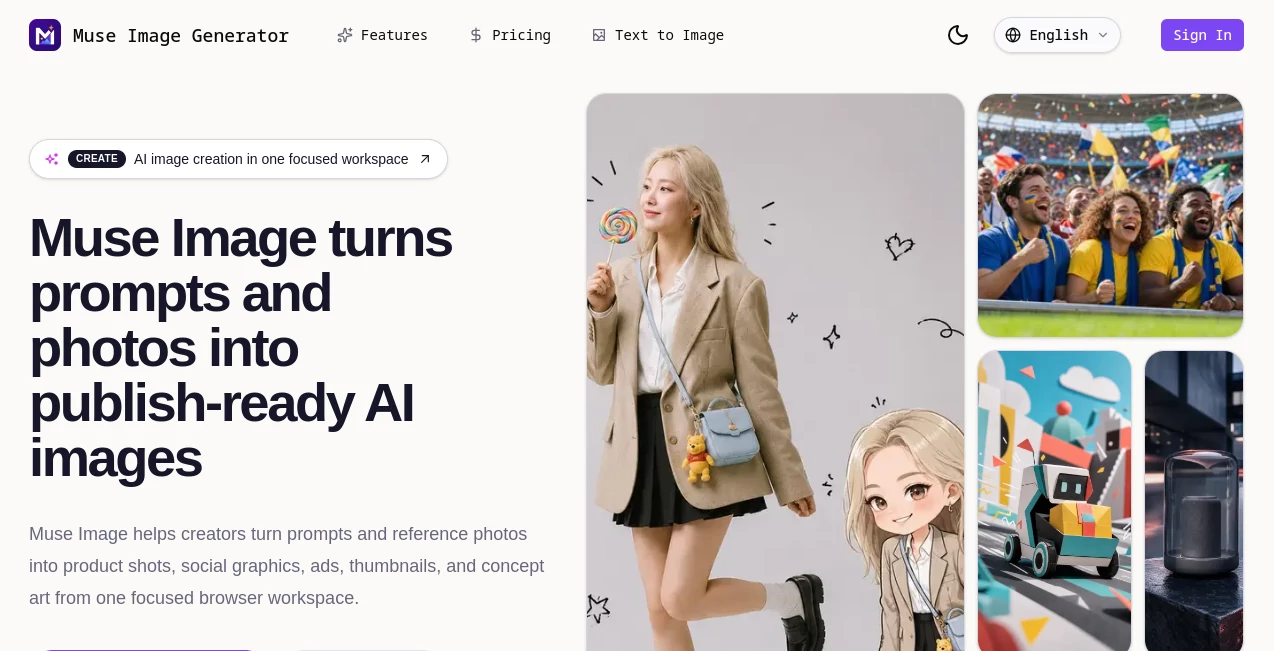
What is Muse Image Generator?
Muse Image is a focused AI image creation workspace designed to turn written ideas and reference photos into visuals that can be used in real creative projects. Instead of making image generation feel like a complicated production process, it keeps prompting, reference images, generation, refinement, and downloads together in one browser-based workflow.
Creators can start with a simple description, add an authorized reference image when more visual control is needed, generate variations, and refine the strongest result. The workflow is particularly useful for product visuals, advertising concepts, social media graphics, thumbnails, concept art, landing page imagery, and presentation assets.
One of its more practical strengths is the emphasis on the final use of an image. A generated picture is not treated simply as an experiment; it can be prepared for a campaign, product page, newsletter, social post, mockup, or client presentation.
Key Features
- Text-to-image generation from detailed creative prompts
- Image-to-image generation using authorized reference images
- Reference-based control for products, compositions, materials, and visual style
- Generation variations for comparing creative directions
- Downloadable generated image files
- Commercial use for exported images on supported plans
- Private generation history
- HD exports and upscaling on the Creator plan and above
- Batch variations for faster creative iteration on supported plans
- Saved prompt presets on supported plans
- Brand-safe prompt presets
- Multilingual user experience with nine localized experiences
User Interface
The interface is deliberately straightforward. Users can choose between text-to-image and image-to-image creation, enter a prompt of up to 2,000 characters, select settings such as aspect ratio and quality, and then generate an image. Keeping these controls in one workspace makes the process approachable even for someone who does not regularly work with generative image software.
The example prompts are also useful when inspiration is running low. A creator can inspect an example, understand how the idea was described, and use it as a starting point for a different visual instead of staring at an empty prompt field.
Accuracy & Performance
Image quality naturally depends on the prompt, reference material, selected settings, and generation model, so no AI image generator will produce a perfect result every time. The workflow is designed around iteration: create a direction, compare variations, adjust the prompt or reference, and continue until the visual is closer to the intended result.
This approach works particularly well for early creative development. For example, a marketer can explore several product-ad concepts before deciding which direction deserves a more expensive photoshoot or full design treatment.
Capabilities
The platform supports a broad range of visual projects. Text prompts can be used for product shots, advertising concepts, thumbnails, social graphics, concept art, editorial-style imagery, and presentation visuals. Image-to-image creation adds another layer of control when a user already has a product, composition, material, or visual reference available.
Reference images should be images that the user owns or has permission to use. The workflow is intended to guide creative direction rather than recreate private identities, perform face manipulation, or imitate protected brand assets without authorization.
Security & Privacy
The service places restrictions on several categories of content, including NSFW material, sexually suggestive content, face swaps, deepfakes, identity recreation, harmful or illegal content, and unauthorized use of protected images, characters, trademarks, or brand assets. Prompts are screened under its Acceptable Use Policy.
Paid plans also include private generation history, giving subscribers a more controlled workspace for their creative projects. Users should still avoid uploading material they do not have the right to use and should review the service's current privacy and usage policies before working with sensitive assets.
Use Cases
- Product Photography: Create product-focused visuals and explore different environments, compositions, and campaign directions without arranging a physical shoot for every concept.
- Advertising: Develop advertising concepts, promotional compositions, and visual directions for campaigns.
- Social Media: Produce graphics and creative imagery for social posts, campaigns, and promotional content.
- Thumbnails: Explore attention-grabbing visual concepts for videos and other content.
- Landing Pages: Generate hero imagery and supporting visuals for websites and product launches.
- Concept Art: Turn rough creative ideas into visual references that designers and creative teams can develop further.
- Presentations: Create original visual material for pitch decks, review presentations, and internal concepts.
- Newsletter Graphics: Develop supporting imagery for newsletters and marketing campaigns.
Pros and Cons
Pros
- Combines text-to-image and image-to-image workflows in one place.
- Simple interface that does not overwhelm users with controls.
- Useful for practical marketing and content-production workflows.
- Reference images provide additional creative control.
- Higher plans offer HD exports, upscaling, batch variations, and saved prompts.
- Commercial use is included for exported images on the Starter plan and above.
Cons
- Generation uses a credit system, so frequent users need to monitor their available credits.
- More advanced production features are reserved for higher-priced plans.
- Generated results can still require multiple iterations to reach a precise creative brief.
- Reference-image use is subject to rights and content restrictions.
Pricing Plans
The pricing structure is based on monthly generation credits, with options intended for occasional creators, active individual users, and teams.
- Starter: $9 per month with 600 generation credits, text-to-image and image-to-image creation, reference uploads, commercial use for exported images, private generation history, and standard queue speed.
- Creator: $29 per month, with a listed regular price of $39, including 1,933 monthly credits, HD exports and upscaling, brand-safe prompt presets, batch variations, saved prompt presets, and priority queue speed.
- Studio: $79 per month, with a listed regular price of $99, including 5,266 monthly credits, advanced controls for brand-consistent outputs, higher-resolution exports, the fastest queue speed, team-ready asset history, and priority support.
The service also advertises a yearly option with a 20% saving. Pricing and included features can change, so users should check the current plan information before subscribing.
How to Use Muse Image
- Start by deciding what the finished image needs to accomplish, such as a product hero, advertisement, thumbnail, or social graphic.
- Write a prompt describing the subject, setting, lighting, composition, style, format, and intended use.
- Choose text-to-image or image-to-image depending on whether you need a completely new visual or want to work from a reference.
- If using a reference, upload an image that you own or are authorized to use.
- Generate several variations and compare the results rather than settling immediately on the first output.
- Refine the prompt or reference when the composition, mood, subject, or style needs adjustment.
- Download the strongest result and move it into your website, advertising, social media, presentation, or other approved workflow.
Comparison with Similar Tools
There are many AI image generators available, but they do not all approach the creative process in the same way. Some focus heavily on artistic experimentation, while others are built around professional design workflows or image editing. This platform sits closer to the practical middle ground, with a clear emphasis on turning prompts and reference material into usable visual assets.
Its combination of text-to-image generation, image-to-image refinement, reference uploads, downloadable outputs, prompt presets, and batch variations makes it appealing to creators who want more than a single prompt-and-generate experience. For a marketer testing five advertising concepts or a founder preparing several landing-page directions, that iterative workflow can be more valuable than simply chasing the most elaborate individual image.
Conclusion
For creators who need AI-generated visuals with a clear path from idea to finished asset, this platform offers a practical and approachable workflow. Its strongest qualities are the combination of prompt-based generation, reference-driven creation, iterative variations, and downloadable results.
The Starter plan makes it accessible for occasional experimentation, while Creator and Studio add useful capabilities for people producing visuals regularly. Whether the goal is a product campaign, social graphic, presentation concept, or landing-page image, it provides a convenient place to explore the visual direction before committing additional time and resources to production.
Frequently Asked Questions (FAQ)
What can this AI image generator create?
It can create product visuals, social graphics, thumbnails, advertising concepts, concept art, presentation assets, and other images from text prompts or reference pictures.
Can I upload a reference image?
Yes. Image-to-image generation allows users to upload reference material. Users should only upload images they own or are authorized to use.
Is commercial use available?
Commercial use for exported images is included with the Starter plan and higher plans according to the current pricing information.
Who is this tool best suited for?
It is well suited to creators, marketers, founders, designers, and small teams that need to explore and produce visual assets for campaigns, websites, products, social media, and presentations.
Does it support image-to-image generation?
Yes. Users can combine a written creative direction with an authorized reference image to guide elements such as product shape, composition, materials, and visual style.
Does the service allow face swaps or deepfakes?
No. Its current usage restrictions prohibit face swaps, deepfakes, identity recreation, and other forms of face manipulation, along with several other prohibited content categories.
Can I use the generated images for my business?
Commercial use for exported images is included in the paid Starter, Creator, and Studio plans according to the current plan information. Users should review the latest terms before using generated material commercially.
AI Photo & Image Generator , AI Photography , AI Image to Image , AI Text to Image .
These classifications represent its core capabilities and areas of application. For related tools, explore the linked categories above.
Muse Image Generator details
Website unavailable — View Alternatives
Pricing
- Free
Apps
- Web App
Categories

Muse Image Generator Alternatives Product

NepVox
PatchDesign.…

AI Polaroid …

imagen 5

StyleCut

Reztune

Nano banana …
Unblur Image

XIMAGIN