

















AIMusicFlow
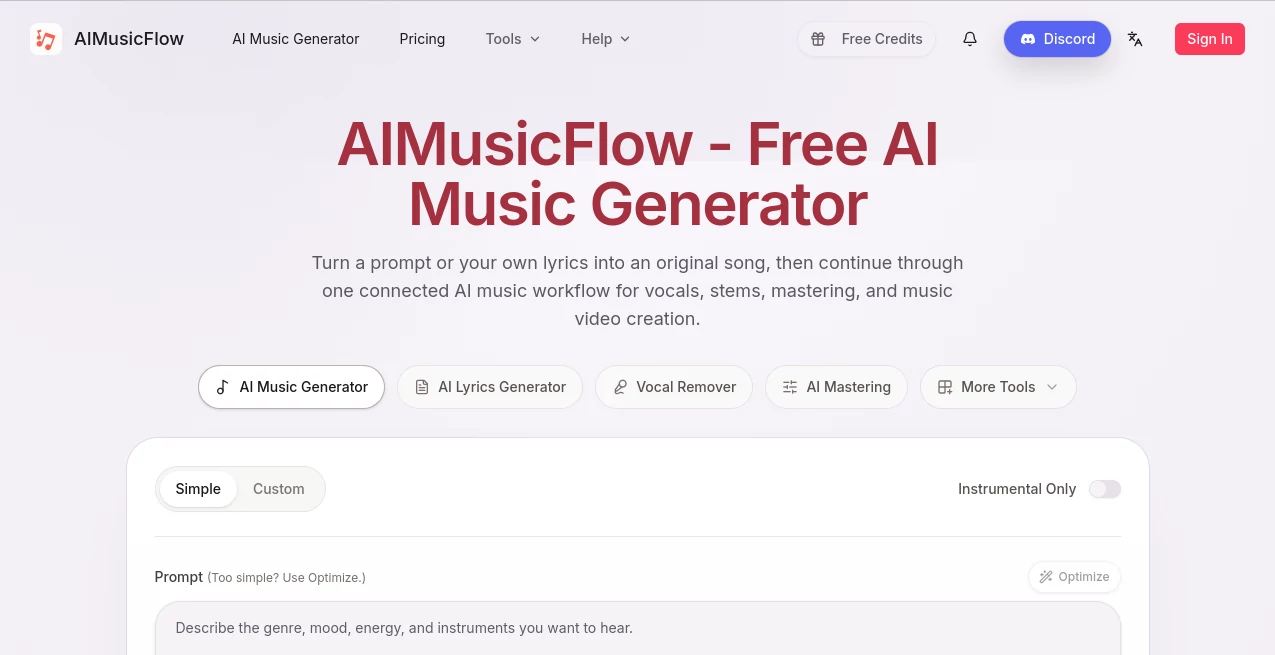
What is AIMusicFlow?
AIMusicFlow is a creator-focused AI music platform that turns a written prompt or original lyrics into music and then provides additional tools for taking that idea further. Instead of stopping after generating a track, the platform brings several parts of the music-making process into one connected workflow, including lyric creation, singing voices, vocal removal, stem separation, mastering, and music video generation.
The approach is particularly useful for creators who want to experiment with music without spending hours inside traditional production software. A songwriter can begin with a rough concept, describe the desired genre and mood, generate a song draft, and continue refining the project through the available audio tools. Someone working on background music can take a different route and start directly with an instrumental brief.
The experience feels practical because the workflow is not limited to one type of music. The generator supports directions ranging from country, folk, rock, blues, and classical to disco, funk, emotional, nostalgic, romantic, and soothing styles. Existing examples also cover ambient, hip-hop, EDM, jazz, lo-fi, and cinematic sounds, giving new users a useful sense of what can be created.
Key Features
- Generate original music from written prompts.
- Turn original lyrics into a complete song draft.
- Create instrumental music without vocals.
- Guide music generation with genre, mood, instruments, energy, and scene descriptions.
- Generate lyrics, hooks, verses, and songwriting ideas.
- Explore AI-generated singing voice directions.
- Remove vocals from tracks for instrumental or karaoke use.
- Split songs into separate stems for editing and remixing.
- Apply AI mastering for more consistent playback.
- Create music videos from generated music.
- Support creative workflows for genres such as hip-hop, EDM, jazz, lo-fi, rock, and cinematic music.
- Download generated music according to the selected plan.
User Interface
The main music generator keeps the starting process straightforward. Users can choose between a simple or custom approach, enter a prompt, and optionally use genre and mood tags to give the generation more direction. There is also an instrumental-only option for projects that do not require a vocal performance.
This setup is helpful when an idea is still vague. Instead of writing a long technical description, a creator can combine a few useful directions such as genre, emotional character, and energy. For someone who already knows exactly what they want, the custom controls provide a more deliberate starting point.
Accuracy & Performance
Music generation is naturally subjective, so quality is better judged by how closely a result matches the creative brief rather than by a single technical score. The platform allows users to describe important musical characteristics such as genre, mood, instrumentation, vocal character, and energy, which gives the generation process more useful context.
The connected workflow is another practical advantage. Once a song has been generated, users can move toward vocal separation, stem work, mastering, or visual presentation instead of exporting the project to a completely unrelated service for every step.
Capabilities
The strongest part of the platform is the range of tasks covered around music creation. A user can begin with lyrics, generate a song, work with vocals, separate stems, and prepare the finished track for sharing. The available toolkit also includes an AI lyrics generator, singing voice generation, vocal removal, stem splitting, mastering, and music video creation.
This makes it suitable for both quick experimentation and more structured creative projects. For example, a content creator could produce a short background track for a video, while a songwriter could start with a chorus idea and use the music generator to explore a fuller arrangement.
Security & Privacy
The service provides dedicated Privacy Policy and Terms of Service pages, but creators should still review those documents before uploading material that contains sensitive or commercially important information. This is especially relevant when working with unreleased lyrics, private recordings, or material that may have contractual restrictions.
Use Cases
- Songwriting: Turn an early lyric or musical concept into a song draft that can be explored and refined.
- Background Music: Create music for videos, presentations, social content, podcasts, and other creative projects.
- Instrumental Production: Generate tracks without vocals when the music itself needs to remain in focus.
- Remixing: Use vocal removal and stem separation when individual parts of a track need to be isolated.
- Karaoke: Create instrumental versions by separating vocals from music.
- Music Practice: Work with isolated musical parts for study, rehearsal, or experimentation.
- Content Creation: Develop original music and continue into music video production for shareable content.
- Creative Experimentation: Quickly test different genres, moods, and musical directions without starting every project from scratch.
Pros and Cons
Pros
- Combines several AI music tools in one workflow.
- Supports both prompts and user-written lyrics.
- Offers an instrumental-only generation option.
- Includes lyric generation, vocal tools, stem separation, and mastering.
- Provides music video generation on paid plans.
- Offers a free plan for trying the core music workflow.
- Supports a broad selection of genres and moods.
- Commercial licensing is included with the paid subscription plans.
Cons
- The free plan has relatively limited monthly generation allowances.
- Commercial use requires a paid plan.
- Creators looking for detailed traditional DAW-style editing may still need additional software.
- AI-generated music can require experimentation before reaching the desired creative result.
Pricing Plans
The platform currently offers a free option alongside paid monthly and yearly subscriptions. The free plan includes 2 songs per month, 1 music generation per month, access to the AI music and lyrics generators, music downloads, and personal-use rights.
The Starter plan costs $14.99 per month and includes 200 songs, 100 music generations, a commercial license, music video generation, and up to 1,000 downloads per month. Annual billing reduces the listed monthly equivalent to $10.49.
The Hobby plan is priced at $29.99 per month and includes 500 songs, 250 music generations, a commercial license, music video generation, unlimited downloads, and 24/7 email support. With annual billing, the listed monthly equivalent is $20.99.
The Professional plan costs $49.99 per month and is designed for higher-volume production, offering 1,200 songs, 600 music generations, a commercial license, music video generation, unlimited downloads, and 24/7 email support. Annual billing brings the listed monthly equivalent to $34.99.
How to Use the Platform
- Start by deciding whether you want a vocal song or an instrumental track.
- Enter a clear description of the music you want, including genre, mood, instruments, energy, or intended setting.
- Use the available genre and mood tags when they help communicate the direction more clearly.
- If you already have lyrics, begin with those instead of writing a music description from scratch.
- Generate a song draft and listen to the result.
- Use vocal removal or stem separation when you need individual parts of the track.
- Apply AI mastering when the track is ready for a more consistent playback experience.
- Create a music video when the project needs a visual presentation.
- Download the finished work according to the rights and download allowances of your selected plan.
Comparison with Similar Tools
Many AI music services concentrate primarily on generating a song from a prompt. The platform takes a broader approach by connecting generation with several of the tasks that normally come afterward. Lyrics, singing voice exploration, vocal removal, stem splitting, mastering, and music video creation are presented as parts of the same creative path.
This makes it particularly attractive to users who want fewer separate services in their workflow. Someone who only needs a quick music-generation experiment may prefer a simpler specialist tool, while creators who expect to move from an initial idea toward editing, mastering, and presentation can benefit from having those stages connected.
Another useful distinction is the pricing structure. The free tier makes it possible to test the basic workflow, while paid plans add considerably higher production limits and commercial licensing. For creators producing music regularly, the higher song and generation allowances become more relevant than simply having access to a single generation feature.
Conclusion
For creators who want more than a one-click music generator, this platform offers a compelling workflow. Its biggest strength is the way different stages of music creation fit together: an idea can become lyrics or a prompt, the prompt can become a song, the song can be separated into useful parts, and the final result can be mastered and presented visually.
The free plan is a sensible starting point for experimentation, while the paid tiers are better suited to creators who need larger production limits or commercial rights. Whether the goal is background music, songwriting, remixing, karaoke, social content, or simply exploring a new musical idea, the platform provides a convenient place to move from a rough concept toward a finished creative project.
Frequently Asked Questions (FAQ)
Can I generate music from a text prompt?
Yes. You can describe the desired genre, mood, instruments, energy, or scene and use that direction to generate a music draft.
Can I use my own lyrics?
Yes. The workflow supports starting with your own lyrics and turning them into a generated song direction.
Can I create instrumental music?
Yes. An instrumental-only option is available for projects where vocals are not required.
Does it include vocal removal and stem separation?
Yes. The connected toolkit includes vocal removal and stem splitting for tasks such as remixing, karaoke, practice, and audio editing.
Can I use the generated music commercially?
Commercial licensing is included with the Starter, Hobby, and Professional paid plans. The free plan is intended for personal use only.
Is there a free plan?
Yes. The free plan includes 2 songs and 1 music generation per month, along with access to the music and lyrics generators and music downloads for personal use.
Can I create music videos?
Yes. Music video generation is included with the Starter, Hobby, and Professional plans.
Which genres can I explore?
The generator provides directions for styles including country, folk, rock, blues, classical, disco, funk, hip-hop, EDM, jazz, lo-fi, ambient, and cinematic music, along with a range of emotional moods.