
Omni Video
What is Omni Video?
AI Omni Video is an advanced AI-powered video creation platform designed to help creators transform ideas, images, and text prompts into engaging video content. The platform makes video production more accessible by allowing users to generate visual stories, marketing clips, social media videos, and creative concepts without requiring traditional editing skills.
With a simple workflow, users can describe their vision, upload reference images, choose preferred styles, and create short videos suitable for different platforms. Whether you are a content creator looking to publish faster, a marketer preparing promotional materials, or a business building visual campaigns, this tool provides a practical way to bring concepts to life.
Key Features
- Text-to-Video Creation: Convert written ideas and descriptions into dynamic video clips with AI-generated scenes, movement, and visual effects.
- Image-to-Video Generation: Animate static images and transform them into engaging video sequences.
- Multiple Creative Styles: Create realistic, cinematic, artistic, anime-inspired, or customized visual experiences.
- Flexible Video Formats: Generate content optimized for social media platforms, presentations, advertisements, and digital campaigns.
- Fast AI Generation: Quickly test ideas and create multiple variations for creative exploration.
- High-Quality Output: Support for HD and higher-resolution video generation depending on the selected plan.
- Creator-Friendly Workflow: Designed for beginners and professionals who need a simple production process.
User Interface
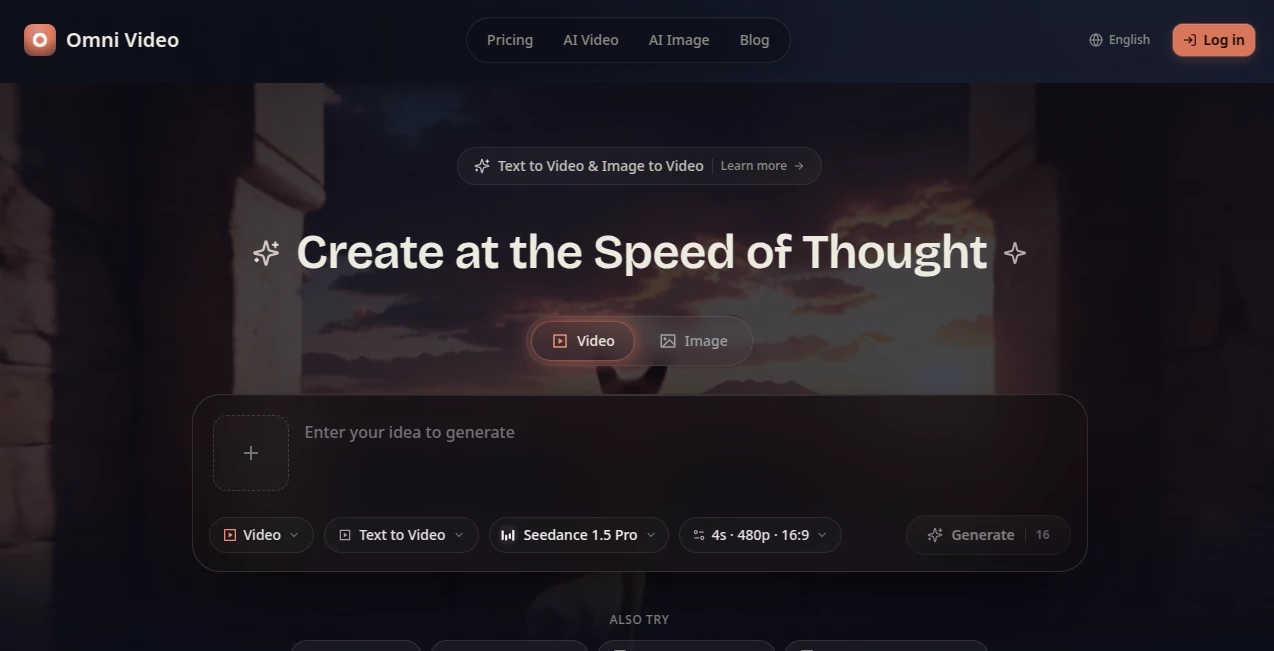
The platform provides a clean and straightforward workspace where users can focus on creativity instead of complicated settings. The process feels familiar: enter a prompt, upload an image if needed, select options, and generate a video. This simple approach makes it suitable for users who have never worked with professional video editing software.
The organized controls help creators experiment with different ideas quickly. Adjusting formats, styles, and visual directions can be done without navigating through complicated menus.
Accuracy & Performance
The AI generation system is built to understand creative instructions and produce videos that follow the user's description. It focuses on maintaining visual consistency, smooth motion, and realistic scene creation.
For example, a creator can describe a product scene, upload a reference image, and generate a promotional concept before investing time in a full production. This makes the tool valuable for brainstorming, prototyping, and rapid content development.
Capabilities
This platform supports a variety of creative workflows, including short advertisements, social media clips, educational videos, product demonstrations, visual storytelling, and experimental designs.
Users can create landscape, portrait, and square videos for different channels such as YouTube, TikTok, Instagram, and online presentations. The combination of text instructions and visual references gives creators more control over the final result.
Security & Privacy
The service is designed with creator workflows in mind, helping users manage their generated content in a secure online environment. Paid plans provide additional benefits such as improved processing options and expanded access to creative features.
Use Cases
- Social Media Content: Create short-form videos for TikTok, Instagram, YouTube Shorts, and other platforms.
- Marketing Campaigns: Produce promotional videos, product concepts, and advertising visuals faster.
- Business Presentations: Turn ideas into engaging visual demonstrations.
- Education: Create explainers and learning materials with attractive visuals.
- Creative Projects: Explore storytelling ideas, animation concepts, and artistic experiments.
- E-commerce: Build product showcase videos without expensive production setups.
Pros and Cons
Pros
- Easy workflow for beginners and experienced creators.
- Supports both text-based and image-based video creation.
- Useful for marketing, social media, and creative projects.
- Multiple styles and video formats available.
- Helps reduce the time needed for video production.
Cons
- Advanced generations may require more credits.
- Complex professional video editing features may still require dedicated software.
- Output quality can vary depending on the prompt and reference materials.
Pricing Plans
The platform offers a free option for users who want to test AI video creation before upgrading. Paid plans provide more credits, access to additional models, higher-quality outputs, faster processing, and expanded features.
- Free Plan: Includes daily credits and basic access for exploring video creation.
- Basic Plan: Designed for individual creators who need regular video generation with HD output and standard AI models.
- Pro Plan: Suitable for professional creators who need more credits, advanced models, higher resolution, and priority processing.
- Max Plan: Built for heavy users requiring large-scale video production, premium access, and maximum generation capacity.
How to Use AI Omni Video
- Create an account and access the video creation workspace.
- Enter a detailed text prompt describing your desired scene.
- Upload a reference image if you want more control over the visual direction.
- Select the preferred style, format, and quality settings.
- Generate the video and review the result.
- Download or refine the output based on your creative needs.
Comparison with Similar Tools
Compared with traditional video production software, this platform focuses on speed and simplicity. Instead of spending hours editing scenes manually, creators can quickly generate concepts and refine their ideas through AI assistance.
While many AI video solutions focus only on text prompts, this service provides a more flexible workflow by combining text instructions with image references and creative controls. This makes it a strong option for users who want both convenience and creative freedom.
Conclusion
AI Omni Video offers a practical solution for anyone who wants to create professional-looking videos without a complicated production process. From social media creators and marketers to businesses and educators, the platform helps transform simple ideas into engaging visual content.
With its combination of AI generation, flexible creative options, and user-friendly experience, it provides a valuable workspace for experimenting, creating, and publishing videos faster.
Frequently Asked Questions (FAQ)
What can I create with this AI video tool?
You can create short videos from text prompts or images, including social media clips, advertisements, product videos, educational content, and creative visual projects.
Can I generate videos from images?
Yes. Users can upload images and transform them into animated video content with AI-generated movement and effects.
Is it suitable for beginners?
Yes. The simple workflow allows beginners to create videos without previous experience in professional editing software.
Can businesses use generated videos for marketing?
Yes. The platform can be used for promotional videos, product demonstrations, campaign ideas, and branded visual content.
Does it support different video formats?
Yes. Users can create videos in different aspect ratios suitable for social platforms, presentations, and online publishing.
AI Image to Video , AI Video Generator , AI Video Editor , AI Text to Video .
These classifications represent its core capabilities and areas of application. For related tools, explore the linked categories above.

Omni Video Alternatives Product

seedance 3.0

ImagineToVid…

Seedance 2.0
gpt video

Mimo AI

ai seedance …

FreeWanVideo

seedance 2

Sora2 AI Vid…