
AI Photo Editor No Sign Up
What is AI Photo Editor No Sign Up?
Editing a photo does not always need to begin with a complicated desktop application, a long registration form, or a subscription. This browser-based AI photo editing service takes a simpler approach: upload an image, describe the change you want, and generate an edited version directly from your browser.
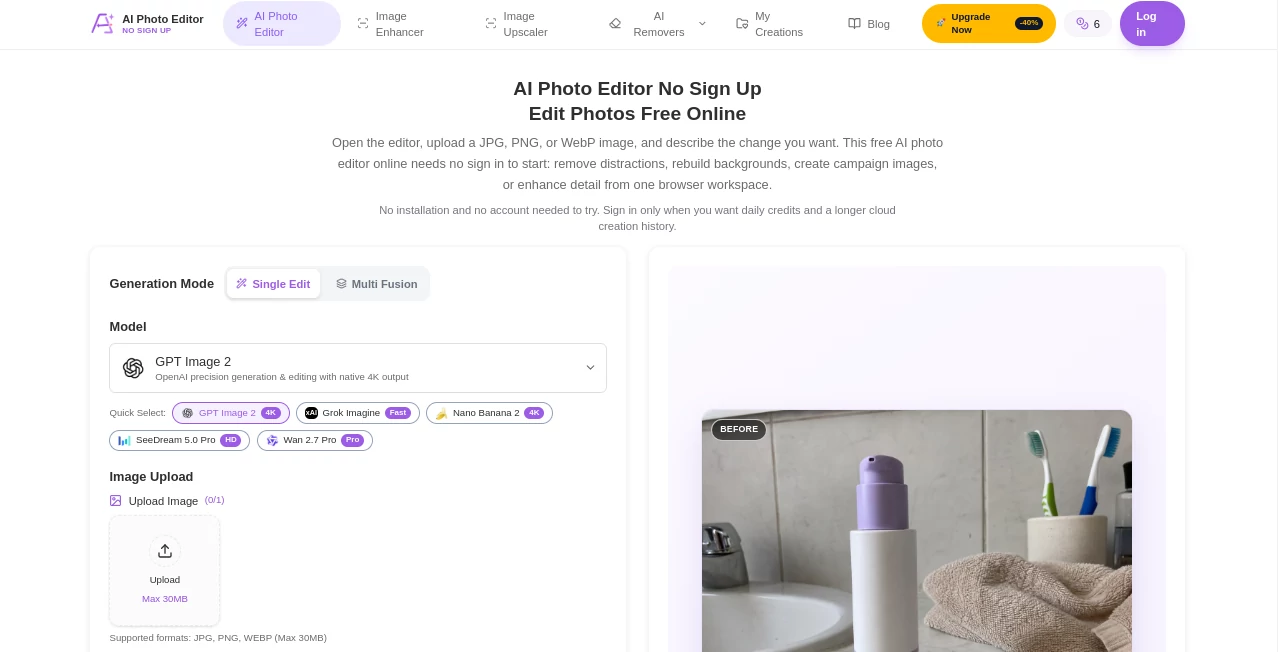
The main attraction is the ability to start without creating an account. JPG, PNG, and WebP files are supported, with uploads of up to 30MB on the main editor. Users can remove unwanted objects, replace backgrounds, restore older photographs, adjust visual elements, create product imagery, and experiment with different creative directions using natural-language instructions.
It is particularly convenient for people who occasionally need professional-looking image changes but do not want to learn a traditional editing application. Instead of manually selecting pixels, users can explain the desired result and let the underlying image models handle much of the editing work.
Key Features
- AI-powered photo editing directly in a web browser.
- No account is required to try the editor.
- Support for JPG, PNG, and WebP images.
- Single Edit mode for working with an individual source image.
- Multi Fusion mode for combining multiple reference images.
- Natural-language prompts of up to 1,000 characters.
- Object removal and scene reconstruction.
- Background replacement and generative fill.
- Image enhancement and upscaling.
- Multiple aspect ratios, including 16:9, 9:16, 1:1, 4:3, and other formats.
- 1K, 2K, and 4K output options.
- Several image-generation and editing models to choose from.
- A My Creations area for reviewing recent results.
User Interface
The editor is organized around a straightforward workflow. The upload area comes first, followed by the prompt field, model selection, aspect ratio, and resolution controls. This makes the process understandable even for someone who has never worked with an AI image editor before.
The quick-select model options also make experimentation easier. Rather than hiding technical choices behind several menus, the interface puts important generation settings in view. Someone preparing a product photograph, for example, can upload the original image, describe the desired advertising scene, select an appropriate resolution, and generate a new version without switching between different applications.
The responsive browser design is another practical advantage. It can be used from a phone or tablet as well as a desktop, although larger images and multi-reference projects are naturally more comfortable on a larger screen.
Accuracy & Performance
Image editing quality depends heavily on the original photograph, the selected model, and how clearly the requested change is described. A sharp source image with clear subject boundaries generally gives the AI more useful information to work with.
The service provides several model choices and resolutions, including options reaching 4K. Different models can have different capabilities, output counts, image limits, and credit costs, so choosing the right configuration is important when quality or processing efficiency matters.
For best results, prompts should describe both what needs to change and what must remain untouched. For example, instead of simply asking to replace a background, a product seller could specify that the product label, camera angle, proportions, and existing shadow should remain unchanged.
As with other generative image systems, results should be inspected before professional publication. Faces, hands, small text, logos, reflections, product labels, and fine edges deserve particular attention because AI can sometimes produce visually convincing details that are not factually correct.
Capabilities
One of the strongest aspects of the editor is the range of editing tasks that can be described with ordinary language. Users can ask for an unwanted person, object, cable, sign, or other distraction to be removed while the surrounding scene is reconstructed.
Background editing is another useful capability. A casual photograph can be given a cleaner studio environment, a different setting, or a more suitable composition for a marketing campaign. This can be especially useful when creating marketplace listings, social media content, advertisements, and presentation graphics.
Generative fill allows users to add or replace elements within a scene. The same workflow can also be used for changing colors, modifying scenery, extending a cropped composition, or exploring different visual concepts.
The Multi Fusion mode expands the creative workflow by allowing multiple reference images. This can be useful when a final concept needs to combine elements such as a person, outfit, background, or visual style from different references.
Enhancement and upscaling are also available for situations where an existing image needs more clarity or a larger output. These functions can help with compressed images, presentation assets, online listings, and social media graphics, although upscaling cannot recover genuine information that was never captured in the original photograph.
Security & Privacy
Not requiring an account for initial use is convenient because visitors can test the editing workflow without immediately connecting their activity to a registered profile. However, users should still treat uploaded images carefully.
Guest creations are temporary rather than a permanent backup. The service indicates that guest users can see up to eight recent creations for 24 hours, while signing in provides account-linked history. Important results should therefore be downloaded rather than treated as permanently stored files.
For sensitive work, it is sensible to avoid uploading confidential documents, private photographs, unreleased commercial material, or images containing information that should not be processed by an external service. Users should also review the service's privacy and terms documentation before using it for sensitive or business-critical projects.
Use Cases
Online sellers: Product sellers can turn ordinary product photographs into cleaner commercial images, replace distracting backgrounds, and create variations for different campaigns.
Social media creators: Creators can remove unwanted objects, adapt images to different aspect ratios, test visual concepts, and produce alternative versions of existing photographs without opening a full editing suite.
Marketing teams: A marketing professional can use generative editing to explore campaign concepts, change environments, create product scenes, and prepare visual drafts before a final production workflow.
Photographers: Photographers can experiment with object removal, background changes, restoration, and enhancement as part of a faster editing process.
Students and occasional users: Someone who only needs an edited image for a presentation, project, profile picture, or personal design can experiment without installing specialist software.
Small businesses: Small teams can quickly prepare visual drafts for websites, advertisements, product pages, and social channels without maintaining a large design workflow.
Pros and Cons
Pros
- No account is needed to begin testing the editor.
- Natural-language editing makes complex operations easier to approach.
- Supports common JPG, PNG, and WebP formats.
- Offers several AI models and output resolutions.
- Includes object removal, background editing, generative fill, enhancement, and upscaling.
- Supports both single-image editing and multi-reference workflows.
- Multiple aspect ratios make the editor useful for different publishing channels.
- A free guest workflow makes it easy to evaluate before committing to an account.
Cons
- Guest creations are temporary and should not be treated as long-term storage.
- Generation uses credits, so free access is not unlimited.
- Different models have different limits and costs.
- AI-generated details can occasionally require manual checking.
- Critical commercial images should be reviewed carefully before publication.
Pricing Plans
The service uses a credit-based pricing model rather than requiring every user to purchase a recurring subscription. Visitors can try the system through guest credits, while registered users can receive 10 credits per day.
For users who need more generation capacity, the pricing page offers one-time credit packages. Available packages include 70 credits for $7, 300 credits for $15, 700 credits for $28.90 during the listed promotion, 2,000 credits for $58.90, 3,000 credits for $78.90, and 5,000 credits for $100. The listed plans state that purchased credits do not expire.
There is also an enterprise option with custom pricing. Business customers can request features such as API access, priority support, custom functionality, a dedicated manager, and team collaboration.
Because individual generations can consume different numbers of credits depending on the selected model, resolution, and output configuration, users should check the generation cost before starting larger batches.
How to Use the Tool
1. Upload an image. Open the editor and upload a JPG, PNG, or WebP file. The main uploader supports images up to 30MB.
2. Choose an editing mode. Single Edit works for a normal one-image workflow, while Multi Fusion can be used when multiple reference images are needed.
3. Write a clear instruction. Describe the desired final image rather than simply naming an editing operation. Mention the subject, requested change, environment, lighting, perspective, and details that should stay unchanged.
4. Select a model. Several available image models can be selected depending on the desired result. Model capabilities and credit requirements may differ.
5. Choose the aspect ratio and resolution. Select a format that matches the destination. Options range from square images to wide, portrait, and cinematic ratios, with output resolutions including 1K, 2K, and 4K.
6. Generate and inspect the result. Do not immediately publish the first result for an important project. Check faces, hands, text, logos, shadows, reflections, and product details at full size.
7. Refine if necessary. If something is incorrect, make one focused change to the prompt and generate another version. Specific instructions tend to produce more predictable results than a long list of unrelated requests.
Comparison with Similar Tools
Traditional photo editors remain the better choice when a designer needs pixel-level control, detailed masking, professional retouching, or precise manual adjustments. They provide control that generative systems cannot always reproduce consistently.
Other AI image editors may focus heavily on a single function, such as background removal, portrait enhancement, or image generation. This service takes a broader approach by combining several AI editing workflows in one browser interface.
Its biggest practical difference is the low-friction starting experience. Users can test image editing without first creating an account, while more advanced workflows can use model selection, higher resolutions, multiple references, and credit-based generation.
For someone who wants complete manual control, a conventional editor may still be preferable. For someone who wants to describe an edit and quickly see what an AI model can produce, this approach can save considerable time.
Conclusion
AI-powered image editing is most useful when it removes the tedious parts of a creative workflow without making the process difficult to understand. This editor does that by putting image upload, natural-language instructions, model selection, resolution, and aspect ratio controls into one accessible browser experience.
The no-registration starting point is particularly appealing for occasional users. There is no need to install software just to remove an unwanted object or test a different background. More demanding users can move toward account-based history and one-time credit packages when their projects require additional capacity.
It is not a replacement for careful human review, especially for commercial images containing text, recognizable people, product details, or important branding. Used as a creative assistant rather than an unquestioned final editor, however, it can make many everyday photo-editing tasks considerably faster.
Frequently Asked Questions (FAQ)
Can I use the editor without creating an account?
Yes. The editor allows visitors to begin with guest credits without signing up. An account becomes useful when you want daily credits and account-linked creation history.
Which image formats are supported?
The editor supports JPG, JPEG, PNG, and WebP images. The main upload interface lists a maximum file size of 30MB, while individual model limitations can vary.
Can I remove unwanted objects?
Yes. Users can describe an unwanted object, person, cable, sign, or other distraction and ask the AI to reconstruct the surrounding area. Clear prompts and sharp source images generally make this workflow easier to control.
Can I change the background?
Yes. Background replacement can be used to create a new environment, cleaner product scene, profile image, or campaign composition. Important edges such as hair, glass, and reflective surfaces should be checked carefully afterward.
Does it support 4K images?
Yes. The editor provides 1K, 2K, and 4K resolution options, although availability and credit requirements can depend on the selected model.
Can I use multiple reference images?
Yes. Multi Fusion mode is designed for workflows involving multiple reference images. The number of references and supported image configurations depend on the selected model.
Are the generated images stored permanently?
Guest creations are temporary. The service states that guest users can access up to eight recent creations for 24 hours. Important images should be downloaded rather than relying on temporary guest history.
Is the service completely free?
It can be tried with guest credits, and registered users can receive daily credits, but generation is not unlimited. Additional credit packages are available for users who need more capacity.
Can AI-edited images be used commercially?
Potential commercial use depends on the rights associated with the original image, people, logos, copyrighted material, and the applicable terms and laws. Users should verify those rights independently before using an edited image commercially.
What should I check before publishing an AI-edited image?
Inspect faces, hands, text, logos, product labels, reflections, shadows, geometry, and repaired edges at full resolution. AI editing can create plausible details that are not actually present in the source, so human review remains important.
AI Background Remover , Photo & Image Editor , AI Photo Enhancer , AI Image to Image .
These classifications represent its core capabilities and areas of application. For related tools, explore the linked categories above.
AI Photo Editor No Sign Up details
Website unavailable — View Alternatives
Pricing
- Free
Apps
- Web App
Categories

AI Photo Editor No Sign Up Alternatives Product

Sora Waterma…

Brat Generat…

AIImageEdit

Gamelabs Stu…

StyleCut
remove bg vi…

Text Behind …

Face Shape D…

Avatarka AI