

















Gamelabs Studio
Verified Blue CheckMark
Verified Blue CheckMark products are featured above free or unverified listings.
This badge indicates authenticity and builds trust, giving your product higher visibility across the platform.
Upgrade to get verified
Verified Blue CheckMark products are featured above free or unverified listings. This badge indicates authenticity and builds trust, giving your product higher visibility across the platform.
Upgrade to get verified
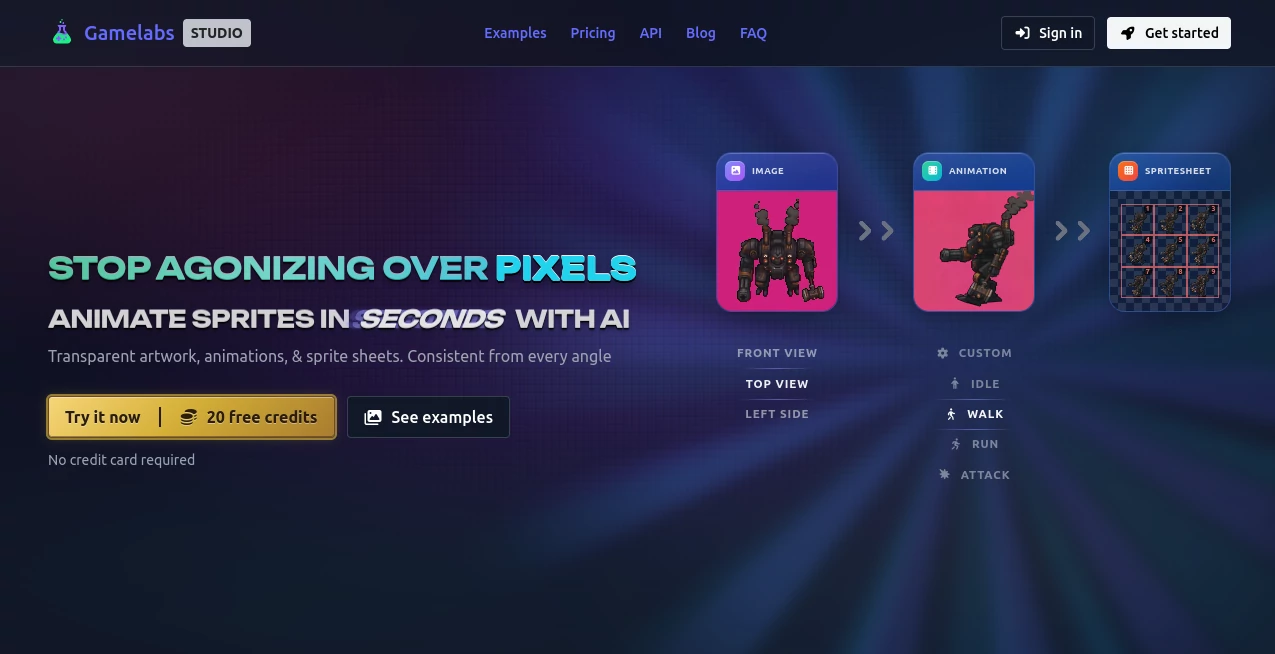
What is Gamelabs Studio?
I still remember the pain of spending days on a single character sprite sheet — drawing every angle, every frame, praying the style stayed consistent. Then I tried this tool and everything changed. You describe what you want or upload a reference, pick your angle, and it generates crisp, game-ready sprites and animations that actually match across views. No more cleaning up AI noise or fixing seams. Solo devs I know have gone from weeks of asset work to shipping prototypes in days, and the results look like they came from a dedicated artist. It’s the kind of tool that makes you excited to build again.
Introduction
Creating 2D game assets has always been one of the biggest bottlenecks for indie developers. Between drawing, animating, and making everything consistent from every angle, many great ideas never see the light of day. This platform solves that by turning text prompts and reference images into production-ready sprites, animations, and sprite sheets — complete with true transparency and engine-friendly exports. Whether you work in pixel art, hand-drawn, or any other style, it keeps your character looking like the same person no matter which way they face. It’s built by game makers for game makers, which shows in every detail.
Key Features
User Interface
The studio feels clean and focused. You start with a simple prompt or reference upload, choose your camera angle and subject direction, and generate. A built-in editor lets you refine directly in the browser with layers, brushes, and even AI-powered fill. Everything is where you expect it to be — no hunting through menus. The workflow is so smooth that you stay in creative flow instead of fighting the tool.
Accuracy & Performance
What sets it apart is the consistency. Generate a front view, then use it as reference for side or back angles, and the character stays recognizable. Animations loop cleanly, and pixel art comes out sharp without the usual downscaling mess. Generation is fast enough to support real iteration — you can try different actions or styles quickly without losing momentum. The output is genuinely game-ready, often needing little to no cleanup.
Capabilities
It handles static sprites, dynamic animations, multi-angle consistency, transparent backgrounds, sprite sheet exports with full control over FPS, grid, and padding, plus seamless tiling textures for maps and environments. You can generate in any art style, create map tiles, and even build complete tile-based maps inside the browser. Exports work beautifully with Unity, Godot, and other engines. There’s also MCP integration so you can generate assets directly from Cursor or VS Code.
Security & Privacy
You own everything you create. Assets are never reused, resold, or trained on. The platform gives you full commercial rights, and your prompts and references stay private. For indie devs and studios alike, that ownership and peace of mind matter a lot.
Use Cases
A solo developer prototypes a full character with walk cycles, attacks, and multiple angles in a single afternoon. A small studio generates consistent enemy variants and environmental tiles to speed up level production. An indie team uses the editor to refine AI outputs into final assets without switching tools. Game jam participants create polished entries in record time. The common thread is faster iteration and higher quality with far less manual work.
Pros and Cons
Pros:
- Outstanding multi-angle consistency that actually feels like the same character.
- True transparency and clean sprite sheet exports ready for engines.
- Fast workflow from idea to game-ready assets.
- Built-in professional editor with AI assistance.
- Generous free tier to test quality before committing.
Cons:
- Best results still benefit from good prompts and references.
- Very complex animations may need some manual polish.
Pricing Plans
It starts with a solid free tier so you can test the quality on real projects. Paid plans unlock higher limits, faster generation, priority access during busy times, and more credits for heavier use. Many developers say the time saved on asset creation more than justifies the cost — especially when you compare it to hiring an artist or grinding through manual work.
How to Use Gamelabs Studio
Describe your character or upload a reference image. Choose the camera view and subject direction. Generate the base sprite, then use it as reference to create animations by describing the action (“walking cycle”, “attack animation”, etc.). Fine-tune in the built-in editor if needed. Export as sprite sheet with your preferred settings — transparent background, grid size, FPS, and padding. Drop the files straight into your engine. The whole loop is fast enough to support real creative experimentation.
Comparison with Similar Tools
Many AI image tools produce pretty pictures but fall apart when you need consistent angles, clean transparency, or actual game-ready sprite sheets. This one is built specifically for game development from the ground up — with proper multi-angle workflow, true alpha channels, and engine-friendly exports. It saves the manual cleanup step that kills momentum in other tools, making it a much more practical choice for real production.
Conclusion
Game development should be about creativity and fun, not weeks lost to pixel pushing. This platform removes one of the biggest pain points by turning ideas into consistent, production-ready assets faster than ever before. Whether you’re a solo indie racing a game jam deadline or part of a team shipping a full release, it gives you more time to focus on what matters — making something people love to play. If you build 2D games, this is one of those tools that quickly becomes indispensable.
Frequently Asked Questions (FAQ)
How consistent are the different angles?
Extremely — using reference images keeps your character looking the same from every direction.
Can I export transparent sprite sheets?
Yes — full alpha channel support with clean chroma key removal.
Does it work with my game engine?
Absolutely — exports are designed for Unity, Godot, and most other 2D engines.
Is pixel art supported?
Yes — native pixel-perfect generation without downscaling artifacts.
Can I use the assets commercially?
Yes — you own what you create with full commercial rights.