Agentic Development Environment
What is Agentic Development Environment?
Modern software development is evolving quickly, and developers need more than a traditional coding assistant to keep pace. This platform introduces an agentic development environment where multiple AI agents can work on different coding tasks simultaneously while developers remain in complete control of every decision. Instead of replacing engineering expertise, it amplifies productivity by combining automation with human judgment.
Designed for professional developers, engineering teams, and technical founders, the platform simplifies complex workflows by allowing parallel task execution, intelligent code reviews, isolated work environments, and seamless collaboration with leading AI coding models. Whether building a new application, refactoring legacy software, or experimenting with new ideas, it helps teams move from concept to production significantly faster without sacrificing code quality or maintainability.
Its thoughtful workflow makes everyday development feel more organized. Developers can assign independent tasks to multiple AI agents, review each result separately, compare implementations, and merge only the changes they approve. This creates a practical balance between automation and engineering best practices.
Key Features
User Interface
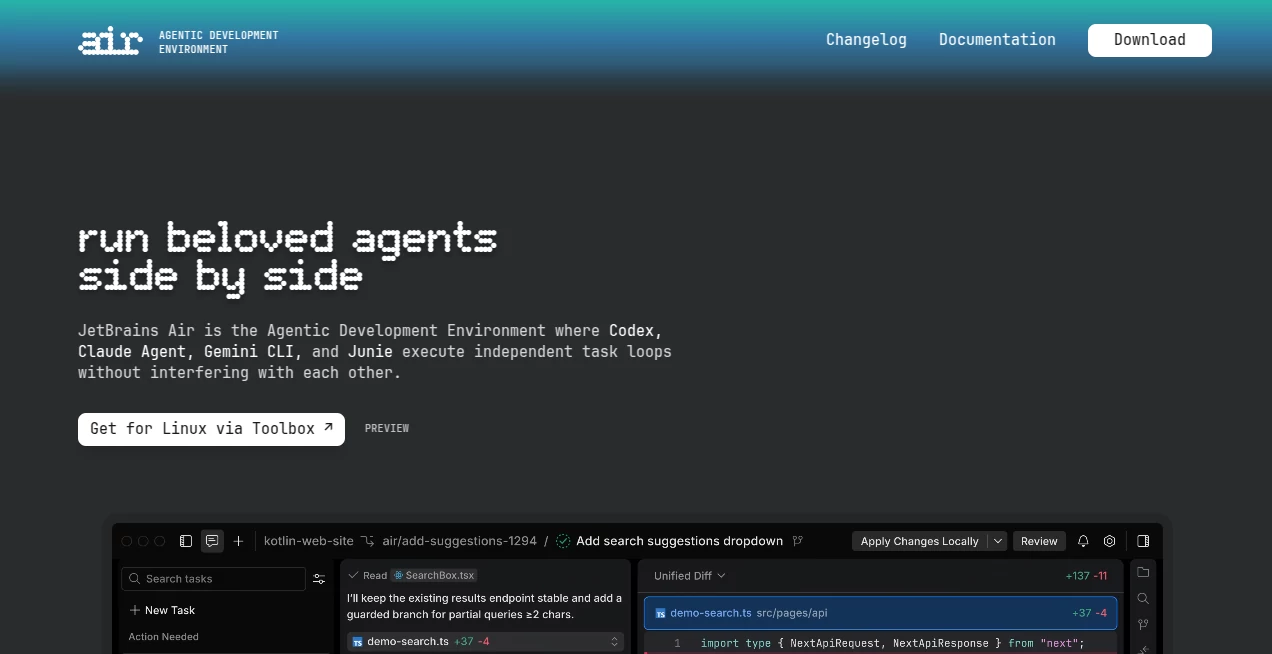
The workspace is designed around developer productivity rather than unnecessary complexity. Multiple AI agents can be monitored from a single interface, making it easy to assign new tasks, review generated code, inspect changes, and manage ongoing work. Built-in previews and contextual navigation reduce the need to switch between multiple applications during development.
Accuracy & Performance
Rather than relying on a single language model, the platform supports several leading AI coding agents, allowing developers to choose the most suitable model for each project. Tasks can run concurrently inside isolated environments, reducing conflicts while improving development speed. Built-in review workflows help ensure that generated code remains reliable before being merged into production.
Capabilities
- Run multiple AI coding agents simultaneously.
- Create isolated execution environments using Docker or Git worktrees.
- Review generated code with inline comments.
- Reference files, folders, commits, symbols, and project context.
- Integrate with popular AI providers.
- Support modern Git workflows.
- Maintain local history for easy rollback.
- Preview applications during development.
- Delegate repetitive coding tasks efficiently.
- Accelerate software delivery without losing developer oversight.
Security & Privacy
Security is built into the development workflow. Tasks can execute inside isolated environments, helping prevent unintended interference with production code. Permission controls allow developers to decide what agents can access, while Git integration ensures every modification remains traceable. Local execution options also provide greater confidence when working with sensitive projects.
Use Cases
- Building new software products faster.
- Refactoring large codebases.
- Generating boilerplate code.
- Creating prototypes for startups.
- Managing enterprise development projects.
- Automating repetitive engineering tasks.
- Reviewing pull requests with AI assistance.
- Learning unfamiliar programming frameworks.
- Testing multiple implementation approaches in parallel.
- Improving collaboration across engineering teams.
Pros and Cons
Pros
- Supports multiple AI coding agents.
- Parallel task execution improves productivity.
- Strong Git integration.
- Developer remains in complete control.
- Clean workflow for reviewing generated code.
- Isolated execution improves reliability.
- Suitable for both startups and enterprise teams.
Cons
- Most beneficial for experienced developers.
- Some AI providers require separate subscriptions.
- Platform availability may vary depending on the operating system.
Pricing Plans
A free preview is available, allowing developers to explore the core experience before making a larger commitment. Depending on the selected AI provider, additional subscription or API costs may apply. This flexible approach lets teams continue using their preferred AI ecosystem instead of being locked into a single model.
How to Use Air
Begin by installing the application and connecting a supported AI provider. Open an existing project or create a new one, then define individual development tasks for one or more AI agents. Each agent works independently while generating code, explanations, or improvements. Review every proposed change, compare implementations, make adjustments if necessary, and merge only the code that meets your quality standards. Throughout the process, Git integration and local history make it easy to track changes and safely revert when needed.
Comparison with Similar Tools
Unlike traditional AI coding assistants that focus on single conversations or inline code suggestions, this solution is built around agent orchestration. Multiple coding agents can work simultaneously on separate tasks without interfering with one another. Combined with isolated execution environments, advanced context sharing, code review tools, and flexible AI model support, it provides a more structured workflow for professional software teams handling large and complex projects.
Conclusion
For developers who want more than simple autocomplete, this platform offers a practical evolution in AI-assisted software engineering. Its ability to coordinate multiple intelligent agents while keeping developers firmly in control creates a workflow that feels both efficient and trustworthy. From rapid prototyping to enterprise-scale development, it delivers a balanced combination of speed, flexibility, and engineering discipline that can significantly improve modern software delivery.
Frequently Asked Questions (FAQ)
Can multiple AI agents work at the same time?
Yes. One of its biggest strengths is the ability to run several AI agents concurrently on separate development tasks.
Does it support Git?
Yes. Developers can review changes, manage commits, and integrate AI-generated code into standard Git workflows.
Is it suitable for professional software teams?
Absolutely. The platform is designed for individual developers, startups, and enterprise engineering organizations.
Can I choose my preferred AI model?
Yes. It supports several leading AI coding providers, giving developers flexibility when selecting models.
Is generated code reviewed before deployment?
Yes. Developers review every suggested modification before accepting or merging changes, ensuring human oversight remains part of the workflow.
AI Code Assistant , AI Code Generator , AI Developer Tools , AI DevOps Assistant .
These classifications represent its core capabilities and areas of application. For related tools, explore the linked categories above.
Agentic Development Environment details
Website unavailable — View Alternatives
Pricing
- Free
Apps
- Web App
Categories