
Veo 4
What is Veo 4?
Creating professional videos often means switching between multiple applications for editing, animation, audio production, and visual effects. This platform brings those creative tasks together into a single workflow, allowing creators to generate cinematic videos by combining text prompts, images, video clips, and audio references in one place. The result is a faster and more intuitive production process for individuals, creative teams, educators, marketers, and businesses.
One of the most impressive aspects is the ability to understand multiple types of input simultaneously. Instead of relying only on text prompts, users can upload existing visuals, reference camera movements, include voice recordings, or provide music tracks to guide the final result. This flexible approach makes it much easier to produce videos that stay faithful to a creative vision while reducing manual editing time.
Whether the goal is producing promotional campaigns, educational lessons, social media content, music videos, or story-driven animations, the platform offers an efficient environment where ideas can move from concept to finished production with remarkable speed.
Key Features
- Multi-modal video generation using text, images, video, and audio.
- Native lip-synced dialogue generation.
- Built-in sound effects and background music creation.
- Reference-based motion and camera movement replication.
- Consistent characters across multiple scenes.
- Multi-shot storytelling from a single prompt.
- Video extension and targeted scene editing.
- Support for landscape and portrait video formats.
- Natural language controls for creative editing.
- Watermark-free video exports.
User Interface
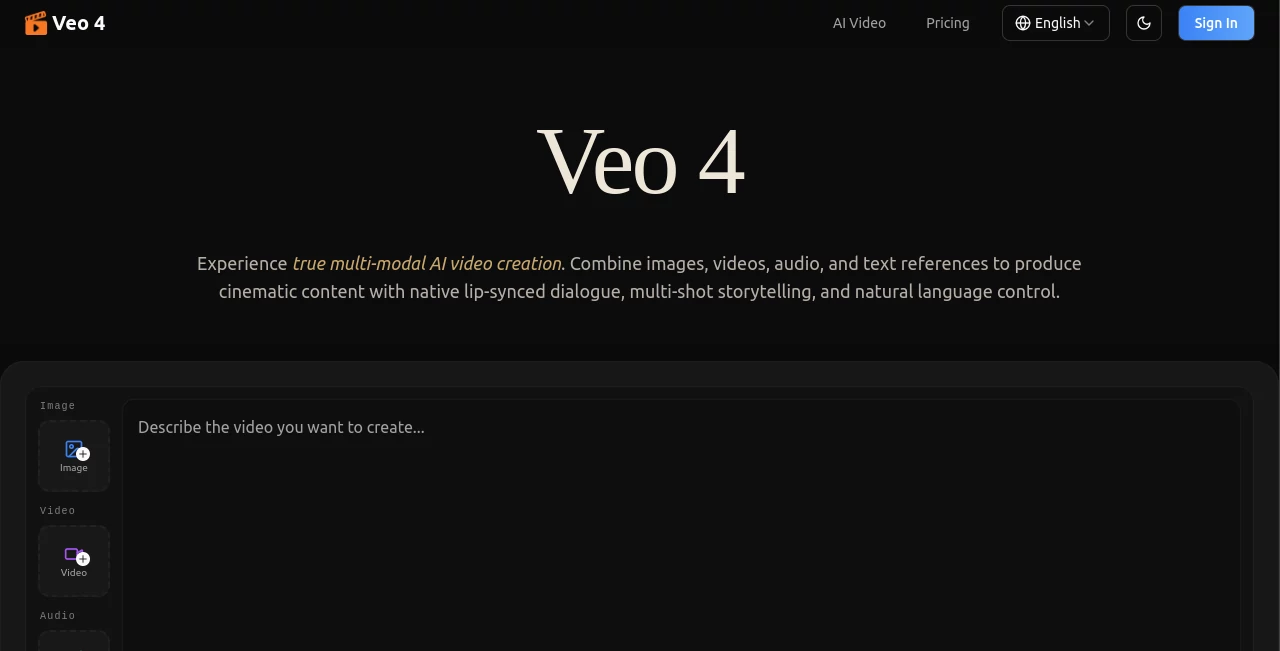
The interface is designed for creators who want powerful functionality without unnecessary complexity. Uploading reference assets is straightforward, and every generation begins with a simple prompt editor that supports images, videos, and audio together. The workflow feels organized, making it easy to experiment with different creative directions while keeping projects manageable.
Accuracy & Performance
Visual consistency is one of the strongest advantages offered by the platform. Characters, clothing, environments, lighting, and scene composition remain stable across multiple shots, creating videos that feel professionally produced instead of disconnected. Motion replication and camera movement are also highly accurate when guided by reference clips, helping users recreate cinematic effects with minimal effort.
Capabilities
The creative possibilities extend far beyond basic text-to-video generation. Users can transform static images into animated scenes, edit existing footage, replace characters, extend videos naturally, generate synchronized dialogue, produce background music, and combine multiple creative references into one cohesive project. This flexibility makes the platform suitable for everything from short-form content to complex visual storytelling.
Security & Privacy
User privacy is treated as an important part of the service. Uploaded assets and generated content are protected using modern security practices, while projects remain private unless users decide to download or share them. The platform also states that creators retain ownership of the content they generate, providing confidence for commercial and professional use.
Use Cases
- Marketing campaigns and product advertisements.
- Social media videos for TikTok, Instagram, and YouTube.
- Educational lessons and online courses.
- Music videos with synchronized audio.
- Film storyboarding and pre-visualization.
- Real estate walkthroughs.
- Architecture presentations.
- Video editing and scene extension.
- Creative storytelling and short films.
- Motion and choreography demonstrations.
Pros and Cons
Pros
- Supports multiple input formats within a single project.
- Excellent scene and character consistency.
- Native audio generation reduces production time.
- Natural language controls simplify editing.
- Professional cinematic output.
- Watermark-free exports.
Cons
- Advanced projects may require subscription credits.
- New users may need time to explore all creative features.
- Rendering time varies depending on project complexity.
Pricing Plans
The service offers multiple subscription plans designed for different creative needs, with options for monthly or annual billing. Higher-tier plans provide additional generation credits and expanded usage, while extra credit packs are available for users who need additional rendering capacity.
How to Use Veo 4
Begin by uploading reference images, video clips, or audio files that match your creative vision. Enter a natural language description explaining the desired outcome, including any references to uploaded assets. Start the generation process, review the output, and refine the project by extending scenes, replacing elements, or adjusting specific sequences until the final video matches your expectations.
Comparison with Similar Tools
Many AI video generators focus primarily on text prompts, but this platform stands out by treating text, images, video, and audio as equal creative inputs. The addition of native synchronized dialogue, consistent character generation, reference-based camera movement, and seamless video editing creates a workflow that feels closer to professional video production than conventional AI generation. Creators looking for greater control over every scene are likely to appreciate this comprehensive approach.
Conclusion
Modern content creators need tools that accelerate production without sacrificing quality. By combining advanced multi-modal generation, realistic audio creation, reference-driven editing, and impressive scene consistency, this platform delivers a complete creative environment suitable for professionals and beginners alike. It transforms complex video production into a streamlined experience while maintaining the flexibility needed for marketing, education, entertainment, and commercial projects.
Frequently Asked Questions (FAQ)
Can I use images, videos, and audio together?
Yes. Multiple media types can be combined in a single project to guide the generated result.
Does it generate synchronized dialogue?
Yes. Native lip-synced dialogue, sound effects, and background music can be generated together with the video.
Can existing videos be edited?
Yes. Users can extend clips, replace characters, modify scenes, and edit selected portions without recreating the entire project.
Is the generated content suitable for commercial projects?
The platform states that creators retain ownership of their generated content, making it suitable for professional workflows.
Does it support different aspect ratios?
Yes. Both landscape and portrait formats are available for various publishing platforms.
AI Image to Video , AI Video Generator , AI Video Editor , AI Text to Video .
These classifications represent its core capabilities and areas of application. For related tools, explore the linked categories above.

Veo 4 Alternatives Product

SlideStorm AI

Klyra AI
Kling 5.0

Seedance 3.0

Happy Horse …
Kling 3.0

Wan 2.7

kling 4.0

brainrotkit