

















What is brainrotkit?
The workflow is designed to be simple. Users paste their script, choose a preferred gameplay background, select an original host, preview the result in real time, and export a vertical video ready for publishing. This approach saves valuable production time while maintaining a consistent visual style across multiple videos.
Whether someone creates educational content, storytelling videos, entertainment clips, or viral social media posts, the platform provides an efficient solution that reduces editing complexity without sacrificing presentation quality.
Key Features
User Interface
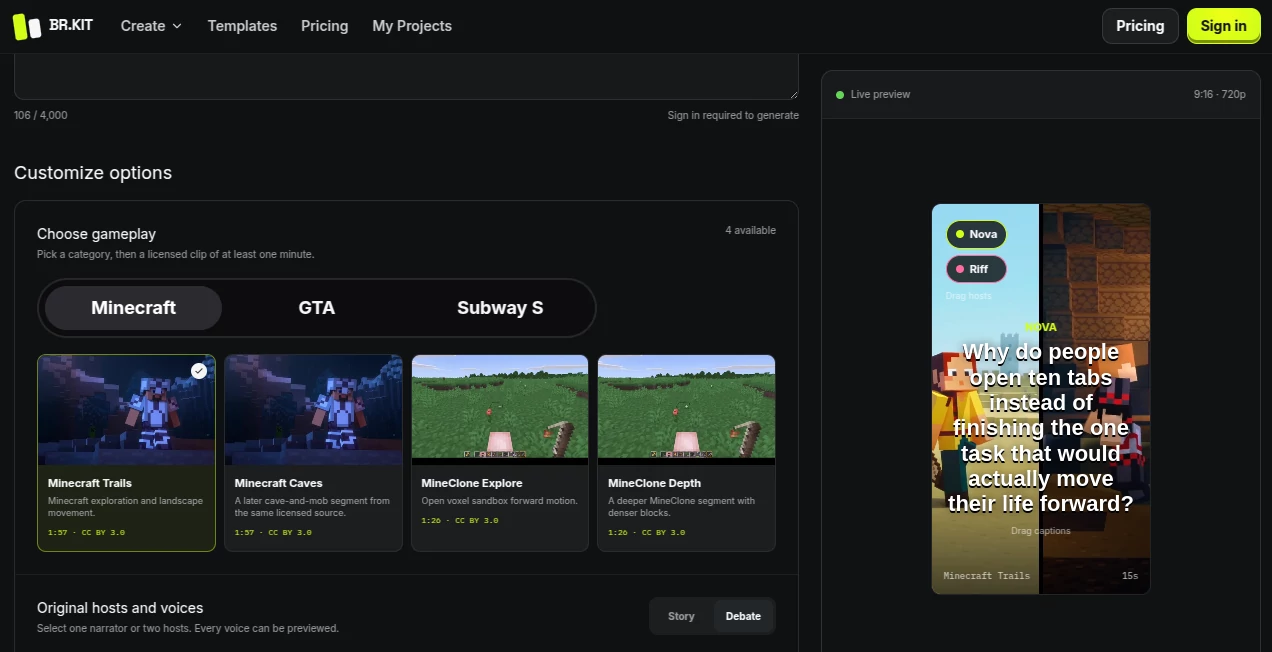
The interface follows a clean step-by-step workflow that makes video creation approachable even for beginners. Every stage of the process is clearly organized, allowing users to move from script input to live preview with minimal effort. Real-time previews help creators adjust their content before exporting, reducing unnecessary revisions.
- Simple script input workflow
- Quick gameplay selection
- Original virtual host options
- Live video preview
- Vertical video optimization
- Straightforward export process
Accuracy & Performance
The platform focuses on converting written content into visually engaging videos while preserving the original script. Automated synchronization between narration, gameplay footage, and host presentation helps produce polished results within a short amount of time. Since the preview updates before exporting, users can review their content and make improvements whenever necessary.
Capabilities
The generator supports a complete workflow for producing short-form videos suitable for popular social media platforms. Users can experiment with different gameplay loops to match the tone of their content while selecting hosts that fit their preferred presentation style.
- Script-to-video generation
- Gameplay background integration
- Virtual host selection
- Vertical video production
- Real-time previews
- Fast export workflow
- Social media ready formatting
Security & Privacy
Video generation requires users to sign in before exporting projects. This account-based workflow allows creators to manage their generated content and access platform features through a secure user profile. Users should always review the platform's privacy policy and terms of service before uploading original content.
Use Cases
- Creating viral short-form social media videos.
- Producing gaming commentary content.
- Turning educational scripts into engaging visual lessons.
- Publishing storytelling videos with animated hosts.
- Building consistent content for TikTok, Instagram Reels, and YouTube Shorts.
- Testing multiple script ideas before publishing.
- Creating entertaining clips for community engagement.
- Speeding up content production for creators and agencies.
Pros and Cons
Pros
- Very easy workflow for beginners.
- Converts scripts into videos quickly.
- Live preview before exporting.
- Includes multiple gameplay styles.
- Original virtual hosts improve presentation.
- Optimized for vertical social media videos.
- Reduces manual editing work.
Cons
- Sign-in is required before generating videos.
- Customization may not match professional video editing software.
- Best suited for vertical content rather than long-form productions.
Pricing Plans
The platform requires users to create an account before generating videos. Pricing details may vary depending on available subscription plans and future updates. Visitors should refer to the official website for the latest information regarding free access, premium features, and commercial usage options.
How to Use AI Brainrot Video Generator
- Sign in to your account.
- Paste your written script into the editor.
- Select a gameplay loop that matches your content.
- Choose one of the available original hosts.
- Preview the generated video.
- Make adjustments if necessary.
- Export the finished vertical video.
- Share it on your preferred social media platform.
Comparison with Similar Tools
Unlike traditional video editors that require manual timeline editing, this platform emphasizes speed and automation. The combination of script-based generation, gameplay backgrounds, and animated hosts allows creators to publish content with significantly less production effort. While many AI video generators focus on cinematic scenes or avatar presentations, this solution is specifically designed around the fast-paced style commonly seen on short-form social media platforms, making it particularly appealing for creators targeting viral engagement.
Conclusion
AI Brainrot Video Generator offers a practical solution for creators who want to produce engaging vertical videos without learning complex editing software. Its streamlined workflow, gameplay integration, original virtual hosts, and live preview capabilities make content production faster while maintaining an entertaining presentation style. For social media creators looking to publish consistently and efficiently, the platform provides a convenient way to transform simple scripts into ready-to-share videos.
Frequently Asked Questions (FAQ)
What does the platform do?
It converts written scripts into vertical videos using gameplay footage and virtual hosts.
Do I need an account?
Yes. Users must sign in before generating and exporting videos.
Can I preview my video before exporting?
Yes. A live preview allows users to review and refine their content before export.
Who is the platform best suited for?
It is ideal for social media creators, marketers, educators, and anyone producing short-form video content.
What type of videos can I create?
You can create vertical videos suitable for platforms that prioritize short-form content, including educational clips, storytelling videos, gaming-style content, and promotional posts.