


















Alav.ai
What is Alav.ai?
Creating high-quality AI video usually means jumping between different platforms, learning separate interfaces, and keeping track of which model is best for a particular shot. Alav AI takes a much simpler approach by bringing multiple leading video generation models into one workspace.
The platform is designed for creators who want to move from an idea to a finished visual without building a complicated production workflow. You can begin with a written prompt, animate an existing image, use reference material to maintain a consistent visual direction, or edit a generated video after it has been rendered.
What makes the experience particularly interesting is the combination of video and image creation in the same environment. Instead of generating a product image somewhere else and then moving it into another application for animation, the creative process can stay within one workspace.
Key Features
- Multi-model AI video generation: Access a selection of advanced video models from one workspace instead of maintaining separate accounts and workflows.
- Text-to-video generation: Turn written descriptions into cinematic video clips while controlling aspects such as style, duration, and aspect ratio.
- Image-to-video generation: Upload an existing image and transform it into a moving scene while preserving important visual characteristics.
- Reference-to-video generation: Use reference images to help maintain composition, colors, subjects, and visual direction across generated footage.
- AI video editing: Modify elements within an already generated video, including backgrounds and objects, without relying on a traditional timeline-based workflow.
- AI image generation: Create thumbnails, advertising graphics, product visuals, and reference images from the same workspace.
- Multiple aspect ratios: The available models support different output formats, making the platform suitable for social media, advertising, presentations, and cinematic projects.
User Interface
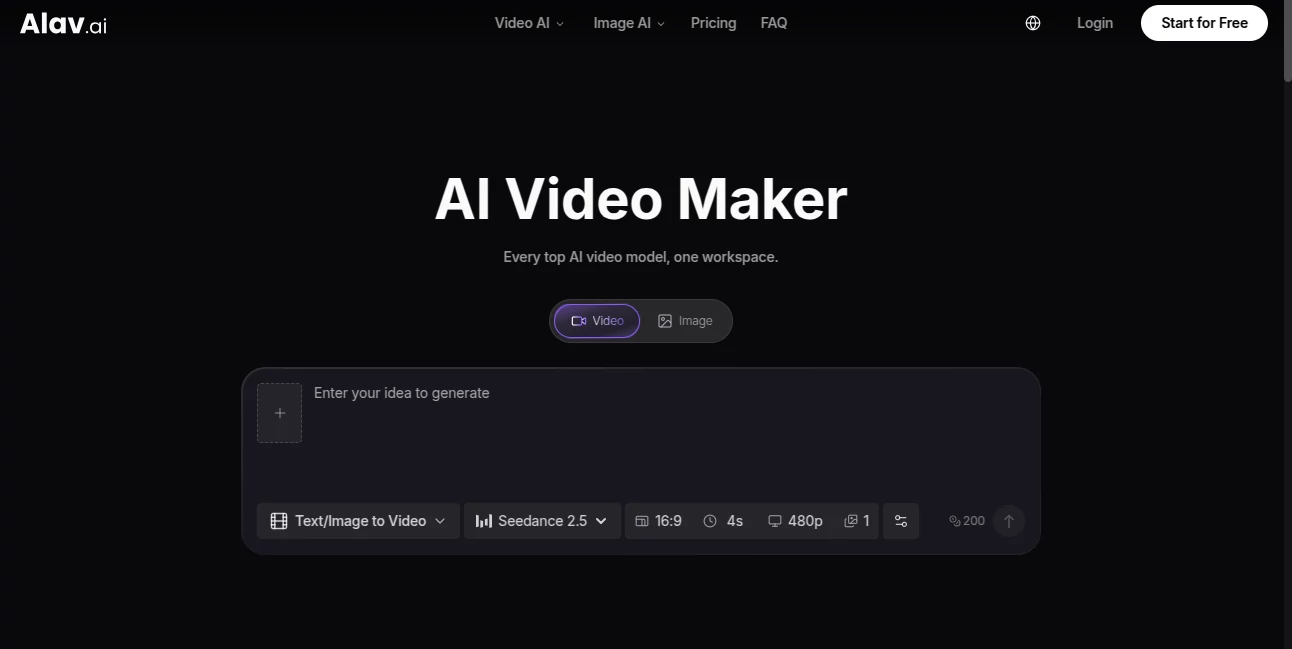
The interface is built around a straightforward generation workflow rather than a complicated editing timeline. Users can choose whether they want to work with video or images and then select the model and generation method that fits the project.
This approach is especially useful for people who are experimenting with several models. Instead of opening multiple services and comparing results manually across different dashboards, the creative work remains centralized.
For a creator producing social media clips, for example, the workflow can be as simple as selecting a model, entering a prompt, choosing the desired format, generating a result, and refining it when necessary.
Accuracy & Performance
Performance naturally depends on the selected model and the complexity of the request, but the platform provides access to models designed for different visual requirements. Some are focused on realistic motion, while others emphasize cinematic output, reference control, audio generation, or efficient short-form production.
Several available models support advanced controls such as reference inputs, first and last frames, native audio, and different aspect ratios. This gives creators more control than a basic one-click video generator.
A practical workflow is to start with shorter or lower-cost generations while developing an idea, identify the strongest result, and then spend more credits on the version intended for final use. This can make experimentation considerably more efficient.
Capabilities
The platform covers much more than simple prompt-to-video generation. Its video workspace supports text-to-video, image-to-video, reference-to-video, video editing, video extension, upscaling, reframing, background removal, object removal, and masking-related workflows.
The model selection is another important advantage. Available options include Seedance 2.5, Seedance 2.0, Sora 2, MiniMax H3, Veo 3.1, Veo 3, Kling V3 Omni, and HappyHorse 1.0. Different models can therefore be chosen according to the type of scene, motion, realism, audio requirements, or production budget. :contentReference[oaicite:1]{index=1}
Image creation is also integrated into the same ecosystem. Users can generate still images for product photography, thumbnails, advertising assets, reference frames, and other visual projects without having to move between separate services.
Security & Privacy
Privacy-related features are included in the paid plans. The pricing information states that Lite, Pro, and Max subscribers receive private images and videos, while paid plans also include commercial licensing. This makes the service more suitable for creators and businesses producing client or commercial material. :contentReference[oaicite:2]{index=2}
As with any generative media platform, users should still review the current privacy policy and terms before uploading confidential, personal, or commercially sensitive material.
Use Cases
Social media content: Short vertical videos can be produced for platforms where visual consistency and fast production matter.
Product advertising: Businesses can create product visuals, promotional scenes, and animated advertising concepts without arranging a full physical shoot for every idea.
Marketing campaigns: Reference images can help maintain a consistent visual direction across multiple pieces of content, which is useful when developing a campaign around an established brand style.
Creative filmmaking: Filmmakers and visual artists can experiment with cinematic scenes, camera movement, characters, environments, and different visual styles.
Content prototyping: Before investing time and money into a traditional production, creators can quickly test visual concepts and determine which direction is worth developing.
Image animation: Existing artwork, product photography, concept images, and other still visuals can be turned into moving sequences.
Pros and Cons
Pros
- Multiple leading AI video models available in one workspace.
- Supports text-to-video, image-to-video, and reference-based generation.
- Integrated image generation reduces the need to switch between creative platforms.
- Includes AI-assisted video editing capabilities.
- Different models provide flexibility for different creative requirements.
- Paid plans include private media and commercial licensing.
- Useful for both experimentation and professional creative production.
Cons
- The number of available models can make choosing the right one slightly overwhelming for new users.
- Generation costs vary according to the selected model and settings.
- High-volume video production can consume credits quickly.
- Results still depend heavily on prompt quality and the capabilities of the selected model.
Pricing Plans
The platform currently uses a credit-based subscription model with Lite, Pro, and Max plans. The pricing page also displays monthly and annual billing options, with annual plans advertised as offering savings. :contentReference[oaicite:3]{index=3}
Lite: The Lite plan is listed at $10 per month when billed annually, compared with a displayed regular price of $15. It includes 350 credits each month, up to 175 videos or 350 images, private media, media without the watermark, and a commercial license.
Pro: The Pro plan is listed at $14.50 per month when billed annually, compared with a displayed regular price of $29. It provides 1,000 credits per month, up to 500 videos or 1,000 images, up to four images or videos per generation, private media, priority support, watermark-free output, and a commercial license.
Max: The Max plan is listed at $108 per month when billed annually, compared with a displayed regular price of $139. It includes 6,500 credits per month, up to 3,250 videos or 6,500 images, private media, priority support, watermark-free output, and a commercial license. :contentReference[oaicite:4]{index=4}
Because model availability, promotional discounts, and pricing can change, users should check the current plan details before subscribing.
How to Use Alav AI
Start by choosing whether you want to create a video or an image. For video production, you can begin with a text prompt, an existing image, or reference material depending on the type of result you need.
Next, select the model that best matches the project. A realistic cinematic scene may benefit from a different model than a quick social media experiment, so comparing models can be part of the creative process.
Set the appropriate aspect ratio, duration, and other available parameters. For example, a vertical format can be more appropriate for short-form social content, while a widescreen format may work better for cinematic material.
Generate the first version and evaluate the movement, composition, subject consistency, and overall visual direction. If the result is close but not quite right, adjust the prompt or generation settings and try again.
Once the visual direction is working, you can continue refining the result or use the available editing tools to make targeted changes. The same workspace can also be used to create supporting images such as thumbnails or advertising graphics.
Comparison with Similar Tools
Many AI video platforms focus primarily on a single model or a particular generation workflow. The main difference here is the multi-model approach. Instead of committing to one generation engine, creators can select between several models from the same environment.
This can be valuable when a project has changing requirements. One model might produce stronger realistic motion, another may be preferable for cinematic visuals, while another may offer useful reference or audio capabilities.
The inclusion of image generation and AI editing also gives the platform a broader role in the creative workflow. Rather than being only a video generator, it can function as a central workspace for generating, refining, and preparing visual assets.
For users who already have a preferred single-model platform and only need that particular model, a specialized service may still be sufficient. For creators who regularly compare different models, however, having several options under one roof can save considerable time.
Conclusion
AI video creation is moving beyond simple text prompts, and this platform reflects that change by combining multiple generation models with image creation and AI-assisted editing in one workspace.
Its strongest appeal is flexibility. A creator can start with a written idea, animate an existing photograph, work from several references, compare different generation models, and continue editing without rebuilding the workflow somewhere else.
For marketers, filmmakers, social media creators, designers, and businesses experimenting with generative media, this makes it a particularly practical option. The real advantage is not simply having access to powerful models; it is having several creative routes available when one approach does not produce the desired result.
Frequently Asked Questions (FAQ)
What can I create with this platform?
You can create AI-generated videos from text, images, and reference material, edit generated footage, and produce still images such as thumbnails, product visuals, advertising graphics, and reference frames.
Can I turn an image into a video?
Yes. The image-to-video workflow allows users to upload a still image and generate movement from that starting frame.
Does it support multiple AI video models?
Yes. The workspace provides access to multiple video generation models, including Seedance, Sora, Veo, Kling, MiniMax, and other models listed on the platform.
Can I create images as well as videos?
Yes. Image generation is available alongside the video tools, allowing users to create assets such as product shots, thumbnails, and reference images.
Are there free options?
The website provides a Start for Free entry point, while its pricing structure also includes paid credit-based plans. The exact free usage and current promotional terms can change, so checking the latest pricing information is recommended. :contentReference[oaicite:5]{index=5}
Do paid plans include commercial licensing?
Yes. The listed Lite, Pro, and Max plans include a commercial license.
Can generated videos be edited?
Yes. The platform includes AI video editing capabilities that can be used for tasks such as changing a background, restyling a scene, or removing an object from footage.
Which plan is best for frequent creators?
The Pro or Max plans are more suitable for users who generate content regularly because they provide substantially more monthly credits than the Lite plan. The right choice ultimately depends on generation volume and the models being used.
AI Image to Video , AI Video Generator , AI Video Editor , AI Text to Video .
These classifications represent its core capabilities and areas of application. For related tools, explore the linked categories above.

Alav.ai Alternatives Product
Wan 2.7
Meigen AI

Seedance 2.0…

LTX 2.3 AI V…

ViewMax Stud…
Subclip

Banana 2 Edi…

Seedance 2.0

Motion Contr…
