Animate Photo
What is Animate Photo?
Creating engaging videos no longer requires advanced editing skills or expensive production software. This AI-powered platform transforms a single image into a smooth, natural-looking animation within seconds. Whether the source is a portrait, product photo, landscape, pet, anime illustration, or an old family memory, the system intelligently generates realistic motion that makes static visuals feel alive.
Designed for creators, marketers, photographers, designers, and everyday users, the platform combines simplicity with powerful AI technology. Instead of spending hours animating frames manually, users simply upload an image, describe the desired movement if needed, select an AI model, and let the system handle the rest. The result is a polished MP4 video ready for social media, presentations, advertisements, or personal projects.
With support for multiple animation styles, HD video exports, text-guided motion, and dozens of advanced AI video models, it offers an enjoyable creative experience while keeping the workflow remarkably fast.
Key Features
User Interface
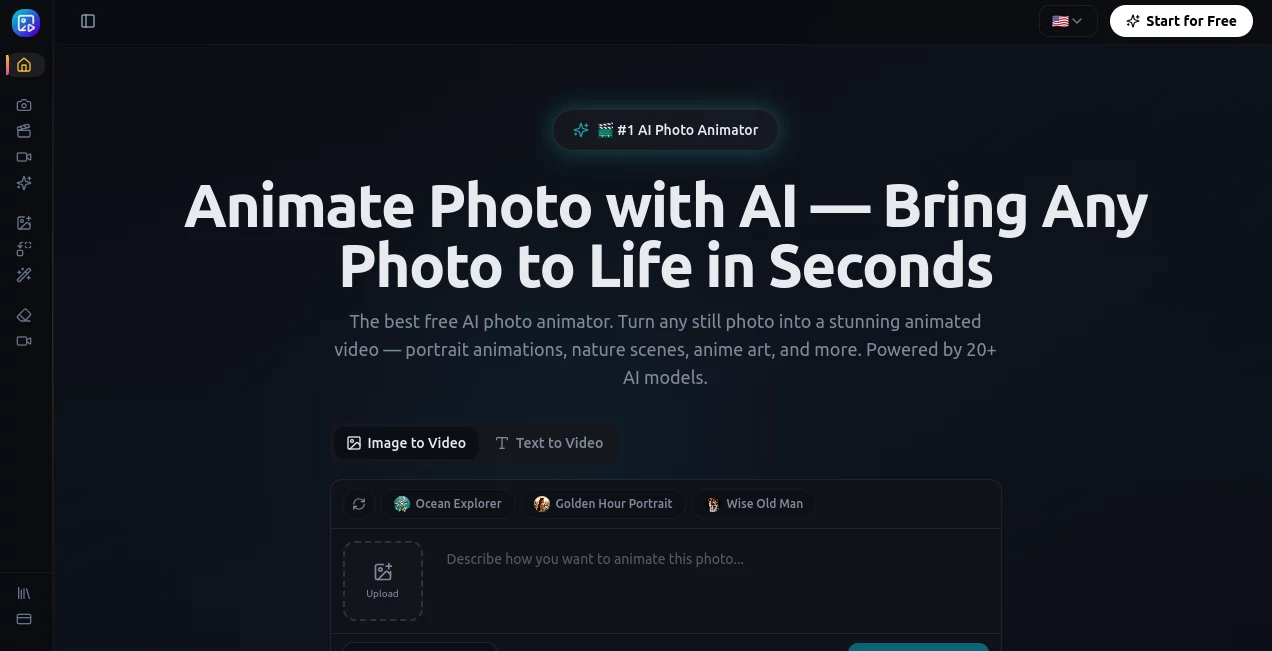
The interface is refreshingly straightforward. Uploading an image takes only a few clicks, while model selection, prompt writing, aspect ratio adjustment, and generation settings are clearly organized. Beginners can create their first animation immediately, while experienced creators have enough flexibility to fine-tune the final result.
Accuracy & Performance
The AI analyzes image composition, subjects, lighting, and depth before generating realistic movement. Portraits receive subtle facial expressions and head motion, landscapes gain moving clouds or flowing water, and product images become dynamic promotional clips. Generation is typically completed within a short time, making it practical for both personal and commercial work.
Capabilities
- Transform still photos into animated videos.
- Create cinematic camera movements from a single image.
- Animate portraits with natural facial motion.
- Generate motion for landscapes and architecture.
- Support pet, anime, artwork, and product photography.
- Control animation through text prompts.
- Choose from numerous AI video generation models.
- Export HD MP4 videos.
- Create content for social media and marketing campaigns.
- Produce specialized video effects including hugs, dancing, cartoon transformations, weddings, and more.
Security & Privacy
The platform processes uploaded images through secure infrastructure while account information and payments are handled using industry-standard security practices. According to its published privacy policy, payment details are processed by external payment providers rather than stored directly, and uploaded content is used to generate requested animations while supporting moderation and service improvements.
Use Cases
- Create eye-catching Instagram Reels, TikTok videos, and YouTube Shorts.
- Convert product photos into engaging advertising videos.
- Bring digital illustrations and concept art to life.
- Restore emotional value to old family photographs.
- Produce animated content for online stores.
- Create promotional videos without a traditional video production team.
- Enhance presentations with moving visuals.
- Generate creative content for personal storytelling.
- Animate pet photos for entertaining social posts.
- Create professional marketing assets from existing images.
Pros and Cons
Pros
- Very easy for beginners.
- Fast video generation.
- Supports many AI video models.
- Works with portraits, artwork, products, and landscapes.
- High-quality HD exports.
- Text-guided motion improves creative control.
- Suitable for both personal and commercial projects.
- Free credits are available for new users.
Cons
- Premium models require credits or paid plans.
- Generation quality depends on the uploaded image.
- Advanced customization is more limited than professional video editing software.
- Longer or higher-resolution videos consume more credits.
Pricing Plans
The service follows a freemium model. New users can begin with free credits to test image animation capabilities without entering payment information. Premium plans unlock additional credits, access to advanced AI models, longer video durations, higher resolutions, and enhanced generation options suitable for professional creators and businesses.
How to Use Animate Photo
Start by uploading a JPG, PNG, or WebP image. Select one of the available AI video models based on your preferred balance between speed and quality. Optionally write a short description explaining how the image should move, choose the desired aspect ratio and output settings, then begin generation. After processing is complete, download the MP4 file and share it across social media, websites, presentations, or marketing campaigns.
Comparison with Similar Tools
Compared with many AI image-to-video generators, this platform stands out by offering access to a large collection of AI models rather than relying on a single engine. Users can select models optimized for cinematic animation, faster rendering, higher resolution, or specific creative styles. It also includes specialized animation effects that extend beyond standard image animation, making it attractive for content creators who want more variety without switching between multiple applications.
Conclusion
This platform makes photo animation accessible to everyone, regardless of technical experience. Its combination of speed, multiple AI models, realistic motion generation, and simple workflow creates an impressive balance between usability and creative power. Whether the goal is producing marketing materials, preserving memories, growing a social media audience, or experimenting with digital art, it provides an enjoyable experience that consistently delivers visually engaging results.
Frequently Asked Questions (FAQ)
Can I use portraits and selfies?
Yes. Portraits are one of the strongest use cases, with realistic facial expressions and natural head movement.
Is there a free version?
Yes. New users receive free credits that allow them to test the platform before upgrading.
What file format do I receive?
Generated animations can be downloaded as MP4 videos that are suitable for sharing online.
Can I animate artwork and illustrations?
Absolutely. Anime art, concept art, digital paintings, and illustrations are all supported.
Who benefits most from this platform?
Content creators, marketers, photographers, designers, e-commerce businesses, educators, and anyone who wants to transform still images into engaging videos.
AI Animated Video , AI Image to Video , AI Video Generator , AI Text to Video .
These classifications represent its core capabilities and areas of application. For related tools, explore the linked categories above.

Animate Photo Alternatives Product
Visfeng AI F…

Gemini AI vi…

AI Animate I…

JSON to Video
Veo4AI

OmniGemini

AISeedance2
Seedance Stu…

Wan 2.7