Anime Maker
What is Anime Maker?
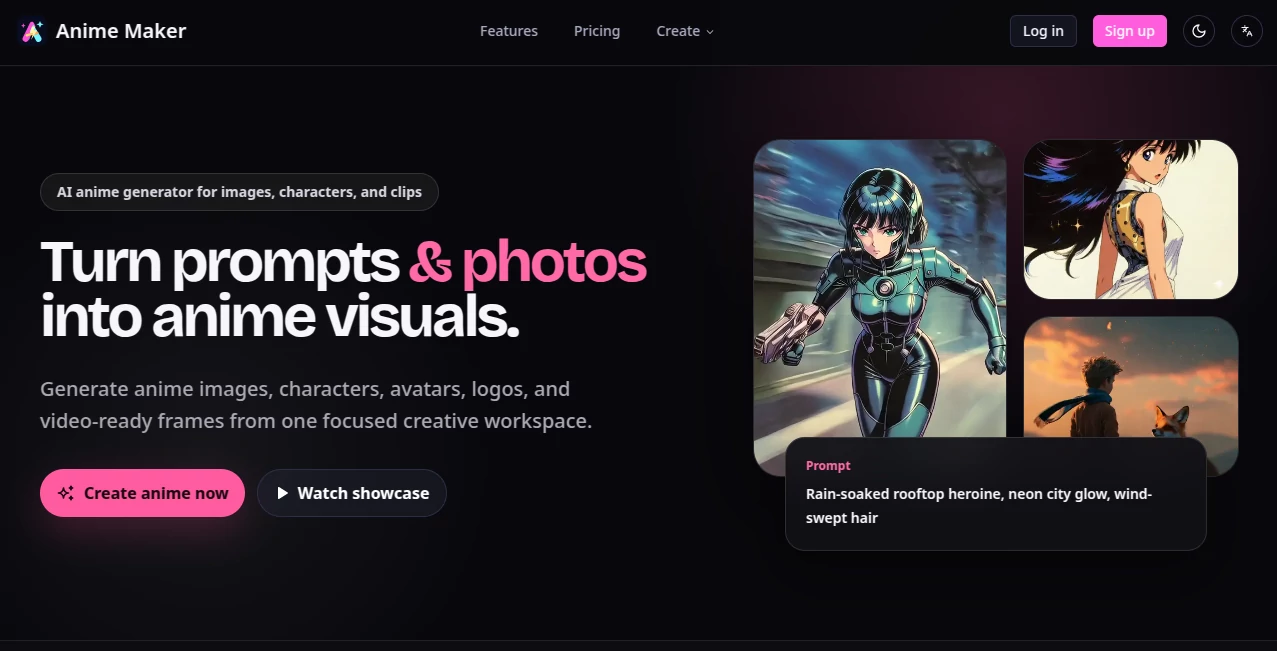
Creating anime-style artwork no longer requires years of drawing experience or expensive design software. This platform provides an intuitive AI-powered workspace where anyone can transform simple text prompts, reference photos, or creative concepts into stunning anime-inspired visuals. Whether the goal is to design an original character, generate an avatar, produce concept art, or prepare assets for animated scenes, the entire workflow feels straightforward and enjoyable.
One of its biggest strengths is the way it guides users through the creative process instead of overwhelming them with dozens of disconnected tools. Beginners can start with a short description, while experienced artists can refine lighting, expressions, camera angles, and character details to achieve highly personalized results. The result is a flexible creative environment suitable for hobbyists, content creators, game developers, VTubers, and digital artists looking for high-quality anime visuals.
Key Features
User Interface
The interface is clean, modern, and designed around creativity rather than technical complexity. Every major workflow is clearly organized, allowing users to move between text-to-anime generation, photo conversion, character creation, avatars, logos, and video-ready artwork with very little learning curve. Prompt guidance also helps users describe scenes more effectively.
Accuracy & Performance
The image generation engine produces visually appealing anime artwork with impressive consistency. Character features, clothing, colors, facial expressions, and environments remain coherent across multiple generations, making it practical for projects that require recurring characters or storyboard development. Rendering is fast enough to encourage experimentation without slowing the creative process.
Capabilities
- Generate anime artwork from text prompts.
- Convert portraits and photos into anime illustrations.
- Create unique anime characters with customizable appearances.
- Design profile avatars and social media artwork.
- Generate anime-inspired logo concepts.
- Create first-frame concepts for animated videos.
- Produce multiple image variations for comparison.
- Develop storyboard-ready visual assets.
- Support creative prompt building with structured scene descriptions.
- Export artwork for personal or professional projects.
Security & Privacy
User creations remain within a structured cloud-based workflow, allowing projects to be managed without complicated local installations. Account-based access and project management provide a convenient way to organize creative work, while subscription plans offer additional generation capacity for professional users.
Use Cases
- Design original anime characters for games and novels.
- Create VTuber avatars and streaming graphics.
- Generate social media profile pictures.
- Produce promotional anime illustrations.
- Build visual references before professional illustration.
- Create concept art for animation projects.
- Generate thumbnails for YouTube and online content.
- Prepare storyboard frames for short animated videos.
- Design fantasy characters for tabletop games.
- Create eye-catching digital artwork for portfolios.
Pros and Cons
- Pros
- Easy to use for beginners.
- High-quality anime image generation.
- Supports both text and photo inputs.
- Character consistency across multiple generations.
- Integrated workflow for images and video concepts.
- Affordable entry-level subscription.
- Free plan available for testing.
- Cons
- Advanced usage depends on monthly credits.
- Internet connection is required.
- Some premium capabilities are limited to paid plans.
Pricing Plans
The platform offers a free Starter plan that allows new users to explore its core features before upgrading. Paid subscriptions begin with a Pro plan priced at approximately $9.90 per month, providing additional monthly credits and higher generation limits. A Lifetime option is also available for users who prefer one-time access with recurring monthly credits.
How to Use Anime Maker
Begin by creating a free account and selecting the type of content you want to generate. Choose whether to start with a text prompt or upload a reference image. Describe the character, scene, lighting, clothing, and artistic style using natural language. Generate several variations, compare the results, refine the prompt if needed, and export the final artwork for your project. Users planning animated content can continue by generating video-ready frames and storyboard concepts from the same workflow.
Comparison with Similar Tools
Many AI art generators provide anime styles as one option among many artistic filters. This platform takes a different approach by focusing entirely on anime creation. Instead of offering unrelated creative tools, it concentrates on workflows that matter to anime artists, including character generation, avatar creation, image-to-video preparation, and prompt guidance. This specialization creates a smoother experience for users who primarily work with anime-inspired content rather than general digital art.
Conclusion
For creators interested in anime artwork, this platform delivers an enjoyable balance between simplicity and creative flexibility. It removes much of the technical complexity often associated with AI image generation while still providing enough control to build distinctive characters and detailed scenes. From hobby artists exploring new ideas to professionals developing visual concepts for games, streaming channels, or animated projects, it offers a polished environment that makes anime creation faster, more accessible, and genuinely enjoyable.
Frequently Asked Questions (FAQ)
Can beginners create professional-looking anime artwork?
Yes. The guided prompt system and intuitive interface make it suitable for users with little or no artistic experience.
Can I upload my own photos?
Yes. Portraits and reference images can be transformed into anime-style illustrations while preserving recognizable features.
Is there a free version available?
Yes. A Starter plan allows users to explore the platform before choosing a paid subscription.
Can the generated images be used for creative projects?
Yes. Users can export their creations for various personal and professional creative purposes according to the platform's licensing terms.
Does it support video creation?
Yes. In addition to generating images, the platform helps users prepare anime-style visuals and first-frame concepts for animated video workflows.
AI Image to Video , AI Character , AI Anime & Cartoon Generator , AI Text to Image .
These classifications represent its core capabilities and areas of application. For related tools, explore the linked categories above.

Anime Maker Alternatives Product

WonderShare …
ds video

Artguru

Nano Banana …

Seedance 2.0
seedance2-pro
Happy Horse:…

Motion Contr…
Seedance 2.0…