Apptovid
What is Apptovid?
Creating video ads for a mobile app usually takes more than simply recording a few screens. Someone has to find the right angle, write a script, choose visuals, edit the footage, add voiceovers and captions, and then prepare different versions for each advertising platform. For small teams, that process can quickly become a serious production task.
Apptovid takes a much simpler approach. Instead of starting with a blank video editor, users can provide a Google Play or Apple App Store link and let the platform turn the available app information and assets into promotional video creatives. It can work with app names, screenshots, videos, reviews, product highlights and other listing information to build ads around the product.
The platform is particularly interesting for mobile app developers, game studios, user acquisition managers, app marketing agencies, indie developers and growth teams. Its focus is not simply on making attractive videos, but on producing multiple advertising concepts that can be tested across major social and advertising channels.
For a developer preparing a launch campaign, this can remove a large amount of repetitive production work. Instead of spending hours creating every variation manually, the same app can be presented through UGC-style content, animated explainers and short storytelling concepts.
Key Features
- Generate promotional video ads from a Google Play or Apple App Store link.
- Automatically use app information, screenshots, videos, reviews and product highlights as creative inputs.
- Create Social and UGC-style advertising videos.
- Produce animated explainer ads using motion graphics, feature callouts and kinetic text.
- Create storytelling advertisements built around a hook, conflict and product payoff.
- Generate multiple creative variations to help reduce ad fatigue.
- Produce advertising content for Meta, TikTok, YouTube, Instagram and X.
- Support both vertical 9:16 and horizontal 16:9 advertising formats.
- Generate scripts, voiceovers, captions and edits as part of the video creation workflow.
- Allow users without professional video editing experience to create promotional content.
User Interface
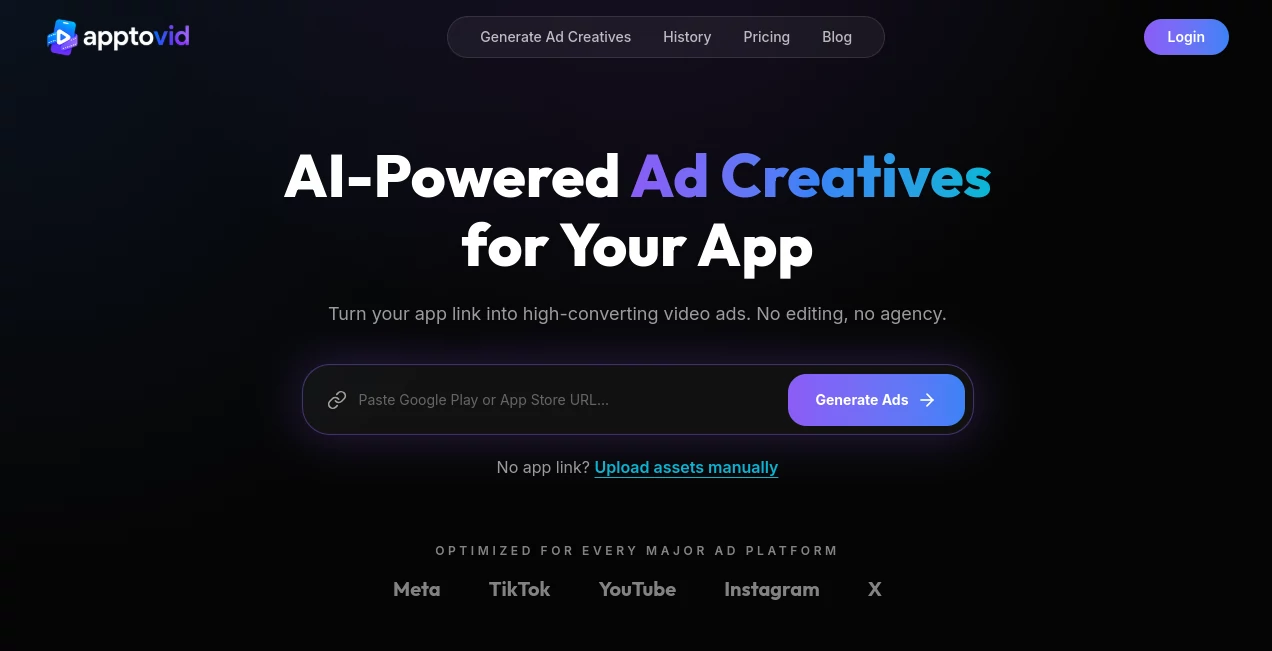
The workflow is deliberately straightforward. The main starting point is an app store URL, which makes the process feel closer to submitting information than operating a traditional video editor.
Users can paste their application link and let the platform retrieve relevant information automatically. If an app store link is unavailable, assets such as screenshots, videos and descriptions can also be uploaded manually.
This approach is useful for marketers who would rather spend their time deciding which advertising ideas to test than learning complicated editing software. The workflow is also easy to understand for developers who may not have an in-house creative team.
Accuracy & Performance
The quality of an advertising video depends heavily on the information available about the promoted application. The platform uses the contents of an app listing, including descriptions, screenshots, videos, reviews and product highlights, to understand what should appear in the creative.
Its performance-oriented workflow also considers advertising requirements such as aspect ratios and durations for major platforms. This makes the output more practical for campaigns where several versions need to be produced and tested rather than creating one video and stopping there.
A useful example is a mobile app with several strong features but limited marketing material. An animated explainer can emphasize those features visually, while a UGC-style concept can approach the same product from a more conversational angle.
Capabilities
Three creative directions form the core of the platform. Social and UGC ads are designed to feel more organic and can feature AI avatars or UGC-style creators discussing the application. These formats are especially suited to short-form environments such as TikTok, Instagram Reels and YouTube Shorts.
Animated Explainer Ads take a more structured route. Screenshots, feature callouts, motion graphics and kinetic text can be combined to communicate what an application does in a short amount of time. This can be particularly useful when the product is easier to understand through its interface than through a talking-head advertisement.
Storytelling Ads use a different creative formula. Rather than simply listing features, they introduce a hook, establish a situation or conflict, and position the application as part of the resolution. For performance marketers, having these different approaches available can make creative testing much more flexible.
Security & Privacy
The platform provides dedicated Terms of Service, Privacy Policy and Cookies Policy pages. Users should review those documents before uploading proprietary marketing assets or other information that may be commercially sensitive.
As with any cloud-based AI video service, businesses should consider what information they provide to the service and make sure their use of uploaded materials is consistent with their own privacy, licensing and advertising requirements.
Use Cases
- Mobile app launches: Quickly create promotional videos for a newly released application without building a complete video production workflow.
- Mobile games: Create different advertising concepts that showcase gameplay, features or a particular user experience.
- User acquisition campaigns: Produce multiple creative variations for testing different hooks and approaches.
- Social media marketing: Prepare short-form promotional content for TikTok, Instagram Reels and YouTube Shorts.
- Performance advertising: Create platform-ready variations for campaigns on Meta, TikTok and YouTube.
- Creative fatigue management: Keep campaigns supplied with fresh concepts instead of repeatedly using the same advertisement.
- Small marketing teams: Reduce dependence on traditional editing workflows when a dedicated video specialist is unavailable.
- App marketing agencies: Create different advertising concepts for multiple applications and clients.
Pros and Cons
Pros
- Turns an app store listing into a starting point for video advertising.
- Requires little traditional video editing knowledge.
- Supports three distinct advertising styles.
- Useful for generating multiple creative variations.
- Designed around mobile app and game promotion.
- Supports major advertising and social platforms.
- Can work with manually uploaded assets when an app store URL is not available.
Cons
- The quality of the generated creative depends partly on the quality of the source app information and assets.
- Businesses with highly specific brand guidelines may still need additional editing or review.
- AI-generated advertising should be checked before publication to ensure that claims, visuals and messaging accurately represent the product.
- Video generation limits depend on the selected subscription plan.
- The service states that refunds are not available because of the high cost of AI video generation.
Pricing Plans
The service uses subscription-based plans, with the number of videos that can be created each month depending on the selected plan. The website does not present a single universal video limit for every user because generation capacity varies according to the subscription level.
For teams considering the service for ongoing user acquisition campaigns, the most important factor is therefore not simply the monthly price, but how many usable creative variations can be produced within the chosen plan.
It is also worth noting that the service states that refunds are not available due to the generation costs associated with AI video production, while subscriptions can be cancelled at any time.
How to Use the Tool
- Add your app: Paste the Google Play or Apple App Store URL into the input field.
- Let the platform analyze the listing: Relevant information such as screenshots, videos, reviews and product highlights can be collected from the app listing.
- Upload assets if necessary: If you do not have an app store link, you can provide your own screenshots, videos and descriptions.
- Select an advertising mode: Choose between Social and UGC, Animated Explainer or Storytelling.
- Generate the creative: The AI workflow creates the selected promotional video using the available product information and assets.
- Create variations: Generate different concepts and openings so that you have more creative options for campaign testing.
- Prepare the campaign: Use the generated videos on supported advertising and social platforms according to your campaign requirements.
Comparison with Similar Tools
Many AI video generators are designed for general-purpose video creation, while this platform takes a narrower approach around mobile application and game advertising. That distinction can be valuable when the goal is not to create a presentation or a generic social video, but to produce advertising material designed around an app's actual store presence.
The URL-based workflow is another notable difference. Instead of manually gathering every piece of information before beginning production, users can start with the existing application listing. The system can then use that information as the foundation for the creative process.
Its three advertising modes also provide a practical testing advantage. A team can approach the same application through a creator-style advertisement, a feature-focused explainer and a short story rather than relying on one creative formula.
For marketers who need highly specialized manual editing, detailed frame-by-frame control or complex brand production, a conventional professional editor may still be preferable. For teams primarily interested in producing app advertising concepts quickly, the more automated workflow can be a strong alternative.
Conclusion
Producing effective app advertising is often less about making one beautiful video and more about finding several messages that resonate with different audiences. That is where this platform makes a compelling case.
By starting with an app store URL and turning existing product information into advertising concepts, it removes much of the repetitive work involved in preparing promotional videos. The combination of UGC-style ads, animated explainers and storytelling creatives gives marketers several ways to present the same application.
It is especially well suited to developers, game studios and user acquisition teams that need a steady flow of fresh creative material. If your marketing strategy depends on testing multiple hooks, formats and concepts rather than relying on a single campaign video, this workflow can make the production side considerably easier.
Frequently Asked Questions (FAQ)
What type of videos can be created?
There are three main creative modes: Social and UGC Ads, Animated Explainer Ads and Storytelling Ads. Each format approaches app promotion from a different creative angle.
Can I create a video from an app store URL?
Yes. You can provide a Google Play or Apple App Store URL, and the platform can retrieve relevant app information and assets to use in the advertising workflow.
Which advertising platforms are supported?
The generated creatives are designed for major platforms including Meta, TikTok, YouTube, Instagram and X. Both vertical 9:16 and horizontal 16:9 formats are supported.
Do I need video editing experience?
No advanced editing experience is required for the basic workflow. The process is centered around providing an app link or assets, selecting an advertising mode and generating the creative.
Can I create multiple versions of the same advertisement?
Yes. The platform is designed to generate multiple creative variations, which can be useful when testing different hooks and concepts or when trying to reduce creative fatigue.
Who is this platform best suited for?
It is particularly useful for mobile app developers, game studios, user acquisition managers, app marketing agencies, indie developers and growth-focused teams.
AI Ad Creative Assistant , AI Ad Generator , AI Video Generator , Marketing .
These classifications represent its core capabilities and areas of application. For related tools, explore the linked categories above.

Apptovid Alternatives Product

AI ASMR Gene…

Adscriptly

Seedance Art

Seedance 2.0
seedance 3.0

Lutains

Fiddl.art
Seedance 4.0

Happyhorse