
















Artaivo
What is Artaivo?
Creating a good video often starts with a simple idea, a product image, or even a rough visual concept. Turning that starting point into something polished, however, can take hours of editing and several different tools. Artaivo brings many of those creative steps into one workspace, allowing users to generate, animate, transform, and enhance visual content with AI.
The platform is built around AI video creation, but it goes beyond basic text-to-video generation. Users can start with a written prompt, an image, or an existing video and choose a workflow that fits the project. Image generation, video transformation, avatars, lip sync, motion control, video enhancement, and audio features can all be part of the same creative process.
This makes it particularly interesting for creators, marketers, online businesses, artists, and teams that regularly need visual content but do not want to rebuild their workflow every time they move between different AI tools.
Key Features
- Text-to-video generation: Turn written ideas into video scenes while describing the desired mood, movement, visual style, and composition.
- Image-to-video: Animate photographs, illustrations, product images, and other static visuals with prompt-guided movement and camera actions.
- Video-to-video transformation: Rework existing footage into a different visual style while maintaining important movement and composition.
- AI image generation: Create visual assets that can also serve as references or starting points for video projects.
- AI avatars and lip sync: Create talking characters and synchronize speech with facial movement.
- Video enhancement: Extend clips, upscale video quality, control motion, and add AI-generated sound effects.
- Multiple AI models: The platform provides access to models including Kling 3.0, Veo 3.1, and Seedance 2.0 for different creative requirements.
- Image editing: Image workflows include background removal, image expansion, upscaling, watermark removal, and style transformation.
- Creative workflows: Projects can be created for product videos, social media content, avatar presentations, advertisements, visual storytelling, and motion artwork.
User Interface
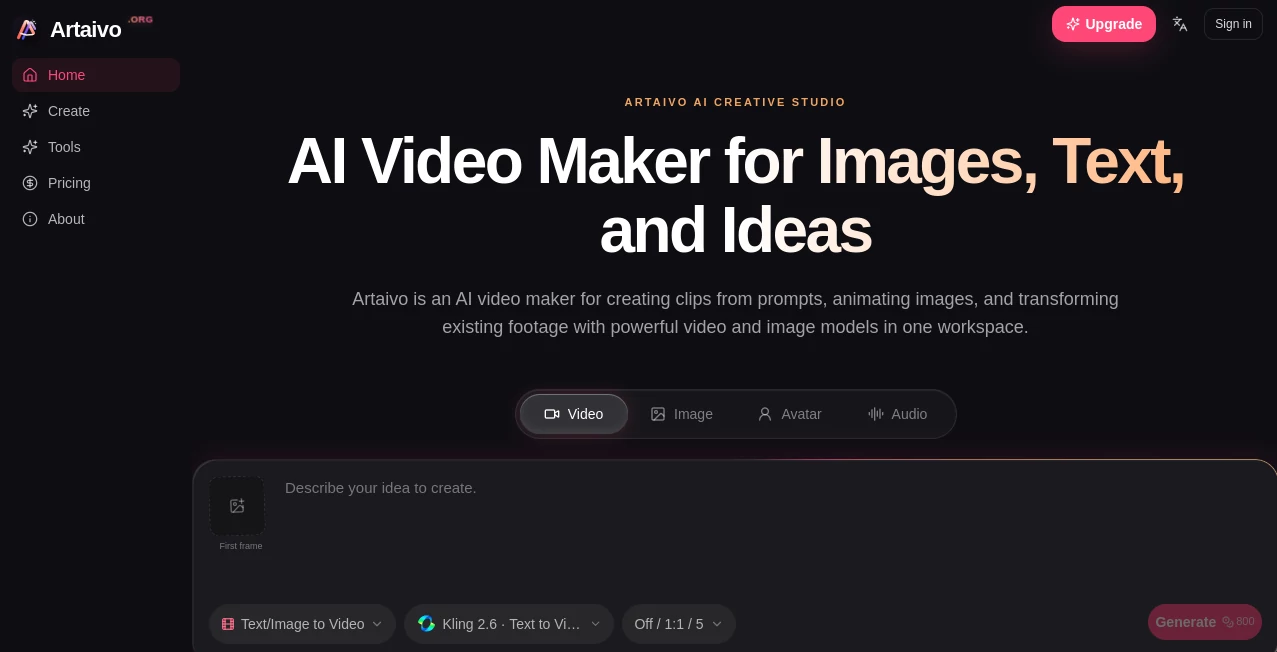
The workspace is designed around the way people actually create visual content. Instead of forcing users to begin with one specific format, the workflow can start from text, an image, or an existing video. From there, users can choose a suitable generation method and model before refining the result.
This approach is useful when an idea changes halfway through production. For example, a product image can become an animated clip, the resulting video can be enhanced, and additional creative elements can be introduced without moving the project through a collection of unrelated services.
Accuracy & Performance
Video quality naturally depends on the selected model, prompt, input material, duration, resolution, and generation settings. The platform addresses this by providing several AI video models rather than relying on one generation engine for every task.
Kling 3.0 is presented for cinematic movement, expressive characters, and camera control, while Veo 3.1 focuses on high-fidelity motion and audiovisual storytelling. Seedance 2.0 is positioned toward fast ideation, fluid choreography, and reference control. This variety gives creators more room to choose an approach that matches the project rather than settling for one visual style.
Capabilities
The strongest aspect of the platform is the breadth of its creative workflow. A creator can generate an image, animate it, enhance the resulting video, and work with avatars or audio without having to completely restart the production process.
For example, an online store could begin with a product photograph, generate controlled camera movement around the product, improve the resulting clip, and turn it into promotional content. A social media creator could instead begin with a written concept and develop it into a short visual sequence.
There is also room for more experimental work. Illustrations, photography, campaign artwork, characters, and other visual references can be transformed into moving content, making the platform useful beyond conventional business videos.
Security & Privacy
Privacy and service terms should always be reviewed before uploading sensitive, confidential, or commercially restricted material to an AI creative platform. The website provides dedicated privacy and terms pages, and it states that analytics are enabled only after user consent. Declining analytics does not affect the creation tools.
For commercial projects, users should also check the applicable plan and the terms associated with the underlying AI model. Commercial usage can depend on both the service plan and the model being used.
Use Cases
- Product marketing: Turn product photography into promotional videos for stores, advertisements, launches, and product pages.
- Social media: Develop visual content for short-form platforms such as TikTok, Reels, and YouTube Shorts.
- Advertising: Explore campaign concepts, product movements, visual hooks, and cinematic advertising ideas.
- AI avatar content: Combine portraits, scripts, and voices for presentations, announcements, explainers, and onboarding material.
- Creative storytelling: Experiment with characters, locations, lighting, camera movement, and different visual directions before committing to a traditional production.
- Motion artwork: Transform illustrations, cover art, and photography into loops, atmospheric clips, and visualizers.
- Visual prototyping: Help teams communicate visual ideas before a complete production is created.
Pros and Cons
Pros
- Combines video, image, avatar, and audio workflows in one workspace.
- Supports text-to-video, image-to-video, and video-to-video creation.
- Provides access to several modern AI generation models.
- Useful for both commercial content and creative experimentation.
- Offers image editing and enhancement tools alongside video generation.
- Shows the estimated credit cost before generation.
- Failed generations have reserved credits refunded according to the platform's pricing information.
Cons
- Generation costs vary depending on the selected model, duration, resolution, and workflow.
- Users working with large volumes of video may need a higher-tier subscription.
- Commercial usage requirements can vary depending on the underlying model and plan.
- AI-generated results may still require several attempts or creative refinement for demanding projects.
Pricing Plans
The platform uses a credit-based pricing system with annual subscription options. The Starter plan is listed at $86 per year and includes 12,000 credits for image, video, and audio workflows. It is positioned toward occasional projects and personal experimentation.
The Pro plan costs $278 per year and provides 48,000 credits, giving creators four times the creative capacity of the Starter tier. It is aimed at people publishing content on a regular weekly schedule.
The Enterprise plan is listed at $950 per year and includes 180,000 credits. It is designed for campaigns and higher-volume production. The available model library is included across these plans, with the estimated generation cost shown before creating content.
Because AI model availability, credit consumption, and generation costs can change, users should check the current pricing information before purchasing a plan.
How to Use It
- Choose a starting point: Begin with text, an image, or an existing video depending on the type of content you want to create.
- Select a workflow: Choose text-to-video, image-to-video, or video-to-video based on your source material.
- Pick a model: Select the AI model that best matches the visual style and movement you are looking for.
- Describe the result: Provide a clear prompt describing the scene, movement, camera action, mood, or desired transformation.
- Generate and review: Create the clip and examine the result before deciding whether another generation is necessary.
- Refine the project: Use enhancement, extension, motion, avatar, image, or audio features to develop the final piece.
Comparison with Similar Tools
Many AI video services focus primarily on one part of the production process. Some concentrate on text-to-video generation, while others are built around avatars, image generation, or conventional editing.
The main advantage here is the combination of these workflows. Someone who begins with an image does not necessarily need to leave the workspace when the project moves toward video. Likewise, creators interested in avatars, image editing, video enhancement, or AI-generated sound can continue developing the same creative direction instead of assembling a workflow from several disconnected platforms.
The choice ultimately depends on the project. A specialist tool may be preferable for a very specific production requirement, while a broader creative workspace can be more convenient for creators who regularly move between images, videos, avatars, and audio.
Conclusion
For creators looking for more than a simple prompt-to-video generator, this platform offers a compelling approach. Its combination of video generation, image creation, motion tools, avatars, lip sync, enhancement, and multiple AI models gives users considerable flexibility when developing visual content.
The workflow is especially well suited to product marketing, social media, advertising, visual storytelling, and rapid creative experimentation. Being able to move from an idea or image to a finished video without constantly switching services can make a noticeable difference in a busy content workflow.
It is worth considering for anyone who wants a flexible AI creative workspace and prefers having several generation and editing capabilities available under one roof.
Frequently Asked Questions (FAQ)
What can I create with this platform?
You can create AI videos from text and images, transform existing videos, generate images, create talking avatars, synchronize speech with facial movement, enhance videos, and work with AI-generated audio.
Can I turn an image into a video?
Yes. You can upload an image, describe the movement or camera action you want, and use an image-to-video workflow to animate the visual.
Can I generate videos from text?
Yes. Text-to-video workflows allow written prompts to be transformed into AI-generated scenes and video clips.
Which AI models are available?
The available model library includes options such as Kling 3.0, Veo 3.1, and Seedance 2.0. Model availability, capabilities, and credit requirements may change as the service develops.
Do I need video editing experience?
No. The workflows are designed for users with different levels of experience. You can begin with a prompt, image, or video and refine the result using the available controls.
How much does video generation cost?
The credit cost depends on factors such as the selected model, video duration, resolution, and workflow. The estimated cost is displayed before generation.
Can AI-generated videos be used commercially?
Commercial usage depends on the applicable subscription and the terms of the underlying AI model. Users should review the relevant terms before publishing commercial work.