


















ArtRobot
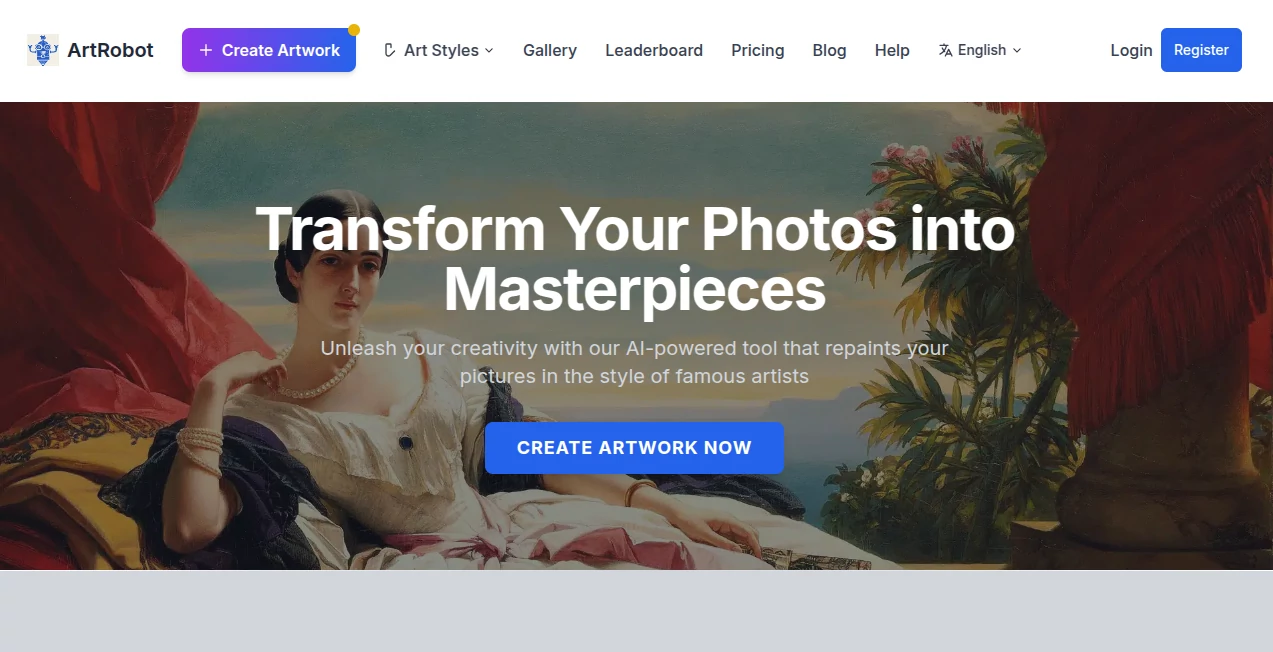
What is ArtRobot?
There is something satisfying about seeing an everyday photo transformed into artwork that feels gallery-worthy. A simple portrait, a pet photo, or even a vacation snapshot can suddenly look like it belongs inside an art exhibition. This platform brings that experience to life through intelligent AI-powered style transfer technology.
Instead of relying on generic filters, it recreates images using artistic principles inspired by famous painters, movements, and visual styles. From Renaissance aesthetics and Cubism to anime-inspired visuals and pop art themes, users can experiment with a huge creative playground without needing design skills or editing experience.
What makes the experience especially enjoyable is its simplicity. Upload a photo, pick a style, and watch an ordinary image evolve into something with character. It feels less like using editing software and more like collaborating with a digital artist.
Key Features
User Interface
The interface is approachable from the first click. Users are guided through a clear three-step process: upload an image, select an art style, and generate the result. Navigation feels straightforward and uncluttered, which makes experimentation surprisingly addictive.
The platform also works smoothly across desktop and mobile browsers, making creative sessions possible almost anywhere.
Accuracy & Performance
Performance is one of the strongest aspects of the experience. Rather than applying flat overlays or simplistic filters, the AI analyzes both content and artistic characteristics before generating results.
The image keeps recognizable elements—faces, landscapes, expressions, and important details—while introducing stylistic transformations that feel intentional and artistic.
Processing is also quick. Images can often be generated within seconds rather than requiring lengthy rendering sessions.
Capabilities
- More than 150 artistic styles available
- Portrait transformation
- Pet artwork generation
- Anime-inspired visual styles
- Cartoon effects
- Classical painting aesthetics
- Pop culture themes
- Avatar and wallpaper creation
- HD and 4K exports
One particularly enjoyable detail is the diversity of styles. Users can jump from Van Gogh-inspired visuals to pixel art and then immediately create a family portrait with a completely different personality.
Security & Privacy
User-generated content appears to be stored using secure cloud systems designed for accessibility and convenience. Projects can be accessed later, allowing creators to revisit and download previous work.
For users uploading personal photos, especially family images or portraits, this kind of storage approach adds confidence and convenience.
Use Cases
- Create personalized gifts from family portraits
- Generate artistic pet illustrations
- Build profile avatars for social platforms
- Design wallpapers for desktop and mobile devices
- Create unique social media visuals
- Transform travel photography into artistic prints
- Experiment with historical or modern art styles
A travel creator, for example, could turn landscape photos into impressionist paintings. A pet owner could convert a favorite dog photo into a frame-worthy portrait. Small details like these make the tool feel useful beyond simple entertainment.
Pros and Cons
Pros
- Simple beginner-friendly workflow
- Large collection of artistic styles
- Fast rendering performance
- HD and 4K output support
- Mobile-friendly experience
- Useful for both casual and creative projects
Cons
- Advanced editing controls remain limited
- Some styles naturally perform better with specific image types
- High-resolution exports may require paid access
Pricing Plans
The platform offers free usage options for new users through a credit system, making it easy to test multiple styles before making a commitment.
Additional plans appear designed for creators who need larger volumes, higher resolutions, or extended usage.
This approach feels practical because users can explore without pressure and upgrade only when larger projects require it.
How to Use ArtRobot
Step 1: Upload a photo from your device.
Step 2: Browse artistic categories and select a preferred style.
Step 3: Submit the image for AI processing.
Step 4: Download the transformed artwork in your chosen format.
The process takes very little effort, which encourages experimentation. Many users may find themselves trying five or six different styles just to see how dramatically one image can change.
Comparison with Similar Tools
Many image transformation tools focus on quick filters or heavily automated effects. Their results often feel repetitive after a few uses.
This platform stands apart because it leans heavily into artistic identity. Instead of producing generic edits, it offers access to styles inspired by historical art movements and famous artistic approaches.
The larger style library, high-resolution exports, and style diversity create a more creative experience than many lightweight photo filter alternatives.
Conclusion
Photo editing has changed dramatically in recent years. People no longer need professional software or years of design experience to create memorable visuals.
This AI-powered experience turns creative experimentation into something approachable and enjoyable. Whether someone wants a playful avatar, a custom pet portrait, social media artwork, or a digital piece worth printing, the process feels smooth from beginning to end.
Sometimes the most interesting artwork starts with an ordinary image already sitting in your camera roll.
Frequently Asked Questions (FAQ)
Can beginners use this platform?
Yes. The workflow is intentionally simple and requires no editing or artistic background.
How many art styles are available?
Users can access over 150 styles ranging from classical art movements to modern themes.
Can I create profile avatars?
Yes. Users can generate profile images, wallpapers, and personalized artistic visuals.
Does it support high-quality downloads?
Yes. HD and 4K export options are available.
Can I use it on mobile devices?
Yes. The platform works directly inside mobile browsers without requiring installation.
AI Photo & Image Generator , AI Avatar Generator , AI Art Generator , AI Image to Image .
These classifications represent its core capabilities and areas of application. For related tools, explore the linked categories above.

ArtRobot Alternatives Product
Nano Banana …
GPT Image 2

string art g…

Nano Banana …

VividManga

Mage

Use Nano Ban…
GPT IMAGE2
Ghibli Image…
