

















AskSary
What is AskSary?
I got tired of juggling between ChatGPT, Claude, Grok, and Gemini tabs, copying context back and forth every time I wanted a different perspective. Then I found this platform and it felt like someone finally solved a problem I’d accepted as normal. You start a conversation in one model, switch to another with a single click, and the entire history follows seamlessly. No re-explaining, no lost context, no multiple subscriptions. It’s one clean workspace with the best models available, plus real-time voice, image and video tools that actually feel integrated rather than tacked on.
Introduction
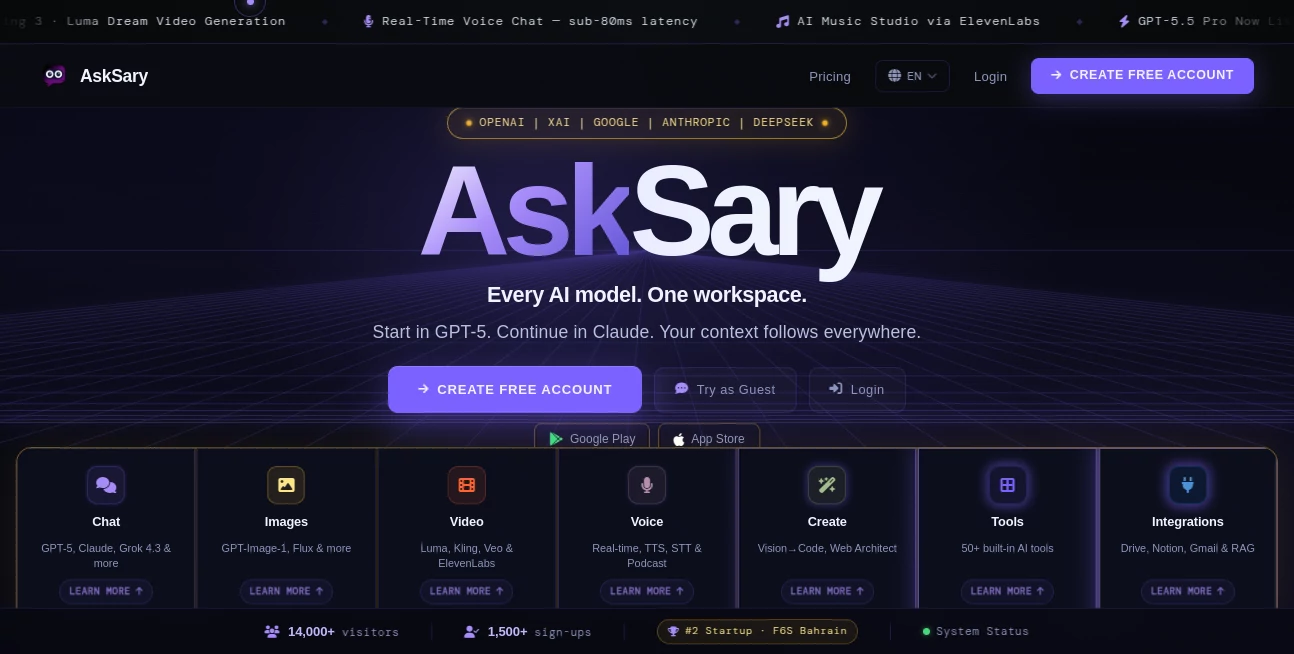
Most people end up paying for several AI subscriptions because each model excels at different things. AskSary brings them all together so you don’t have to choose or switch browsers. Start with GPT-5 for reasoning, jump to Claude for writing, verify facts with Grok, or analyze with Gemini — your full conversation history travels with you. It’s more than just a wrapper; it’s a thoughtful workspace with smart routing, real-time voice chat under 80ms latency, powerful image and video generation, and built-in tools that make daily work smoother. For heavy users who were drowning in tabs and bills, it feels like a genuine relief.
Key Features
User Interface
The interface is clean and calm, designed so you focus on thinking instead of managing tools. A sidebar lets you switch models instantly, while the main chat area stays consistent no matter which brain you’re using. Folders, smart search, and collections keep everything organized as your projects grow. Real-time voice mode feels like an actual phone call — you can interrupt naturally and it responds almost instantly. Everything just flows without the usual friction you get when jumping between separate platforms.
Accuracy & Performance
Because context carries over perfectly, responses feel more intelligent and consistent across models. The smart auto-routing picks the right model for each request automatically, while still letting you override it. Real-time voice has impressively low latency, and image/video generation delivers high-quality results quickly. In daily use, it saves enormous time compared to managing separate chats and re-pasting context everywhere.
Capabilities
You get access to GPT-5 series, Claude Sonnet, Grok, Gemini, and DeepSeek models in one place. Beyond chat, there’s image generation with Flux and GPT-Image, video tools like Luma, Kling and Veo, real-time voice conversation, AI music and podcast creation, document analysis, web search, code generation, and over 20 built-in tools. Integrations with Google Drive, Notion, and Gmail let you bring your own files into conversations. It’s a true all-in-one studio rather than just another chatbot.
Security & Privacy
Incognito mode lets you chat with zero footprint — everything disappears when you close the session. Regular conversations are protected with strong encryption, and the platform follows solid privacy practices. You stay in control of your data, with clear options for what gets saved and what doesn’t. For users handling sensitive work, that transparency and respect for privacy build real trust.
Use Cases
A writer starts drafting in Claude, switches to GPT-5 for research, then uses Grok for fact-checking — all without losing a single paragraph. A student uploads lecture notes and jumps between models to understand concepts from different angles. A marketer creates campaign copy, generates images, then turns the best ideas into short videos and podcasts. Developers debug code with one model and generate UI with another. The seamless switching and shared memory make complex, multi-step work feel natural instead of fragmented.
Pros and Cons
Pros:
- Seamless context across every major model — no more copy-paste hell.
- Real-time voice chat that actually feels conversational.
- Strong creative tools (image, video, music) in the same workspace.
- One subscription instead of five separate ones.
- Regular updates and new capabilities added consistently.
Cons:
- Some advanced video and music features have usage limits on lower plans.
- New users might feel overwhelmed by how many tools are available at once.
Pricing Plans
It offers a solid free tier for light use so you can experience the multi-model magic before committing. Paid plans unlock higher limits, priority access to newest models, faster generation, and advanced features. Many users find the paid tier pays for itself quickly by replacing multiple other subscriptions while providing a much smoother experience.
How to Use AskSary
Sign up (it takes under a minute), start typing in the chat, and pick your model or let smart routing choose. Switch models anytime — your full conversation history follows automatically. For voice, click the microphone and talk naturally. Upload images, documents, or links whenever needed. Save important chats in folders, generate images or videos directly from the conversation, and export results as needed. The more you use it, the more natural the workflow becomes.
Comparison with Similar Tools
Most other platforms lock you into one model family or make switching painful with lost context. This one removes those barriers completely while adding strong creative and productivity tools in the same space. It’s less about being the absolute best at one thing and more about being genuinely excellent at bringing everything together without friction — something users who previously paid for multiple services appreciate immediately.
Conclusion
AskSary feels like the AI workspace many of us have quietly wished for: one place where the best models work together instead of against each other. It saves money, saves time, and most importantly, keeps your thinking flow uninterrupted. Whether you’re a heavy daily user or someone who just wants reliable access to powerful AI without complexity, it delivers a refreshing experience that actually makes you more productive and creative.
Frequently Asked Questions (FAQ)
Do I lose context when switching models?
No — the entire conversation history carries over perfectly between models.
Is real-time voice available?
Yes, with very low latency and natural interruption support.
Can I generate images and videos here?
Absolutely — multiple high-quality engines are built in.
Is there a free way to try it?
Yes, the free tier gives meaningful access to test the multi-model experience.
AI Productivity Tools , AI Design Generator , AI Chatbot , AI Voice Assistants .
These classifications represent its core capabilities and areas of application. For related tools, explore the linked categories above.

AskSary Alternatives Product

AssiPilot

MeetAssist

z image

Treeova

Soulthread

morse code t…

grok bikini

trellis 2

Wplace Live
