


















Auggie CLI
What is Auggie CLI?
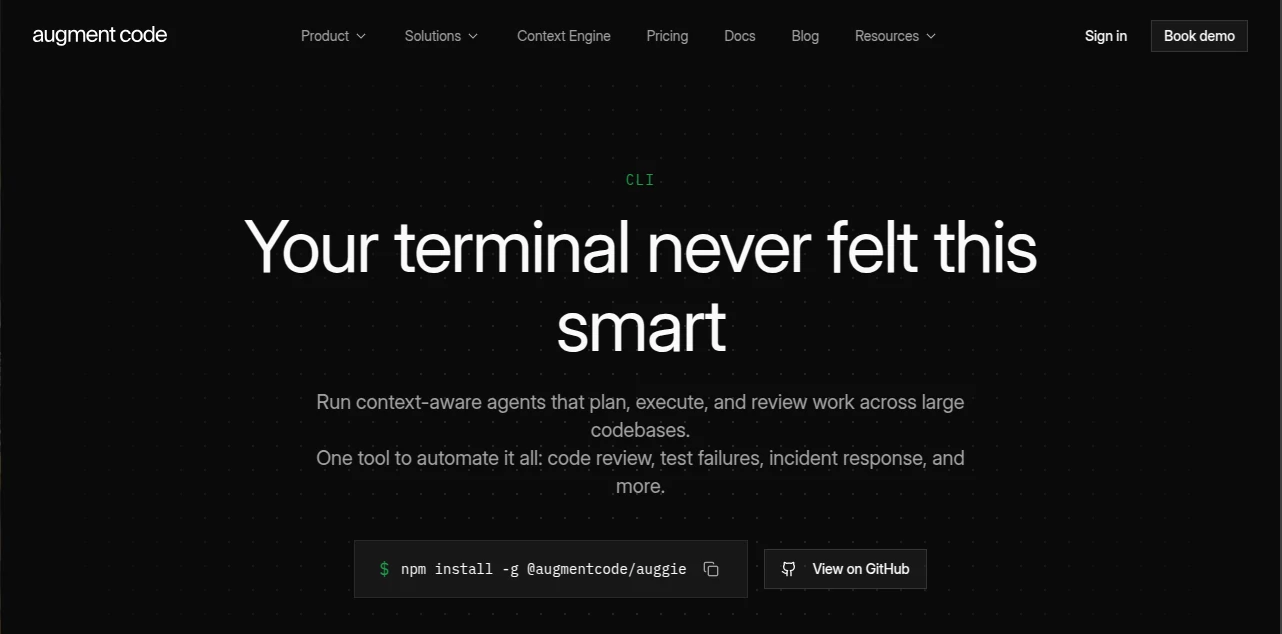
Modern software projects can become difficult to navigate long before they become difficult to code. Large repositories, unfamiliar services, failing tests, dependency updates, and repetitive maintenance work can consume hours of a developer's day. Auggie CLI brings an agentic coding workflow directly into the terminal, allowing developers to work with an AI agent that can understand a codebase, plan tasks, make changes, and review results.
What makes this approach particularly useful is its focus on context. Instead of treating every request as an isolated coding question, the tool uses a context engine designed to understand large codebases. That makes it practical for work such as debugging, feature development, code review, test generation, issue triage, and automation.
The experience also adapts well to different working styles. Developers can use an interactive terminal session when they want to watch progress and guide the work, or switch to automated execution when the same type of task needs to run inside a CI pipeline or scheduled workflow.
Key Features
- Context-aware understanding of large codebases
- Interactive terminal-based coding sessions
- Automated execution for CI/CD and other workflows
- Sub-agents for specialized development tasks
- Resumable sessions that preserve task state
- Prompt enhancement for turning rough instructions into clearer tasks
- User and repository rules for consistent development standards
- Parallel agents for handling multiple tasks simultaneously
- Headless operation for automated environments
- MCP support for connecting external tools and services
- Multi-model support
- Custom commands for specialized development workflows
- Configurable tool permissions
- Task management for breaking larger jobs into smaller steps
- GitHub Actions integration for automated pull request workflows
User Interface
The interface stays close to the environment developers already spend much of their time in: the terminal. Running the interactive command opens a live experience where responses stream in real time and tool calls and progress can be followed as the agent works.
This is a thoughtful choice for experienced developers. There is no need to constantly move between an IDE, a browser tab, and a separate AI chat window just to investigate an issue. A developer can describe a problem, inspect the proposed work, and continue from the same terminal session.
For developers who prefer automation, the command-line interface can also operate without an interactive conversation. This makes it easier to integrate AI-assisted tasks into existing engineering infrastructure rather than treating AI as a separate part of the development process.
Accuracy & Performance
For coding agents, the quality of the answer depends heavily on how much relevant context the system can understand. The underlying context engine is designed to provide semantic understanding of a codebase rather than relying only on simple text searches. That distinction becomes increasingly important when a task touches several related files or components.
For example, fixing a failing API endpoint may require understanding a service, its data layer, shared utilities, tests, and configuration. A context-aware workflow can investigate those relationships before making changes instead of treating the error message as an isolated snippet.
Performance also benefits from automation features such as parallel agents and resumable sessions. Developers can divide larger jobs into focused tasks and return to previous work without starting the investigation from scratch.
Capabilities
The platform is designed for much more than generating individual code snippets. Developers can use it to build features, investigate bugs, generate tests, review code, analyze CI failures, handle dependency updates, and automate repetitive engineering tasks.
Its automation capabilities are particularly interesting for teams. A workflow can be configured to inspect pull requests, analyze incoming issues, investigate exceptions, or respond to recurring maintenance tasks. GitHub Actions support also makes it possible to introduce context-aware code review and pull request description generation into existing repositories.
Another useful capability is MCP support. This allows the agent to connect with services such as GitHub, Linear, and Jira, giving development workflows access to information and actions beyond the local repository.
Developers can also create custom commands and define repository or user rules. In practice, this means a team can encode development conventions and preferred behaviors into the workflow instead of repeating the same instructions every time.
Security & Privacy
Security is an important consideration when an AI system has access to source code. The provider states that customer proprietary code is not used to train AI models and emphasizes data minimization and access controls.
The service has achieved SOC 2 Type II attestation, and its security materials also describe additional enterprise controls such as customer-managed encryption keys, granular access controls, audit capabilities, and data residency options. Enterprise customers can also access more advanced identity and security features.
Tool permissions provide another useful layer of control. Teams can decide what actions an agent is allowed to perform in a particular environment, which is especially valuable when automation is connected to production engineering workflows.
Use Cases
- Feature Development: Describe a feature and let the agent inspect the repository, plan the implementation, modify relevant files, and help validate the result.
- Debugging: Investigate errors by providing logs or describing the problem while allowing the agent to explore the surrounding code.
- Code Review: Run context-aware reviews against pull requests and receive feedback based on the wider codebase rather than only the changed lines.
- Test Generation: Create tests around existing functionality and help improve coverage as a project evolves.
- CI Failure Analysis: Pipe build output into an automated workflow and receive a concise explanation of the failure and possible fixes.
- Dependency Maintenance: Review dependency updates, assess potential conflicts, and determine whether changes are safe to approve.
- Security Reviews: Delegate focused security-related investigations to specialized agents.
- Issue Triage: Analyze incoming issues and help classify or investigate them before developers begin manual work.
- Incident Response: Start an investigation from alerts or exceptions and produce an initial assessment while the engineering team is being notified.
- Documentation: Keep documentation synchronized with code changes and export useful development conversations as Markdown.
- CI/CD Automation: Run coding tasks in GitHub Actions, Jenkins, serverless environments, containers, or other automated systems.
Pros and Cons
- Pros: Strong codebase context, terminal-first workflow, interactive and automated modes, reusable rules, parallel agents, MCP integrations, resumable sessions, GitHub Actions support, and extensive automation capabilities.
- Pros: The ability to move from a developer's local terminal to CI/CD automation makes it useful beyond ordinary AI code completion.
- Pros: Security controls and SOC 2 Type II provide additional reassurance for teams working with proprietary source code.
- Cons: The tool is primarily aimed at developers who are comfortable working with command-line environments and agentic workflows.
- Cons: Usage-based billing means costs can vary depending on the amount and complexity of work performed.
- Cons: Some advanced capabilities, including service accounts for production workloads, are reserved for enterprise customers.
Pricing Plans
The current Business plan is priced at $100 per month and uses a flat team price rather than a per-seat charge. It includes up to 50 seats and $100 of monthly usage across LLM inference, the context engine, and compute. CLI access, MCP and native tools, usage analytics, and top-ups are included.
When the included usage is exhausted, teams can add additional usage on a pay-as-you-go basis. This shared model can be useful for teams with different usage patterns because the included balance is pooled across the workspace.
Enterprise pricing is custom and is designed for organizations with higher-volume usage, advanced security requirements, or dedicated support needs. Enterprise options include features such as SSO, OIDC, SCIM, customer-managed encryption keys, security reports, data residency controls, and dedicated support.
How to Use the CLI
Getting started is straightforward for developers who already have a modern Node.js environment. The CLI can be installed globally through npm, and current documentation lists Node.js 22 or later as the system requirement for the standard installation.
After installation, developers can authenticate from the terminal and start an interactive session. From there, they can describe a coding task, ask questions about the repository, investigate an issue, or request changes.
For automation, the print mode is particularly useful. A developer can provide a single instruction and receive the result without maintaining an interactive conversation. Output can also be formatted for automation workflows, making the CLI suitable for scripts and CI environments.
A typical workflow might look like this: install the package, authenticate, open a repository, describe a task such as investigating a failing test, review the agent's proposed changes, and then run the project's own validation commands. For automated environments, authentication can be supplied through an appropriate session configuration rather than requiring an interactive login each time.
Comparison with Similar Tools
Traditional code completion assistants are often strongest when a developer already knows what line or function they want to write. This terminal-based approach is broader. It is designed around tasks rather than individual completions, allowing an agent to investigate a repository, plan a change, use development tools, and continue through multiple steps.
Compared with a basic terminal chatbot, the major difference is repository context and workflow integration. The system can work with large codebases, maintain sessions, delegate specialized tasks, connect through MCP, and participate in CI/CD processes.
It also occupies an interesting middle ground between a local coding assistant and a fully automated engineering platform. A solo developer can use the interactive mode for everyday development, while a larger team can use headless execution, GitHub Actions, custom commands, and organizational controls for repeatable engineering workflows.
Conclusion
For developers who want AI assistance to become part of the development process rather than another browser tab, this CLI approach is compelling. Its strongest quality is the combination of codebase context with practical automation. Building a feature, investigating a production issue, reviewing a pull request, or diagnosing a CI failure can all happen from the same environment.
The interactive experience keeps developers involved when judgment matters, while automation features make it possible to delegate repetitive engineering work. Add MCP connectivity, custom rules, parallel agents, GitHub integration, and enterprise security controls, and the result is a tool that can fit into both individual development workflows and larger engineering operations.
Frequently Asked Questions (FAQ)
What is this CLI designed for?
It is designed for agentic software development from the terminal. Developers can use it for coding, debugging, code review, testing, repository exploration, CI failures, issue triage, and engineering automation.
Does it work with large codebases?
Yes. Its context engine is specifically designed to provide semantic understanding across large repositories, making it suitable for projects where a task may involve multiple connected files and components.
Can it run in CI/CD pipelines?
Yes. The CLI provides automation and headless modes that can be used in environments such as GitHub Actions, Jenkins, serverless functions, containers, and other automated workflows.
Does it support external tools?
Yes. MCP support allows it to connect with compatible services and tools, including integrations such as GitHub, Linear, and Jira.
Is customer code used to train AI models?
The provider states that proprietary customer code is not used to train AI models. Its security program also includes SOC 2 Type II and additional enterprise security and privacy controls.
How much does it cost?
The current Business plan costs $100 per month with up to 50 seats and $100 of pooled monthly usage. Additional usage can be purchased as needed, while Enterprise pricing is customized for larger organizations.
What operating systems are supported?
The current installation documentation lists macOS, Windows WSL, and Linux, with Node.js 22 or later required for the current CLI installation.
Can developers use it interactively?
Yes. Interactive mode provides streaming output, visible progress, tool calls, and a persistent session experience that is useful for feature development, debugging, and exploring unfamiliar codebases.
AI Testing & QA , AI Code Assistant , AI Developer Tools , AI DevOps Assistant .
These classifications represent its core capabilities and areas of application. For related tools, explore the linked categories above.

Auggie CLI Alternatives Product
Timestamp Ro…

UpMocker

Prava Ai

Blackbox AI

Mythx AI

JSON to TOON…

GPTLocalhost

Velokey

BetterAntisp…
