betterani
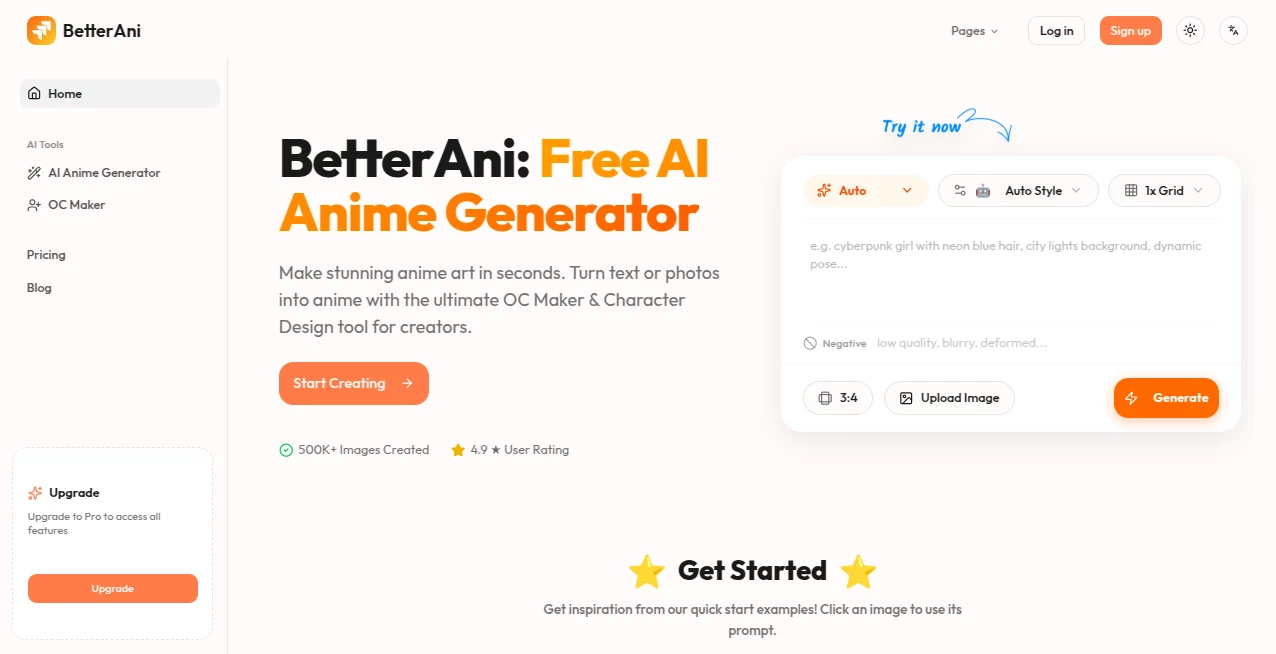
What is betterani?
There’s a big difference between “it moves” and “it feels alive.” A lot of indie animations have good ideas but fall flat in the final execution—stiff motion, inconsistent lines, or that slightly off timing that breaks immersion. This tool quietly fixes those problems. You upload your rough animation or even just a sequence of frames, and it refines everything: smooths the movement, improves line quality, enhances colors, and adds that subtle polish that makes it feel like it came from a bigger studio. I’ve seen creators go from embarrassed to proud after one pass. It doesn’t replace your artistry—it simply helps your work look as good as it deserves.
Introduction
Creating fluid, appealing 2D animation is incredibly hard. Timing, spacing, line consistency, and color harmony all need to work together, and small mistakes become very obvious once it’s moving. BetterAni acts as a thoughtful assistant that handles the tedious cleanup while preserving your unique style. Whether you’re an indie animator, motion designer, student, or content creator, it turns “good enough” into “this looks pro.” The best part? It respects the original intent instead of forcing a generic look. Many users say it feels like having a senior animator review their work without the ego or the price tag.
Key Features
User Interface
The interface is refreshingly straightforward. Drag your animation frames or video file in, choose the level of refinement you want, and hit go. Before-and-after comparisons appear side by side so you can see exactly what changed. Sliders for smoothness, line weight, color vibrancy, and detail preservation give you fine control without complexity. It never feels like you’re fighting the tool—you stay focused on your vision while it handles the heavy lifting.
Accuracy & Performance
It keeps your original character designs and artistic style intact while fixing common issues like jittery lines, inconsistent volumes, and awkward transitions. Motion becomes more natural without losing the handmade feel. Processing is fast—even longer sequences finish in reasonable time—and the output quality holds up at 1080p and above. The consistency across different animation styles (clean anime, sketchy cartoon, semi-realistic) is impressive.
Capabilities
Supports frame sequences and short video clips, offers multiple refinement strengths (subtle cleanup to full polish), improves line art consistency, enhances colors and lighting, smooths timing and spacing, and can even add subtle effects like motion blur or glow where appropriate. You can process entire short scenes or individual loops. The results integrate cleanly into your existing workflow—export back as image sequences or video ready for After Effects, Toon Boom, or Premiere.
Security & Privacy
Your animations are processed securely and not stored long-term. No account is forced for basic use, so you can test privately without creating a profile. For professional work or client projects, that discretion matters. Files are deleted after processing unless you choose to save them to your account.
Use Cases
An indie animator cleans up a fight sequence that took weeks to rough out, turning it into something portfolio-ready in one evening. A YouTuber improves their explainer animations so they look more premium without hiring an extra artist. A student polishes their final project and gets noticeably better feedback from professors. A game studio uses it to quickly refine prototype animations before committing to full production. Wherever animation quality is holding you back, this tool gives a meaningful lift.
Pros and Cons
Pros:
- Preserves your unique art style while dramatically improving technical quality.
- Fast enough to fit into real production schedules.
- Before-and-after comparison makes it easy to approve changes.
- Works on a wide range of animation styles and skill levels.
- Generous free tier lets you test real projects before committing.
Cons:
- Extremely experimental or highly abstract animations may need manual guidance.
- Longer sequences work best when broken into shorter segments.
- Advanced features like batch processing require a paid plan.
Pricing Plans
Free tier offers several high-quality refinements per day—perfect for testing or small personal projects. Paid plans unlock unlimited processing, higher resolutions, batch capabilities, priority queue, and commercial licensing. Pricing is reasonable for the time it saves and the quality jump it delivers. Many creators say it pays for itself after polishing just one significant project.
How to Use BetterAni
Upload your animation frames (PNG sequence) or short video clip. Choose the refinement level—light for subtle cleanup or strong for full polish. Adjust any specific sliders (line consistency, color vibrancy, motion smoothing) to taste. Hit generate and review the before-and-after. Download the improved version once you’re happy. For longer animations, process scenes separately and combine them later in your editor. The whole process is fast enough that you can iterate multiple times in one session.
Comparison with Similar Tools
Many AI animation tools focus on generating from scratch but struggle with refining existing work. Others apply heavy filters that destroy the handmade feel. This one excels specifically at respectful enhancement—improving technical quality while protecting your artistic voice. It sits in a sweet spot: more powerful than basic filters, more respectful than full AI generators, and far more practical for real production pipelines.
Conclusion
Animation should be about storytelling and emotion, not fighting technical limitations. This tool removes a lot of that friction so you can focus on what matters most: making your work feel alive. Whether you’re a solo creator racing a deadline, a student building a reel, or a studio polishing deliverables, it consistently delivers that extra layer of professionalism without changing your core style. Sometimes the best creative tools are the ones that simply help your work look as good as you always imagined it could.
Frequently Asked Questions (FAQ)
How many frames can I process at once?
Free tier handles shorter sequences; paid plans support longer clips and batch processing.
Will it change my art style?
No—it enhances technical quality while protecting your unique look and feel.
Can I use this for commercial projects?
Yes—paid plans include full commercial rights.
What file formats are supported?
PNG sequences and common video formats (MP4, MOV) work best.
Is there a watermark on free results?
Small watermark on free tier; paid plans remove it completely.
AI Animated Video , AI Image to Video , AI Video Enhancer , AI Design Generator .
These classifications represent its core capabilities and areas of application. For related tools, explore the linked categories above.

betterani Alternatives Product

uni-1

Seedance Art

Seedance 2 P…
시댄스 2.5
Nano Banana 2

Seedream 5.0
ds video
Seedance 2.0…

Wan AI Video…