
Breme AI
What is Breme AI?
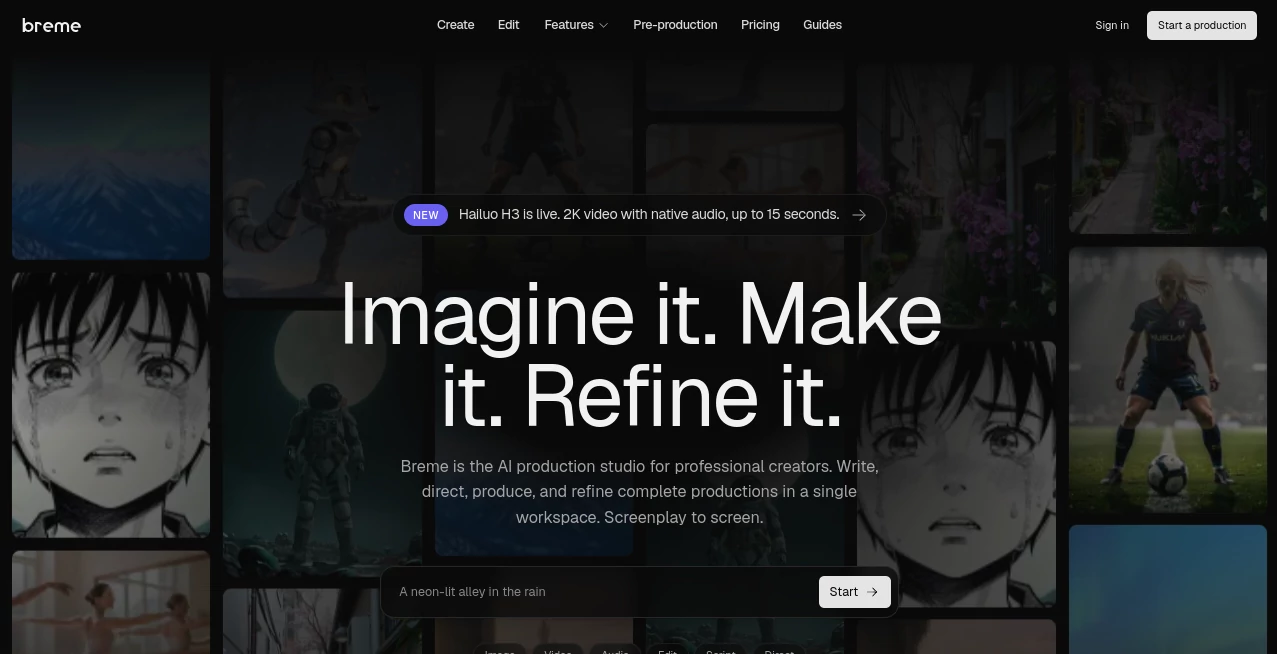
Breme is an AI production studio built for creators who want to take an idea from screenplay to finished production without constantly moving between different applications. Instead of treating writing, storyboarding, generation, and editing as separate tasks, it brings them together inside one connected workspace.
The concept is particularly appealing for filmmakers, creative teams, video producers, and independent creators working on projects that need more than a single generated clip. A screenplay can become the foundation for the rest of the production, with shot lists, storyboards, production planning, generated media, and editing all connected to the same project.
That workflow makes a noticeable difference when a project starts becoming more complicated. Rather than exporting one asset, opening another application, and trying to keep everything consistent, creators can continue developing the same production from one stage to the next.
Key Features
- End-to-end AI production workflow from screenplay to final edit
- Built-in screenplay editor and screenplay import
- Automatic shot list generation
- AI storyboard generation
- Production bible creation
- AI image generation
- AI video generation
- Voice and audio generation
- AI-powered editing and refinement
- Support for multiple video generation models
- Reusable production elements for better character and visual consistency
- Export options for finished media and production documents
User Interface
The interface is organized around the production itself rather than a collection of disconnected AI utilities. The workflow moves through recognizable filmmaking stages, starting with the script and continuing through shot planning, storyboarding, production preparation, generation, and editing.
This structure is useful for creators who already think in terms of scenes and shots. Someone starting with a screenplay can work forward instead of having to translate the project into a completely different format for every AI tool. The result feels closer to a digital production workspace than a basic text-to-video generator.
Accuracy & Performance
For larger creative projects, consistency matters just as much as individual image or video quality. The platform addresses this by keeping production information connected throughout the workflow and by supporting reusable elements for characters and other visual references.
Its generation layer can work with several current video models, including Veo, Kling, Seedance, Luma, and Vidu. This model-agnostic approach gives creators more flexibility when a particular model performs better for a specific type of shot.
Video generation can reach up to 1080p, with 4K available through upscaling. Depending on the selected model, generated shots can also include native audio. These capabilities make the system more suitable for actual production work rather than simple visual experimentation.
Capabilities
The strongest part of the platform is the connection between its individual capabilities. A creator can import a screenplay in formats such as PDF, Final Draft FDX, Fountain, or plain text and use it as the foundation for production planning.
From there, the system can help create a shot list and storyboard, prepare production documentation, generate images and video, produce voice and audio, and continue into editing. Storyboards can also be exported as PDFs, while production materials can be delivered in formats useful for professional workflows.
The creative toolkit extends beyond video generation. Available features include an image generator, video generator, voice and audio generator, shot list generator, storyboard generator, and script-to-video workflow. Individual editing features can also be used to refine generated or uploaded assets without abandoning the project.
Security & Privacy
Privacy and acceptable-use information are provided through dedicated legal and privacy documentation. For creators working with original scripts, client projects, or unreleased concepts, reviewing the current privacy and terms documentation before uploading sensitive material is a sensible step.
The platform also keeps versions of generated and edited work in the production workflow. This is useful when experimenting with creative changes because an earlier version does not have to be treated as disposable simply because a new variation has been created.
Use Cases
Independent filmmakers can use the workflow to move from an initial screenplay toward a visual production plan without assembling a large collection of unrelated creative applications.
Video agencies can use it when developing concepts for clients, particularly when a project requires scripts, storyboards, pitch materials, and visual examples before production is finalized.
Content creators can also benefit from the faster transition between an idea and a finished sequence. Instead of generating isolated clips, they can organize those clips around a broader production and refine them within the same project.
For pre-production, the combination of script analysis, shot planning, storyboards, and production documentation is especially useful. A director can start with a written scene and gradually turn it into something that communicates framing, characters, visual direction, and production intent.
It can also be useful for creative pitches. A filmmaker may begin with a screenplay, develop representative shots and storyboards, and prepare supporting production material that makes the concept easier to present to collaborators or clients.
Pros and Cons
Pros
- Connects screenplay, pre-production, generation, and editing in one workspace
- Designed around complete productions rather than isolated AI generations
- Supports multiple leading video generation models
- Includes automatic shot list and storyboard workflows
- Useful for maintaining characters and visual elements across a project
- Supports both creative generation and production documentation
- Offers several export formats for production materials
Cons
- The workflow may be more than needed for someone who only wants a quick AI-generated clip
- Generation capabilities and output limits can vary depending on the underlying model
- More complex productions require more planning and experimentation than simple one-prompt projects
- Usage-based billing means heavier video production can consume more of the included monthly usage window
Pricing Plans
The pricing system uses a usage-based model rather than traditional per-click credits. New accounts begin with a free plan that includes a small monthly usage window, allowing users to explore the studio before committing to a paid subscription.
Paid subscriptions provide a larger monthly usage window, while heavier operations such as video generation consume more of that allowance than lighter operations such as image generation. The billing dashboard shows how much of the monthly window has been used.
Paid plans can continue beyond the included usage through pay-as-you-go overage. Subscriptions are available on monthly or annual billing, with the annual option offering two months free. Users can upgrade, downgrade, or cancel through the billing dashboard.
How to Use Breme
Start by creating a production and bringing in your screenplay or beginning with a new script. The screenplay becomes the foundation for the subsequent stages of the project.
Next, develop the shot list and storyboard. Review the proposed shots and visual direction so that the production reflects the story rather than simply generating unrelated clips.
Build the production bible and establish important visual elements, characters, and references. This step becomes increasingly valuable as the project grows and consistency between scenes becomes more important.
Once the planning is ready, generate the required images, video, voice, and audio. Different generation models can be used depending on the requirements of individual shots.
Finally, move into editing and refinement. Compare different versions, adjust the generated material, and assemble the production toward the final cut. The central advantage is that these stages remain connected instead of requiring constant exports between separate applications.
Comparison with Similar Tools
The platform occupies a slightly different position from many popular AI video generators. Tools such as Runway are strongly focused on frontier video generation and creative AI tools, while this workflow puts more emphasis on the complete production process surrounding generation.
For example, a filmmaker starting with a screenplay may prefer a system that can turn that screenplay into a shot list and storyboard before generating the individual shots. That approach can be more practical for longer productions where continuity and planning matter.
Another advantage is model choice. Instead of depending entirely on one proprietary video model, the platform can work with several current generation systems. This gives creators the opportunity to choose a suitable model for different shots as the technology evolves.
It is therefore best suited to users who need a production pipeline rather than simply a place to type a prompt and receive a short video. For quick social clips, a specialized generator may be simpler. For screenplay-driven productions, the connected workflow is considerably more compelling.
Conclusion
AI video creation becomes much more useful when the technology supports the entire creative process instead of stopping at generation. This platform takes that approach by connecting screenplay development, shot planning, storyboarding, production preparation, media generation, and editing in one environment.
Its biggest strength is the way these pieces relate to one another. A screenplay can remain the source of truth for the production, while shots, storyboards, visual references, and generated media develop around it. The ability to work with multiple generation models adds another practical advantage for creators who do not want their workflow tied to a single model.
For filmmakers, agencies, creative teams, and serious independent creators, it offers a thoughtful way to turn an early idea into a structured visual production. It is not simply about making another AI clip; it is about giving the creator a place to build the whole project.
Frequently Asked Questions (FAQ)
What type of creators is Breme designed for?
It is primarily designed for professional creators, filmmakers, video producers, agencies, and creative teams working on productions that involve multiple stages from screenplay through final edit.
Can I start with an existing screenplay?
Yes. Existing scripts can be imported in formats including PDF, Final Draft FDX, Fountain, and plain text. The screenplay can then drive the subsequent production workflow.
Does it generate video?
Yes. The platform includes an AI video generator and can use several current video generation models. Supported models and capabilities can change as new generation technology becomes available.
Can it create storyboards?
Yes. It includes a storyboard generation workflow designed to turn production plans into visual references for individual shots. Storyboards can also be exported as PDF files.
Is there a free option?
Yes. New accounts start with a free plan that includes a small monthly usage window. When the allowance is exhausted, it refreshes at the beginning of the next calendar month, or users can upgrade to continue creating.
How is usage calculated?
Usage depends on the type and weight of the media being processed. Lighter operations such as image generation use less of the monthly window, while heavier operations such as video generation consume more.
Can I use different AI video models?
Yes. The platform supports multiple video generation models, giving creators the flexibility to select different technologies for different shots and production requirements.
What makes it different from a basic AI video generator?
The main difference is the production workflow. Instead of focusing only on generating individual clips, it connects screenplay writing, shot lists, storyboards, production planning, generation, and editing within one project.
AI Animated Video , AI Video Generator , AI Video Editor , AI Text to Video .
These classifications represent its core capabilities and areas of application. For related tools, explore the linked categories above.

Breme AI Alternatives Product

KissGen AI

GoViralTrend

Seedance 2.0

Seedance 2.0…

seedream 5

Veo 4
SkyReels-V4

Seedance 2.0…

Free Sora Ge…