Chickytutor
What is Chickytutor?
I still remember the awkward silence when I finally tried speaking Spanish with a native speaker after months of studying. I knew the grammar, I knew the words, but my mouth froze. That gap between knowing a language and actually speaking it comfortably is where most learners get stuck. This platform targets exactly that problem. It gives you low-pressure, voice-based conversations in over 70 languages, with gentle, instant corrections that help you improve without killing the flow. It feels more like chatting with a patient friend than a strict teacher, and that makes all the difference.
Introduction
Most language apps focus on vocabulary, grammar drills, or listening. But real confidence comes from speaking. ChickyTutor fills that gap by letting you practice live conversations with an AI tutor that listens, understands, and gently corrects you in the moment. You don’t need perfect sentences to begin — the goal is to build fluency through actual talking. It’s especially valuable for people who can read and write decently but freeze or hesitate when it’s time to speak. The experience is relaxed, supportive, and surprisingly effective at building real conversational comfort.
Key Features
User Interface
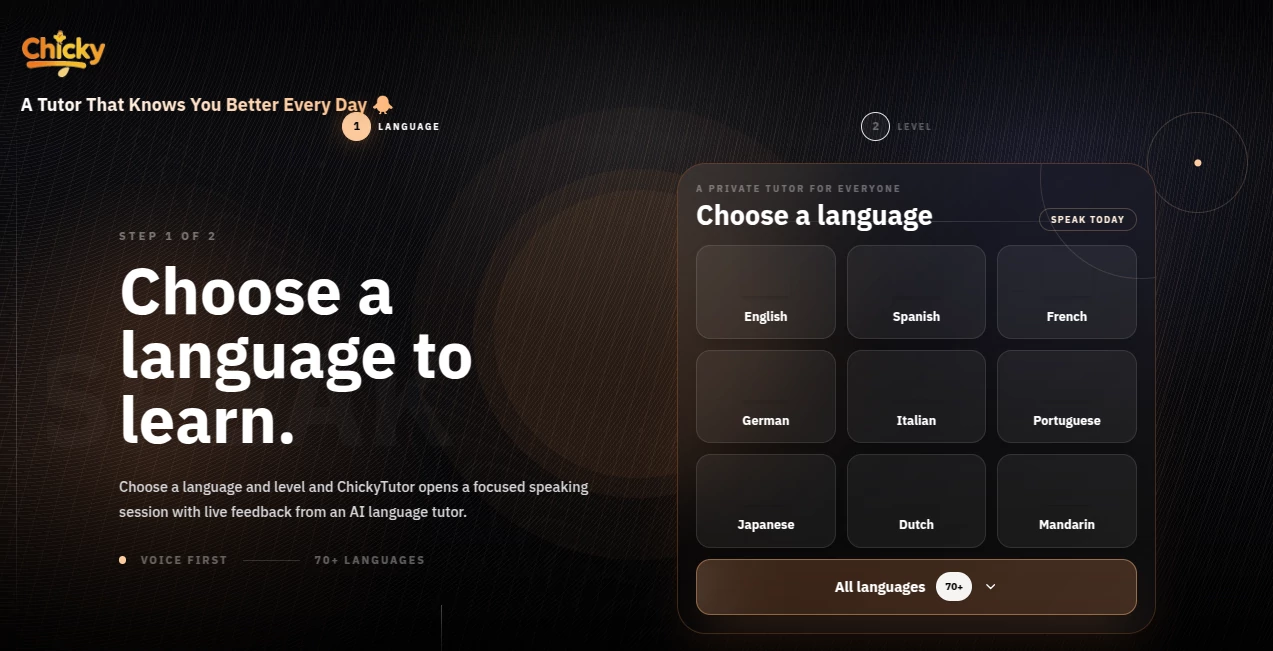
The interface is delightfully simple and focused on conversation. You pick a language, choose a topic or practice path, and start speaking. The AI listens naturally, gives short useful feedback when needed, and keeps the conversation going. No overwhelming dashboards or complicated menus — just a clean space where the talking happens. It works great on both desktop and mobile, so you can practice during a commute or a quiet moment at home.
Accuracy & Performance
The speech recognition is impressively accurate across accents and speeds, and the corrections feel natural rather than robotic. It understands context well enough to give relevant feedback without interrupting the flow too much. In my experience, it catches pronunciation issues and grammar slips effectively while still encouraging you to keep talking. The balance between correction and conversation is one of its strongest points.
Capabilities
It supports more than 70 languages with different practice paths tailored to real-life situations — ordering food, job interviews, casual chats, travel scenarios, and more. You can practice short focused sessions or longer free conversations. The AI remembers context within a session so dialogues feel coherent. It’s particularly good at helping learners move from “I understand” to “I can say this comfortably.”
Security & Privacy
Your voice sessions are private and not stored long-term unless you choose to save them for review. The platform focuses on learning without unnecessary data collection, giving you confidence to speak freely even when practicing sensitive topics or making mistakes.
Use Cases
A professional preparing for a job interview in a second language practices common questions and gets immediate feedback on phrasing and pronunciation. A traveler heading to Japan does daily short sessions to build confidence ordering food and asking directions. A university student learning French uses it to practice casual conversation before a study abroad trip. Parents use it with their kids to make language learning feel like play rather than homework. It fits beautifully into busy lives because sessions can be as short as five minutes.
Pros and Cons
Pros:
- Focuses on the speaking skill most apps neglect.
- Gentle, encouraging corrections that don’t kill motivation.
- Works in over 70 languages with relevant conversation topics.
- Simple, distraction-free experience that encourages regular practice.
- Great for building real conversational confidence quickly.
Cons:
- Best results come with clear pronunciation (heavy accents may need extra patience).
- Free tier has usage limits — heavy practice benefits from paid access.
- Still evolving, so some niche conversation topics have fewer options.
Pricing Plans
It offers a generous free tier so you can test the quality and build the habit before committing. Paid plans unlock unlimited sessions, more advanced conversation paths, progress tracking, and priority support. The pricing is reasonable for the value — many users find that consistent daily practice with the tool accelerates their speaking ability faster than traditional classes.
How to Use ChickyTutor
Go to the site, pick your target language, and choose a conversation topic or practice path. Click the microphone and start speaking naturally. The AI listens, responds, and offers gentle corrections when helpful. Keep the conversation going as long as you like, or end the session and review key feedback. Regular short sessions work better than occasional long ones. The more you use it, the more comfortable speaking becomes.
Comparison with Similar Tools
Many language apps focus heavily on reading, writing, or flashcards. This one stands out by putting speaking practice front and center in a natural, low-pressure way. Where other tools feel like tests, this feels like conversation practice with a patient coach. The balance of freedom and useful feedback makes it especially effective for building real-world confidence.
Conclusion
Learning to speak a new language should feel exciting, not terrifying. This platform helps bridge that gap by making speaking practice accessible, effective, and even enjoyable. Whether you’re preparing for travel, work, or simply want to connect with another culture, it gives you a safe space to improve without judgment. The combination of smart AI and thoughtful design makes it one of the most practical tools available for anyone serious about actually speaking their target language.
Frequently Asked Questions (FAQ)
How many languages are supported?
Over 70 languages with conversation practice available.
Do I need perfect pronunciation to start?
No — the AI is designed to help learners who are still building confidence.
Is it suitable for complete beginners?
It works best if you already know some basic vocabulary and grammar. It’s ideal for moving from passive knowledge to active speaking.
Can I practice specific situations?
Yes — there are tailored paths for travel, business, daily life, and more.
AI Tutorial , AI Education Assistant .
These classifications represent its core capabilities and areas of application. For related tools, explore the linked categories above.

Chickytutor Alternatives Product

ReportRemarks

Llamaroo

Dialogues wi…

Mexty AI

EduSolver: A…

GameClick.io

Peanut AI

SuperAI

AHelp