


















Chirpy AI
What is Chirpy AI?
For many businesses, a surprising amount of time is spent answering the same questions: pricing, availability, product details, booking information, delivery options, and basic support requests. An AI receptionist can take care of those conversations while the team focuses on customers who actually need human attention.
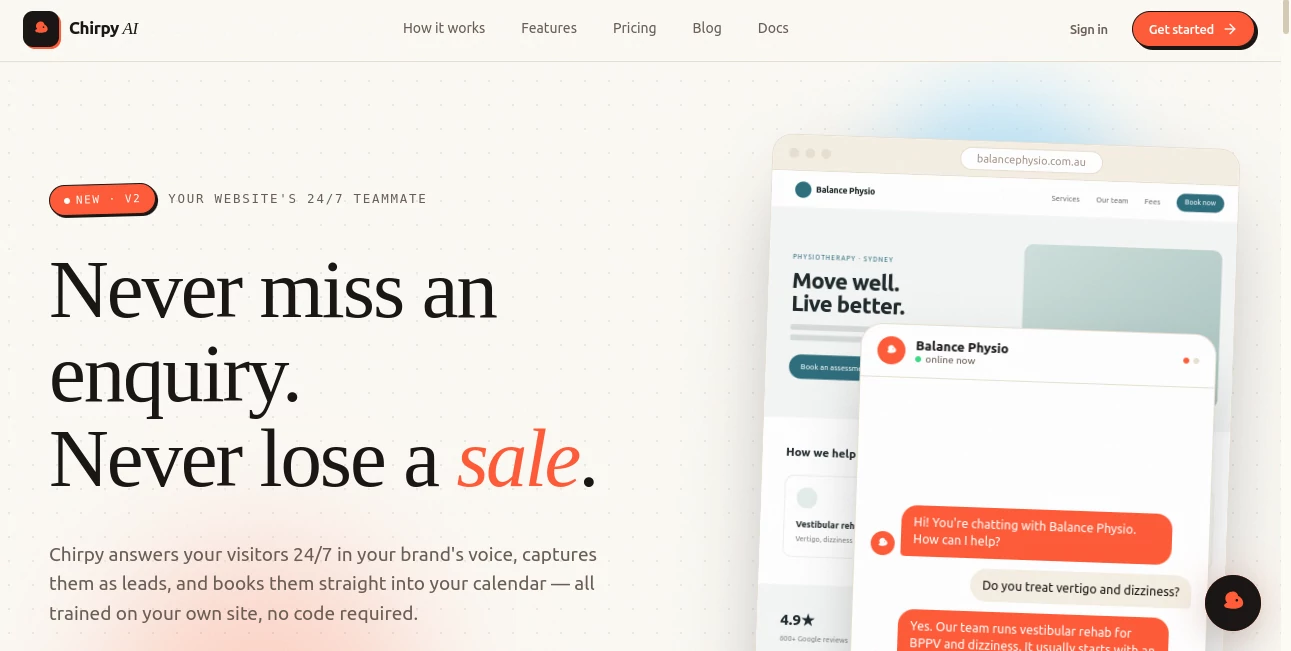
This website-based AI assistant is designed to answer visitor questions, guide people toward useful actions, and capture potential leads around the clock. Instead of relying on a generic chatbot with a complicated setup, businesses can provide their own website content, PDFs, and documents so the assistant can build its knowledge from information they already have.
One of its strongest advantages is the speed of setup. A business can provide its website URL or upload a PDF, adjust the assistant's tone and appearance, and add it to an existing website with a short embed snippet. The process is designed to take only a few minutes, making it practical for small businesses as well as growing teams.
Key Features
- 24/7 automated website conversations
- Answers based on a business's own website content
- Support for PDFs and documents as knowledge sources
- Custom welcome messages, tone, colors, and instructions
- Lead capture and qualification
- Custom calls-to-action for bookings, checkout pages, signup forms, and other URLs
- Multilingual visitor conversations
- Conversation logs and analytics
- Knowledge-gap identification
- Weekly AI recommendations for improving the assistant
- Multiple assistants on higher plans
- Custom knowledge and enterprise support options
User Interface
The experience is built around simplicity rather than a long configuration process. Businesses begin by entering their website address or providing a PDF, after which the system creates a knowledge-based assistant. The available controls allow owners to shape the welcome message, tone, colors, and behavioral instructions so the conversation feels closer to the company's existing brand.
For visitors, the interface works directly from the website. There is no need to send customers to a separate support portal. This makes it particularly useful for businesses that want assistance to be available without adding another destination to the customer journey.
Accuracy & Performance
The quality of an AI website assistant depends heavily on the information it has access to. Here, the knowledge process is centered around the company's own material rather than requiring users to build a large collection of prompts from scratch. Websites, PDFs, and documents can be used as sources, helping the assistant answer questions in the context of the business.
The platform also highlights knowledge gaps by showing what visitors are asking that may not be sufficiently covered. This is a useful detail because unanswered questions can reveal missing information on a website, unclear product descriptions, or areas where customer communication could be improved.
Capabilities
The assistant goes beyond simply responding to questions. It can recognize buying signals during conversations, collect visitor details, and help turn interested visitors into leads. Custom calls-to-action can direct people to a checkout page, booking calendar, registration form, or another destination.
Businesses can also use the conversation data to understand what customers are actually asking. Weekly recommendations and analytics provide a practical feedback loop: the assistant handles conversations, the business learns from those conversations, and the knowledge base can gradually become more useful.
Security & Privacy
Businesses should always review the privacy and data-handling terms of any customer-facing AI service before uploading sensitive information. This is especially important when documents contain customer data, internal business information, contracts, or other confidential material.
For organizations with more demanding requirements, the enterprise offering includes features such as SSO and SAML, dedicated support, custom service-level agreements, and customized knowledge and conversation configurations.
Use Cases
Customer Support: Businesses can use the assistant to handle repetitive questions about products, services, pricing, opening hours, policies, and other commonly requested information.
Lead Generation: When a visitor shows genuine interest, the assistant can capture relevant details and help qualify the lead rather than leaving the visitor to find a contact form on their own.
Bookings and Appointments: Custom calls-to-action can send visitors directly to booking calendars, making the transition from conversation to appointment much shorter.
E-commerce: Online stores can use conversational assistance to answer product questions and guide shoppers toward checkout or relevant product pages.
Service Businesses: Agencies, consultants, local service providers, and other businesses can provide answers outside normal working hours without requiring someone to monitor the website throughout the night.
SaaS Companies: Software businesses can use their existing documentation and website content as a knowledge source while guiding prospective customers toward signups, demos, or other conversion points.
Pros and Cons
Pros
- Very quick setup compared with traditional chatbot projects
- Uses existing website content, PDFs, and documents
- Designed for both support and lead generation
- Custom calls-to-action can shorten the conversion path
- Available around the clock
- Supports multilingual conversations
- Provides conversation analytics and knowledge-gap insights
- Offers a free plan without requiring a credit card
Cons
- The free plan has relatively limited monthly conversation capacity
- Advanced functionality requires a paid plan
- Businesses with highly specialized workflows may need an enterprise setup
- As with any knowledge-based AI assistant, response quality depends on the quality and completeness of the information provided
Pricing Plans
The platform offers a free entry-level plan, making it possible for businesses to test the assistant before committing to a subscription.
Nest: Free. Includes one assistant, up to 50 chats per month, 1 MB of knowledge, and email support.
Flock: A$29 per month, or A$199 per year according to the current pricing page. It includes up to five assistants, 2,000 chats per month, 10 MB of knowledge, priority support, and the ability to remove the platform branding. A 14-day trial is available.
Aviary: Designed for teams that need a larger-scale setup. Pricing is customized and can include custom assistants, custom conversations, custom knowledge, SSO and SAML, a dedicated success manager, and custom SLAs.
All listed prices are in Australian dollars. The current pricing information also states that there are no setup fees and includes a 14-day money-back guarantee.
How to Use It
- Enter your business website URL or upload a PDF containing useful business information.
- Allow the system to process the supplied information and create the knowledge base.
- Customize the assistant's tone, colors, welcome message, and behavioral instructions.
- Configure calls-to-action for destinations such as checkout, booking, signup, or another relevant page.
- Add the provided short embed snippet to your website.
- Review conversations and analytics after visitors begin interacting with the assistant.
- Use knowledge-gap insights to improve the information available to customers.
Comparison with Similar Tools
Traditional live chat software generally requires a person to be available to answer incoming questions. That approach can work well for complex conversations, but it becomes expensive and difficult to maintain when customers ask similar questions repeatedly.
Generic chatbot builders offer more flexibility, but they can require considerable configuration, prompt design, integrations, and ongoing maintenance. The approach here is more focused: provide existing business information, customize the assistant's personality and behavior, and place it directly on the website.
The combination of automated support, lead qualification, conversion-focused calls-to-action, and knowledge-gap reporting also gives it a broader role than a basic FAQ chatbot. It is positioned as a customer-facing assistant that can participate in the journey from the first question through to a booking, signup, or purchase.
Conclusion
A website visitor who cannot find an answer may simply leave. That makes fast, useful communication particularly important for businesses that depend on online enquiries and conversions.
This AI receptionist provides a practical way to make a website more responsive without building a complicated customer-support system from scratch. Its ability to learn from existing business content, answer questions continuously, capture leads, and direct visitors toward specific actions makes it useful for companies that want both customer service and conversion support in the same place.
The free plan is a sensible starting point for testing the experience, while the higher tiers provide more assistants, larger knowledge capacity, branding controls, and enterprise-oriented capabilities. For businesses receiving repetitive questions or missing potential enquiries outside working hours, adding an always-available conversational layer to the website can be a worthwhile improvement.
Frequently Asked Questions (FAQ)
What is this AI assistant used for?
It is designed to answer website visitors' questions, provide customer support, capture and qualify leads, and guide visitors toward actions such as bookings, signups, and purchases.
Can it learn from my website?
Yes. A business can provide its website URL as a knowledge source. PDFs and documents can also be used on plans that support additional knowledge sources.
How long does setup take?
The platform is designed for a very fast setup. Its website states that businesses can create an assistant in roughly two minutes, with the final step involving a short embed snippet added to the website.
Does it have a free plan?
Yes. The Nest plan is free and includes one assistant, 50 chats per month, 1 MB of knowledge, and email support.
Can it capture leads?
Yes. The assistant can identify buying signals during conversations, capture visitor information, and help businesses turn interested visitors into qualified leads.
AI Lead Generation , AI Sales Assistant , AI Chatbot , AI Customer Service Assistant .
These classifications represent its core capabilities and areas of application. For related tools, explore the linked categories above.

Chirpy AI Alternatives Product

Duct Tape 3

Free AI Chat

AthenaChat

Helploom

LSGRO

Sales Prospe…

Tinylawn

Vapi

Lessie AI
