


















ClaviSay
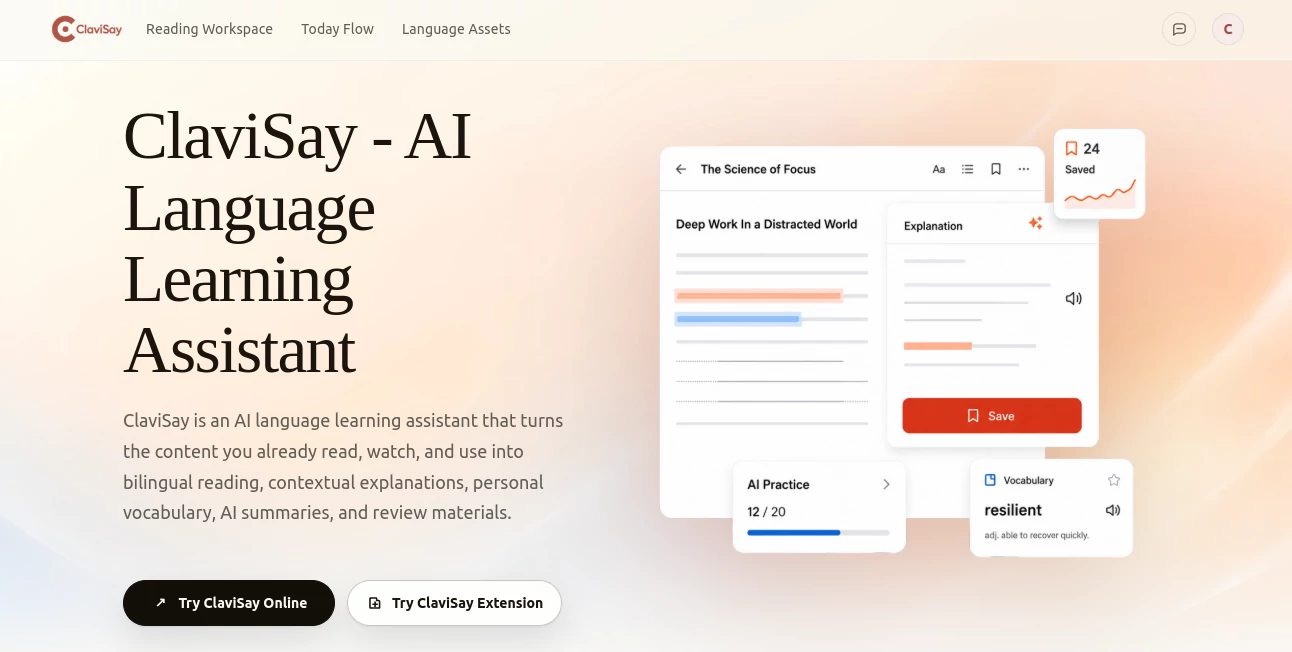
What is ClaviSay?
Let’s be honest—language apps are great for ordering coffee, but they completely fall apart when you’re trying to read a technical report, understand a legal document, or follow a complex video tutorial. You end up switching between tabs, copying and pasting into translators, and losing your flow every few seconds. I’ve been there, and it’s exhausting. This tool fixes that by bringing translation and explanation right into your reading environment. It’s designed for people who need to understand real-world content—not just textbook phrases—and it does so without breaking your concentration.
Key Features
What makes this platform unique is how it preserves context. Instead of giving you isolated word translations, it shows you meaning within the actual sentence and paragraph, so you understand tone, structure, and nuance.
User Interface
The browser extension sits quietly in your sidebar until you need it. Select any text on a webpage—a word, a phrase, a whole paragraph—and a floating card appears instantly with translation and AI-powered explanation. The web workspace is equally clean: you can import articles, PDFs, or video transcripts, and the platform turns them into side-by-side bilingual readings. The layout keeps the original content visible while adding translations and notes in the margins, so you never lose your place.
Accuracy & Performance
I threw a messy engineering document at it—full of jargon and complex sentences—and the context-aware explanations correctly clarified technical terms based on how they were used in each paragraph. The AI doesn't just translate words; it interprets meaning. Speed-wise, generating a full bilingual reading for a 20-page PDF takes under a minute. The floating card responses on webpages are instant enough that you won't notice any lag while scrolling.
Capabilities
You can import content from just about anywhere: articles, webpages, PDFs, video transcripts, or even pasted text. The tool preserves the original formatting and structure, so charts and headings remain intact. It generates AI summaries that highlight key ideas and surface useful vocabulary from long documents—perfect for research papers or meeting notes. Plus, you can save words, phrases, sentence patterns, and even your own annotations into a personal library that syncs across devices for spaced review.
Security & Privacy
Your imported documents and saved vocabulary remain private to your account. The platform doesn’t use your personal content for training public models. Everything is stored securely, and you can delete your library at any time. The developers are transparent about data handling, which is refreshing for a free tool.
Use Cases
This isn’t just for students. Professionals use it to speed through international reports and emails without getting stuck on unfamiliar terms. Freelance translators rely on it to maintain consistency across projects by saving terminology in context. I personally used it to get through a dense 50-slide presentation from a client—the bilingual reading mode let me grasp the technical details without pausing every two minutes. Even content creators use it to adapt articles from other languages while preserving the original tone and meaning.
Pros and Cons
Pros:
- Keeps content context intact, so translations make sense.
- Works with multiple formats—webpages, PDFs, videos, text.
- Personal vocabulary library syncs across devices for review.
- Free to start, with no aggressive paywalls for basic features.
- Browser extension is lightweight and non-intrusive.
Cons:
- The free version has limited monthly imports.
- PDF formatting can occasionally break if the file is scanned (not text-based).
- Advanced spaced review features are still developing.
Pricing Plans
There’s a free tier that gives you a generous number of translations and imports per month—enough to test it thoroughly. Paid plans unlock unlimited document imports, priority processing, and additional review tools. Pricing starts at around $8 per month for individuals, with discounted annual options. Teams and educators get custom pricing with shared libraries and collaborative features.
How to Use ClaviSay
Getting started is simple. Install the browser extension from the Chrome Web Store, or visit the web app directly. Sign up with an email or Google account. Once you’re in, you can either browse the web and select text to see translations pop up, or import a file—click “Import” and choose a PDF, webpage link, or video transcript. The platform will generate a bilingual reading view automatically. From there, you can highlight any word or phrase to see an in-context explanation, save it to your personal library, or generate a summary. The sidepanel lets you ask questions about the imported content, which is a huge time-saver for research and study.
Comparison with Similar Tools
Most translation tools give you isolated word or sentence translations without considering how terms relate to each other. Others offer reading assistance but don’t let you save vocabulary in context or generate summaries. This platform bridges that gap: it combines real-time translation, context-aware explanations, personal vocabulary management, and AI summaries into one fluid workflow. Compared to general-purpose translators, it feels like having a language tutor sitting next to you—one who knows exactly what you’re reading and why you need to understand it.
Conclusion
If you’ve ever felt lost trying to read content in another language—whether for work, study, or curiosity—this tool is a breath of fresh air. It doesn’t just translate; it explains. It doesn’t just save words; it saves understanding. And it does all this without interrupting your reading flow. I’ve used it for everything from tech blogs to legal contracts, and it’s saved me hours of frustration. Give it a try—you’ll wonder how you ever managed without it.
Frequently Asked Questions (FAQ)
Is it free to use?
Yes, there’s a free tier with monthly limits on imports and translations. Premium plans unlock unlimited usage.
Can I use it offline?
Currently, the tool requires an internet connection for AI processing and translation. The browser extension works online only.
What file formats are supported?
You can import webpages (via URL), PDFs, video transcripts (via text or auto-generated from supported platforms), and plain text.
Does it work with languages other than English?
Yes, it supports translation to and from multiple languages, including Spanish, French, Chinese, Japanese, and German. The context explanations adapt to each language pair.
How is my data handled?
Your imported content and saved vocabulary are private to your account. The platform does not use your data to train public AI models.
AI Translate , AI Content Generator , AI Education Assistant , AI Productivity Tools .
These classifications represent its core capabilities and areas of application. For related tools, explore the linked categories above.
ClaviSay details
Website unavailable — View Alternatives
Pricing
- Free
Apps
- Web App
- Chrome Extensions
Categories

ClaviSay Alternatives Product

Sourcetable

Humanize AI …

Workik

Lutains

Drafted AI

Calculadora …

AI Subtitle …

kling 3

CapyQR
