


















ClawDaddy
What is ClawDaddy?
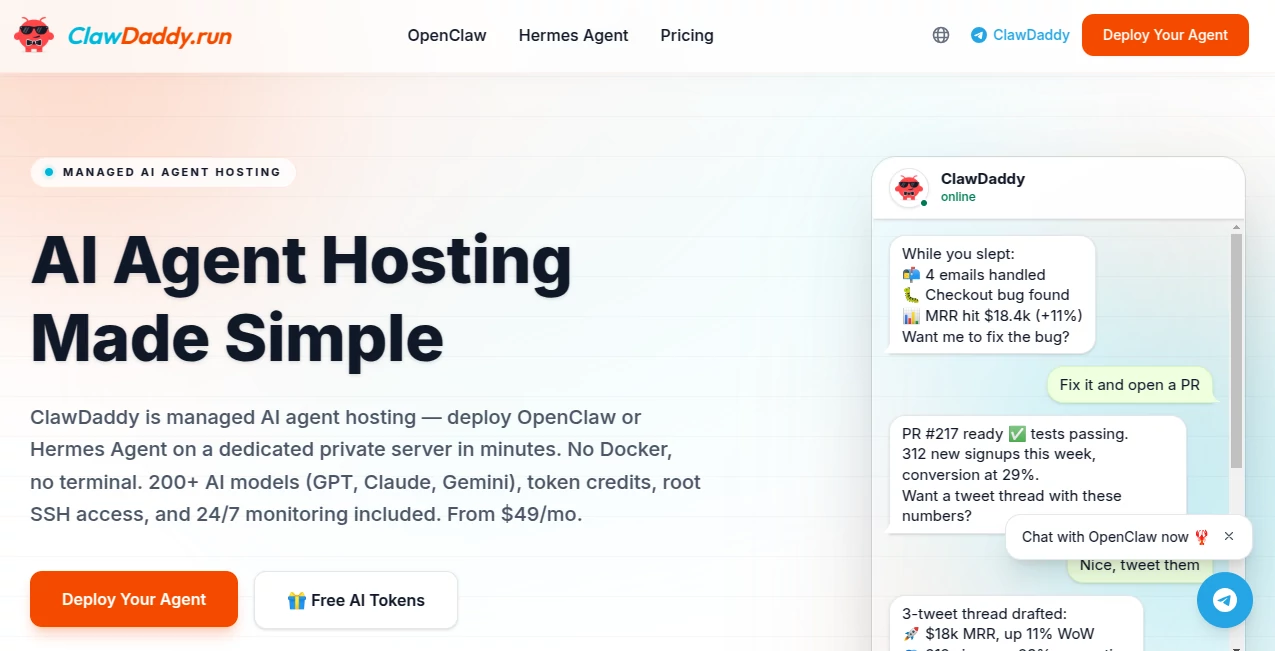
Deploying and maintaining AI agents can be frustrating, especially for users who want the benefits of automation without spending hours configuring servers, managing containers, or troubleshooting integrations. This platform removes those barriers by providing a fully managed environment where intelligent agents can be deployed, customized, and operated through a simple chat-based experience.
Instead of dealing with infrastructure, users can focus on what matters most: building workflows, automating repetitive tasks, and creating assistants that work around the clock. The service combines cloud hosting, AI model access, messaging platform integration, and ongoing maintenance into a single streamlined solution.
What makes it particularly appealing is the balance between simplicity and power. Beginners can launch an agent in minutes, while advanced users gain access to a dedicated server environment capable of handling complex workflows and integrations.
Key Features
User Interface
The platform takes a refreshing approach to deployment. Rather than requiring users to navigate technical dashboards or configure complicated settings, most actions can be completed through natural conversation. Agent creation, configuration changes, model switching, and resource management are all designed to feel intuitive.
This conversational setup dramatically reduces the learning curve, making sophisticated AI infrastructure accessible to users with little or no technical background.
Accuracy & Performance
Performance is supported by dedicated cloud resources and access to a wide selection of AI models. Agents operate continuously, maintain context, and respond across connected communication channels. Because the environment remains active 24/7, tasks can continue running even when users are offline.
Persistent memory and ongoing operation allow agents to deliver more consistent results than traditional session-based chat systems.
Capabilities
- Managed deployment of autonomous AI agents.
- Support for hundreds of AI models.
- Multi-channel communication through popular messaging platforms.
- Website and application hosting capabilities.
- Continuous operation with always-on infrastructure.
- Agent customization and personality configuration.
- Automated maintenance and software updates.
- Support for advanced workflows and automation tasks.
Security & Privacy
Security is built into the architecture through isolated environments, encrypted communication, and dedicated server resources for higher-tier plans. Users maintain control over their agents and data while benefiting from managed monitoring and infrastructure maintenance.
The platform also emphasizes ownership and portability, helping users avoid dependency on a single provider while maintaining access to their agent configurations and operational history.
Use Cases
- Creating customer support agents that operate around the clock.
- Managing social media communities and communication channels.
- Automating business workflows and recurring tasks.
- Building research assistants that gather and organize information.
- Running AI-powered productivity systems for teams.
- Hosting intelligent assistants for internal company operations.
- Developing personal AI agents that remain active across multiple platforms.
- Launching AI-powered websites and online services.
Pros and Cons
Pros
- Extremely beginner-friendly deployment process.
- No server management or technical setup required.
- Always-on infrastructure with continuous operation.
- Access to a large collection of AI models.
- Multi-platform communication support.
- Dedicated hosting options for improved performance.
- Flexible scaling for growing projects.
Cons
- Advanced plans may be more suitable for power users than casual users.
- Some premium capabilities require higher-tier subscriptions.
- Users seeking full self-hosting control may prefer a completely independent setup.
Pricing Plans
The platform offers multiple pricing tiers designed for different levels of usage.
- Free Plan: Suitable for testing and exploring the platform.
- Starter Plans: Includes managed infrastructure and operational features for individuals and small projects.
- Professional Plans: Provides expanded resources, additional channels, and advanced capabilities.
- Scale Plans: Built for organizations and users running multiple agents or demanding workloads.
Pricing structures may evolve over time, so users should review the official pricing page for the most current details.
How to Use ClawDaddy
Getting started is straightforward and does not require technical expertise.
- Sign up and create an account.
- Start a conversation with the deployment assistant.
- Choose an agent name and define its purpose.
- Select the preferred AI model and configuration.
- Connect messaging channels or communication platforms.
- Launch the agent on managed infrastructure.
- Monitor activity and adjust settings through chat-based commands.
- Expand functionality with integrations, workflows, and additional services.
Most users can move from account creation to a fully operational agent in only a few minutes.
Comparison with Similar Tools
Many AI agent platforms focus either on developer flexibility or user-friendly deployment. This solution successfully bridges the gap between the two approaches.
Compared with traditional self-hosted agent frameworks, it removes the burden of infrastructure management, security updates, and server maintenance. Compared with standard AI chat applications, it offers greater persistence, automation capabilities, and operational control.
The combination of managed hosting, multi-channel communication, persistent operation, and broad model support creates a compelling alternative for users who want powerful AI agents without infrastructure complexity.
Conclusion
This platform stands out as a practical solution for anyone looking to deploy intelligent agents quickly and efficiently. Its conversational setup process, managed hosting environment, extensive model support, and multi-channel functionality make it an attractive option for businesses, creators, and automation enthusiasts alike.
By eliminating technical obstacles while preserving powerful capabilities, it enables users to focus on outcomes rather than infrastructure. Whether the goal is customer engagement, workflow automation, research, or productivity enhancement, the platform provides a reliable foundation for building AI-driven solutions.
Frequently Asked Questions (FAQ)
What is this platform used for?
It is designed to deploy, host, and manage AI agents without requiring users to handle technical infrastructure.
Do I need coding knowledge to use it?
No. The deployment process is designed for non-technical users and can be completed through conversational interactions.
Can agents operate continuously?
Yes. Agents are hosted on always-on infrastructure and can remain active 24 hours a day.
Does it support multiple communication platforms?
Yes. Agents can interact across various messaging and collaboration platforms depending on the selected plan.
Can businesses use it for customer support?
Absolutely. Many organizations use AI agents for customer service, automation, lead handling, and operational assistance.
Is my data secure?
The platform utilizes isolated environments, encrypted communication, and dedicated resources to help protect user data and agent operations.
AI Developer Tools , AI Chatbot , AI Productivity Tools , AI Workflow Management .
These classifications represent its core capabilities and areas of application. For related tools, explore the linked categories above.

ClawDaddy Alternatives Product

Where Is Thi…

XreplyAI

GetVivix

SalaryHow

Blackbox AI

cznull

AI2AI project

Beat API

Carmatec
