
Clypse AI
What is Clypse AI?
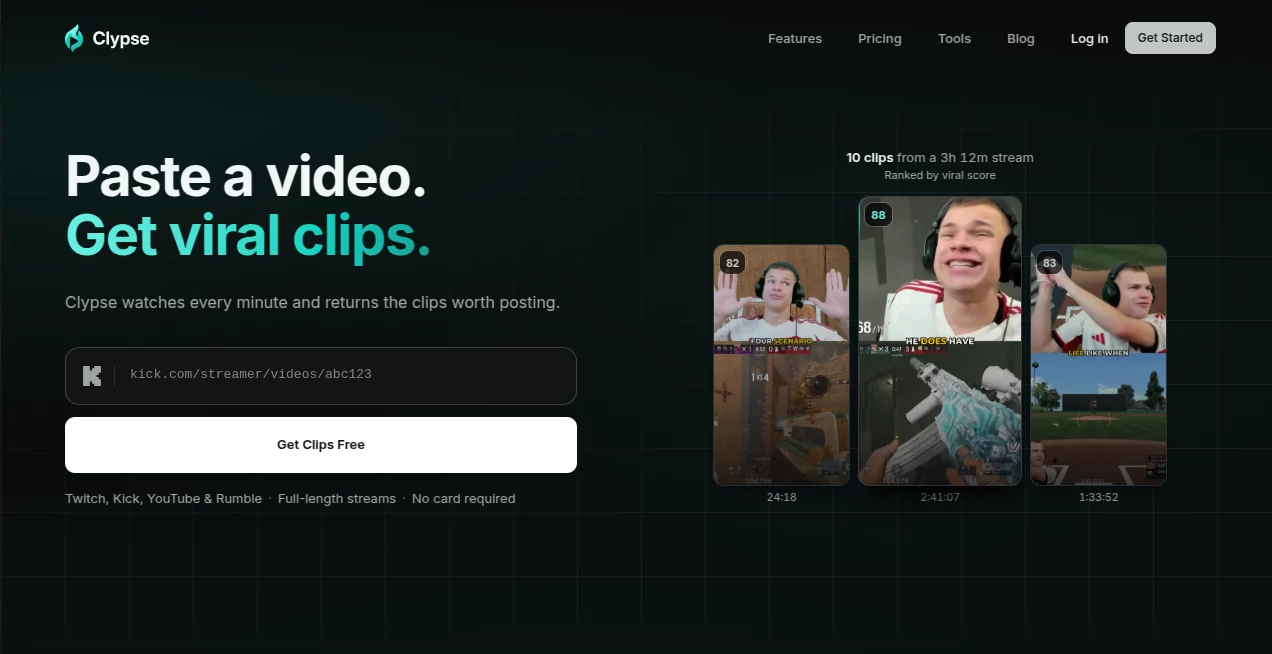
Clypse is an AI-powered video clipping platform built for creators who have plenty of long-form footage but not enough time to turn it into short-form content. Instead of manually watching a stream, finding the best moments, cutting the footage, resizing it, adding captions, and preparing each post, the platform handles much of that workflow from a single video link.
It supports content from Twitch, Kick, YouTube, and Rumble, allowing streamers, podcasters, educators, and other creators to turn long recordings into vertical clips for TikTok, YouTube Shorts, and Instagram Reels. The idea is refreshingly simple: paste a video, let the system examine it, and review the moments it believes are worth publishing.
Key Features
- AI-powered identification of strong moments throughout long videos
- Automatic vertical reframing for short-form platforms
- AI-generated captions with multiple visual styles
- Speaker and action tracking to keep important subjects visible
- Clip scoring and ranking so stronger moments can be reviewed first
- Support for Twitch, Kick, YouTube, and Rumble
- 1080p exports on paid plans without a watermark
- Scheduling and direct posting to TikTok, YouTube Shorts, and Instagram Reels
- Support for videos of up to six hours on Pro accounts
User Interface
The interface is designed around a straightforward workflow rather than a traditional video-editing timeline. Users begin by pasting a video or VOD link and selecting the content they want analyzed. This makes the process particularly appealing to creators who would rather spend their time recording and publishing than dragging clips around a timeline.
The editing experience still provides useful control when needed. Captions can be adjusted in terms of style, position, layout, and appearance, while the automatic framing helps transform wide footage into a 9:16 format without simply cutting off whoever happens to be speaking.
Accuracy & Performance
Finding a good clip is more complicated than locating the loudest moment in a recording. The system looks at signals such as reactions, changes in audio, visual framing, and complete story beats when deciding where a clip should begin and end. Generated clips are also scored and organized so creators can start with the strongest candidates.
This approach can be especially useful with lengthy streams. Rather than watching a three-hour recording from beginning to end just to find a handful of usable moments, a creator can review a ranked selection and decide which clips deserve a final edit.
Capabilities
The platform is particularly strong at converting long-form creator content into short-form social material. A single stream can produce multiple clips, with automatic cropping, captions, and framing designed for vertical viewing.
There is also a practical publishing layer. Pro and Studio users can schedule clips for TikTok, YouTube Shorts, and Instagram Reels, turning one recording into a series of posts spread across several days. For a streamer who normally finishes a broadcast and then forgets about it, that extra step can make a meaningful difference.
Security & Privacy
Creators should still review the platform's current terms and account settings before processing private or sensitive material. The service is primarily designed around public creator content and video links, so it is best suited to recordings that are intended for editing and distribution rather than confidential footage.
Use Cases
Streamers are one of the clearest audiences. A long Twitch or Kick broadcast can contain dozens of funny reactions, unexpected plays, useful explanations, or memorable conversations, but manually finding all of them takes time. Automated clip discovery makes it easier to turn those moments into a steady stream of short-form posts.
Podcasters can use the same workflow to repurpose interviews and conversations. Instead of publishing only the full episode, creators can extract individual moments that make sense as standalone social posts.
It can also work well for educators, gaming creators, commentators, coaches, and businesses that regularly publish long videos. Someone producing a weekly livestream, for example, could potentially turn each session into several days of social content without starting the editing process from scratch.
Pros and Cons
- Pros: Simple link-based workflow, long-video analysis, automatic clip discovery, vertical reframing, captions, clip scoring, multiple source platforms, and social publishing.
- Pros: The free tier provides a useful way to test the workflow without entering payment details.
- Pros: Paid plans remove watermarks and keep generated clips from expiring.
- Cons: Free exports contain a watermark and the free allowance is limited.
- Cons: Creators who want highly detailed manual editing may still prefer a dedicated professional video editor.
- Cons: The quality of suggested clips depends on the content and the signals available in the original recording.
Pricing Plans
The free plan costs $0 and includes 30 credits for one full video, with watermarked downloads and two free downloads. It is a convenient starting point for creators who want to see whether automated clipping fits their workflow.
The Pro plan costs $14.99 per month and includes 300 credits, up to 100 clips per month, longer scans of up to six hours, ranked clips, automatic reframing, captions, watermark-free exports, and social posting.
The Studio plan costs $29.99 per month and increases the allowance to up to 250 clips per month while adding priority processing. Annual billing is also available at a lower effective monthly price. One-time credit packs are available as an alternative for users who only need additional processing occasionally.
How to Use Clypse
- Choose a video or VOD from a supported source such as Twitch, Kick, YouTube, or Rumble.
- Paste the video link into the platform.
- Select the relevant scan range and start processing.
- Review the suggested clips and their scores.
- Choose the moments you want to publish.
- Adjust captions, framing, or clip presentation when necessary.
- Export the finished vertical videos or schedule them directly to supported social platforms.
Comparison with Similar Tools
There are several AI video clipping platforms available, but their workflows are not identical. Some focus heavily on general-purpose editing, while others concentrate on captions, repurposing, or social publishing.
This platform stands out when the main requirement is turning long streams and recordings into short vertical clips with as little manual searching as possible. It supports Twitch, Kick, YouTube, and Rumble, automatically reframes content for vertical viewing, and combines clip discovery with captions and publishing.
For creators who already have a professional editing workflow and want detailed timeline control, a traditional editor may remain the better choice. For someone whose biggest problem is simply finding the best moments inside hours of footage, automated discovery can save considerably more time.
Conclusion
Turning long-form video into consistent short-form content is often less about editing skill and more about having enough time to find the right moments. This platform addresses that bottleneck directly by watching long recordings, identifying potential highlights, preparing them for vertical viewing, and helping creators move them toward publication.
Its combination of automatic clip discovery, reframing, captions, scoring, and social publishing makes it a compelling option for streamers and creators who want to get more mileage from every recording. The free plan also makes it easy to test the workflow before committing to a subscription.
Frequently Asked Questions (FAQ)
What types of videos can I process?
You can process content from Twitch, Kick, YouTube, and Rumble, with support for long-form recordings and VODs.
How long can a video be?
Free accounts can process videos up to two hours long, while Pro accounts support videos of up to six hours.
Can it automatically create vertical videos?
Yes. The system automatically reframes wide footage into a vertical format and attempts to keep important speakers or action within the frame.
Does it add captions?
Yes. Several caption styles are available, including animated and cleaner subtitle-focused designs. Paid users also receive additional customization options such as custom fonts and branding.
Can I publish directly to social media?
Yes. Pro and Studio users can schedule and publish clips to TikTok, YouTube Shorts, and Instagram Reels.
Are free exports watermarked?
Yes. Free downloads include a small watermark. Pro and Studio exports are available without the watermark and can be produced at 1080p.
Is there a free plan?
Yes. The free plan allows users to try the service on one full video and includes 30 credits without requiring a credit card.
Who is this tool best for?
It is particularly useful for streamers, podcasters, gaming creators, educators, commentators, and anyone who regularly produces long videos and wants to turn them into a consistent supply of short-form social content.
AI Video Generator , AI Video Editor , AI Short Clips Generator , AI Social Media Assistant .
These classifications represent its core capabilities and areas of application. For related tools, explore the linked categories above.

Clypse AI Alternatives Product

Simplified

Veo4

Seedance 2.5

VidiOne

LoveGen AI
Seedance 2.0

Happy Horse …

Wurt.app

AI Dog Dance