


















Conduyt
What is Conduyt?
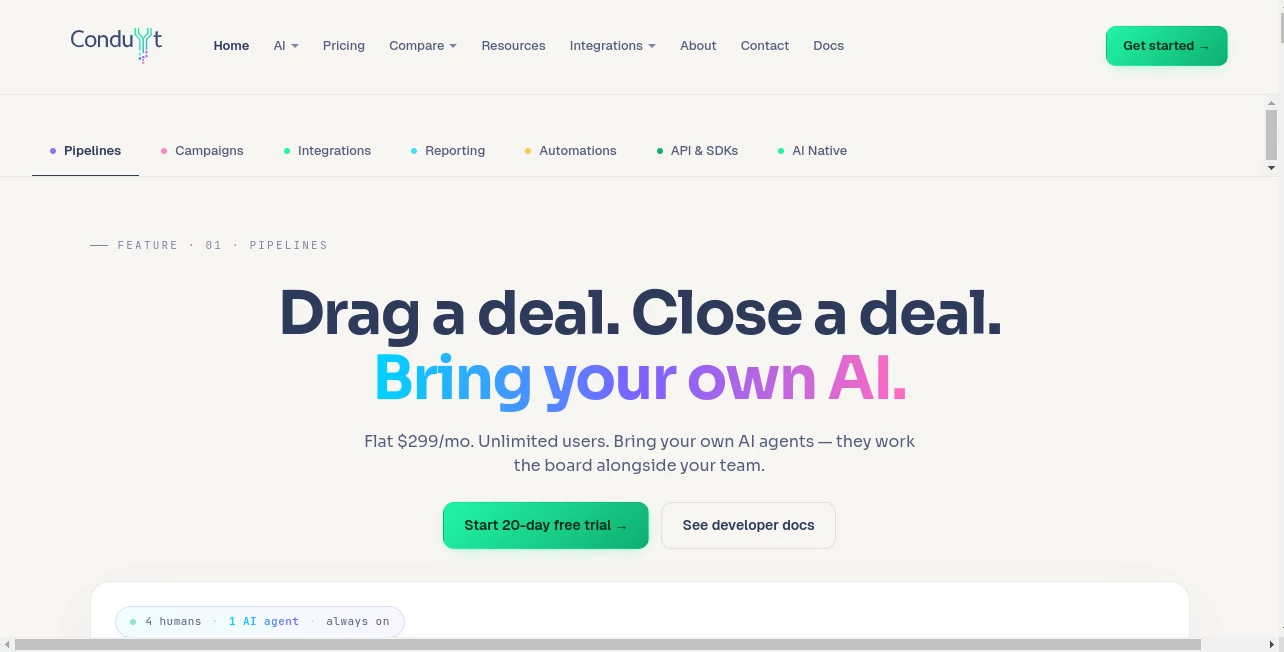
Conduyt takes a different approach to customer relationship management by putting AI at the center of the CRM architecture rather than treating it as an extra feature. The platform is designed for sales teams, operations teams, developers, and businesses that want their AI agents to work directly with customer and sales data.
Instead of forcing teams to use a single built-in AI assistant, the platform follows a bring-your-own-AI approach. Teams can connect Claude, ChatGPT, Gemini, n8n, Zapier, custom Python agents, and other systems that communicate through HTTP or MCP. This makes the CRM useful not only to people working inside the interface, but also to AI agents that need to read information, update records, create workflows, and perform operational tasks.
The platform combines contact management, sales pipelines, campaigns, reporting, integrations, workflow automation, APIs, and AI capabilities in one environment. Its flat-rate pricing also avoids the per-seat structure commonly found in traditional CRM software.
Key Features
- AI-native CRM architecture designed for both humans and AI agents
- Unlimited contacts, pipelines, and team members on paid plans
- Native MCP server with 162 tools for AI agent access
- REST and GraphQL APIs with official TypeScript, Python, and Go SDKs
- Visual workflow automation with branching, conditions, delays, webhooks, AI actions, and loops
- Email and SMS campaigns from a unified composer
- Real-time dashboards and sales reporting
- 42 native integrations plus webhook-based connectivity
- AI-powered lead scoring, contact summaries, predictive insights, and AI-assisted sales operations on higher plans
- Security controls including scoped API keys, dry-run mode, confirmation tokens, rate limiting, and audit logs
User Interface
The interface is built around practical CRM workflows rather than flashy AI gimmicks. Sales teams can work with pipelines, contacts, deals, campaigns, dashboards, and automation flows from familiar visual interfaces.
The workflow builder is particularly useful for teams that want to automate processes without writing code. Users can connect nodes visually, create conditions, introduce delays, send messages, update contacts, create deals, trigger webhooks, and involve an AI action when a decision requires more context.
For developers, the experience is different but equally important. The same operational functionality exposed through the interface is also available through APIs, allowing technical teams to build custom applications and AI agents around the CRM.
Accuracy & Performance
Performance matters in a CRM because sales information quickly becomes outdated when systems depend on delayed synchronization. The platform is designed around real-time data, with integrations and event-driven workflows intended to keep customer activity moving through the system as it happens.
Reporting is also designed to remain transparent. Forecasts can use stage probability, deal value, and time-in-stage information instead of presenting unexplained predictions. This gives sales managers a clearer way to understand where numbers come from before making decisions.
For automation, execution history provides a practical safety net. Teams can inspect workflow runs, review failed steps, and replay executions rather than trying to guess what went wrong.
Capabilities
The core CRM covers contacts, deals, pipelines, stages, campaigns, reporting, integrations, and automations. Multiple pipelines can be used for different sales processes such as new business, renewals, or expansions without requiring duplicate customer records.
AI agents can interact with the CRM through the native MCP server and APIs. This opens up more advanced possibilities. An agent can analyze customer information, create or modify workflows, update CRM records, assist with lead qualification, or perform repetitive operational tasks according to the permissions assigned to it.
The workflow system adds another layer of flexibility. More than a simple linear sequence, workflows can branch according to CRM data, pause for human approval, call external APIs, assign work, send messages, and invoke AI actions. This makes it suitable for sales operations where different customers need different paths.
Security & Privacy
Giving AI agents access to CRM data requires stronger controls than simply connecting an AI chatbot. The platform addresses this with scoped API keys, allowing different agents to receive different levels of access.
A read-only analytics agent, for example, does not need the same permissions as an automation agent capable of modifying records. Dry-run functionality can also be used to test actions before allowing them to create real changes.
Additional controls include confirmation tokens for destructive actions, rate limiting, audit trails, and sandbox-related safeguards. These features are especially valuable for organizations that want to experiment with AI automation without giving every agent unrestricted access to business data.
Use Cases
AI-powered sales operations: Sales teams can use AI agents to analyze contacts, assist with lead qualification, summarize customer information, and support day-to-day CRM activities.
Lead management: New contacts can enter automated workflows, receive appropriate follow-ups, receive tags, and move through sales pipelines according to predefined rules or AI-driven decisions.
Email and SMS campaigns: Marketing and sales teams can create broadcasts, drip sequences, and message variations while keeping replies connected to the customer's timeline.
Automated CRM workflows: Businesses can automate repetitive operations such as assigning new leads, updating deal stages, sending notifications, calling external services, and requesting human approval for sensitive decisions.
AI agent development: Developers can build custom agents around CRM data using MCP, REST, GraphQL, webhooks, or SDKs instead of being restricted to the platform's built-in AI functionality.
Sales forecasting: Managers can use live pipeline information, deal values, stage probabilities, and time-based signals to create more transparent forecasts.
CRM integration: Companies already using services such as Slack, Stripe, Google Workspace, Twilio, Segment, or other connected systems can use native integrations and webhooks to connect their sales operations.
Pros and Cons
Pros
- AI agents are treated as first-class CRM participants rather than an add-on chatbot.
- Bring-your-own-AI approach provides flexibility in choosing AI providers.
- Native MCP support makes the platform interesting for AI-agent developers.
- Unlimited users and contacts on paid plans can be attractive for growing teams.
- Strong workflow automation capabilities with visual and API-based options.
- Transparent sales forecasting rather than relying entirely on black-box predictions.
- Extensive API and webhook capabilities for custom integrations.
- Useful security controls for managing AI agent permissions.
Cons
- The monthly price is considerably higher than many lightweight CRM products.
- Smaller businesses may not need the extensive AI-agent and API infrastructure.
- Getting the most value from MCP and custom AI agents requires some technical understanding.
- Teams looking for a very simple contact-management tool may find the platform broader than necessary.
- Some advanced AI and sales capabilities are reserved for higher-tier plans.
Pricing Plans
A 20-day free trial provides access to the full platform without requiring a credit card. After the trial, paid plans use flat monthly pricing rather than charging per user.
- Free Trial: $0 for 20 days, with full Professional-level access, unlimited contacts, unlimited pipelines, unlimited team members, campaigns, API access, and the native MCP server.
- Starter: $299 per month when billed annually. It includes unlimited contacts, pipelines, and team members, email and SMS campaigns, standard automations, basic AI features, reporting dashboards, booking pages, API access, and 162 MCP tools.
- Professional: $499 per month when billed annually. It adds advanced AI, lead scoring, predictive insights, an AI bot, unlimited automations, advanced reporting, sales forecasting, calendar synchronization, team analytics, role-based permissions, and white-label capabilities.
- Enterprise: Custom pricing with options such as self-hosting, SSO/SAML, dedicated infrastructure, custom SLA, audit logs, and volume discounts.
Annual billing reduces the effective monthly cost, with the Starter plan dropping to $249 per month and the Professional plan to $399 per month when paid annually.
How to Use It
Start by creating an account and using the 20-day free trial. You can begin by importing or creating contacts, setting up sales pipelines, and connecting the services your team already uses.
For regular CRM work, create pipelines and define stages that match your sales process. Add contacts and deals, configure dashboards, and create campaigns when you are ready to automate communication.
To introduce AI, generate an appropriately scoped API key and connect your preferred AI system. Developers can use MCP for compatible AI agents or work directly with the REST and GraphQL APIs. Start with read-only access for analytical agents and expand permissions only when the workflow has been tested.
For automation, open the workflow builder and select a trigger. Add conditions, actions, delays, notifications, webhooks, or AI actions as needed. Test the workflow before publishing it, then use execution history to monitor its behavior.
Comparison with Similar Tools
Traditional CRM platforms such as HubSpot, Salesforce, and Pipedrive generally provide AI features within their own product ecosystems. This platform takes a more open approach by allowing external AI systems and custom agents to interact directly with CRM data.
The biggest distinction is therefore not simply the presence of AI. It is how deeply AI agents can participate in CRM operations. With MCP and extensive API access, developers can build agents that perform real CRM actions instead of limiting AI to drafting text or answering questions in a sidebar.
The pricing model is another important difference. Instead of increasing the bill as more users are added, paid plans provide unlimited team members. This can make the economics more predictable for larger sales and operations teams, although the starting price means that smaller companies should evaluate whether they will actually use the platform's broader capabilities.
Conclusion
For teams searching for a CRM that can work alongside AI agents rather than simply adding an AI assistant to an existing CRM model, this platform offers an unusually developer-friendly approach. MCP access, extensive APIs, workflow automation, real-time reporting, integrations, and granular AI controls make it more than a conventional contact and pipeline manager.
Its strongest appeal is likely to be businesses that already use AI in their operations or plan to build AI agents into their sales processes. The combination of human-facing CRM tools and machine-accessible infrastructure creates room for workflows that would otherwise require several separate applications.
The price may be difficult to justify for a very small team looking for basic CRM functionality. For organizations with larger teams, complex sales processes, or ambitious AI automation plans, however, the flat-rate structure and extensive automation capabilities make it a compelling option worth testing during the free trial.
Frequently Asked Questions (FAQ)
What is an AI-native CRM?
An AI-native CRM is designed so that AI can participate directly in the system's core operations instead of being limited to a separate chatbot or assistant. AI agents can access data, trigger workflows, and perform permitted actions through APIs or compatible protocols.
Can I use my own AI model?
Yes. The platform follows a bring-your-own-AI approach and supports systems such as Claude, ChatGPT, Gemini, n8n, Zapier, custom Python agents, and other applications capable of communicating through HTTP or MCP.
Does it support AI agents?
Yes. Its native MCP server provides 162 tools that AI agents can use to interact with CRM functionality. Access can be controlled through scoped API keys and other security mechanisms.
Does it charge per user?
No. Paid plans use flat monthly pricing and include unlimited team members. This makes the pricing model more predictable as a company adds people to its CRM workspace.
Is there a free trial?
Yes. New accounts receive a 20-day free trial with full Professional-level access and no credit card required.
Can developers build custom integrations?
Yes. REST and GraphQL APIs, webhooks, SDKs, and MCP support give developers several ways to connect external applications and build custom AI-powered workflows.
Can workflows include AI decisions?
Yes. The workflow builder includes an AI action that can use contact data and conversation context when deciding what should happen next. Workflows can also include conditions, branches, loops, delays, webhooks, notifications, and human approval steps.
Is the platform suitable for sales teams?
Yes. Sales pipelines, deal management, lead scoring, forecasting, campaigns, dashboards, automation, and AI-assisted operations make it particularly suitable for sales and revenue teams.
What makes its AI approach different from a normal CRM?
The main difference is that AI is treated as part of the operating architecture. External AI agents can interact with CRM records and workflows through MCP and APIs, allowing them to perform useful operational tasks rather than simply generating responses.
AI Workflow Management , AI Sales Assistant , AI Analytics Assistant , AI CRM Assistant .
These classifications represent its core capabilities and areas of application. For related tools, explore the linked categories above.

Conduyt Alternatives Product

Surmado

Weekly Brief

Sorank

MacroMicro

ttanonviewer
LaunchBoard

Candidate Sc…

Duct Tape AI…

Meev
