Creastor
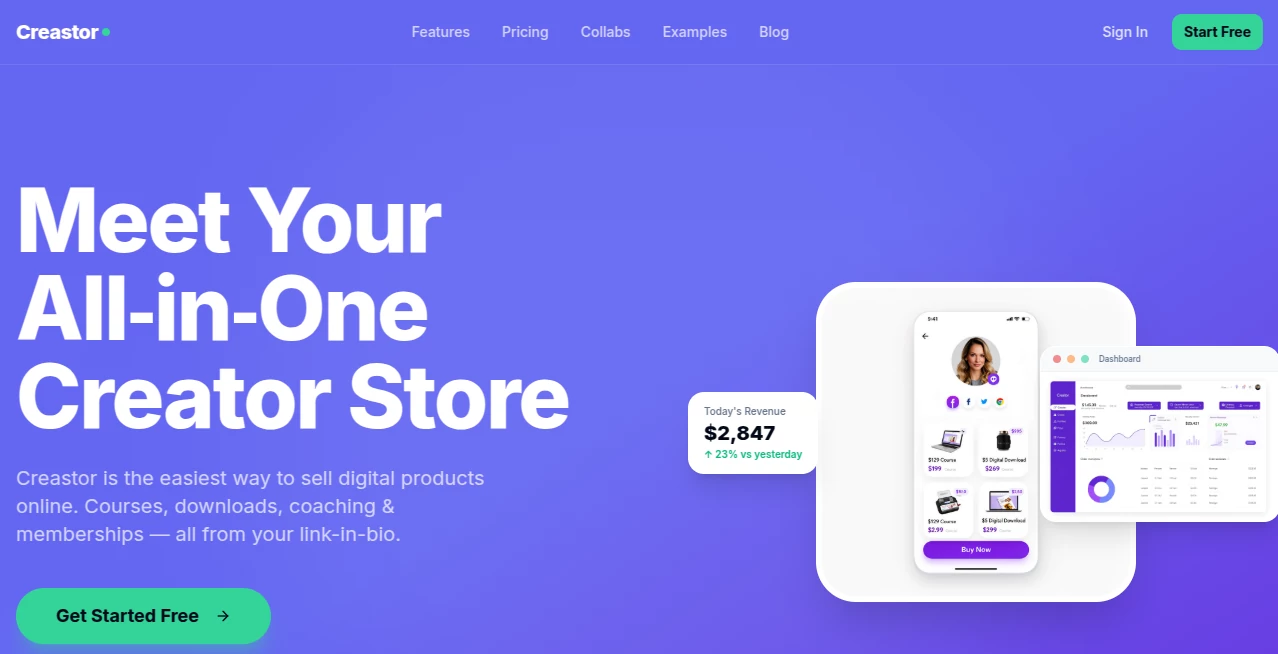
What is Creastor?
There’s something deeply satisfying about having one clean link that does everything—show your work, sell your products, collect emails, and look professional while doing it. This platform delivers exactly that feeling. You set up once, customize it to match your vibe, and suddenly your bio link becomes a full storefront that actually converts. I’ve watched creators go from scattered Linktree pages and Gumroad links to one elegant hub where everything lives together. The difference in how seriously people take them is noticeable almost immediately.
Introduction
Most creators start selling digital products with whatever’s easiest—maybe a Gumroad link here, a Stan Store there—but it quickly becomes messy. Creastor was built to solve that scattered feeling. It gives you one beautiful, customizable page where you can sell PDFs, templates, courses, coaching calls, memberships, and lead magnets all in the same place. No complicated apps, no high fees eating your earnings, and no need to beg for traffic. It’s designed for people who want to focus on creating and selling, not managing five different platforms. Many users say they made their first sale the same day they set it up, which tells you how frictionless the whole experience is.
Key Features
User Interface
The setup feels refreshingly human. You pick a template that already looks good, then tweak colors, fonts, and layout until it feels like you. Adding products is as simple as uploading files and writing a description—no complicated product setups. The live preview updates in real time, so you can see exactly what your customers will see. It’s one of those rare tools where you don’t need a tutorial; you just start building and it flows naturally.
Accuracy & Performance
Checkout is fast and mobile-optimized, with instant payouts through Stripe. Analytics show you exactly what’s working—who’s clicking, what’s converting, and where people drop off. The platform loads quickly even with multiple products and media files. Most importantly, the file delivery is secure—buyers get unique, expiring download links instead of public URLs that can be shared endlessly.
Capabilities
You can sell pretty much any digital thing: ebooks, Notion templates, video courses, 1:1 coaching sessions with calendar booking, recurring memberships, and free lead magnets that build your email list automatically. Built-in SEO tools help your store rank in Google. Social proof notifications (“Someone just bought this”) gently boost conversions. Order bumps at checkout let you offer related products right before payment. It’s a complete toolkit packed into one clean link.
Security & Privacy
Your products are protected with secure delivery tokens—no one can share a link and give away your work. Payments go directly to your Stripe account. The platform has clear policies and doesn’t suspend accounts without reason like some competitors. For creators who’ve been burned before, that reliability and respect for your business is a big deal.
Use Cases
A fitness coach sells workout plans and books discovery calls from the same page, turning followers into paying clients smoothly. A designer offers Notion templates and premium presets, building a passive income stream that grows while she sleeps. A language teacher creates a membership site for monthly conversation practice and resources. Even someone just starting out can offer a free lead magnet that collects emails and gently introduces paid products. The flexibility means it grows with you—from first sale to full business.
Pros and Cons
Pros:
- 0% platform fees on paid plans—keep more of what you earn.
- Beautiful, customizable stores that actually look like your brand.
- Built-in SEO and blog features to attract organic traffic.
- Secure file delivery and strong anti-piracy protection.
- Generous free plan to start without risk.
Cons:
- Still growing, so it doesn’t have the massive audience of older platforms yet.
- Advanced features like full course builders are on higher plans.
Pricing Plans
The free plan is genuinely useful—unlimited products, basic analytics, and secure delivery. The Creator plan at $29/month removes transaction fees, adds custom domains, advanced analytics, and discount codes. Pro at $79/month brings course builders, memberships, affiliate tools, and multiple stores. It’s structured so you can start free and upgrade naturally as your business grows. Many creators say the paid plans pay for themselves quickly through higher conversions and zero fees.
How to Use Creastor
Sign up (takes about 30 seconds), choose a template, and start customizing your page. Upload your first product—whether it’s a PDF, video course, or coaching session. Write a compelling description, set your price, and publish. Share your single link everywhere: bio, emails, social posts. Track performance in the dashboard and tweak as you learn what converts. The whole process from zero to first sale can happen in under an hour if you’re ready.
Comparison with Similar Tools
Unlike platforms that take 5–10% forever or force you to use multiple tools, Creastor combines store, checkout, email collection, and SEO in one place with much lower (or zero) fees. Where some competitors feel generic or restrictive, this one gives you real design freedom and business tools that actually help you grow. It’s built by creators who understand the pain points and fixed them thoughtfully.
Conclusion
Building an audience is hard enough. Selling to them shouldn’t be harder. This platform removes unnecessary friction so you can focus on what you do best—creating things people love. When your work lives in one beautiful, professional place that converts and protects your effort, it changes how seriously people take you. For any creator ready to turn their knowledge or art into income, it’s one of the smartest single links you can have.
Frequently Asked Questions (FAQ)
Do I need to pay to start selling?
No—the free plan lets you create a full store and sell right away.
Are there transaction fees?
Only 5% on the free plan. Paid plans offer 0% fees.
Can I sell courses and memberships?
Yes—full support for digital downloads, courses, coaching, and recurring memberships.
Is my data and my customers’ data secure?
Yes—secure payments through Stripe and protected file delivery.
Can I use my own domain?
Yes—custom domains are available on paid plans.
These classifications represent its core capabilities and areas of application. For related tools, explore the linked categories above.

Creastor Alternatives Product

Marketinguys
X Growth Eng…
Astic AI

Marketing To…

Lebesgue: AI…

Andreas Chri…

Nodu AI

KarmaGuy

Flitz AI