
CreateQR
What is CreateQR?
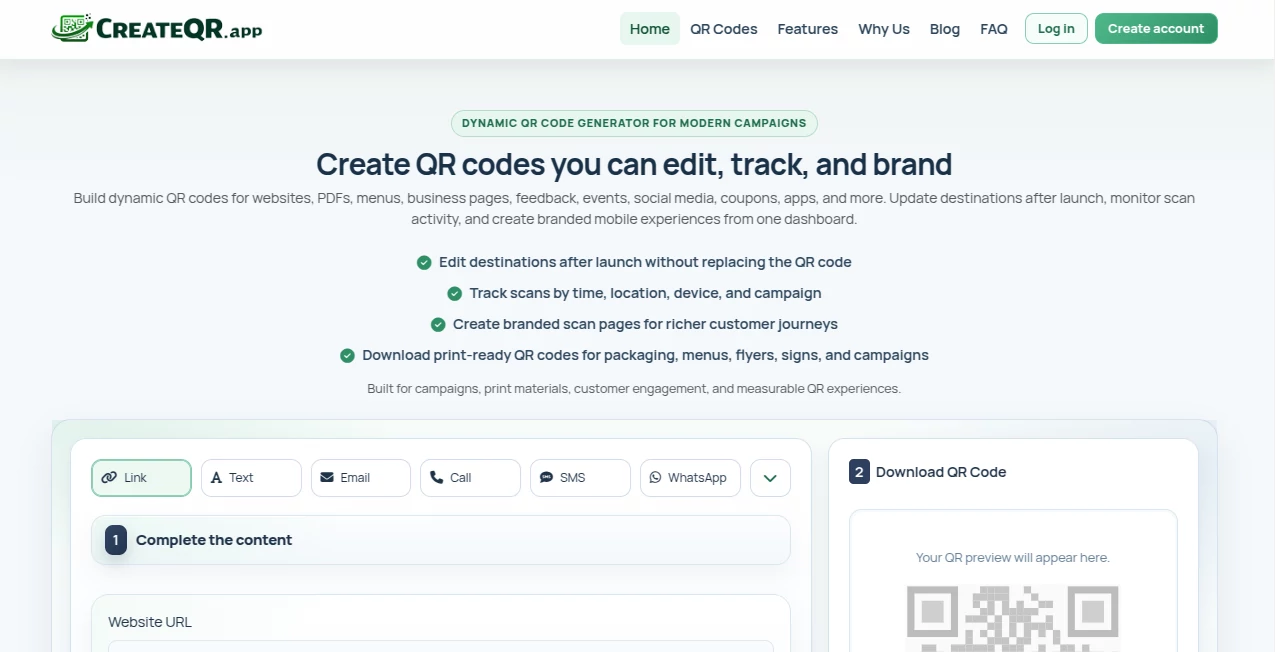
Most QR codes look like they were designed in 2012 — ugly black-and-white squares that scream "scan me if you dare." This tool changes that completely. You get clean, branded, visually appealing QR codes that people actually want to scan instead of avoiding. Whether it's for a business card, product packaging, event ticket, or restaurant menu, the result feels intentional and professional. I’ve used it for client projects and the feedback is always the same: “Finally, a QR code that doesn’t ruin the design.”
Introduction
QR codes are everywhere now, but most still look like an afterthought. This platform makes them part of your brand instead of an eyesore. You can start with a simple URL and turn it into something that matches your colors, logo, and aesthetic in seconds. No design degree required, no clunky software to learn. It’s become my go-to whenever I need a QR code that doesn’t make the whole design suffer. The best part? It still scans reliably even with creative patterns, frames, and colors added — something many other tools struggle with.
Key Features
User Interface
The interface is refreshingly straightforward. You paste your link or choose what the QR should do (URL, WiFi, vCard, social media, etc.), then play with colors, shapes, logos, and frames in real time. Live preview updates instantly so you can see exactly how it will look before downloading. No confusing menus or hidden settings — everything important is right in front of you. It feels more like designing a small piece of branding than generating a code.
Accuracy & Performance
The generated codes scan quickly and reliably across different phones and lighting conditions. Even with heavy customization — rounded corners, embedded logos, gradient colors — the error correction stays strong. I’ve tested some pretty artistic versions and they still worked on the first try. Download speeds are fast, and the output files are clean at multiple resolutions, perfect for both digital and print use.
Capabilities
Beyond basic URLs, it supports WiFi passwords, contact cards, social profiles, PDF menus, payment links, and more. You can add your logo, choose from dozens of frame styles, adjust patterns, and pick colors that match your brand. It even generates dynamic QR codes with tracking if you need analytics on scans. The variety means you can create everything from elegant minimalist codes to bold, eye-catching ones without sacrificing functionality.
Security & Privacy
Your data stays private during creation — no unnecessary accounts required for basic use. Generated codes are yours to keep, and dynamic ones give you control over destinations. It’s built with care for both personal and business use, so you don’t have to worry about your links or branding ending up in the wrong hands.
Use Cases
A coffee shop adds a stylish QR code to their menu that links to the full digital version — customers love the clean look. A freelancer puts a custom code on business cards that opens their portfolio with their photo and branding intact. Event organizers create beautiful check-in codes that match the invitation design. Real estate agents generate property-specific codes that link to virtual tours. The common thread is turning something functional into something that actually enhances the overall presentation.
Pros and Cons
Pros:
- Results look like real design work, not generic QR patterns.
- Extremely reliable scanning even with heavy customization.
- Fast workflow — from idea to finished code in under a minute.
- Great selection of templates and customization options.
- Free tier is generous for most personal and small business needs.
Cons:
- Advanced analytics and unlimited dynamic codes require a paid plan.
- Some very complex logo integrations need careful adjustment.
Pricing Plans
The free plan covers most everyday needs with beautiful static codes and decent customization. Paid plans unlock dynamic codes with scan tracking, more storage for saved designs, higher resolution exports, and removal of any small watermarks. Pricing feels fair — many small businesses find the upgrade pays for itself quickly through better brand consistency and analytics.
How to Use CreateQR
Go to the generator, paste your link or choose the QR type (URL, WiFi, contact, etc.). Pick a style or start customizing colors and shapes. Upload your logo if you want it embedded. Adjust the frame and pattern until it feels right. Preview on different backgrounds if needed, then download in high resolution. Save the design for later if you’re on a paid plan. The whole process is intuitive enough that you’ll be creating polished codes on your first try.
Comparison with Similar Tools
Most free QR generators give you basic black-and-white codes that look dated. Others allow customization but sacrifice scannability or add ugly watermarks. This one manages to balance beauty, reliability, and ease of use better than most. The design options feel modern and flexible without compromising the one thing that matters most — actually working when scanned.
Conclusion
QR codes aren’t going away anytime soon. The difference now is whether yours looks like an afterthought or a deliberate part of your brand. This tool makes the latter easy and enjoyable. It turns a purely functional element into something you can actually be proud to show. In a world where every detail counts, having QR codes that enhance rather than detract from your design is a small but meaningful advantage.
Frequently Asked Questions (FAQ)
Do the customized QR codes still scan reliably?
Yes — they maintain strong error correction even with logos and colors.
Can I add my company logo?
Absolutely — and it looks natural with good placement options.
Is there a limit on free uses?
Free tier is generous for most individuals and small projects.
Can I track scans?
Yes, dynamic codes with analytics are available on paid plans.
Are the downloads high resolution?
Yes — suitable for both digital use and professional printing.
AI Design Generator , AI Graphic Design , AI Tools Directory .
These classifications represent its core capabilities and areas of application. For related tools, explore the linked categories above.

CreateQR Alternatives Product
Yooiu

Brat Generat…

Shipstry

AI Slop Canv…

AiToolsObser…

FaceShapeDet…

chibi genera…

Undertale Te…
Gamelabs Stu…