


















CreateVision AI
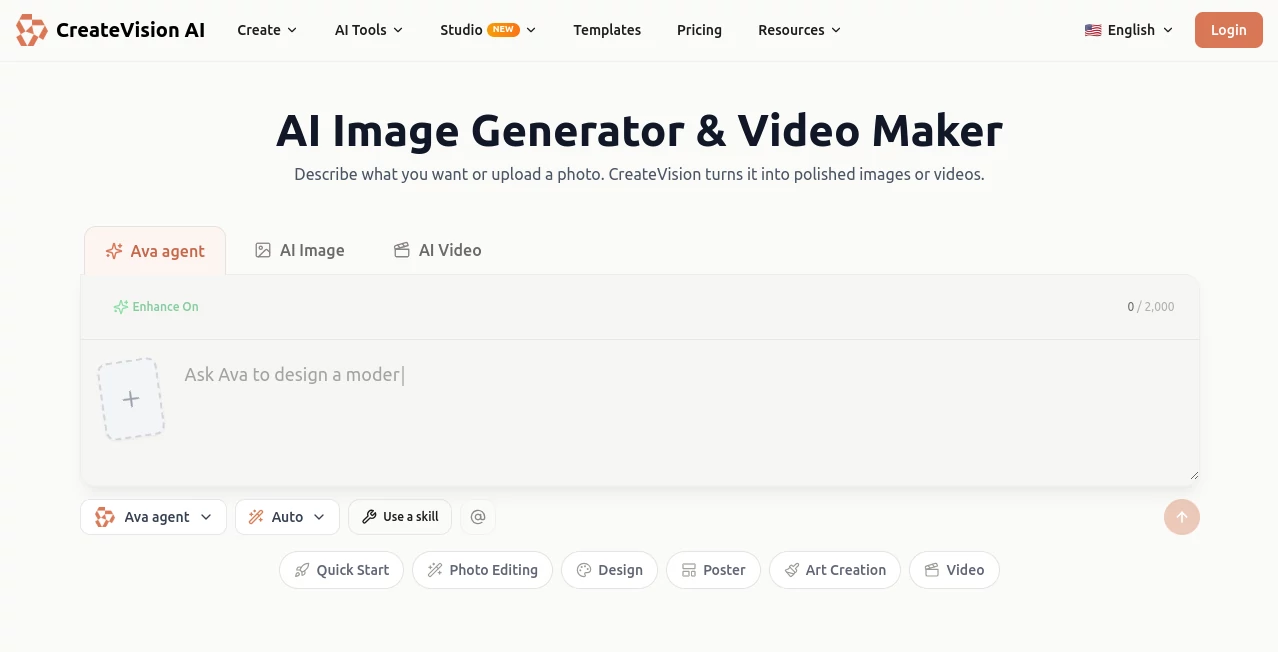
What is CreateVision AI?
CreateVision AI is an all-in-one creative platform designed to make AI-powered image and video generation accessible to everyone. Instead of forcing users to learn prompt engineering or compare dozens of AI models, the platform intelligently analyzes each request and automatically selects the most suitable generation model. This approach allows beginners and professionals alike to focus on creativity rather than technical complexity.
Whether you want to generate marketing visuals, anime artwork, product photography, social media graphics, concept art, or animated videos, the platform combines multiple state-of-the-art AI models inside one streamlined workspace. The addition of an intelligent AI Agent and creative mentors helps users transform simple ideas into polished visual content with minimal effort.
One of the most impressive aspects is its balance between simplicity and professional output. Instead of overwhelming users with settings, the platform quietly handles model selection, prompt optimization, and workflow improvements in the background, making high-quality AI content creation surprisingly approachable.
Key Features
User Interface
The interface is clean, modern, and beginner-friendly. Users simply describe their idea or upload an existing image, while the AI Agent manages prompt enhancement and automatically routes the request to the most appropriate AI model. Navigation remains intuitive even though dozens of creative tools are available from a single dashboard.
Accuracy & Performance
The platform leverages multiple advanced image and video generation models rather than relying on a single engine. Intelligent model routing helps improve generation quality while reducing unnecessary experimentation. Results are typically produced quickly, and users can create professional-quality graphics, illustrations, portraits, product images, and videos without extensive manual adjustments.
Capabilities
The platform offers an extensive collection of creative AI tools including text-to-image generation, image editing, image enhancement, face swapping, background removal, watermark removal, AI upscaling, anime conversion, Ghibli-inspired artwork, logo creation, product photography, room visualization, thumbnail generation, image-to-video conversion, photo animation, AI hug and kiss videos, portrait creation, concept art, and many additional creative workflows. Smart templates and AI creative mentors further simplify the entire design process.
Security & Privacy
User privacy is treated seriously through centralized project management and controlled access to generated content. Private generation options are available for higher-tier subscribers, while users retain ownership of the images they create for both personal and commercial projects according to the platform's published policies.
Use Cases
Content creators can quickly generate engaging social media visuals and YouTube thumbnails.
Marketing teams can produce advertising creatives, banners, promotional graphics, and campaign assets.
E-commerce businesses can create professional product photography and mockups without expensive photo shoots.
Designers can develop concept art, illustrations, branding materials, and visual prototypes.
Game developers can generate environments, characters, and creative assets for early-stage production.
Educators and students can visualize ideas, presentations, educational graphics, and learning materials.
Individuals can transform personal photos into artistic portraits, anime illustrations, or animated memories.
Pros and Cons
Pros
Simple workflow suitable for beginners.
Automatic AI model selection removes technical complexity.
Large collection of specialized creative tools.
Supports both image and video generation.
Includes AI prompt enhancement and creative mentor guidance.
Commercial usage rights for generated content.
Free plan available with daily credits.
Cons
Premium features require paid subscriptions.
Credit-based system may limit heavy users.
Advanced private generation features are reserved for higher plans.
Pricing Plans
The platform offers a generous free plan that includes daily and monthly AI credits, allowing users to explore most core features without providing a credit card. Paid Premium and Ultimate subscriptions provide significantly higher credit limits, faster generation speeds, access to additional AI models, HD output, priority processing, and enhanced privacy options for professional users.
How to Use CreateVision AI
Sign up for a free account.
Describe your idea or upload a reference image.
Allow the AI Agent to optimize your request automatically.
Select one of the recommended creative options if desired.
Generate your image or video.
Edit, enhance, or download the final result for personal or commercial use.
Comparison with Similar Tools
Unlike many AI image generators that expect users to understand prompt engineering and manually choose between numerous AI models, this platform automates those decisions. Its intelligent AI Agent analyzes the request, improves prompts, and selects the most appropriate generation engine behind the scenes. The combination of multiple AI models, creative mentors, specialized editing tools, and integrated video generation creates a more complete creative ecosystem than many single-purpose competitors.
Conclusion
For creators who want professional-quality AI visuals without spending weeks learning prompt engineering, this platform delivers an excellent balance of intelligence, simplicity, and creative flexibility. Its automatic model selection, extensive collection of creative tools, AI-powered guidance, and support for both image and video generation make it a valuable solution for marketers, designers, businesses, educators, and content creators. Whether producing marketing assets or artistic illustrations, users can move from an idea to polished visuals in just a few minutes.
Frequently Asked Questions (FAQ)
Is there a free version available?
Yes. A free plan includes daily and monthly AI credits that allow users to generate images and explore the platform before upgrading.
Can generated images be used commercially?
Yes. According to the platform's published policy, users own the generated content and may use it for commercial projects.
Do I need prompt engineering experience?
No. The AI Agent automatically improves prompts and selects the best AI model for each request.
Does it support AI video generation?
Yes. In addition to image creation, the platform includes image-to-video generation, photo animation, and several AI-powered video creation tools.
Who is this platform best suited for?
It is ideal for marketers, designers, content creators, e-commerce businesses, educators, developers, and anyone looking to create professional visual content with minimal technical knowledge.
AI Photo & Image Generator , AI Image to Video , AI Video Generator , AI Text to Image .
These classifications represent its core capabilities and areas of application. For related tools, explore the linked categories above.
CreateVision AI details
Website unavailable — View Alternatives
Pricing
- Free
Apps
- Web App
Categories

CreateVision AI Alternatives Product
Z-Image
Kling 5.0
upscayl

GPT Image 2 …
Seedream Ima…

Flowmata AI
Seedance 2.0…
MuseCraft.AI

Gpt Image 1.5
