
Creativly Image
What is Creativly Image?
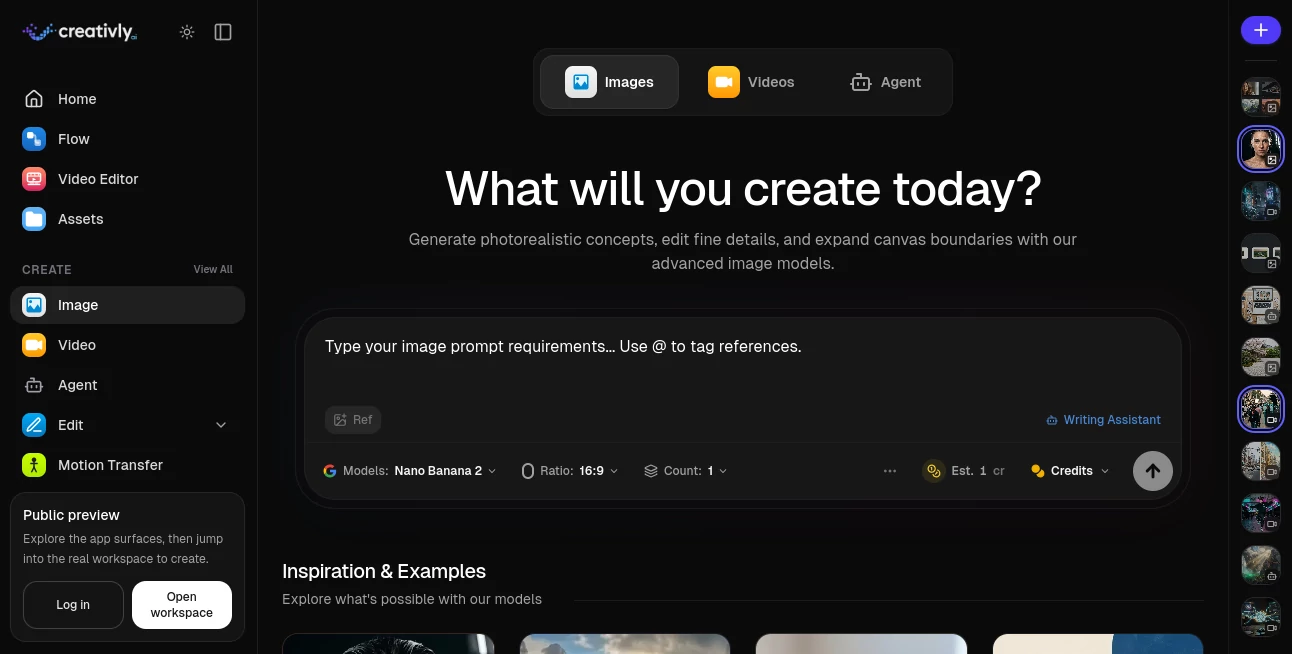
Creativly AI brings image generation and creative editing into a single workspace, giving creators a practical way to turn ideas into polished visuals without jumping between multiple services. Its image studio supports several leading generation models, making it possible to compare different approaches to the same creative brief from one place.
The platform is designed for more than simple text-to-image generation. Users can create photorealistic concepts, work with reference images, refine visual details, and expand image boundaries. The experience is especially appealing to designers, marketers, freelancers, and content teams who need to produce a steady stream of visual material.
One particularly useful aspect is the choice of models. Depending on the project, users can work with options such as Nano Banana 2, Flux 2, Seedream 4.5, GPT Image 2, and other available image models. This makes the workspace feel less like a single-purpose generator and more like a creative toolbox.
Key Features
- AI-powered image generation from natural-language prompts
- Access to multiple image generation models from one workspace
- Reference-image support for more controlled creative results
- Photorealistic image generation for portraits and product concepts
- Concept art generation for creative and visual development
- Product photography workflows for commercial content
- Editorial poster creation with advanced typography support
- Flexible aspect-ratio controls
- Multiple output options for creative exploration
- Image editing and detail refinement capabilities
- Canvas expansion for extending existing compositions
- Integration with broader image, video, audio, and text workflows
User Interface
The image workspace keeps the main creation process straightforward. A prompt field sits at the center of the experience, while model, aspect ratio, output count, and reference options can be adjusted around the generation process. The interface is clean enough for someone trying an AI image generator for the first time, while still providing useful controls for experienced creators.
The wider workspace also connects image creation with other creative applications. That can be helpful when a project starts as a still image but eventually needs animation, editing, or additional assets.
Accuracy & Performance
Image quality depends partly on the selected model, which is one of the platform's strengths. Nano Banana 2 is positioned for fast generation and supports resolutions up to 4K, while Flux 2 focuses on realism, detail, and prompt adherence. Seedream 4.5 is suited to photorealistic and composition-heavy work, while GPT Image 2 is particularly useful when accurate typography and more complicated layouts matter.
For practical workflows, having several models available is valuable because the best choice can change from project to project. A product photograph, an illustrated concept, and a poster with substantial text may each benefit from a different model.
Capabilities
The image studio covers a broad range of creative tasks. A designer can start with a written concept, generate several visual directions, compare results, and then refine the preferred version. A marketing team might use it to create product imagery, campaign concepts, social graphics, or editorial-style visuals.
Reference images can also be incorporated into prompts, giving creators more control over the direction of a generation. Combined with image editing and canvas expansion features, this makes the platform useful beyond the initial generation stage.
Security & Privacy
The service includes account, project, session, asset, upload, and generation features as part of its broader creative workspace. Uploaded images and videos are also subject to background safety checks, with blocked references prevented from being used for generation.
Users who prefer greater control over model access can also use the platform's bring-your-own-key approach on supported providers. This gives professionals another way to manage their AI provider usage while working inside the same creative environment.
Use Cases
- Product Photography: Create polished product concepts and commercial-style imagery without arranging a traditional photo shoot for every idea.
- Marketing Campaigns: Develop visual directions for advertisements, product launches, and promotional campaigns.
- Social Media Content: Produce eye-catching graphics and visual variations for social platforms.
- Concept Art: Explore characters, environments, scenes, and creative directions during early-stage development.
- Editorial Design: Create poster concepts, layouts, and typography-focused imagery.
- Portrait Creation: Generate detailed portraits and photographic concepts for creative projects.
- Brand Development: Experiment with visual identities, campaign aesthetics, and different art directions.
- Freelance Design: Quickly explore multiple concepts before committing time to a final design.
Pros and Cons
Pros
- Multiple leading image models available from one workspace
- Useful combination of generation and editing features
- Supports reference-based creative workflows
- Suitable for both personal and professional projects
- Can connect image creation with broader AI creative workflows
- Offers a free Starter option for experimentation
Cons
- Results and generation costs vary depending on the selected model
- Advanced users may need time to understand the differences between available models
- High-volume professional work can require a paid plan or external API keys
Pricing Plans
The platform offers a free Starter plan with 5 credits per month, access to its core applications, bring-your-own-key support, and limited daily image and video generations.
The BYOK Pro plan is listed at £20 per month and includes high-volume usage with personal API keys, 50 monthly credits, premium workflows, video upscaling, background removal, and high-quality exports without a watermark.
The Platform plan costs £30 per month and is designed for users who want a managed experience without configuring their own API keys. It includes 200 platform credits per month, access to premium models, concurrent generations, priority support, and premium workflows.
Image generation uses different credit amounts depending on the selected model, so users can choose between faster or more advanced options according to the needs of each project.
How to Use Creativly AI
- Open the image creation workspace and sign in or create an account.
- Enter a detailed description of the image you want to create.
- Select an image model that fits the visual style and requirements of your project.
- Choose an aspect ratio and the desired number of outputs.
- Add a reference image when you need additional visual guidance.
- Generate the image and compare the available results.
- Refine the prompt or switch models if the first result is not quite right.
- Use editing or canvas tools when the generated image needs additional adjustments.
Comparison with Similar Tools
Many AI image generators concentrate primarily on a single model or generation style. This platform takes a different approach by putting multiple image models into one creative environment. That is useful when consistency of workflow matters more than loyalty to one particular model.
For example, a creator working on product photography may prefer Flux 2 for its realism, while a typography-heavy poster could benefit from GPT Image 2. Another project might favor Seedream 4.5 for detailed visual composition. Instead of maintaining separate workflows for each model, users can explore these options from the same workspace.
The broader ecosystem is another distinction. Image generation can be part of a larger workflow involving video, editing, audio, agents, assets, and visual automation. For creators producing campaigns rather than isolated images, that connected approach can save considerable time.
Conclusion
Creativly AI is a strong option for creators who want more freedom than a single-model image generator provides. Its combination of multiple image models, reference-based creation, editing capabilities, and flexible workflows makes it useful for everything from quick creative experiments to commercial visual production.
The biggest advantage is choice. Instead of asking which single image generator is best, users can select the model that makes the most sense for the task in front of them. Add the wider creative workspace and the platform becomes a practical home for experimenting, refining, and producing AI-generated visual content.
Frequently Asked Questions (FAQ)
What can I create with this AI image platform?
You can create photorealistic portraits, product imagery, concept art, editorial posters, marketing visuals, social media graphics, and many other types of AI-generated images.
Does it support multiple AI image models?
Yes. The image workspace provides access to several models, including Nano Banana 2, Flux 2, Seedream 4.5, GPT Image 2, and other supported models.
Can I use reference images?
Yes. Reference images can be used to provide additional visual direction when creating new images, helping creators achieve more controlled results.
Is there a free plan?
Yes. The Starter plan is free and includes 5 credits per month along with limited image and video generation capabilities.
Can I use my own AI provider API keys?
Yes. Bring-your-own-key support is available for supported providers, giving users another way to manage model access and usage.
AI Photo & Image Generator , AI Image to Image , AI Text to Image .
These classifications represent its core capabilities and areas of application. For related tools, explore the linked categories above.
Creativly Image details
Website unavailable — View Alternatives
Pricing
- Free
Apps
- Web App
Categories

Creativly Image Alternatives Product

Image Unblur
Image By Qwen

Gemini AI Ph…

Before After…

AI Picture G…

China Brush

Nano Banana …

Lovable

Nano Banana …