AI Dance Generator
What is AI Dance Generator?
I still remember uploading an old photo of my niece doing a silly pose and watching her suddenly start doing a full TikTok dance a few seconds later. The whole family lost it. That moment of pure delight is what this tool delivers again and again. It takes a still image — whether a person, anime character, pet, or cartoon — and makes it move with surprisingly natural rhythm and energy. No complicated editing, no expensive software, just a few clicks and you have something shareable that actually makes people smile.
Introduction
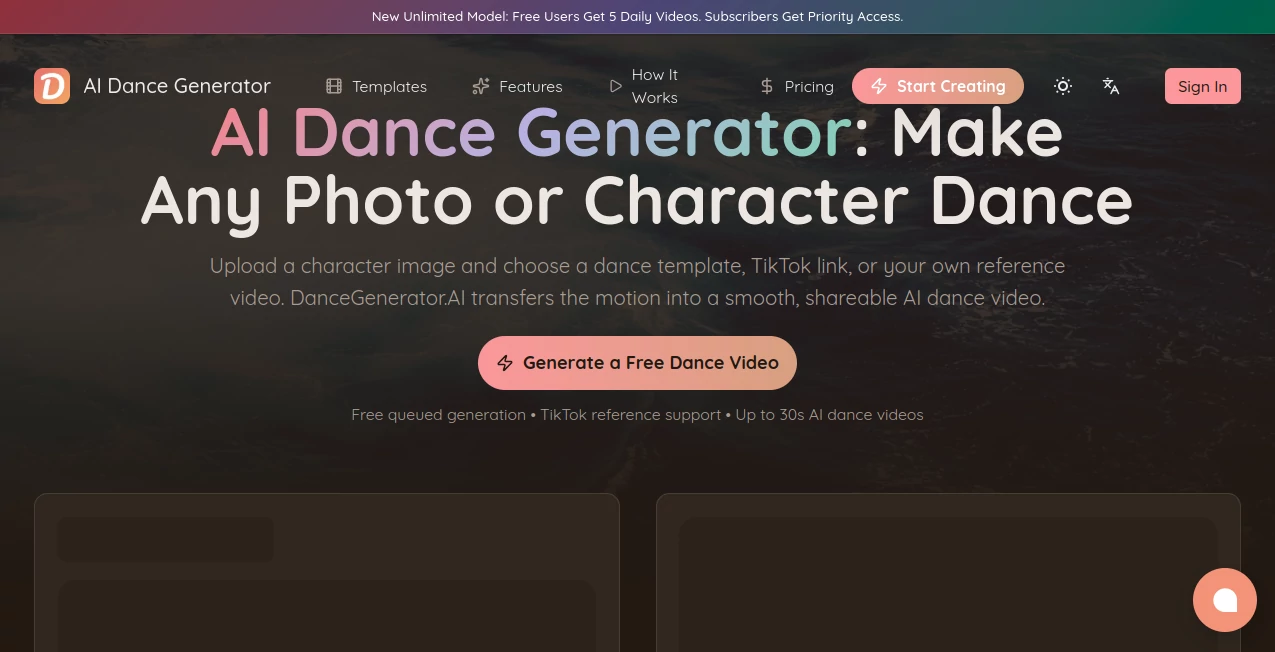
Creating dance videos used to mean filming yourself, hiring dancers, or spending hours in editing software. This platform changes the game completely. You upload a clear photo or character image, pick a dance template, paste a TikTok link, or upload your own reference video, and the AI transfers the motion in a way that feels smooth and alive. It handles full-body movement, keeps hand and finger details sharp, and can generate up to 30 seconds in one continuous clip. For creators, marketers, parents, and anyone who wants fun content fast, it’s become an addictive little creative superpower.
Key Features
User Interface
The whole process is designed to be quick and enjoyable. You see clear options right away: built-in dance templates, a field to paste TikTok links, or the ability to upload your own reference video. Upload your character image (full-body works best), choose your motion source, and hit generate. The interface stays out of the way so you can focus on the fun part — watching your creation come to life. Previews load fast, and you can generate multiple variations easily.
Accuracy & Performance
The motion transfer is where it really shines. It captures posture, limb movement, and even fine details like hand gestures with impressive accuracy. Characters stay recognizable across the clip, and the dancing looks natural rather than robotic. Generation times are reasonable, and the quality holds up well even on more complex routines. I’ve tried it with both real people and anime-style characters, and the consistency is better than most tools I’ve tested.
Capabilities
You can create dance videos from regular photos, anime characters, pets, cartoons, or game avatars. It supports TikTok references, built-in templates, and custom uploaded dance clips. Videos can reach up to 30 seconds in one shot, with good full-body fidelity and expressive movements. Exports are clean MP4 files ready for TikTok, Instagram Reels, YouTube Shorts, or any other platform. There’s even an API for developers who want to build automated workflows.
Security & Privacy
Your uploaded images and generated videos are handled responsibly. The platform focuses on delivering the fun without unnecessary data collection. Generated content belongs to you, and you can download and share freely once created.
Use Cases
A content creator pastes a trending TikTok dance and turns their own photo into a viral-ready video in minutes. A digital artist brings their illustrated characters to life for social media posts that get great engagement. Parents make funny pet dance videos that light up family group chats. Marketers create quick, eye-catching clips for product campaigns or brand challenges. The possibilities feel endless because it turns any recognizable subject into something that moves and entertains.
Pros and Cons
Pros:
- Surprisingly natural motion transfer with good attention to hands and full-body movement.
- Multiple input options — templates, TikTok links, or your own reference videos.
- Works on people, anime, pets, and cartoons.
- Up to 30 seconds of continuous video without quality breakdown.
- Free daily generations available to try it out.
Cons:
- Best results come from clear, full-body images.
- Free tier has daily limits and queued processing.
- Very complex or fast choreography can occasionally lose some detail.
Pricing Plans
Free users get a daily allowance of generations with queued processing — enough to play and create fun content regularly. Paid plans offer priority access, faster generation, higher daily limits, and longer videos. The pricing is reasonable for creators who want more volume or speed, making it accessible for both casual users and serious content makers.
How to Use DanceGenerator
Go to the generator section, upload a clear full-body photo or character image. Choose a built-in dance template, paste a TikTok link, or upload your own reference video. Adjust any settings if needed, then hit generate. Wait a short moment while the AI works its magic, preview the result, and download the MP4 when you’re happy. You can generate multiple versions with different references or styles until you find the perfect one. The whole flow is fast enough that you can create several fun clips in one sitting.
Comparison with Similar Tools
Many AI animation tools produce short, choppy movements or struggle with consistency. This one stands out with better full-body fidelity, longer clip support, and strong handling of custom references including TikTok dances. It feels more focused and practical for actual content creation rather than just quick gimmicks. The combination of quality, length, and input flexibility makes it one of the stronger options currently available.
Conclusion
Turning still images into dancing videos used to be complicated or expensive. This tool makes it fun, fast, and accessible to almost anyone. Whether you’re creating content for fun, building a social media presence, or just entertaining friends and family, it delivers results that feel magical without requiring technical skills. In a world full of serious AI tools, this one reminds us how delightful creativity can be when technology gets out of the way and just lets you play.
Frequently Asked Questions (FAQ)
How long can the generated videos be?
Up to 30 seconds in one continuous clip on higher plans, with good motion quality throughout.
Can I use my own dance video as reference?
Yes — uploading a custom reference gives you the most control over the final movement.
Does it work with anime or cartoon characters?
Yes, as long as the image is clear and recognizable, it handles illustrated and anime styles very well.
Is there a free way to try it?
Yes — free users get daily generations so you can test the quality right away.
What platforms are the videos good for?
Perfect for TikTok, Instagram Reels, YouTube Shorts, and general social sharing.
AI Animated Video , AI Image to Video , AI Fun Tools , AI Video Generator .
These classifications represent its core capabilities and areas of application. For related tools, explore the linked categories above.
AI Dance Generator details
Website unavailable — View Alternatives
Pricing
- Free
Apps
- Web App
Categories

AI Dance Generator Alternatives Product
Kling 3 AI
AI Baby Dance

Seedance 2.0

Pinci.ai

Wan AI Video…
Wan 2.7

kling 3 AI
Motion Contr…

Wan 2.7