Delta
What is Delta?
Delta is a multiplayer environment built for a new style of software development, where human developers and coding agents work together in the same space. Created by the team behind Zed, it focuses on something that becomes increasingly important as AI agents write more code: understanding how the work happened, not just looking at the final diff.
Instead of treating an AI-generated change as an isolated result, the platform keeps the conversation, decisions, prompts, edits, and development activity connected. This gives developers more context when reviewing changes and makes collaboration with coding agents feel closer to working with another member of the team.
Key Features
- Multiplayer coding with agents: Developers can invite teammates into the same thread and work alongside an agent in real time.
- Context-rich code review: Changes remain connected to the conversations and decisions that produced them.
- Conversation and code synchronization: The development thread stays connected to the worktree, helping developers understand why a change was made.
- Review in context: Comments and feedback can remain anchored to the relevant conversation or line of code.
- Development activity tracking: The environment can show actions such as searches, file reads, edits, tests, and benchmarks performed during a task.
- Local and cloud workflows: Developers can move the same conversation and worktree between the desktop or web environment and a cloud runner.
- Agent transparency: Instead of simply presenting generated code, the workflow exposes more of the reasoning process and development history behind a change.
User Interface
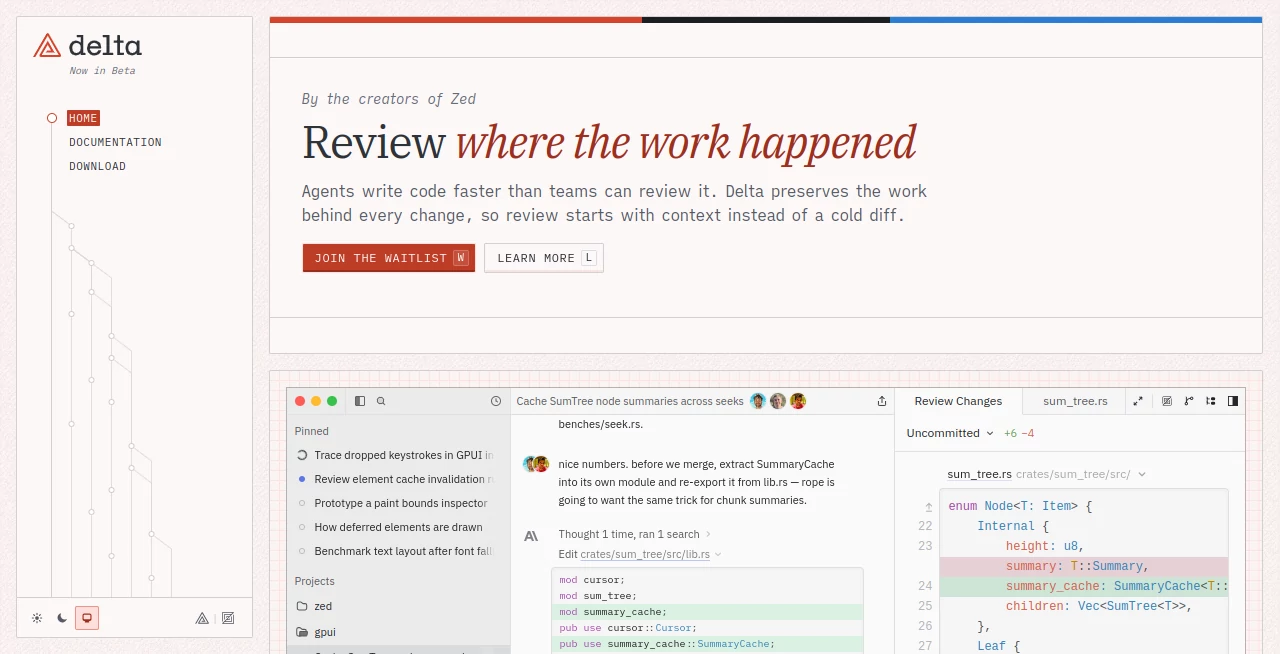
The interface is designed around a shared development thread rather than a traditional code editor alone. Conversations, code changes, file activity, and review comments can appear together, creating a more connected view of an ongoing task.
This approach is particularly useful when an agent has touched several files. A developer can follow what was changed, see the related discussion, inspect the resulting diff, and continue the conversation without having to reconstruct the entire story from scratch.
Accuracy & Performance
The platform is designed around practical software-engineering workflows rather than simply generating code and stopping there. Its examples show agents reading files, editing source code, running tests, investigating implementation details, and performing benchmarks before changes are reviewed.
One example on the site demonstrates a benchmark where repeated seeks through a large tree improved from 41.2 microseconds to 3.4 microseconds after introducing a caching approach. The important point is not only the speed improvement, but the workflow: the agent is asked to support its claim with measurable data before the change is considered ready to merge.
Capabilities
The environment is well suited to projects where AI agents are actively involved in implementation. An agent can investigate a problem, search through a codebase, edit multiple files, run tests, benchmark an implementation, and respond to developer feedback within an ongoing thread.
Developers can also collaborate directly in these threads. A teammate can review a change, ask for additional evidence, request a refactor, or comment on a particular line of code. This makes the workflow feel less like handing work to an automated tool and more like supervising an active engineering partner.
Security & Privacy
For teams evaluating a development environment, privacy and access controls should be reviewed carefully before using it with sensitive repositories. The site demonstrates collaborative access controls such as owners and members with editing permissions, while also describing a shared replicated workspace for developers and agents.
Because the product is designed around conversations and development history, teams should also consider what repository information, prompts, and collaboration data will be shared in their particular workflow. Detailed security commitments and enterprise policies should be confirmed directly with the provider before adopting it for confidential projects.
Use Cases
- AI-assisted software development: Work with coding agents while retaining visibility into their implementation process.
- Code review: Review changes with access to the conversations and decisions behind them.
- Team collaboration: Let multiple developers participate in the same agent-assisted development thread.
- Debugging: Follow an agent as it investigates files, reproduces problems, makes changes, and tests potential solutions.
- Performance optimization: Ask agents to benchmark proposed improvements rather than relying solely on assumptions.
- Open-source development: Keep technical discussions and implementation work connected for easier review.
- Agent supervision: Give developers a clearer view of what an AI coding agent has actually done before accepting its work.
Pros and Cons
Pros:
- Combines coding-agent workflows with multiplayer collaboration.
- Keeps development conversations connected to code changes.
- Provides more context than a conventional code diff.
- Supports review and feedback during the development process.
- Encourages testing and benchmarking alongside AI-generated changes.
- Can extend the workflow between desktop, web, and cloud environments.
Cons:
- The product is currently presented as a waitlist-based experience rather than a broadly available mature platform.
- Teams looking for a conventional standalone AI coding assistant may find the collaborative approach broader than necessary.
- Users with highly sensitive repositories should evaluate the available privacy and security policies before adoption.
- The multiplayer model may require teams to adapt their existing development and review habits.
Pricing Plans
No public pricing plans are listed on the product website at the time of writing. The current site directs interested developers to join a waitlist, so pricing and availability may be introduced or changed as the product evolves.
For teams considering adoption, it is worth checking the latest availability and commercial terms before planning a production rollout.
How to Use
- Join the product waitlist through the official website.
- Once access is available, connect the development environment to an appropriate project or worktree.
- Start a thread describing the coding task, bug, feature, or investigation you want the agent to handle.
- Allow the agent to inspect relevant files and work through the problem.
- Review its edits, searches, tests, benchmarks, and supporting discussion.
- Invite teammates when another developer needs to review or contribute to the work.
- Leave comments or requests directly in the relevant conversation or code context.
- Use the resulting thread and changes as the basis for your final code review and merge decision.
Comparison with Similar Tools
Traditional AI coding assistants generally focus on helping an individual developer generate, modify, or understand code. This platform takes a different direction by treating the agent, developer, codebase, and conversation as parts of one shared environment.
That distinction matters for teams. If the main requirement is fast code completion, a conventional coding assistant may be sufficient. If the challenge is reviewing increasingly large amounts of agent-generated work, keeping context around changes, and allowing several people to collaborate with an agent, the multiplayer approach offers a more interesting alternative.
It also differs from ordinary pull-request workflows. A pull request usually presents the final change for review, while this environment aims to preserve the trail leading to that change. For AI-heavy development, that additional context can make it easier to understand whether an implementation was properly investigated, tested, and justified.
Conclusion
AI coding is moving beyond autocomplete and isolated code generation. As agents become capable of handling larger engineering tasks, the difficult part increasingly becomes reviewing their work and understanding how they arrived at a solution.
That is where this platform makes a compelling case. By combining coding agents, shared development threads, real-time collaboration, code review, and the history behind changes, it creates an environment designed around the realities of agent-assisted software development.
For developers who want more than generated code and prefer to see the work behind each change, it is a promising direction worth watching. Its waitlist-based availability means it is still an emerging product, but the underlying idea is particularly relevant for teams preparing for a future where humans and coding agents work side by side.
Frequently Asked Questions (FAQ)
What is this platform designed for?
It is designed for collaborative software development where human developers work alongside AI coding agents. The environment keeps code changes connected to the conversations and decisions behind them.
Can multiple developers collaborate with an AI agent?
Yes. The product is specifically designed as a multiplayer environment, allowing teammates to join the same thread, review changes, comment, and work alongside the agent.
Does it support code review?
Yes. Code review is one of its central ideas. Developers can inspect changes while also viewing the development context, conversations, prompts, and activity associated with those changes.
Can agents run tests and benchmarks?
The examples on the site show agents reading files, making edits, running tests, and performing benchmarks as part of their workflow.
Is it available to everyone?
The current website directs users to join a waitlist, indicating that access is currently controlled rather than being presented as a fully open product.
Does it replace a traditional code editor?
Not necessarily. Its purpose is broader than simply replacing an editor. It focuses on connecting development, AI agents, collaboration, and review into one workflow.
Who can benefit most from it?
Development teams and individual programmers who increasingly rely on AI coding agents are likely to get the most value, especially when reviewing, testing, and understanding agent-generated changes is becoming a significant part of their workflow.
AI Testing & QA , AI Code Assistant , AI Team Collaboration , AI Developer Tools .
These classifications represent its core capabilities and areas of application. For related tools, explore the linked categories above.

Delta Alternatives Product

BootstrapKing
Kimi K2.5

Devplan

Candidate Sc…

UpMocker
TutuoAI

Gemini Omni

Sourcetable

Luma AI