
Design Maker AI
What is Design Maker AI?
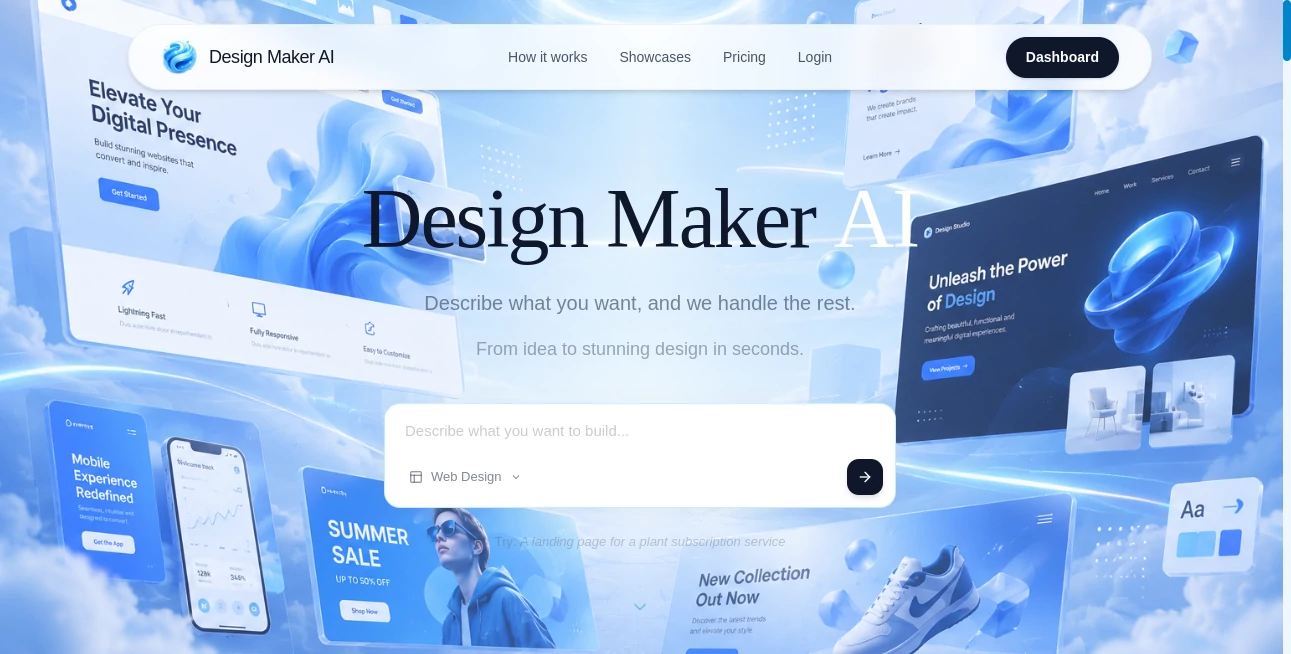
Creating professional visuals no longer requires years of design experience or expensive software. Design Maker AI transforms simple text descriptions into polished graphics, allowing individuals and businesses to turn ideas into eye-catching designs within seconds. Whether you need marketing materials, social media content, presentations, or creative artwork, the platform streamlines the entire design process with the help of artificial intelligence.
Instead of starting from a blank canvas, users simply describe their vision in natural language. The platform interprets the request and generates visually appealing designs that can be customized and refined. This dramatically reduces the time spent brainstorming layouts, selecting colors, and arranging design elements, making professional-quality design accessible to everyone.
Key Features
User Interface
The interface is clean, intuitive, and beginner-friendly. Users can quickly enter a prompt, preview generated designs, edit visual elements, and export finished projects without navigating through complicated menus. The streamlined workflow keeps the creative process simple from start to finish.
Accuracy & Performance
The AI understands natural language prompts and converts creative ideas into visually balanced designs. Fast generation speeds allow users to experiment with multiple concepts, compare different styles, and refine their results in just a few minutes.
Capabilities
- Generate designs from text descriptions.
- Create marketing graphics and promotional materials.
- Produce social media posts and banners.
- Generate presentation visuals.
- Create branding assets and creative illustrations.
- Customize colors, typography, and layouts.
- Produce high-quality downloadable graphics.
- Support rapid design iteration and experimentation.
- Save significant time compared to manual design workflows.
Security & Privacy
User projects remain organized within a secure workspace, allowing creators to manage their designs efficiently. The platform is designed to provide a reliable environment for individuals, freelancers, and businesses working on creative projects.
Use Cases
- Create engaging social media graphics.
- Design marketing banners and advertisements.
- Generate presentation visuals.
- Build branding materials for startups.
- Create blog and website illustrations.
- Produce promotional content for online stores.
- Generate creative concepts for clients.
- Design event posters and digital flyers.
Pros and Cons
Pros
- Very easy for beginners to use.
- Transforms simple ideas into polished designs.
- Fast design generation saves valuable time.
- Reduces the need for advanced graphic design skills.
- Suitable for businesses, marketers, and content creators.
Cons
- Highly customized branding may still require manual editing.
- Advanced export options may depend on premium plans.
- Creative output is influenced by the quality of user prompts.
Pricing Plans
The platform may offer free access with optional premium subscriptions that unlock additional design capabilities, higher-quality exports, and advanced customization features. Pricing options may evolve over time.
How to Use Design Maker AI
Start by entering a description of the design you want to create. The AI generates one or more visual concepts based on your prompt. Review the results, customize colors, fonts, images, or layouts if needed, then export the finished design for use on websites, social media, presentations, or marketing campaigns.
Comparison with Similar Tools
Unlike traditional graphic design software that requires users to manually build layouts from scratch, this platform focuses on prompt-driven creation. It combines AI-powered generation with an easy editing experience, making it significantly faster for users who want professional results without mastering complex design applications.
Conclusion
Design Maker AI offers a practical solution for anyone looking to transform ideas into professional visuals with minimal effort. By combining artificial intelligence with an intuitive editing experience, it helps creators move from inspiration to finished design in just a few clicks. Whether you're building marketing assets, branding materials, or social media content, the platform makes high-quality design faster, easier, and more accessible.
Frequently Asked Questions (FAQ)
Who can use this platform?
It is suitable for marketers, entrepreneurs, designers, students, freelancers, and anyone who needs professional graphics quickly.
Do I need graphic design experience?
No. The AI generates designs from simple text descriptions, making it accessible to users of all skill levels.
Can I edit generated designs?
Yes. Users can customize layouts, colors, typography, and other visual elements before exporting.
What types of designs can be created?
The platform supports social media graphics, banners, presentations, marketing materials, branding assets, and many other visual projects.
Is it suitable for commercial projects?
Yes. Businesses and content creators can use it to produce professional marketing and promotional visuals efficiently.
AI Design Assistant , AI Marketing Plan Generator , AI Design Generator , AI Graphic Design .
These classifications represent its core capabilities and areas of application. For related tools, explore the linked categories above.
Design Maker AI details
Website unavailable — View Alternatives
Pricing
- Free
Apps
- Web App
Categories

Design Maker AI Alternatives Product
PatchDesign.…

LogoAI

Geoleaper

ModelsLab
image2ai.art

ImageKontext…

Free AI Kiss…

PaperYak

RoomDecorFin…