


















Ecomstation Ai
What is Ecomstation Ai?
Creating professional product photography is one of those jobs that can quietly consume a huge amount of time and money. A single product may need several backgrounds, lifestyle scenes, marketplace formats, advertising creatives, and social media variations. For smaller sellers, arranging photographers and studios for every new product is rarely practical.
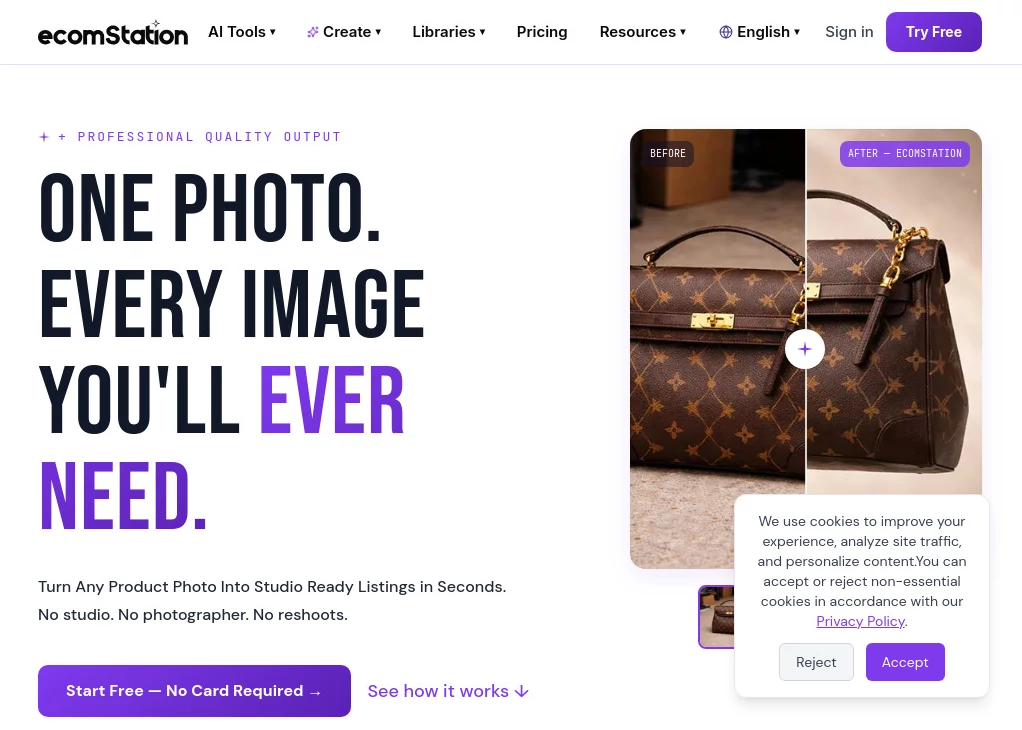
EcomStation AI takes a much simpler approach. It turns an existing product photo into polished, studio-ready visuals without requiring a physical studio, photographer, or repeated photoshoot. The idea is particularly useful for ecommerce sellers who need to produce large numbers of consistent product images while keeping production costs under control.
The workflow is straightforward: upload a product image, describe the scene you want, and download the finished visual. There is also a growing library of more than 1,000 ready-made ecommerce templates, making it possible to experiment with different backgrounds and presentation styles without starting every project from scratch.
Key Features
- AI product photography: Turn a single product image into professional-looking studio and lifestyle scenes.
- Product consistency: The platform is designed to preserve important product details such as shape, color, texture, and branding while changing the surrounding environment.
- AI image editing: Modify product visuals using simple text instructions instead of working through a complicated editing workflow.
- Background removal: Create clean white or custom backgrounds with a single action.
- Image generation: Generate new product-focused visuals from scratch when an existing photo is not enough.
- Image upscaling: Improve image resolution for higher-quality marketplace, print, and marketing use.
- Ready-made templates: More than 1,000 ecommerce templates cover different backgrounds, scenes, and visual styles.
- Marketplace-focused output: Visuals can be prepared for different ecommerce and social formats, including white-background marketplace images and vertical social content.
- Multiple image variations: A single source photo can be transformed into numerous creative variations for stores, advertisements, and social media.
User Interface
The interface is built around a simple upload-and-create workflow rather than a traditional professional editing suite. A seller can upload a JPG, PNG, or WEBP image, choose a template or describe a desired scene, and generate the result without needing advanced design knowledge.
This simplicity is one of its strongest qualities. Someone managing a Shopify store, marketplace account, or small product catalog can start creating visuals without first learning layers, masks, lighting controls, or complicated editing panels.
Accuracy & Performance
Product consistency is a major focus. The platform specifically aims to preserve the original product while modifying its background, scene, lighting, or presentation. That matters for ecommerce because changing the appearance of a product itself can create confusion for shoppers.
The service also emphasizes speed. Its own product information states that a catalog can move from upload to finished visuals in under three minutes, while individual image generation is designed to take only a short amount of time. Results will naturally depend on the source image, requested scene, and generation settings, but the workflow is clearly designed for fast production rather than lengthy manual editing.
Capabilities
The toolset extends beyond simple background replacement. Users can create product photography, generate new visuals, edit images with text prompts, remove backgrounds, upscale images, and produce marketing variations from a single original photo.
For example, a seller could start with one clean photo of a pair of headphones and create a plain marketplace image, a lifestyle scene showing the headphones in a modern gaming room, a colorful advertising visual, and several social-media-ready variations. The physical product remains the central reference while the surrounding presentation changes.
The platform also offers templates such as marble, rich red velvet, colored backgrounds, riverside scenes, and levitating product compositions. This makes experimentation much quicker for sellers who want variety without commissioning a new photoshoot for every campaign.
Security & Privacy
The public product information focuses primarily on image generation, ecommerce workflows, pricing, and usability rather than providing extensive technical documentation about data retention or security architecture. Businesses handling commercially sensitive product photography should therefore review the platform's current privacy terms and service documentation before uploading confidential assets.
For ordinary ecommerce imagery, the service is positioned as a straightforward online production tool. However, companies with strict internal requirements around intellectual property, confidential launches, or unreleased products should verify the applicable policies before adopting it for sensitive workflows.
Use Cases
- Online stores: Create cleaner and more consistent product images for ecommerce product pages.
- Marketplace sellers: Produce white-background and marketplace-oriented visuals without arranging separate photography sessions.
- Social media marketing: Turn one product photo into lifestyle and promotional variations suitable for social platforms.
- Advertising teams: Quickly create multiple creative concepts for product campaigns.
- Small ecommerce businesses: Replace some of the cost and coordination involved in traditional product photography.
- Marketing agencies: Produce visuals for multiple brands while maintaining a consistent appearance across product catalogs.
- Large catalogs: Generate different visual treatments from existing product photos instead of photographing every item repeatedly.
Pros and Cons
Pros
- Very simple workflow for non-designers.
- Focused specifically on ecommerce product imagery.
- More than 1,000 ready-made templates.
- Can generate multiple scenes from one product photo.
- Includes image editing, background removal, generation, and upscaling tools.
- Free plan available for testing the service.
- Useful for producing marketplace and social-media variations quickly.
Cons
- Advanced privacy and data-handling information is not prominently detailed on the public product page.
- Results can still depend on the quality and composition of the original product image.
- Credit limits may become important for stores producing large catalogs or many variations.
- Some marketplace integrations are presented as coming soon rather than fully available.
Pricing Plans
The pricing structure is designed to let users test the service before committing to a larger plan. A free option provides 5 starter credits, access to the standard engine, one concurrent job, background removal, and image upscaling.
The weekly plan costs $3 per week and includes 20 credits, access to all AI tools, Standard and Pro engines, and two concurrent jobs.
The Starter plan costs $15 per month and includes 120 credits, all Standard, Pro, and Premium engines, video generation, high-resolution downloads, two concurrent jobs, and cancellation at any time.
The Basic plan costs $32 per month and provides 330 credits, all available engines, video generation, high-resolution downloads, three concurrent jobs, and flexible cancellation.
The Pro plan costs $54 per month and includes 650 credits, all engines, video generation, high-resolution downloads, three concurrent jobs, cancellation at any time, and early access to new templates.
For studios, agencies, and larger brands, a Studio plan is available through a custom arrangement with custom volume, dedicated support, and white-label exports. Annual billing is advertised with a 20% saving.
How to Use the Tool
- Upload a product image in JPG, PNG, or WEBP format.
- Choose one of the available templates or describe the visual scene you want to create.
- Let the AI generate the new product visual while keeping the original product as the reference.
- Review the result and create additional variations if needed.
- Download the finished image for your ecommerce store, marketplace, advertising campaign, or social media content.
For the best results, start with a clear product photograph where the item is visible and not heavily obstructed. A clean source image gives the generation system a stronger reference and makes it easier to maintain the product's important visual characteristics.
Comparison with Similar Tools
Many general-purpose image generators are excellent for artistic concepts, but ecommerce sellers often need something more specific: the product itself must remain recognizable while the surrounding scene changes. That is where this platform takes a more specialized approach.
Compared with traditional photography, the biggest advantage is speed and repeatability. There is no need to book a studio, arrange lighting, hire a photographer, or organize another shoot simply because a product needs a different background.
Compared with general image-editing software, the workflow is considerably more focused on ecommerce. Instead of manually constructing every scene, sellers can use specialized templates and text-based instructions to produce multiple versions of the same product.
It is therefore best viewed as a production tool for ecommerce visuals rather than simply another general AI image generator. Businesses that need artistic experimentation may still prefer broader creative platforms, while online sellers who need consistent product-focused imagery can benefit more from a specialized workflow.
Conclusion
For ecommerce businesses, good product photography is not just decoration. It affects how professional a store looks, how clearly customers understand a product, and how consistently a brand is presented across different channels. The traditional process, however, becomes difficult to maintain when a catalog grows.
This platform addresses that problem with a practical combination of AI product photography, image editing, background removal, upscaling, templates, and automated visual variations. Its strongest point is the ability to start with one product photo and turn it into a much broader collection of marketing-ready imagery.
The free plan makes it relatively easy to test the workflow before paying, while the higher plans provide more credits and generation capacity for growing businesses. For sellers who regularly need new product visuals but do not want every image to involve a photographer or designer, it is a compelling option worth exploring.
Frequently Asked Questions (FAQ)
Is the tool suitable for beginners?
Yes. The workflow is designed for users without professional design or photography experience. Uploading an image and selecting a template or describing a scene are the main steps.
Can I create different backgrounds for the same product?
Yes. A single product image can be used to create multiple scenes and backgrounds while the system aims to preserve the product's original characteristics.
Does it offer a free plan?
Yes. The free plan costs $0 and includes 5 starter credits, along with access to the standard engine, background removal, and image upscaling.
Can the generated images be used for ecommerce stores?
Yes. The service is specifically designed around ecommerce imagery and provides visuals intended for product listings, marketplaces, advertisements, and social media.
Are marketplace integrations available?
The platform describes support and format preparation for marketplaces and social platforms including Amazon, Shopify, TikTok Shop, Instagram, Etsy, WooCommerce, Pinterest, and eBay. Several direct integrations are currently marked as coming soon.
Can I generate several versions from one product image?
Yes. Creating multiple variations from one source image is one of the central use cases, allowing sellers to create different backgrounds, lifestyle scenes, advertising visuals, and social-media content without new photography.
Is there a plan for agencies and larger brands?
Yes. A Studio option is available for studios, agencies, and brands, with custom volume, dedicated support, and white-label exports.
What image formats can I upload?
The online upload interface accepts JPG, PNG, and WEBP images, with a maximum upload size of 10MB.
How much can AI product photography reduce costs?
The platform advertises image production at roughly £15 per 100 images compared with an example traditional photoshoot cost of £8,000. Actual savings will depend on the business, photography requirements, and volume of images produced.
AI Photo & Image Generator , Photo & Image Editor , AI Background Generator , AI E-commerce Assistant .
These classifications represent its core capabilities and areas of application. For related tools, explore the linked categories above.
Ecomstation Ai details
Website unavailable — View Alternatives
Pricing
- Freemium
Apps
- Web App
Categories

Ecomstation Ai Alternatives Product

Avatarka AI

X Grok Imagi…

SeeDream 4.5

bratgenerator

ShinePhoto

Pixelied

Sourcetable

Omnesuite AL…

AI Ease AI P…
