
EduVız
What is EduVız?
Turning a mathematical idea into something students can actually see is often harder than explaining the idea itself. A teacher may know exactly how a function changes, how a tangent approaches a curve, or how a geometric construction develops, yet creating a clear animation for that explanation can take hours.
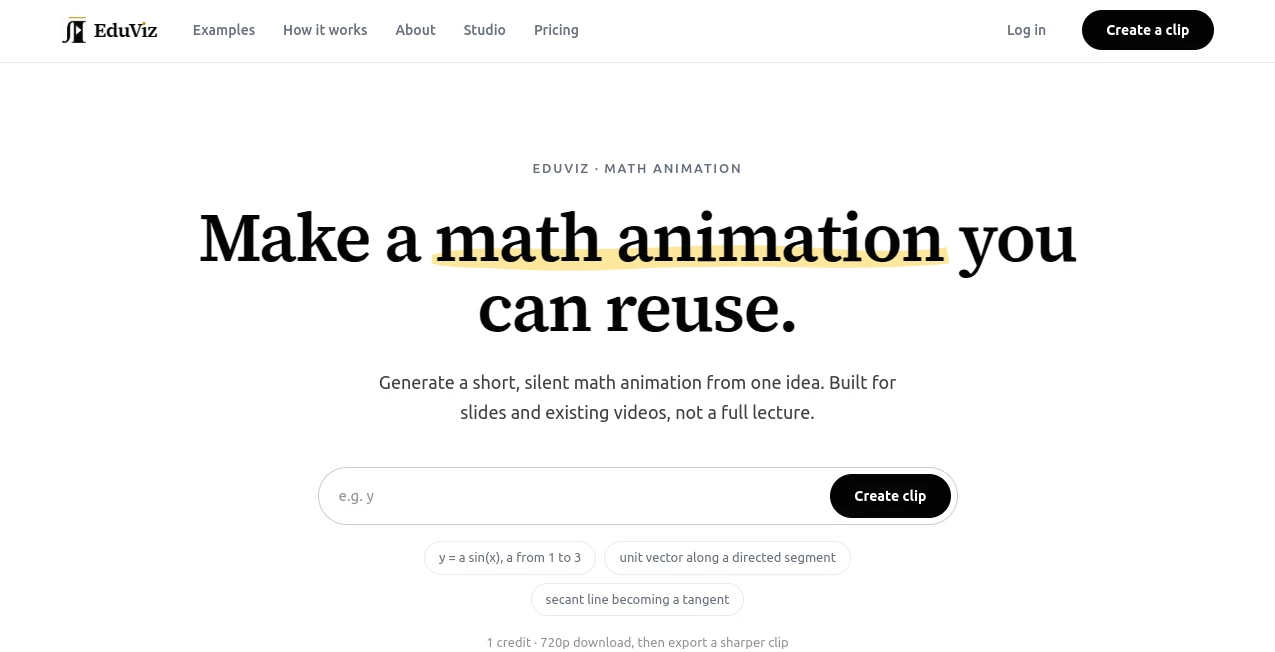
EduViz takes a much more focused approach. It generates short, silent math animation clips from a written description, giving teachers, tutors, researchers, course creators, and other educators a visual element they can place directly into slides, courses, or existing video edits. Instead of trying to produce an entire lecture, the platform concentrates on the specific mathematical moment that needs to move.
The result is particularly useful when a static diagram is not enough. A changing parameter, a moving vector, a geometric construction, or the transition between a secant and tangent can become much easier to understand when the relationship is shown through motion.
Key Features
The main strength of the platform is its deliberately narrow focus on mathematical animation. Users describe what should happen, and the system turns that description into a short visual clip.
- Generate short math animations from a written idea.
- Create silent clips designed for slides, courses, and existing video projects.
- Work with functions, geometry, vectors, parametric curves, transformations, and other mathematical concepts.
- Download generated clips in 720p, with 1080p export available for an additional credit.
- Use motion to demonstrate relationships that are difficult to communicate with a static image.
- Generate examples involving concepts such as vector fields, Fourier epicycles, 3D surfaces, recursive structures, and coordinate transformations.
User Interface
The interface keeps the workflow remarkably simple. The central action is describing the mathematical animation you want to create. Example prompts are provided to help users understand the kind of input the system expects, including mathematical changes such as a parameter moving through a range or a line approaching a tangent.
This simplicity is useful for educators who do not want to learn a complicated animation editor. There is no need to manually draw every frame or build a timeline from scratch. The workflow is closer to describing the visual moment and then reviewing the resulting clip.
Accuracy & Performance
Mathematical visualization needs more than attractive motion. The relationship being demonstrated has to remain understandable throughout the animation. The platform is designed around that principle, with examples covering subjects where movement itself carries part of the mathematical explanation.
A useful example is the transition from a secant line to a tangent on a parabola. Rather than showing only the final tangent, an animation can make the approach visible, helping the viewer understand the underlying idea of a limit.
Generated clips are intentionally short. Most are only a few seconds long, while slower mathematical constructions can run longer when the visual requires additional time. This focused format also makes the clips easier to reuse in existing educational material.
Capabilities
The platform is especially suited to mathematical concepts that involve change. Functions can be animated as parameters vary, geometric relationships can be constructed step by step, vectors can demonstrate direction, and recursive structures can reveal how a repeated rule creates a larger pattern.
Its showcased visual range includes linear transformations, coordinate maps, vector fields, Fourier epicycles, 3D surfaces, parametric curves, and recursive structures. That makes it more than a general-purpose video generator; its purpose is to make mathematical relationships visible through movement.
Another practical advantage is that the clips are designed to fit into material users already create. A teacher can insert a short animation into a presentation rather than replacing an entire lesson with automatically generated content.
Security & Privacy
The service collects account information such as a name and email address when required for supported sign-in, along with billing and technical information needed to operate the platform. It states that full payment card numbers are not stored by the service because payment processing is handled by a dedicated payment provider.
Prompts and generated project content are processed to create and deliver requested clips. The privacy policy also states that personal information is not sold and that prompts or generated clips are not used to advertise to users. Content sent to specialized processing services is limited to what is necessary for generation.
Users should still avoid placing sensitive student information into prompts. The service specifically advises against including student names, grades, or other personal information in submitted descriptions.
Use Cases
One of the strongest applications is classroom teaching. A mathematics teacher can create a short animation to accompany a lesson on calculus, geometry, vectors, functions, or transformations. Instead of spending an evening producing a custom animation, the teacher can focus on describing the exact movement students need to see.
Course creators can use clips as visual inserts in recorded lessons. For example, a calculus course might use an animation showing a secant approaching a tangent, while a linear algebra lesson could use a moving vector or transformation to illustrate an abstract relationship.
Tutors can also benefit from the format. A short clip can be used during an explanation and then reused with another student or in a later lesson. Researchers and technical creators may find the same approach useful when a mathematical relationship needs to be demonstrated without producing a complete narrated video.
- Mathematics classroom presentations
- Online courses and educational videos
- Calculus and geometry explanations
- Linear algebra and vector demonstrations
- STEM tutorials and technical presentations
- Educational slide decks
- Short visual inserts for existing videos
Pros and Cons
Pros
- Very focused on mathematical visualization.
- Simple prompt-based workflow.
- Useful for concepts where movement explains the idea.
- Short clips are easy to reuse in existing educational content.
- Supports several areas of mathematics, including functions, geometry, vectors, and 3D concepts.
- Paid plans and clip packs provide watermark-free commercial exports.
- Failed generations automatically return the credits used for the unsuccessful attempt.
Cons
- The output is designed as a short silent animation rather than a complete teaching video.
- Users looking for narration, voiceovers, or full lesson production will need additional tools.
- Subscription credits do not roll over to the following month.
- 1080p export requires an additional credit.
- The platform is specialized for mathematical animation, so it is not intended to replace a general video editor.
Pricing Plans
The pricing model is based on credits, with one credit generating one silent 720p clip. Users can either subscribe monthly or purchase credit packs that do not expire.
- Free: $0, including 3 clips usable within 30 days, 720p at 30 fps with a watermark, personal and classroom use, standard queue access, and seven-day storage.
- Creator: $23.25 per month, or $279 billed yearly, with 80 clips per month, 1080p export without a watermark, commercial use, priority processing, and 90-day storage.
- Pro: $63.25 per month, or $759 billed yearly, with 250 clips per month, 1080p export without a watermark, commercial use, the highest processing priority, and one-year storage.
For users who prefer not to subscribe, clip packs are available at $19 for 30 credits, $49 for 100 credits, and $129 for 300 credits. Pack credits never expire. The pricing page also mentions volume arrangements, team seats, brand styling, higher concurrency, and API access for organizations producing larger quantities of clips.
How to Use It
Getting started is straightforward. First, identify the mathematical relationship that would benefit from animation. Instead of asking for an entire lesson, describe the specific movement that students should see.
For example, you might describe a parabola with a secant line whose second point gradually approaches a fixed point, while keeping the slope visible. The system can then create the requested scene as a short clip.
- Describe the mathematical idea and the movement you want to show.
- Generate the animation clip.
- Preview the scene and check that the important elements remain readable.
- Download the 720p version or use an additional credit for 1080p export.
- Insert the clip into a presentation, course, classroom material, or existing video.
The best results come from treating each generation as one visual moment. Larger explanations are better divided into several smaller clips rather than trying to make one animation explain an entire lesson.
Comparison with Similar Tools
General AI video generators are usually designed for broader creative work, while traditional animation software gives users detailed control over individual objects, timelines, and effects. Neither approach is necessarily ideal when the immediate goal is to demonstrate a mathematical relationship quickly.
This platform occupies a more specialized position. Its workflow is built around mathematical motion, and its examples focus on subjects such as functions, geometry, vectors, transformations, and recursive structures. That specialization can be a real advantage for educators who need a particular mathematical construction rather than a cinematic video.
It also differs from static diagram generators. A diagram can show the beginning and end states of a concept, but animation can reveal the transition between them. For topics involving limits, parameter changes, constructions, or repeated processes, that distinction can make the explanation substantially clearer.
Conclusion
For educators and creators who regularly explain mathematics, producing good visual material can consume almost as much time as preparing the lesson itself. This platform tackles one specific part of that problem: turning a mathematical idea into a short, reusable animation.
Its strongest quality is its focus. Rather than attempting to become a complete lecture-production suite, it concentrates on the moments where mathematics benefits from motion. A changing function, approaching tangent, evolving vector relationship, or recursive construction can be much easier to grasp when the viewer can watch the relationship develop.
The combination of prompt-based creation, short reusable clips, downloadable exports, and flexible credit options makes it a practical addition to an educator's existing workflow. For anyone who wants to make mathematical explanations more visual without becoming an animation specialist, it is a particularly interesting option.
Frequently Asked Questions (FAQ)
What does the platform generate?
It generates short, silent mathematical animation clips from written descriptions. The clips are intended to be used in presentations, courses, and existing video projects.
Can it create complete educational lectures?
No. The service is intentionally designed for individual mathematical motion clips rather than full narrated lessons. Larger explanations can be divided into several smaller animations.
What subjects can be visualized?
Examples include functions, geometry, vectors, coordinate transformations, vector fields, Fourier epicycles, parametric curves, 3D surfaces, and recursive structures.
Does it include narration?
No. The generated clips are silent. This makes them suitable as visual elements that can be placed alongside a teacher's narration or added to an existing video.
Can I use the generated clips commercially?
Commercial use is included with paid plans and clip packs under the applicable content license. The free plan is intended for personal and classroom use.
How many clips does one credit generate?
One credit generates one 720p clip. Exporting the same clip at 1080p requires one additional credit.
Do purchased clip-pack credits expire?
No. Credits purchased through clip packs do not expire. Subscription allowances, on the other hand, refresh monthly and do not roll over.
How long are generated clips stored?
Storage depends on the plan. Free clips are available for seven days, Creator and clip-pack content for 90 days, and Pro content for one year.
Is there a free plan?
Yes. The free option provides three clips within a 30-day period and allows users to try the actual generation workflow before subscribing.
Who is it best suited for?
It is particularly well suited to mathematics teachers, tutors, course creators, researchers, engineers, and educational content creators who need concise visual explanations of mathematical concepts.
AI Animated Video , AI Education Assistant , AI Tutorial .
These classifications represent its core capabilities and areas of application. For related tools, explore the linked categories above.

EduVız Alternatives Product

Wan AI Video…

LTX-3 AI

Nano Banana …

GameGen

Veo 3.2

PaperCheck

LongTerMemory
soro2

kling 5.0