TranscribeYT
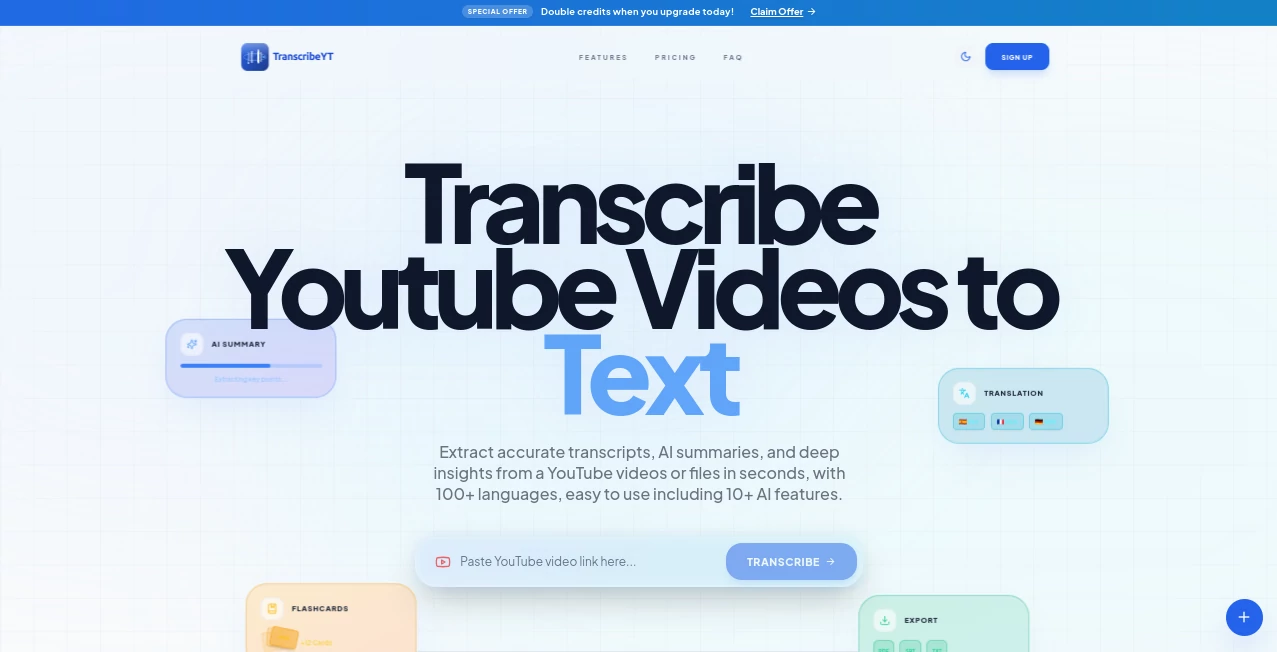
What is TranscribeYT?
Turning video content into searchable text has become an essential part of modern workflows. Whether you are a student reviewing lectures, a creator repurposing content, a marketer extracting insights, or a researcher analyzing long-form discussions, having access to accurate transcripts can save countless hours.
This platform simplifies the entire transcription process by converting YouTube videos into structured text within seconds. Beyond transcription, it also provides AI-generated summaries, study materials, translations, and multiple export options that help users get more value from every video they watch. The combination of speed, usability, and intelligent content analysis makes it a practical solution for both casual users and professionals.
What stands out most is the ability to transform lengthy videos into actionable information. Instead of manually taking notes or replaying sections repeatedly, users can quickly search, organize, and reuse important content whenever needed.
Key Features
User Interface
The platform offers a clean and intuitive experience that requires little to no learning curve. Users simply paste a YouTube URL and begin the transcription process immediately. Navigation is straightforward, allowing quick access to transcripts, summaries, exports, and collaboration tools.
The minimalist design helps users focus on content rather than complicated settings, making it accessible for beginners while remaining efficient for advanced users.
Accuracy & Performance
Accuracy is one of the most important factors in transcription software, and this solution performs exceptionally well across various content types including interviews, lectures, podcasts, tutorials, webinars, and business presentations.
Processing speed is equally impressive. Long-form videos can be converted into readable text in a short amount of time, helping users maintain productivity without lengthy waiting periods. Support for more than 100 languages further expands its usefulness for international audiences.
Capabilities
- Convert YouTube videos into text transcripts.
- Generate AI-powered summaries and key takeaways.
- Create flashcards and quizzes from transcript content.
- Build visual mind maps from extracted information.
- Translate transcripts into multiple languages.
- Export content in PDF, DOCX, TXT, SRT, VTT, Markdown, CSV, JSON, and HTML formats.
- Collaborate with team members on transcript projects.
- Extract insights from educational, business, and creative content.
Security & Privacy
Privacy remains an important consideration when handling content and data. The platform incorporates secure processing practices designed to protect user information throughout the transcription workflow. Users maintain control over their exported files and generated content, making it suitable for both personal and professional use.
For organizations handling educational material, research content, or business discussions, secure processing adds confidence when working with sensitive information.
Use Cases
- Students converting lectures into searchable study notes.
- Researchers analyzing long interviews and educational content.
- Content creators repurposing videos into articles, newsletters, and social posts.
- Podcast producers generating subtitles and show notes.
- Marketers extracting quotes, insights, and campaign ideas from industry videos.
- Language learners reading transcripts alongside video playback.
- Business professionals documenting webinars and presentations.
- Teams collaborating on content analysis and research projects.
Pros and Cons
Pros
- Fast transcription process.
- Supports more than 100 languages.
- AI-generated summaries and insights.
- Multiple export formats available.
- Flashcards, quizzes, and mind map generation.
- Suitable for creators, students, and professionals.
- Simple interface with minimal setup.
- Collaboration features for teams.
Cons
- Advanced capabilities require a paid subscription.
- Results may vary depending on audio quality.
- Focused primarily on YouTube-based workflows.
- Heavy users may require higher-tier plans.
Pricing Plans
The platform offers several subscription options designed for different usage levels.
- Premium: Suitable for individual creators and occasional users with monthly transcription allowances and AI-powered tools.
- Pro: Designed for professionals requiring increased transcription capacity, additional credits, and faster processing.
- Max: Built for teams and power users with large transcription limits, collaboration features, extended history retention, and priority support.
Pricing may change over time, so users should review the latest plans before subscribing.
How to Use TranscribeYT
- Copy the URL of a YouTube video.
- Paste the link into the transcription field.
- Start the transcription process.
- Wait for the AI engine to generate the transcript.
- Review summaries, flashcards, or generated insights.
- Export the content in the preferred format.
- Share or collaborate with team members if needed.
The workflow is intentionally simple, allowing users to move from video content to actionable information within minutes.
Comparison with Similar Tools
Many transcription platforms focus solely on converting speech into text. This solution goes beyond basic transcription by offering a complete content understanding workflow. Features such as AI summaries, flashcards, quizzes, mind maps, multilingual support, and extensive export options create a more comprehensive experience.
While traditional transcription tools often require additional software for note-taking, analysis, or content repurposing, this platform combines those capabilities into a single environment. As a result, users spend less time switching between tools and more time working with meaningful information.
Conclusion
For anyone who regularly consumes YouTube content, converting videos into organized and searchable information can dramatically improve productivity. This platform delivers far more than simple transcription by helping users understand, summarize, study, and reuse video content efficiently.
Its combination of speed, multilingual support, flexible exports, and AI-powered learning features makes it an attractive choice for students, creators, researchers, marketers, and business teams alike. Whether the goal is learning faster, creating content, or extracting valuable insights, it provides a practical and reliable solution.
Frequently Asked Questions (FAQ)
Can I transcribe long YouTube videos?
Yes. The platform supports long-form content including lectures, webinars, interviews, podcasts, and educational videos.
Does it support multiple languages?
Yes. Users can transcribe and translate content in more than 100 languages.
Can I export subtitles?
Yes. Subtitle formats such as SRT and VTT are available alongside other export options.
Is it useful for students?
Absolutely. Features such as summaries, flashcards, quizzes, and searchable transcripts make studying more efficient.
Can teams collaborate on projects?
Yes. Collaboration tools allow multiple users to work together on transcripts and content analysis workflows.
AI Summarizer , AI Education Assistant , AI Transcription , AI Speech to Text .
These classifications represent its core capabilities and areas of application. For related tools, explore the linked categories above.
TranscribeYT details
Pricing
- Free
Apps
- Web App
Categories
TranscribeYT Alternatives Product

Zeemo AI
EZ Grader

Whisper AI
CSCA Prepare…
Instagram Tr…
Medical Scri…
Voza Transcr…

PrepScore

Llamaroo