EventFlyer.AI
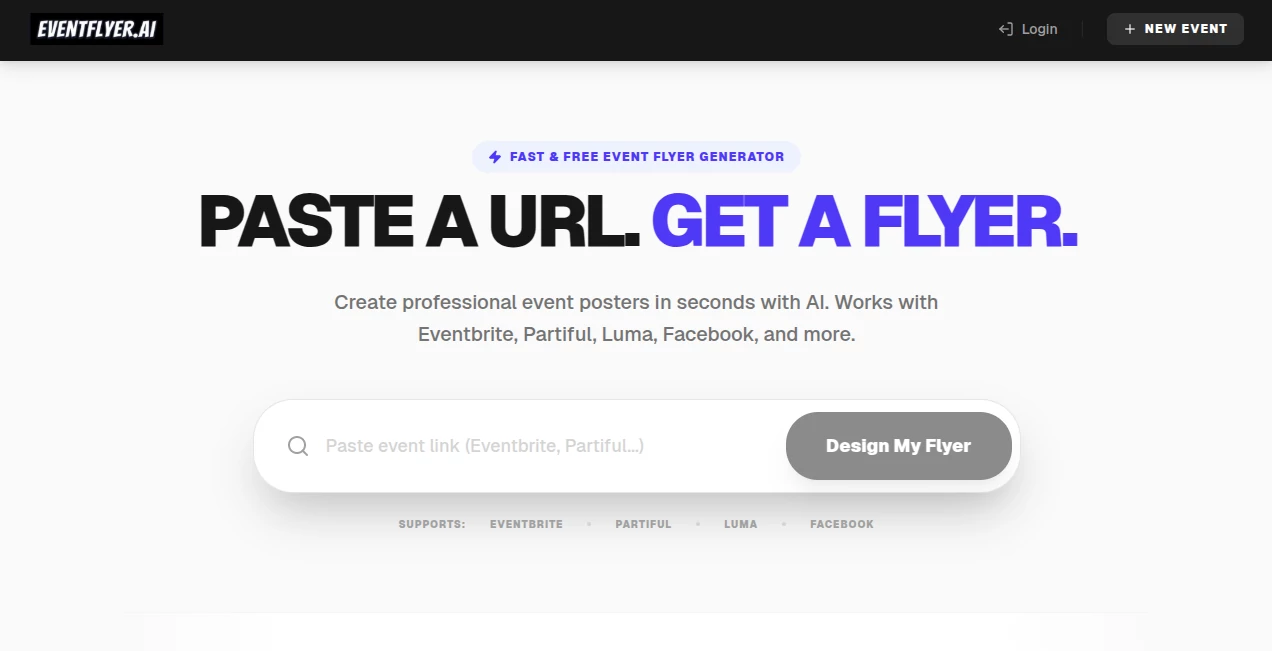
What is EventFlyer.AI?
Designing a professional event flyer used to require hours of effort, design skills, and constant back-and-forth with templates that never quite felt right. Today, modern AI-powered design platforms are changing that experience completely. This tool brings a refreshing approach to flyer creation by turning simple ideas into visually striking promotional materials within moments.
Whether you’re organizing a music event, a corporate meetup, a workshop, or a private celebration, it helps you produce polished, attention-grabbing designs without needing any graphic design background. Everything is built to feel fast, intuitive, and surprisingly creative, even for first-time users.
Key Features
User Interface
The platform is built with simplicity in mind. Users are guided through a clean, minimal workspace where they can enter event details and instantly see design suggestions. The workflow feels natural, removing unnecessary complexity and making design accessible to everyone.
Accuracy & Performance
The AI engine focuses on producing visually balanced and context-aware flyer layouts. It understands event type, tone, and audience, then generates designs that match the intended purpose with impressive consistency.
Capabilities
It can generate a wide range of flyer styles, from modern corporate layouts to vibrant party posters. Users can adjust colors, typography, and visual elements to better match their brand or event identity.
Security & Privacy
User-generated content is handled with standard privacy protections. Event details and designs remain private and are not publicly shared, ensuring a secure creative environment for individuals and businesses.
Use Cases
- Promoting concerts, festivals, and live performances
- Creating corporate event announcements and invitations
- Designing social media event promotions
- Marketing workshops, webinars, and online sessions
- Producing personal party or celebration invitations
Pros and Cons
Pros
- Extremely fast flyer generation process
- No design skills required
- Wide variety of templates and styles
- Suitable for both personal and business use
Cons
- Advanced customization may feel limited for professional designers
- Requires internet connection to access full functionality
Pricing Plans
The platform typically follows a flexible pricing model, often including a free tier for basic flyer creation and premium plans for advanced features such as higher-resolution exports, additional templates, and branding customization options. This makes it accessible for individuals while still scalable for businesses.
How to Use the Tool
Getting started is simple and does not require any prior experience in design. Users begin by entering basic event information such as title, date, and theme. The system then generates multiple design options automatically. From there, users can select a preferred style and make quick edits to fine-tune the final result before downloading or sharing it.
Comparison with Similar Tools
Compared to traditional design platforms that rely heavily on manual editing, this solution significantly reduces the time needed to create professional flyers. While other tools may offer more granular design control, they often require a learning curve. Here, the focus is on speed, automation, and simplicity, making it ideal for users who value efficiency over complex editing workflows.
Conclusion
For anyone looking to create eye-catching event promotions without spending hours on design software, this tool offers a practical and modern solution. It bridges the gap between creativity and convenience, allowing users to produce professional-quality flyers in just a few clicks. Whether for personal events or business marketing, it delivers a smooth and reliable experience that saves both time and effort.
Frequently Asked Questions (FAQ)
Is design experience required?
No, the platform is designed for beginners and professionals alike, with an intuitive interface that handles most of the design work automatically.
Can I customize my flyers?
Yes, users can adjust text, colors, layouts, and visual elements to match their preferences or branding needs.
Is it suitable for business use?
Absolutely. Many businesses use it for promotional events, marketing campaigns, and announcements.
Can I download my designs?
Yes, finished flyers can typically be downloaded in standard image formats suitable for both print and digital use.
Does it work for all types of events?
It supports a wide range of events, from casual gatherings to professional conferences and large-scale public events.
AI Poster Generator , AI Banner Generator , AI Design Generator , AI Graphic Design .
These classifications represent its core capabilities and areas of application. For related tools, explore the linked categories above.

EventFlyer.AI Alternatives Product

Z Image
GPT Image 2 …

GenPPT AI

Nano Banana …

Nano Banana 2

Graffiti Gen…
Banana Prompt
Pixora
Photoshoot A…