
















Face Shape Detector Free for Hairstyles & Beauty
What is Face Shape Detector Free for Hairstyles & Beauty?
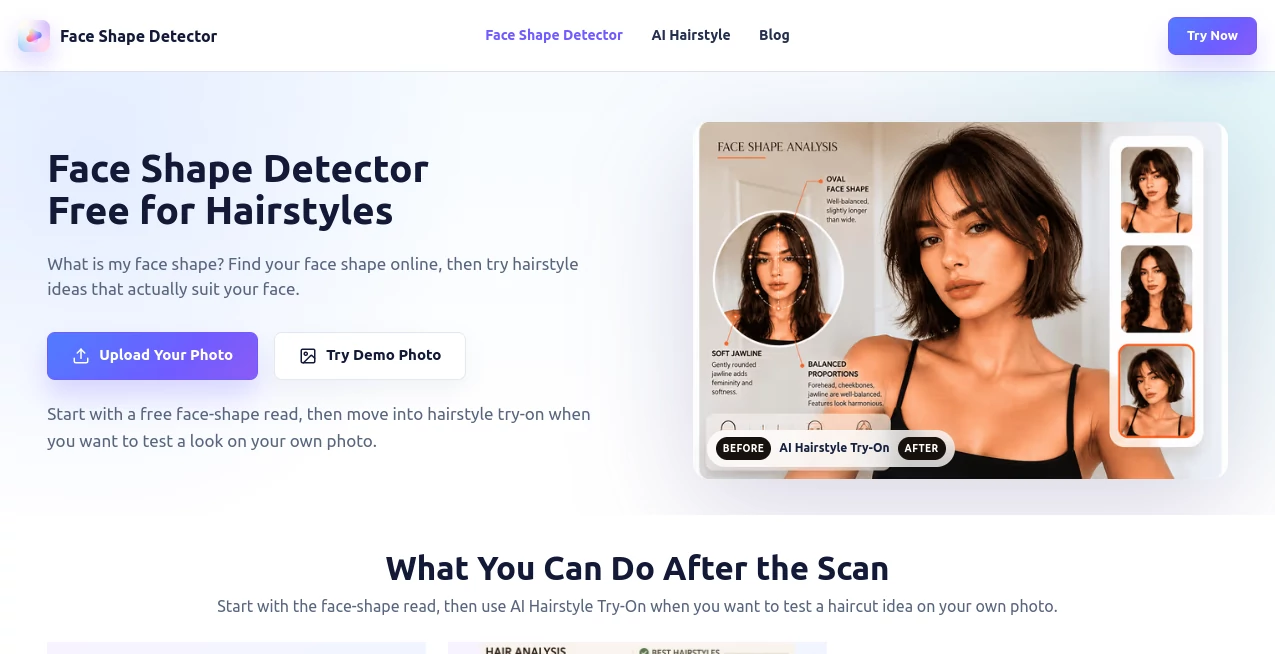
I’ve lost count of how many times I’ve stood in front of a mirror wondering why a certain haircut looked amazing on my friend but felt completely wrong on me. Then I tried this tool. Upload a clear photo, wait a few seconds, and it tells you your face shape with practical, no-fluff advice on what styles will actually flatter you. The best part? It also lets you virtually try on hairstyles on your own photo. I went from guessing to confidence in minutes, and the recommendations actually made sense when I showed them to my stylist.
Introduction
Knowing your face shape is one of those small pieces of knowledge that makes a surprisingly big difference in how you choose hairstyles, glasses, makeup, and even jewelry. This platform makes finding out effortless and useful. Using AI, it analyzes your photo and identifies whether your face is oval, round, square, heart, diamond, oblong, or other variations. Then it goes further by suggesting flattering hairstyles and letting you test them directly on your image. It’s quick, private, and focused on giving you actionable insights instead of vague beauty advice. For anyone who’s ever felt lost in the sea of haircut trends, it feels like finally having a knowledgeable friend who actually knows your face.
Key Features
User Interface
The design is refreshingly straightforward. A prominent upload area invites you to drop a photo or take one directly through your browser. Once uploaded, the analysis runs smoothly with a clean progress indicator. Results appear with clear visuals and explanations, plus easy access to hairstyle try-on. No complicated menus or distracting ads — just a focused experience that gets you answers fast.
Accuracy & Performance
It delivers impressively consistent results on clear, front-facing photos. The AI measures key proportions like forehead width, cheekbones, jawline, and face length to determine the most likely shape. Processing is quick, usually under 30 seconds, and the recommendations feel grounded rather than generic. While no tool is perfect with every angle or lighting condition, it performs reliably for everyday use and gives practical advice that translates well to real-life decisions.
Capabilities
Beyond basic shape detection, it offers AI-powered hairstyle try-on so you can see different cuts and styles on your own face. You get suggestions tailored to your detected shape, along with practical guides for choosing flattering looks. It supports multiple common face shapes and provides clear reasoning for why certain styles work better. The combination of analysis and virtual try-on makes it more than just a detector — it becomes a personal styling helper.
Security & Privacy
Your photos are processed securely and not stored long-term after analysis. You don’t need to create an account for basic use, which keeps things low-pressure and private. For anyone uploading personal photos, that respect for privacy adds a layer of comfort that many similar tools overlook.
Use Cases
Someone preparing for a big haircut appointment uploads their photo, gets their shape confirmed, and walks into the salon with clear reference images of flattering styles. A person shopping for glasses online uses the shape result to narrow down frames that balance their features. A makeup enthusiast experiments with contouring techniques recommended for their specific face type. Even stylists occasionally use it as a quick second opinion when consulting with clients. It’s versatile for personal grooming decisions and light professional use alike.
Pros and Cons
Pros:
- Fast and easy analysis that gives clear, practical results.
- AI hairstyle try-on helps you visualize changes before committing.
- No account required to get started and see real value.
- Focuses on helpful styling advice rather than superficial scores.
- Works well on common phone photos with decent lighting.
Cons:
- Best results need a clear, front-facing photo with hair pulled back.
- Very angled or low-light shots can reduce accuracy.
- Advanced features and unlimited try-ons may require payment.
Pricing Plans
The core face shape detection is available for free so you can try it risk-free. Paid options unlock more hairstyle try-ons, higher resolution outputs, additional styles, and removal of any limitations. The pricing stays reasonable for how much time and bad-haircut regret it can save. Many users find even the free version useful enough to make informed decisions about their next style change.
How to Use Face Shape Detector
Go to the upload area and either take a selfie directly or choose a clear front-facing photo from your device. For best results, make sure your hair is away from your face and lighting is even. Click analyze and wait a short moment for the result. Review your face shape explanation, then move to the hairstyle try-on section to test different looks on your photo. Save or download the ones you like as reference. The entire process is quick enough to do during a lunch break or while planning your next salon visit.
Comparison with Similar Tools
Many face shape tools give vague or overly generalized results with little styling guidance. This one combines accurate detection with practical hairstyle recommendations and virtual try-on, making it more actionable. Where some apps feel gimmicky or push heavy filters, this stays focused on helpful, realistic advice. The balance of simplicity, privacy, and useful output makes it stand out from both basic free detectors and more complicated beauty apps.
Conclusion
Choosing the right hairstyle or frame shouldn’t feel like guesswork. This tool takes the uncertainty out of the equation by giving you a clear understanding of your face shape and showing you what actually works. It’s fast, private, and genuinely useful whether you’re planning a big change or just curious about what suits you best. In a world full of beauty trends that come and go, knowing your own face shape is timeless advice — and this makes discovering it easier than ever.
Frequently Asked Questions (FAQ)
What photo works best for accurate results?
A clear, front-facing shot with even lighting and hair pulled away from your face gives the most reliable reading.
Is my photo stored or shared?
No — photos are processed temporarily and deleted after analysis for privacy.
Can I try hairstyles on my own photo?
Yes, the AI try-on feature lets you test different cuts and styles directly on your uploaded image.
How many face shapes does it recognize?
It identifies the main ones including oval, round, square, heart, diamond, oblong, and others based on proportions.
Is this only for women?
Not at all — the advice works for anyone looking to understand their face shape and find flattering styles.