
Fello AI
What is Fello AI?
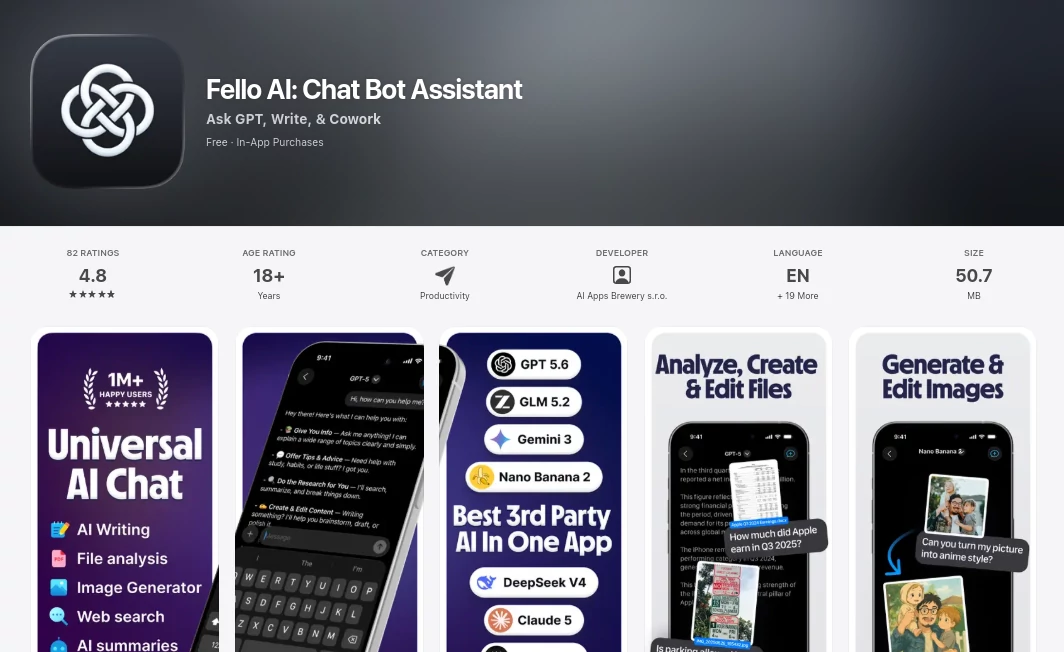
Managing multiple AI subscriptions can quickly become expensive and inconvenient. This platform solves that problem by bringing many of today's leading AI models into one polished application, allowing users to switch between them without leaving the conversation. Whether you need help writing documents, analyzing files, creating presentations, generating images, or researching complex topics, everything is available from a single workspace.
Designed for Mac, iPhone, and iPad, the app focuses on productivity without sacrificing simplicity. Instead of forcing users to learn different interfaces for different AI services, it delivers a consistent experience while offering access to advanced language models, image generation, document creation, and intelligent web search. The result is an AI assistant that feels practical enough for everyday work while remaining powerful enough for professionals, students, creators, and businesses alike. Its combination of speed, flexibility, and broad functionality makes it one of the most complete AI productivity solutions currently available. :contentReference[oaicite:0]{index=0}
Key Features
User Interface
The application features a clean native Apple design that feels responsive across iPhone, iPad, and Mac. Conversations stay organized with bookmarks, pinned chats, projects, and full-text search, making it easy to return to previous work. Light and Dark Mode support create a comfortable experience for long working sessions, while seamless synchronization across devices allows users to continue projects wherever they are. :contentReference[oaicite:1]{index=1}
Accuracy & Performance
Instead of relying on a single AI engine, the platform gives users access to multiple leading language models, allowing them to compare answers and choose the best one for different tasks. It also performs online searches with cited sources for up-to-date information, improving reliability when researching current topics. Fast response times and optimized workflows make the application suitable for both quick questions and demanding professional projects. :contentReference[oaicite:2]{index=2}
Capabilities
- Create Word documents, spreadsheets, presentations, and PDF files directly from chat.
- Analyze PDFs, images, presentations, spreadsheets, and many other document formats.
- Generate and edit AI images.
- Search the web with source citations.
- Summarize lengthy reports and technical documents.
- Create business content, emails, blogs, and reports.
- Build financial spreadsheets with real formulas.
- Generate presentation slides for meetings or lectures.
- Assist with homework, research, and learning.
- Convert documents and conversations into podcast-style audio.
- Support multilingual conversations and content creation.
- Organize ongoing work using Projects and chat management tools.
Security & Privacy
The service includes a published privacy policy and terms of use while offering an ad-free experience for subscribers. Conversations and workflows are designed to remain organized within the application, and users maintain control over uploaded documents when interacting with AI-powered features. The developer also provides regular updates that improve reliability, file handling, and overall application performance. :contentReference[oaicite:3]{index=3}
Use Cases
- Writing professional reports and business documents.
- Creating PowerPoint presentations within minutes.
- Building Excel spreadsheets with formulas.
- Researching complex subjects using multiple AI models.
- Summarizing contracts, PDFs, and academic papers.
- Generating marketing content and social media posts.
- Editing and creating AI-generated images.
- Learning new subjects with detailed explanations.
- Planning vacations and organizing travel.
- Creating podcast-style audio from documents.
Pros and Cons
Pros
- Access to multiple premium AI models in one application.
- Creates real Office and PDF files ready for download.
- Supports extensive document analysis.
- Built-in AI image generation and editing.
- Modern interface optimized for Apple devices.
- Cross-device synchronization.
- Integrated web search with cited sources.
- Free version available.
Cons
- Advanced capabilities require a paid subscription.
- Primarily designed for Apple ecosystem users.
- Daily limits apply to free accounts.
Pricing Plans
The application offers a free plan with limited daily AI usage, making it easy for new users to explore its capabilities before upgrading. Those who need unlimited access to premium AI models, advanced productivity features, and specialized AI skills can subscribe to a paid plan that also includes a free trial. The subscription eliminates advertisements while providing access to the complete collection of supported AI models and tools. :contentReference[oaicite:4]{index=4}
How to Use Fello AI
Download the application on your Apple device and create an account. Start a new conversation and select the AI model that best matches your task. Upload documents, PDFs, images, or spreadsheets whenever additional context is needed. Ask questions, generate content, create presentations, build spreadsheets, or edit images directly from the conversation. Once your work is complete, export the generated files in supported formats for immediate use.
Comparison with Similar Tools
Many AI assistants concentrate on only one language model or specialize in a narrow workflow. This solution stands out by combining several leading AI providers within a single interface while also supporting document generation, spreadsheet creation, presentation building, image editing, web research, and advanced file analysis. Instead of switching between separate AI subscriptions and applications, users can complete nearly every productivity task from one workspace, saving both time and subscription costs. :contentReference[oaicite:5]{index=5}
Conclusion
For anyone looking to centralize their AI workflow, this application offers an impressive balance of convenience, flexibility, and professional-grade capabilities. It simplifies daily work by bringing multiple leading AI models together while extending far beyond simple conversations. From creating polished business documents to analyzing PDFs, generating images, researching online, and producing presentations, it provides an efficient environment for both personal and professional productivity. Its polished Apple-native experience, frequent updates, and broad feature set make it an excellent choice for users who want a complete AI assistant instead of managing multiple separate tools.
Frequently Asked Questions (FAQ)
Does it support multiple AI models?
Yes. Users can access several leading AI models from one application and switch between them depending on the task.
Can it analyze PDF documents?
Yes. It can summarize, explain, and answer questions about PDFs and many other document formats.
Can it generate Office documents?
Yes. Users can create Word documents, Excel spreadsheets, PowerPoint presentations, and PDF files directly from chat.
Is there a free version?
Yes. A free plan is available with daily usage limits, while premium subscriptions unlock unlimited access.
Which devices are supported?
The application is available for Mac, iPhone, and iPad with synchronization across supported Apple devices.
AI Documents Assistant , AI Productivity Tools , AI Chatbot , AI Writing Assistants .
These classifications represent its core capabilities and areas of application. For related tools, explore the linked categories above.

Fello AI Alternatives Product

Une Amie à P…

Document Chat

Motion

Create Filla…

photo to URL

eesel AI

Gochu

FLINT AI

Soulthread