Fig0
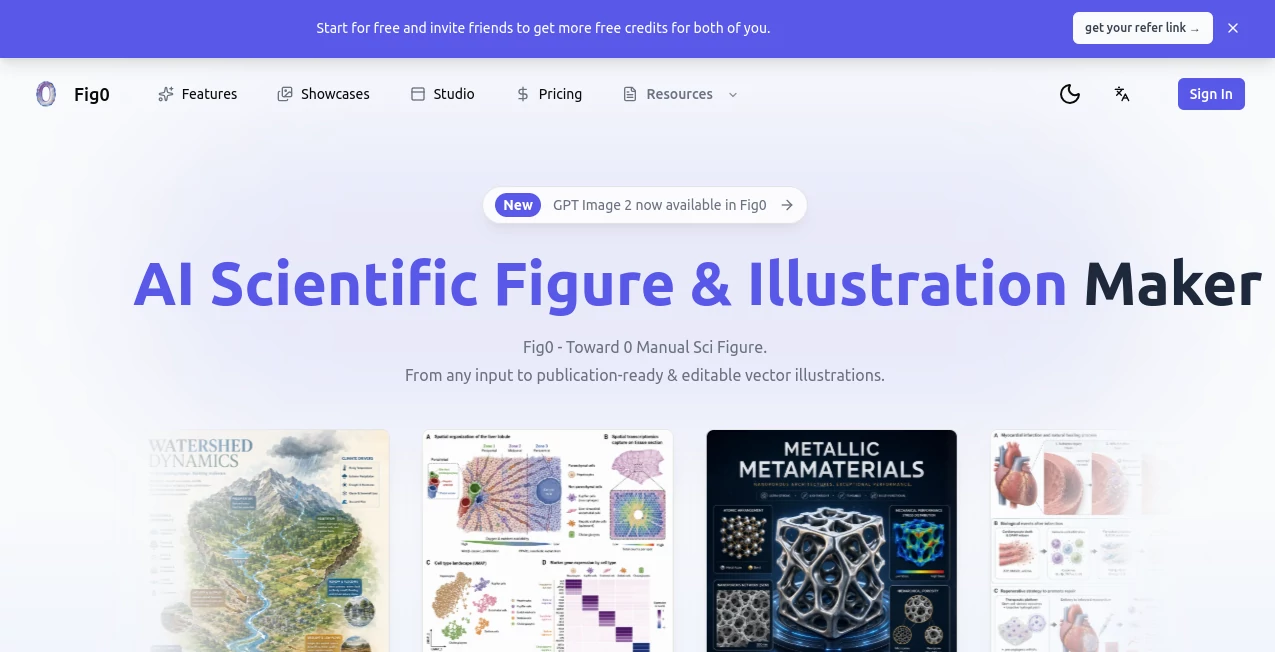
What is Fig0?
Creating scientific illustrations has traditionally been one of the most time-consuming parts of research communication. Whether preparing a manuscript, conference poster, grant proposal, or educational material, researchers often spend hours refining diagrams, adjusting labels, and rebuilding figures after reviewer feedback.
This platform approaches the problem from a completely different angle. Instead of forcing scientists to become graphic designers, it transforms existing research materials into publication-ready scientific figures. Users can start with text descriptions, sketches, reference images, PDFs, screenshots, or photos and quickly generate structured visual content designed for academic workflows.
What makes the experience particularly appealing is its focus on editability and scientific clarity. Rather than producing static images that are difficult to modify later, the platform supports vector-based outputs that remain useful throughout revisions, collaborations, and publication processes.
Key Features
User Interface
The workspace is designed around an intuitive canvas-based environment that allows users to create, organize, and refine scientific illustrations without unnecessary complexity. The layout supports iterative editing, making it easy to adjust individual elements, annotations, labels, and figure compositions.
Researchers can work with multiple visual assets in a single environment, reducing the need to jump between separate design applications.
Accuracy & Performance
The platform is optimized specifically for scientific communication rather than general-purpose image generation. This specialized approach helps produce diagrams, pathways, mechanisms, and conceptual illustrations that better align with academic publishing standards.
Generation is fast enough to support rapid experimentation, allowing researchers to explore different visual representations before finalizing a figure for publication.
Capabilities
- Text-to-figure generation for scientific concepts and mechanisms.
- Sketch-to-figure conversion for transforming rough drafts into polished visuals.
- Reference-based figure creation using screenshots and existing images.
- Canvas-based editing for continuous refinement.
- Editable vector exports for long-term usability.
- High-resolution outputs suitable for publication and printing.
- Support for scientific diagrams, workflows, pathways, and educational graphics.
Security & Privacy
Research projects often involve unpublished data, confidential findings, and sensitive intellectual property. The platform is designed to support professional scientific workflows, allowing researchers to create and manage figures within a dedicated environment built for academic use.
The ability to maintain editable assets throughout the research lifecycle also helps teams collaborate more efficiently while preserving control over their visual content.
Use Cases
- Creating publication-ready figures for scientific journals.
- Designing pathway diagrams and biological illustrations.
- Preparing conference posters and presentation materials.
- Visualizing experimental workflows and research methods.
- Generating educational content for teaching and training.
- Building conceptual models for grant applications.
- Producing editable graphics for collaborative research teams.
Pros and Cons
Pros
- Supports multiple input formats including text, sketches, PDFs, and images.
- Built specifically for scientific and academic workflows.
- Editable vector exports simplify revisions.
- High-resolution output suitable for publication.
- Reduces the time required to create professional scientific illustrations.
- Useful for both researchers and educators.
Cons
- Primarily focused on scientific figure creation rather than general graphic design.
- Advanced users may still require external design software for highly specialized adjustments.
- Complex projects may require iterative refinement to achieve the desired final result.
Pricing Plans
The platform offers access options that allow researchers to explore its capabilities before committing to broader usage. Availability of features, export limits, and premium functionality may vary depending on the selected plan.
Users should review the latest pricing information directly on the official website for the most accurate details.
How to Use Fig0
Getting started is straightforward and requires only a few steps:
- Upload a sketch, PDF, reference image, screenshot, or provide a text description.
- Generate an initial scientific figure draft.
- Refine labels, layouts, annotations, and visual elements on the canvas.
- Review the figure for scientific accuracy and presentation quality.
- Export the final version in SVG, PPTX, PDF, PNG, or TIFF format.
- Use the exported assets for manuscripts, presentations, posters, or collaborative editing.
Comparison with Similar Tools
Many image-generation platforms can create visually appealing graphics, but they often struggle with scientific precision, structured layouts, and post-generation editing. Generic design tools frequently require extensive manual work to transform generated images into publication-ready assets.
This solution stands out by focusing on the needs of researchers. Its support for editable vector exports, scientific figure workflows, sketch-based generation, and publication-oriented output formats provides advantages that are difficult to find in traditional image-generation products.
For scientists who regularly create diagrams, pathways, workflows, and educational illustrations, the workflow feels significantly more aligned with real-world research requirements.
Conclusion
Scientific communication depends heavily on clear and accurate visuals, yet figure creation remains a challenge for many researchers. This platform helps bridge the gap between scientific expertise and visual presentation by turning existing ideas, sketches, and research materials into polished figures that remain editable throughout the publication process.
Its combination of flexible inputs, academic-focused generation, vector-based editing, and publication-ready exports makes it a compelling solution for researchers, educators, and scientific teams looking to spend less time drawing and more time focusing on their work.
Frequently Asked Questions (FAQ)
What types of scientific figures can be created?
The platform can be used for pathways, mechanisms, conceptual diagrams, workflows, research illustrations, educational graphics, and many other scientific visualizations.
Can figures be edited after generation?
Yes. One of the platform's key strengths is maintaining editability through its canvas workflow and vector-based exports.
What input formats are supported?
Users can start from text descriptions, sketches, PDFs, screenshots, photos, and reference images.
Which export formats are available?
Supported outputs include SVG, PPTX, PDF, PNG, and high-resolution TIFF formats.
Is it suitable for academic publishing?
Yes. The workflow and export options are specifically designed to support publication, presentation, and collaborative research requirements.
Can educators use it for teaching materials?
Absolutely. The platform is useful for creating diagrams, explanatory graphics, and educational illustrations for classrooms and training programs.
AI Diagram Generator , AI Illustration Generator , AI Education Assistant , AI Research Tool .
These classifications represent its core capabilities and areas of application. For related tools, explore the linked categories above.
Fig0 details
Pricing
- Free
Apps
- Web App
Categories

Fig0 Alternatives Product

Ryne AI

HostFinder

SuperAI

Creget

UPDF AI

Flyback.ai

EZ Grader

Futurwise

ShinePhoto