
file2markdown
What is file2markdown?
Working with documents inside modern AI workflows can become surprisingly frustrating. PDFs, Word files, presentations, spreadsheets, images, and other formats often contain useful information, but getting that information into a clean format for AI systems or knowledge bases is not always straightforward.
file2markdown takes a practical approach to this problem by converting documents into clean, structured Markdown that can be copied, downloaded, or passed directly into tools such as Claude, ChatGPT, NotebookLM, RAG systems, vector databases, and documentation workflows. Instead of manually copying content from a long document, users can upload a file and receive structured Markdown in seconds.
The service supports more than 15 formats, including PDF, DOCX, PPTX, XLSX, CSV, JSON, XML, HTML, EPUB, JPG, PNG, WAV, MP3, and ZIP archives. This makes it useful for developers, researchers, content teams, and anyone who regularly works with documents in AI-powered workflows.
Key Features
- Convert PDFs, Word documents, presentations, spreadsheets, images, and other supported formats into Markdown.
- Extract text, tables, headings, lists, and document structure instead of returning plain unformatted text.
- Support for more than 15 input formats, including PDF, DOCX, PPTX, XLSX, CSV, JSON, XML, HTML, EPUB, JPG, PNG, WAV, MP3, and ZIP.
- OCR support for scanned PDFs and images through Claude AI.
- Copy generated Markdown directly to the clipboard or download it as a Markdown file.
- Batch conversion for up to 10 files at once on the Pro plan.
- Support for files up to 100MB on the Pro plan.
- MCP server integration for AI clients such as Claude and Cursor.
User Interface
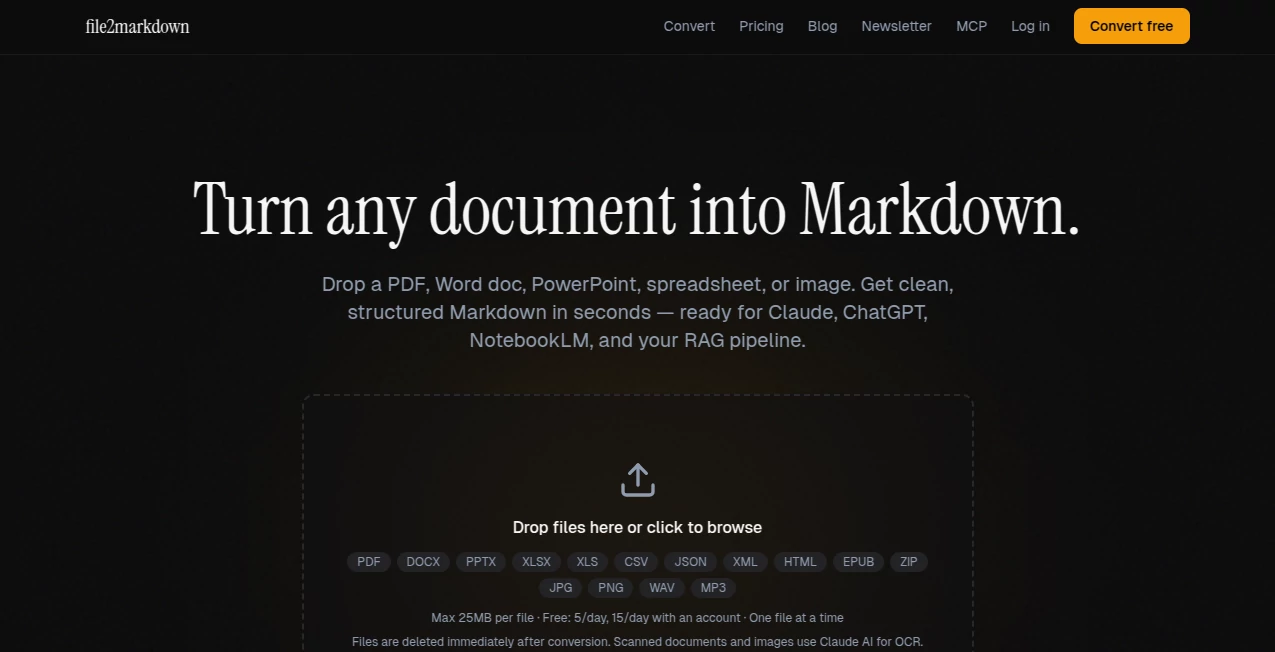
The interface is deliberately simple. Users can drag and drop a supported document into the upload area or select a file from their computer. There is no complicated configuration process, command-line setup, or technical knowledge required for the basic workflow.
After the conversion is complete, the resulting Markdown can be copied or downloaded. This straightforward design works particularly well for people who need to process a document quickly rather than spend time configuring a document-processing environment.
Accuracy & Performance
The main advantage of the conversion approach is that it focuses on extracting the actual structure and content of a document rather than asking a language model to recreate the document from scratch. Text, tables, headings, lists, and other structural elements can therefore be represented as Markdown instead of being treated as an ordinary block of text.
This distinction is especially useful when working with research papers, technical documentation, reports, spreadsheets, and other files where the relationship between different sections matters. Scanned PDFs and images can also be processed using OCR, although results naturally depend on the quality and clarity of the original material.
Capabilities
The platform covers a broad range of document conversion tasks. A PDF can be transformed into Markdown with its text, headings, tables, and structure preserved. DOCX files can retain headings, formatting, and lists, while PowerPoint presentations are converted into structured sections.
Spreadsheet-oriented formats receive similar treatment. XLSX and CSV files can be transformed into Markdown tables, while JSON and XML content can be organized into a format that is easier to read and process. HTML and EPUB files are also supported, making the service useful for content migration and knowledge-management projects.
For developers and AI power users, the MCP server adds another useful layer. Documents can be converted from within compatible AI environments, reducing the need to manually move files between different applications.
Security & Privacy
Privacy is one of the more important considerations when working with documents, particularly when files contain research, business information, or private material. Uploaded files are processed in memory and are deleted immediately after conversion rather than being permanently stored on the service's servers.
The service states that it does not read, analyze, or share uploaded content as part of a separate data-storage system. For scanned PDFs and images, OCR processing uses Claude AI, so users handling particularly sensitive material should still consider the nature of the document and the processing requirements before uploading it.
Use Cases
AI and RAG workflows: Researchers and developers can convert source documents into structured Markdown before sending them to language models, retrieval systems, or vector databases. Markdown is particularly convenient for chunking, indexing, and human review.
Research papers: Academic papers and reports can be transformed into structured text that is easier to search, summarize, analyze, or import into knowledge-management applications.
Developer documentation: Developers can turn documents into Markdown for GitHub repositories, READMEs, blogs, static websites, or internal documentation.
Presentations: PowerPoint files can be converted into structured sections, making the information inside slides easier to reuse in other workflows.
Scanned documents: Images and scanned PDFs can benefit from OCR when the original file contains text that cannot be selected or copied normally.
Knowledge management: Converted Markdown files can be moved into applications such as Obsidian or other systems that work naturally with plain-text and Markdown-based knowledge bases.
Pros and Cons
Pros
- Supports a wide selection of document formats.
- No account is required for the basic free conversion workflow.
- Produces structured Markdown rather than simply extracting raw text.
- Useful for AI, RAG, research, and documentation workflows.
- Supports OCR for scanned PDFs and images.
- Files are deleted after processing according to the service's privacy policy.
- Pro users can process larger files and multiple documents in batches.
- MCP support makes the service particularly interesting for AI-assisted workflows.
Cons
- The free plan has daily conversion limits.
- Free users are limited to smaller files and one file at a time.
- OCR quality can vary depending on the quality of the scanned source.
- Users processing sensitive documents should consider the external OCR processing used for scanned files and images.
Pricing Plans
The service offers a free option that can be used without creating an account. The current free workflow allows up to 5 conversions per day with files up to 25MB each. Creating a free account increases the daily allowance to 15 conversions.
The Pro plan is designed for heavier usage and is listed at $9 per month, with an annual option billed at $108 per year. Pro includes unlimited conversions, support for files up to 100MB, batch processing of up to 10 files at once, OCR for scanned PDFs, and priority support.
This pricing structure makes the service easy to test before committing to a subscription. Someone who only needs to convert an occasional report or PDF may find the free allowance sufficient, while developers, researchers, and teams processing documents regularly have a clear upgrade path.
How to Use It
- Open the document conversion interface.
- Drag and drop a supported file or choose one from your computer.
- Wait while the document is processed and converted into structured Markdown.
- Review the generated Markdown to make sure the extracted content matches your source document.
- Copy the result to the clipboard or download the Markdown file.
- Use the resulting file in your preferred AI, documentation, research, or knowledge-management workflow.
For users working with multiple files, the Pro plan adds batch processing, allowing up to 10 files to be converted at once. Developers and advanced AI users can also connect through the available MCP server and use document conversion directly within compatible AI clients.
Comparison with Similar Tools
There are several ways to convert documents into Markdown, but they serve different audiences. Pandoc is an extremely powerful command-line conversion utility with broad format support, although it requires local installation and a more technical workflow.
Microsoft MarkItDown is another strong option, particularly for developers who want an open-source Python library that can run locally. It provides more control for custom development, but users need to install and configure the software themselves.
A hosted document converter is more convenient when the goal is simply to upload a file and receive usable Markdown without setting up a development environment. This makes the service particularly attractive to researchers, content teams, and AI users who value speed and simplicity over maintaining their own conversion infrastructure.
Conclusion
Turning documents into AI-ready content does not need to involve manual copying, complicated scripts, or lengthy setup processes. This service provides a focused solution for converting common document formats into structured Markdown while supporting workflows ranging from everyday document handling to RAG pipelines and developer documentation.
Its combination of broad format support, OCR capabilities, simple browser-based conversion, privacy-focused file handling, and MCP integration gives it appeal beyond a basic PDF converter. The free tier is also useful for testing the workflow before deciding whether unlimited conversions and larger files justify a Pro subscription.
For anyone who frequently moves information from PDFs, Word documents, presentations, spreadsheets, images, or other files into AI and Markdown-based workflows, it is a practical addition to the toolkit.
Frequently Asked Questions (FAQ)
What types of files can be converted?
Supported formats include PDF, DOCX, PPTX, XLSX, CSV, JSON, XML, HTML, EPUB, JPG, PNG, WAV, MP3, ZIP, and other supported document formats.
Can scanned PDFs be converted?
Yes. Scanned PDFs can be processed using OCR. OCR is also available for images, with the Pro service providing access to these capabilities.
Do I need an account to use the service?
No. The free conversion workflow can be used without an account. A free account provides a higher daily conversion allowance.
Can I convert multiple files at the same time?
Yes. Batch processing is available for Pro users and supports up to 10 files in one batch.
How large can my files be?
The free service supports files up to 25MB, while the Pro plan increases the maximum file size to 100MB.
Can the converted Markdown be downloaded?
Yes. Users can either copy the generated Markdown to the clipboard or download it as a Markdown file.
Is it useful for RAG pipelines?
Yes. Structured Markdown can be useful as an intermediate format for retrieval pipelines, vector databases, document indexing, and other AI workflows that need clean source material.
Can it work with Claude or Cursor?
Yes. An MCP server is available for compatible AI clients, allowing document conversion to take place within supported AI-assisted workflows.
AI Document Extraction , AI PDF , AI Documents Assistant , AI Files Assistant .
These classifications represent its core capabilities and areas of application. For related tools, explore the linked categories above.
file2markdown details
Website unavailable — View Alternatives
Pricing
- Freemium
Apps
- Web App
Categories

file2markdown Alternatives Product
GLM-OCR Onli…

TurboScribe

Odysseus AI

JSON to Excel
The #1 Text …

Transcribe A…
PDF Studio

tryon.ink

Flowmata AI