Flare Warden
What is Flare Warden?
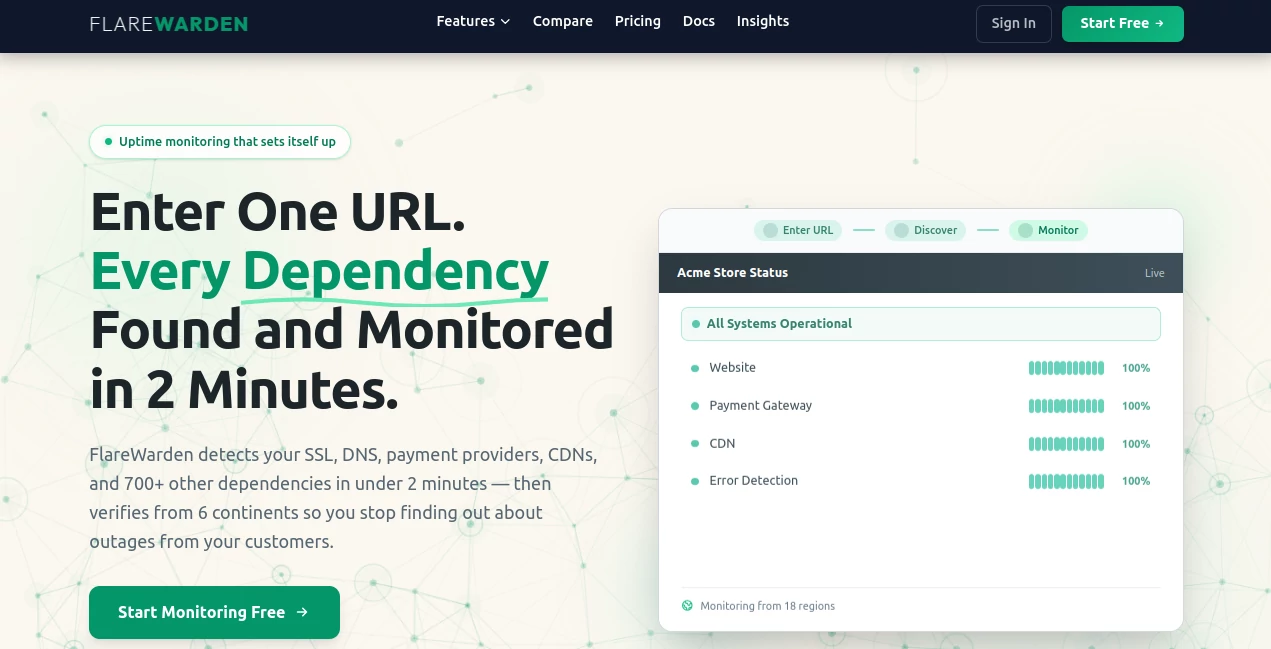
Nothing ruins a good night’s sleep like waking up to angry customer messages because your site went down. FlareWarden takes that stress off your shoulders. You enter just one URL, and it automatically discovers your entire stack — SSL certificates, DNS providers, CDNs, payment gateways, and over 700 other dependencies — then starts monitoring them from multiple continents. It’s the kind of tool that makes you wonder why monitoring ever had to be this complicated before. I’ve seen solo founders and small teams go from constant worry to peaceful confidence after setting it up in under two minutes.
Introduction
Most uptime tools require you to manually add every service you depend on, which is both time-consuming and easy to get wrong. FlareWarden flips that model. Enter your main website URL and it intelligently scans and maps your full infrastructure, then monitors everything with smart cross-region verification to cut down on false alarms. It also gives you beautiful, auto-updating status pages your customers can check. Whether you’re a freelancer managing client sites, an agency handling multiple projects, or a SaaS team watching your app and its dependencies, it feels like having a reliable night-shift engineer who never sleeps and rarely cries wolf.
Key Features
User Interface
The dashboard is refreshingly clean and focused. After the initial scan, everything is neatly organized — your main site, discovered dependencies, uptime percentages, and response times all visible at a glance. Setting up alerts for Slack, email, or webhooks is straightforward. The status pages look professional right out of the box and can be branded with your own domain. It never feels overwhelming, even when you’re monitoring dozens of services.
Accuracy & Performance
The real differentiator is the cross-region verification. A single location failing doesn’t trigger an alert — it checks from multiple continents first. This dramatically reduces false alarms that wake people up at 3 a.m. for network hiccups. Checks can run as frequently as every 30 seconds, and the system catches SSL expiration, DNS issues, content errors, and third-party outages before your users notice. In practice, it feels trustworthy — you only get notified when something actually matters.
Capabilities
It monitors websites, APIs, SSL certificates, DNS, cron jobs, and third-party dependencies automatically. You get public and private status pages, detailed incident history, webhook integrations, and team collaboration features. The smart setup means you spend minutes instead of hours configuring monitors. It’s particularly strong for modern stacks that rely heavily on external services — you finally see the full picture instead of just pinging your main domain.
Security & Privacy
Your monitoring data is handled securely with regional storage options (US/EU) and strong encryption. It’s GDPR compliant by design, and you maintain full control over what’s public on your status pages. For agencies and businesses handling client sites, the clean security approach builds confidence that sensitive infrastructure details stay protected.
Use Cases
A freelance developer monitors all client websites from one dashboard and gets alerted before clients even notice issues. An e-commerce store owner tracks their payment gateway and CDN alongside their main site, preventing lost sales during peak traffic. A SaaS team monitors their app plus critical dependencies like auth providers and databases, keeping their status page transparent for customers. Agencies use it to offer white-labeled monitoring as a value-added service. Wherever uptime directly impacts revenue or reputation, it becomes an essential safety net.
Pros and Cons
Pros:
- Automatic dependency discovery saves hours of manual setup.
- Cross-region verification dramatically reduces false alarms.
- Professional status pages included on every plan.
- Fast, reliable performance with 30-second check options.
- Generous free plan with real monitoring capabilities.
Cons:
- Very large enterprise setups may need the higher tiers for unlimited monitors.
- Some advanced custom alerting logic requires webhook setup.
Pricing Plans
The free plan is genuinely useful — 15 monitors, multi-region checks, and a status page with no credit card required. Paid plans scale affordably for growing teams and larger infrastructures, unlocking more monitors, faster checks, additional team members, and advanced features. Early adopter pricing makes it especially attractive right now. Many users say the paid tier pays for itself quickly by preventing even one major outage or customer complaint.
How to Use FlareWarden
Sign up (free, no card needed), enter your main website URL, and let it scan. Review the automatically discovered monitors and make any small adjustments. Set up your preferred alert channels (email, Slack, etc.) and customize your public status page if desired. That’s it — monitoring begins immediately. Check the dashboard for uptime trends or review incidents when they happen. For agencies, you can create separate workspaces for different clients. The whole setup usually takes less than two minutes.
Comparison with Similar Tools
Traditional uptime monitors often require manual configuration of every service and still miss dependencies. FlareWarden’s automatic discovery and smart verification give it a clear edge, especially for modern web stacks. While some enterprise tools offer more advanced analytics, they come with complexity and much higher prices. This one delivers the right balance of intelligence, simplicity, and affordability for most growing businesses and agencies.
Conclusion
Downtime is expensive — in money, reputation, and sleep. FlareWarden makes reliable monitoring accessible and almost effortless by handling the complex parts automatically. It gives you peace of mind without requiring constant attention, while providing transparent status pages that build customer trust. For freelancers, agencies, and SaaS teams who can’t afford surprises, it’s one of those rare tools that quietly makes everything run smoother. If your business depends on being online, this is monitoring done right.
Frequently Asked Questions (FAQ)
How long does the initial scan take?
Usually under two minutes — it discovers your stack remarkably quickly.
Does it monitor third-party services?
Yes — payment gateways, CDNs, DNS providers, and hundreds of other dependencies.
Can I brand my status page?
Yes — custom domains and branding are available, especially on paid plans.
Is the free plan actually useful?
Absolutely — 15 monitors with multi-region checks is enough for many small sites and side projects.
What if something goes down?
You’ll get verified alerts only after cross-region confirmation, reducing unnecessary wake-ups.
AI Research Tool , AI Analytics Assistant .
These classifications represent its core capabilities and areas of application. For related tools, explore the linked categories above.

Flare Warden Alternatives Product

CoinIQ

Customer Fee…

Greek Numero…

TutuoAI

Rank++

Chrome Sidek…

Website Audi…

SciFig

Yorph AI