
FlashFeed
What is FlashFeed?
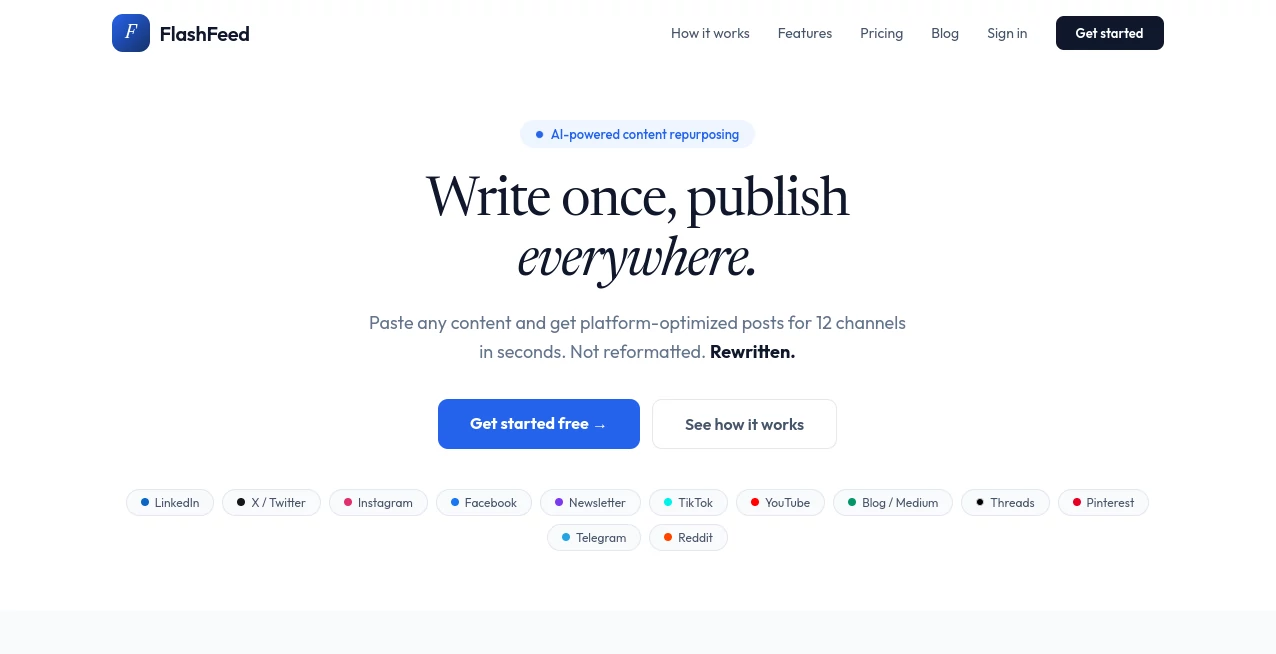
Creating content for multiple social media platforms can quickly become one of the most time-consuming parts of digital marketing. A single blog post, podcast transcript, or video script often needs to be rewritten several times before it fits the style and audience of different channels. This platform simplifies that process by transforming one piece of content into platform-specific posts that are ready to publish in just a few clicks.
Instead of producing generic rewrites, it understands the unique format, tone, and expectations of each supported platform. Whether you're managing a personal brand, growing a startup, running an agency, or publishing educational content, it helps maintain consistency while saving hours of manual editing. The result is a smoother content workflow that allows creators to focus more on ideas and less on repetitive writing tasks.
Key Features
User Interface
The interface is clean, modern, and designed for speed. Users simply paste their existing content, choose the platforms they want to target, select a preferred writing tone, and receive optimized posts within seconds. The workflow is intuitive enough for beginners while remaining efficient for experienced marketers and content teams.
Accuracy & Performance
Rather than producing simple paraphrases, the system restructures content according to the best practices of each social platform. It adapts post length, hooks, hashtags, calls-to-action, and formatting while preserving the original message. Built-in metrics such as character count, word count, hook scoring, and hashtag analysis make it even easier to prepare content for immediate publishing.
Capabilities
- Repurpose blogs, articles, transcripts, meeting notes, and video scripts.
- Generate optimized posts for up to 12 different publishing platforms.
- Select from multiple writing tones including professional, casual, bold, witty, and educational.
- Create platform-native content instead of simple text rewrites.
- Generate ready-to-publish social posts with one click.
- Support multiple languages by matching the language of the original content.
- Export content and quickly copy all generated posts.
- Support brand voice management for consistent messaging.
- Provide content performance metrics before publishing.
Security & Privacy
The service operates through secure online accounts and allows users to manage their own content generation workflow. Team collaboration options are available in higher subscription plans, making it suitable for agencies and businesses that require shared access while maintaining organized content management.
Use Cases
- Content creators expanding their reach across multiple social media platforms.
- Marketing agencies managing several client accounts.
- Startup founders promoting product updates consistently.
- YouTubers converting videos into social media content.
- Newsletter writers creating promotional posts.
- Podcast hosts turning transcripts into engaging social snippets.
- Bloggers distributing articles across different communities.
- Businesses maintaining a consistent brand voice across marketing channels.
Pros and Cons
Pros
- Significantly reduces content creation time.
- Supports 12 major publishing platforms.
- Produces platform-specific formatting rather than generic rewrites.
- Offers multiple writing tones.
- Provides useful publishing metrics.
- Simple workflow suitable for beginners.
- Free trial available without requiring a credit card.
Cons
- Advanced features require paid plans.
- Team collaboration is limited to premium subscriptions.
- Best suited for repurposing existing content rather than creating entirely new long-form articles.
- Sign up for a free account.
- Paste a blog post, article, transcript, meeting note, or script.
- Select the social platforms you want to publish on.
- Choose your preferred writing tone.
- Generate optimized content with one click.
- Review the built-in content metrics.
- Copy or export the generated posts.
- Publish directly on your preferred platforms.
Pricing Plans
A free plan is available with three trial content packs, allowing new users to explore the platform before purchasing. Paid subscriptions include Starter, Pro, and Ultra plans, each increasing the number of supported platforms, monthly content packs, brand voices, export capabilities, collaboration features, and customer support options. Annual billing provides noticeable savings compared to monthly payments.
How to Use FlashFeed
Comparison with Similar Tools
Unlike traditional AI writing assistants that require extensive prompting for every platform, this solution focuses on automated content repurposing. Instead of manually requesting separate versions for LinkedIn, Instagram, X, newsletters, or Reddit, users receive optimized variations simultaneously. The platform-specific formatting, built-in publishing metrics, and multi-channel workflow make it particularly valuable for marketers who regularly distribute the same message across different audiences.
Conclusion
Repurposing content no longer needs to consume an entire workday. This platform transforms one original piece into polished, platform-ready posts that match the expectations of each social network while preserving the creator's core message. Its combination of speed, intelligent formatting, customizable writing styles, and publishing metrics makes it an excellent solution for creators, agencies, entrepreneurs, and marketing teams looking to maximize content reach with minimal effort.
Frequently Asked Questions (FAQ)
Can I start using the platform for free?
Yes. New users receive free trial content packs without providing a credit card.
What types of content can be uploaded?
Blogs, articles, podcast transcripts, meeting notes, video scripts, newsletters, and other text-based content can all be repurposed.
Does it support multiple languages?
Yes. Generated content follows the language of the original input.
Is the generated content ready to publish?
Yes. The platform creates posts with optimized formatting, hooks, hashtags, and calls-to-action suitable for each supported channel.
Who benefits most from this platform?
Content creators, digital marketers, agencies, entrepreneurs, educators, and businesses that publish across multiple social media platforms will gain the most value.
AI Content Generator , AI Social Media Assistant , AI Repurpose Assistant , AI Marketing Plan Generator .
These classifications represent its core capabilities and areas of application. For related tools, explore the linked categories above.

FlashFeed Alternatives Product

Cataseo AI

softshill

Reddit Campa…

Ai Book Publ…

Drafted AI

GPT Image 2

AI Business …
md2card

AIInLink