Flux 3
What is Flux 3?
Flux 3 AI brings image creation, image editing, and video generation into a single creative workspace. Instead of moving a concept between several separate tools, creators can start with a written idea, an image, or video footage and continue developing it from there.
The platform is particularly interesting for people who need more than a single generated picture. A product concept can become a promotional image and then a short video. A character can be created as a still and reused as a visual reference for another scene. This connected approach makes the creative process feel much more practical, especially when consistency matters.
Image generation supports detailed prompts, visual references, multiple aspect ratios, and output quality options. The video side adds text-to-video, image-to-video, video-to-video, continuation, and keyframe-based workflows, with native audio available for generated video.
Key Features
- Text-to-image generation: Create photographic, artistic, cinematic, graphic, and experimental visuals from natural-language prompts.
- Image-to-image editing: Upload an existing image and use instructions to transform its appearance, composition, subject, or style.
- Visual reference control: Use reference images to keep important elements such as characters, products, layouts, and visual direction more consistent.
- Text-to-video: Turn written descriptions into short video scenes with controlled motion and audiovisual elements.
- Image-to-video: Animate a generated or uploaded still image and use it as the starting point for a video sequence.
- Video-to-video: Use existing footage as a reference for creating a new visual treatment or scene.
- Native audio generation: Generated video can include synchronized sound, dialogue, and audio associated with events in the scene.
- Keyframe control: Use keyframes to guide motion and transitions when building video sequences.
- Multiple aspect ratios: Image creation includes formats such as 1:1, 4:3, 16:9, 9:16, and 3:4.
- High-resolution image options: The image workspace provides selectable quality options including 1K, 2K, and 4K where available.
- Multilingual content: The platform supports multilingual text in images and multilingual dialogue in video workflows.
User Interface
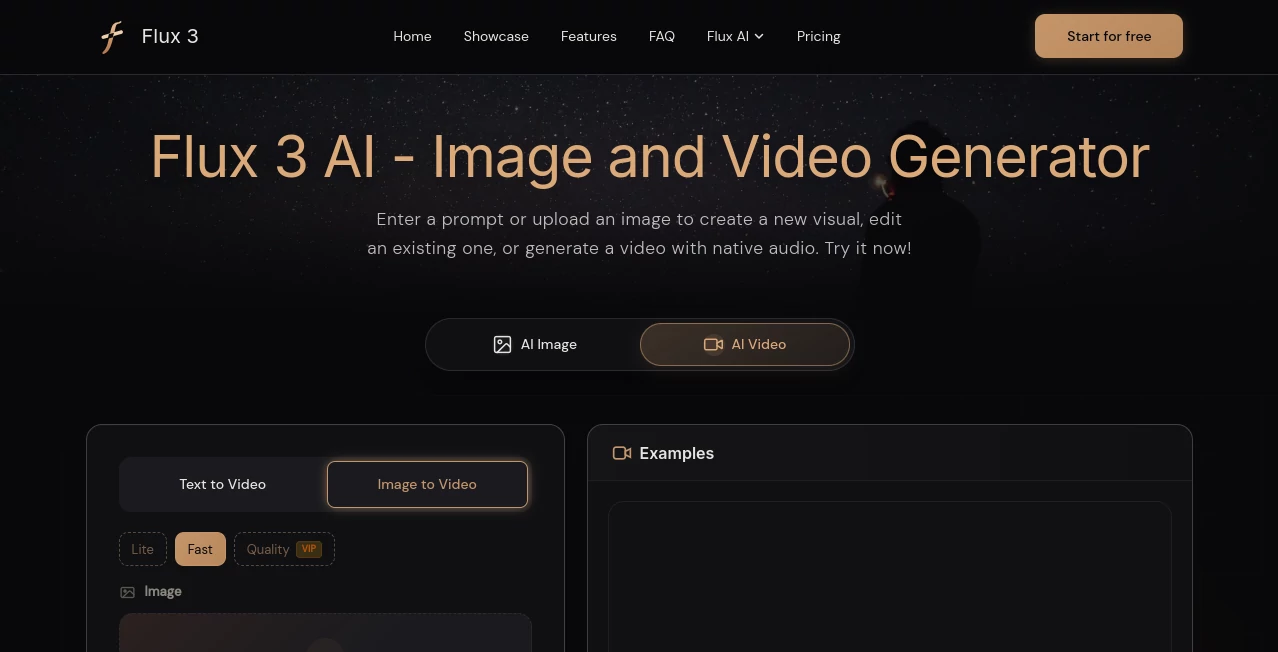
The interface is built around a straightforward generation workflow rather than a complicated collection of controls. Users can choose between image and video creation, enter a prompt, upload references when needed, select output settings, and generate the result.
For image creation, the workspace accepts JPEG, PNG, and WEBP uploads up to 24MB. Users can select an aspect ratio, quality level, and number of outputs before generating. The video workspace provides its own generation controls, including text-to-video and image-to-video options.
This setup is useful for beginners because the basic process is easy to understand, while reference images, keyframes, and different generation modes give experienced creators more room to experiment.
Accuracy & Performance
Visual accuracy depends heavily on the prompt and reference material, but the platform is designed to handle detailed descriptions involving subjects, layouts, lighting, materials, spatial relationships, and typography. This makes it suitable for more specific creative briefs rather than only short generic prompts.
Reference-based workflows are especially useful when an important element needs to remain recognizable. For example, a creator working on a product campaign can specify which parts of the product, logo placement, or camera perspective should remain unchanged before describing the desired modification.
Video generation can produce clips of up to 20 seconds when the relevant controls are available, while shorter configurations are also offered depending on the selected generation settings.
Capabilities
The strongest part of the platform is the connection between still images and moving content. A creator can begin with a product image, use it as a visual reference, and then develop a short promotional sequence around it. The same idea works for characters, environments, advertisements, storyboards, and social media content.
Video creation supports several starting points, including text, still images, source footage, and keyframes. Native audio adds another layer to the workflow, allowing dialogue and scene-related sounds to be generated alongside the visual content.
For designers, the image tools are useful for product concepts, posters, typography, portraits, fantasy environments, and campaign graphics. For video creators, the combination of image references, motion controls, and audio can reduce the need to assemble every part of a short scene separately.
Security & Privacy
Privacy-conscious users should review the platform's current Privacy Policy and Terms of Service before uploading confidential material, proprietary designs, unreleased products, or other sensitive assets. The public product information focuses primarily on its creative generation capabilities and does not provide enough detail to make broad claims about data retention, training usage, or enterprise security controls.
As with any browser-based generative media service, it is sensible to avoid uploading confidential material unless the applicable privacy terms and data practices meet the requirements of your project.
Use Cases
Product Marketing: Create product concepts, advertising visuals, campaign variations, and short launch videos from an initial visual idea.
Social Media Content: Produce portrait graphics, promotional images, animated posts, short scenes, and vertical video concepts for social platforms.
Storyboards and Previsualization: Develop important frames from a written concept and animate selected images to test camera movement, pacing, atmosphere, and scene direction.
Character Development: Create a character as an image, then reuse the visual as a reference when developing additional scenes and environments.
Advertising Design: Explore campaign concepts involving typography, products, fashion, environments, and branded visual compositions before committing to a conventional production process.
Creative Experiments: Combine image generation, image editing, motion, references, and audio to explore visual ideas that would otherwise require several separate creative applications.
Pros and Cons
Pros
- Combines image and video creation in one workspace.
- Supports both generation and editing workflows.
- Allows images, videos, and references to be used together.
- Native audio can be generated alongside video.
- Supports multiple video creation methods, including text-to-video and image-to-video.
- Useful reference-based workflow for maintaining visual direction.
- Supports a range of image aspect ratios and quality settings.
- Free credits are available for new users to try the service.
Cons
- Higher-quality generations can consume more credits.
- Video generation may require more experimentation than simple image generation.
- Generated text should be checked carefully before using an image commercially.
- Users working with confidential assets should review the privacy terms before uploading them.
- Some advanced controls and output options depend on the generation mode and plan available at the time of use.
Pricing Plans
The service is free to try and provides new users with free credits for initial generations. Image generation currently displays credit-based generation, with the image workspace showing a five-credit generation cost for the configuration presented on the site.
Additional credits and paid plans are available for users who need more generation capacity. Since pricing and available plans can change, users should check the current pricing section before purchasing credits or selecting a paid option.
How to Use Flux 3 AI
Start by choosing whether you want to create an image or a video. For an image, enter a detailed description and optionally upload a reference image. You can then select the desired quality, aspect ratio, and number of outputs before generating.
For video creation, select the appropriate video workflow and provide a text prompt, starting image, source video, or keyframes depending on the desired result. Describe not only the subject but also the movement, environment, dialogue, sound, and camera direction when those details matter.
After generating the first result, review it carefully. If the composition or movement is not quite right, refine the instruction instead of completely starting over. When a useful image has already been created, reuse it as a reference for the next stage of the project.
A practical prompting approach is to explain what must remain fixed before describing what should change. For example, when animating a product, specify that the product shape and logo position should remain unchanged, then describe the camera movement and surrounding environment.
Comparison with Similar Tools
Many generative media products specialize in one part of the creative process. Some focus primarily on images, while others are designed around video generation. The main distinction here is the attempt to connect these workflows within the same environment.
For a project that only needs a single still image, a dedicated image generator may be sufficient. However, creators developing a campaign that moves from concept art to animation may benefit from keeping the visual reference inside the same workflow.
The native audio capability is another meaningful difference for video projects. Instead of treating dialogue and sound as completely separate production steps, the system can generate audiovisual content together. This does not remove the need for professional editing in larger productions, but it can make early concepts and short-form content considerably faster to produce.
Conclusion
Flux 3 AI is a compelling option for creators who want image generation and video production to work together rather than as isolated tasks. Its reference-based workflows, image editing, multiple video modes, keyframe support, and native audio give it a broader creative range than a basic text-to-image generator.
The platform is particularly well suited to marketers, designers, social media creators, storytellers, and anyone who regularly turns still concepts into moving content. The free credits also make it easy to experiment before deciding whether additional paid capacity is worthwhile.
For the best results, treat generation as an iterative creative process. Give clear instructions, provide useful references, define what needs to stay consistent, and refine promising outputs instead of expecting every first attempt to be perfect.
Frequently Asked Questions (FAQ)
What is Flux 3 AI?
Flux 3 AI is a multimodal creative platform for generating and editing images and creating video with native audio. It supports text prompts, visual references, source footage, and keyframes across different creative workflows.
Can I generate images from text?
Yes. The image workspace can turn detailed natural-language prompts into photographic, illustrative, cinematic, graphic, and experimental visuals. Users can also select different aspect ratios and available quality settings.
Can I turn an image into a video?
Yes. The video workspace supports image-to-video generation, allowing a still image to become the starting point for an animated scene. Reference images can also help maintain important visual elements during generation.
Does it generate audio with video?
Yes. Video generation can include native audio, including dialogue and sounds associated with events in the generated scene. Multilingual dialogue is also supported.
Is it free to use?
Yes. New users can start with free credits. Additional credits and paid plans are available for users who need more generation capacity.
What types of projects can I create?
You can use it for product imagery, advertising concepts, social media graphics, short videos, storyboards, character development, animated designs, visual experiments, and other image or video projects.
Can I upload my own images?
Yes. The image workspace accepts JPEG, PNG, and WEBP files up to 24MB. Uploaded images can be used for image editing and reference-led creative workflows.
How long can generated videos be?
The available video controls can support clips of up to 20 seconds in a single generation, with the ability to connect clips into longer sequences when the relevant workflow is available.
AI Image to Video , AI Video Generator , AI Image to Image , AI Text to Image .
These classifications represent its core capabilities and areas of application. For related tools, explore the linked categories above.

Flux 3 Alternatives Product

NanoBanana2F…
Z-Image Free
videodance
Image By Qwen

Seedream 6.0

Seedance 2.0…

Square Image

Nano Banana …

Veo 3.2