


















Formala
What is Formala?
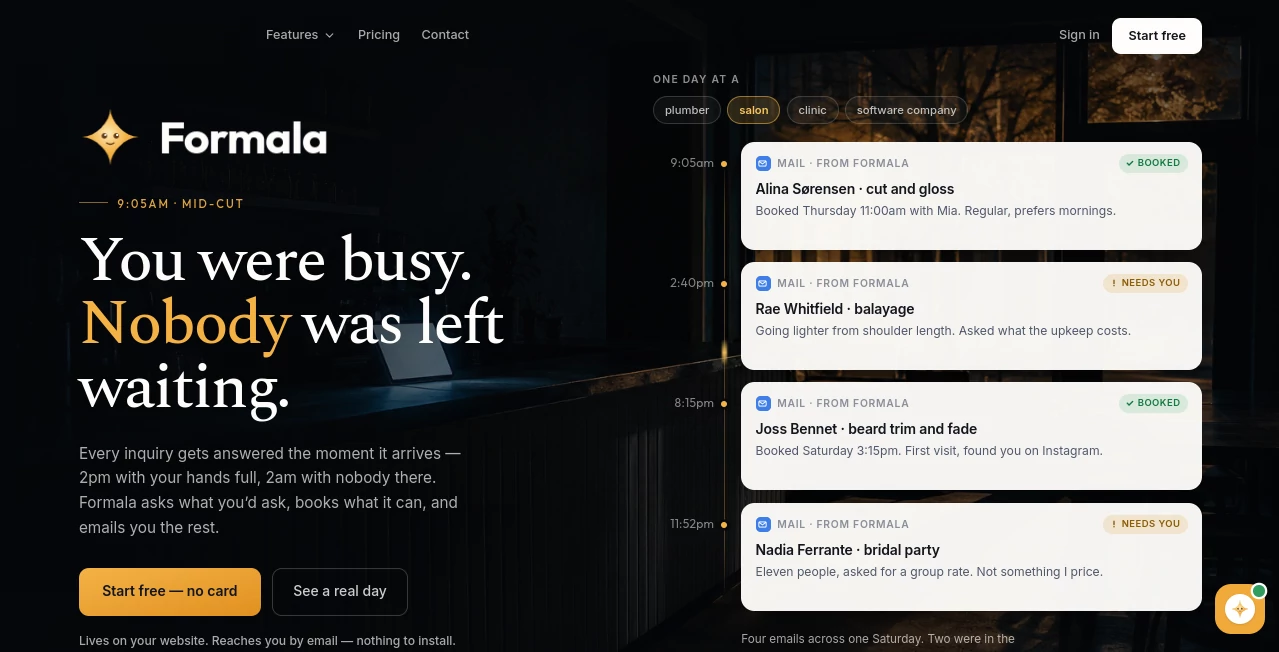
Formala is an AI receptionist designed to turn a business website into an active front desk. Instead of leaving visitors with a traditional contact form and waiting for someone to respond, it can answer questions, collect useful details, qualify potential customers, and arrange appointments.
The idea is particularly practical for small businesses where the person handling customers may also be the person doing the actual work. A plumber could be under a sink, a photographer could be at a shoot, or a clinic receptionist could already be on another call. The website can still respond to new inquiries and collect the information needed for a follow-up.
It can be added to an existing website with a single line of code, and the setup does not require a plugin or a developer. The guided setup helps create greetings, questions, FAQs, and conversation starters based on the business.
Key Features
- AI-powered website receptionist for handling visitor conversations
- Lead qualification and structured lead collection
- Appointment scheduling based on real availability
- Email notifications for new leads
- Integrations with inboxes, Slack, Zapier, CRMs, and webhooks
- Voice conversations with spoken visitor responses
- Photo and PDF attachments that can be discussed during a conversation
- Human takeover for conversations that need personal attention
- Fallback contact form when the AI reaches a limit or becomes unavailable
- Custom business knowledge, FAQs, tone, persona, and response rules
- Conversation insights showing leads, urgent inquiries, and unanswered questions
User Interface
The interface is built around a website widget rather than a separate application that customers need to learn. Visitors can start with suggested options such as requesting a quote, booking a visit, or asking about an urgent issue, then continue naturally through a conversation.
For the business owner, the experience is more focused on the information that matters. Leads can arrive through email and other connected channels, while the dashboard provides a view of conversations, bookings, and important inquiries.
The overall approach feels closer to having a digital front desk than simply adding another chatbot to a website. That distinction is important for service businesses where collecting the right details can be more valuable than simply answering generic questions.
Accuracy & Performance
A strong part of the product's approach is that the assistant is designed not to guess when it does not know something. Businesses can define the information it is allowed to use and create rules for information it should never provide. When a question falls outside that knowledge, the conversation can be passed toward a human follow-up instead.
The system can also use previous conversations to identify questions it could not answer. On higher plans, unanswered questions can be turned into knowledge additions, helping the assistant become more useful as a business receives more inquiries.
Appointment scheduling is another area where accuracy matters. The system checks opening hours and existing bookings before presenting available times, rather than simply sending visitors to a generic calendar link.
Capabilities
The platform combines several jobs that are normally handled by separate website tools. It can answer customer questions, ask qualifying questions, capture contact information, schedule appointments, send lead notifications, and support direct messages to members of a team.
It also supports voice conversations. Visitors can speak instead of typing and receive spoken responses, while the resulting conversation and lead information remain available in the same workflow.
Businesses can additionally let visitors attach photos or PDFs. This is useful for situations where a customer cannot easily explain a problem in words. A service professional may be able to understand the job more quickly from an image than from several paragraphs of description.
Security & Privacy
Privacy is addressed directly in the product's current documentation. The service states that conversations and leads belong to the customer, are not sold or shared, and are not used to train AI models. It also provides options to export or delete leads.
Businesses can control the knowledge given to the assistant and define information that should not be mentioned. This is especially useful for companies that want the assistant to remain within clearly defined boundaries instead of improvising answers about sensitive business details.
Use Cases
- Home service businesses: Capture job details, ask about the work required, collect addresses, and arrange visits.
- Salons and barbers: Answer common questions and help customers arrange appointments.
- Clinics and wellness businesses: Handle routine inquiries and direct customers toward available appointment times.
- Photographers: Collect project requirements, dates, and customer details before a personal consultation.
- Agencies: Qualify prospects and collect information before a sales conversation.
- SaaS companies: Answer website questions and capture potential sales leads.
- Local businesses: Keep responding to inquiries even when nobody is available to monitor the website.
Pros and Cons
Pros
- Simple one-line website installation
- No developer or plugin is required for the basic installation
- Combines customer support, lead qualification, and scheduling
- Can collect structured information rather than just a free-form message
- Supports human takeover when needed
- Includes a fallback contact form
- Voice conversations are available as an optional addition
- Useful analytics for understanding visitor questions and lead activity
- Offers a free option with no credit card required to start
Cons
- The free option limits AI conversations to the first 30 conversations over 30 days
- Higher conversation volumes require a paid plan
- Advanced follow-up and team features are reserved for higher plans
- Businesses still need to provide accurate information and rules for the assistant to work effectively
- The product is more focused on customer-facing conversations and lead handling than general-purpose chatbot development
Pricing Plans
The pricing structure is based mainly on the number of conversations a business expects each month. The Starter plan costs $19 per month for 150 conversations. Growth costs $39 per month for 400 conversations and adds learning from real conversations.
The Pro plan costs $79 per month and includes 1,000 conversations, the AI follow-up engine, and the ability to send follow-ups from the business's own domain. Business costs $149 per month for 2,500 conversations and adds automatically sent AI replies and team seats.
There is also a free option with no credit card required. It provides 30 AI-handled conversations over 30 days, after which the AI stops answering while the contact form, direct messaging, and booking functionality continue to operate. An optional voice add-on costs $59 per month for 200 spoken minutes.
How to Use It
- Create an account and start the guided setup.
- Enter information about your business, services, FAQs, and preferred communication style.
- Choose a persona and adjust the tone of the assistant.
- Review the suggested greeting, conversation starters, questions, and FAQs.
- Configure booking availability if customers should be able to schedule appointments.
- Add the generated script to your website.
- Connect the lead destinations you use, such as email, Slack, Zapier, or a CRM.
- Review conversations and captured leads as visitors interact with the assistant.
- Improve the knowledge base when recurring unanswered questions appear.
Comparison with Similar Tools
Traditional contact forms are useful for collecting messages, but they generally wait for a human response. Standard chat widgets can provide faster communication, yet they may not be designed around qualification, appointment booking, and structured lead capture.
This product takes a broader approach by combining these functions in one website-based receptionist. Compared with a basic chatbot, the emphasis is less on having a conversation for its own sake and more on turning that conversation into a useful business outcome, such as a qualified lead, a booked appointment, or a clear follow-up request.
For a company that already has a sophisticated customer-service stack, a dedicated chatbot or CRM system may offer deeper customization. For smaller teams that want a practical way to stop website inquiries from being missed, the combination of conversational support, lead capture, and scheduling is considerably more attractive.
Conclusion
For businesses that rely on website inquiries, the biggest advantage here is not simply having an AI chat window. It is having something that can keep the front door open when the people behind the business are busy.
The ability to ask useful questions, capture structured lead information, arrange appointments, and hand conversations back to a human makes the platform particularly well suited to service businesses and small teams. The one-line installation also removes much of the technical friction that often comes with adding new website software.
Its pricing is straightforward, the free option makes testing relatively easy, and the higher plans add useful automation as conversation volume grows. For a business that regularly loses potential customers simply because nobody was available to answer at the right moment, this can be a practical addition to the website.
Frequently Asked Questions (FAQ)
Do I need technical knowledge to install it?
No. The setup uses a guided wizard and the website installation requires a single line of code. It is designed to work with common platforms as well as custom HTML websites.
Can it book appointments?
Yes. It can use configured business hours and existing bookings to offer genuinely available appointment times. Customers can also receive reminders and cancel appointments when needed.
Can visitors speak instead of typing?
Yes. An optional voice feature allows visitors to speak through a microphone and hear spoken responses. The conversation can still produce the same type of transcript and lead information as a text conversation.
What happens when the assistant does not know an answer?
It is designed not to guess. Instead, it can collect the visitor's information and indicate that a human will follow up. Businesses can also improve the knowledge base when they discover recurring unanswered questions.
Can a human take over a conversation?
Yes. A team member can step into an active conversation, while the AI pauses until the human hands the conversation back.
Does it have a free plan?
Yes. The free option provides the first 30 AI-handled conversations over a 30-day period without requiring a credit card. Other functions such as the fallback contact form and booking can continue after the AI conversation allowance is reached.
Is it suitable for small businesses?
Yes. The product is specifically positioned for businesses where the same people often handle both customer inquiries and the actual work. It can be useful for local services, salons, clinics, photographers, agencies, SaaS companies, and other businesses that depend on inbound website leads.
AI Lead Generation , AI Chatbot , AI Customer Service Assistant , AI Scheduling .
These classifications represent its core capabilities and areas of application. For related tools, explore the linked categories above.

Formala Alternatives Product

Needle

AIOutreach

BetterAntisp…

MyReply

Ai Angels

KalonAI

Vapi

ChatGPT

TrySchedule
